

6BlackRavens
New member
- Local time
- 10:28 PM
- Messages
- 7
Hi guys I'm hoping some can help me with these rather annoying problems that's been happening for the last week or more.
Problem #1 (happening for 2-3 weeks)
Sometimes I will turn my pc on and I have no internet access because the network adapter is disabled for some reason, this problem is not just with start up.
I could be just browsing the web or even in an online multiplayer game, if browsing I find out only when I cant load a page and I look at the tray icon and there's a blue icon or maybe a red cross so I hover over it and it says no internet access.
So I go through the procedures of reestablishing the connection via the network troubleshooting wizard and it's says something like, restart your modem to fix it.
So I reboot my modem and I get my internet access back finally.
This will happen way too often and can take up to 20 minutes to fix sometimes.
Problem #2 (happening for 1 week)(the most annoying)
Random pc lockups, it could be on screensaver at the time or in a game, this has been happening for about a week and is frustrating because at the time I cannot do anything at all, no alt-tab out of application, no task manager, nothing.
I have to push the reset button on the case to Restart Windows (normally) not safe mode.
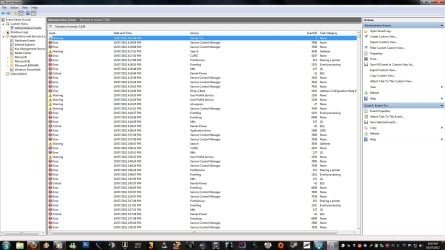
I'm usually pretty alright with pc problems and can fix them myself but this has got me, I have included a screenshot of today's Even Viewer showing lockups this afternoon, well I think they are the lockups as it happened a couple of times, once while in game GTAIV and twice on screensaver.Im' not real sure what I am looking for in this Event Viewer either
After the last lock up today I did a system restore to the 13/6/12 hoping I might eliminate the problem there, but no I am once again at the mercy of the lockup god :devil:

Cheers,
6BR
Problem #1 (happening for 2-3 weeks)
Sometimes I will turn my pc on and I have no internet access because the network adapter is disabled for some reason, this problem is not just with start up.
I could be just browsing the web or even in an online multiplayer game, if browsing I find out only when I cant load a page and I look at the tray icon and there's a blue icon or maybe a red cross so I hover over it and it says no internet access.
So I go through the procedures of reestablishing the connection via the network troubleshooting wizard and it's says something like, restart your modem to fix it.
So I reboot my modem and I get my internet access back finally.
This will happen way too often and can take up to 20 minutes to fix sometimes.
Problem #2 (happening for 1 week)(the most annoying)
Random pc lockups, it could be on screensaver at the time or in a game, this has been happening for about a week and is frustrating because at the time I cannot do anything at all, no alt-tab out of application, no task manager, nothing.
I have to push the reset button on the case to Restart Windows (normally) not safe mode.
I'm usually pretty alright with pc problems and can fix them myself but this has got me, I have included a screenshot of today's Even Viewer showing lockups this afternoon, well I think they are the lockups as it happened a couple of times, once while in game GTAIV and twice on screensaver.Im' not real sure what I am looking for in this Event Viewer either
After the last lock up today I did a system restore to the 13/6/12 hoping I might eliminate the problem there, but no I am once again at the mercy of the lockup god :devil:
Cant anyone shed some light on these most annoying problems.Here's the application error for GTAIV - game lockup this afternoon.
Code:Log Name: Application Source: Application Error Date: 10/07/2012 4:08:24 PM Event ID: 1000 Task Category: (100) Level: Error Keywords: Classic User: N/A Computer: VIKING Description: Faulting application name: GTAIV.exe, version: 1.0.7.0, time stamp: 0x4bd9efbe Faulting module name: GTAIV.exe, version: 1.0.7.0, time stamp: 0x4bd9efbe Exception code: 0xc0000005 Fault offset: 0x001a9346 Faulting process id: 0x1830 Faulting application start time: 0x01cd5e6264fa9427 Faulting application path: G:\Grand Theft Auto IV\GTAIV.exe Faulting module path: G:\Grand Theft Auto IV\GTAIV.exe Report Id: a7ec5dcd-ca55-11e1-8217-0026832fc673 Event Xml: <Event xmlns="http://schemas.microsoft.com/win/2004/08/events/event"> <System> <Provider Name="Application Error" /> <EventID Qualifiers="0">1000</EventID> <Level>2</Level> <Task>100</Task> <Keywords>0x80000000000000</Keywords> <TimeCreated SystemTime="2012-07-10T06:08:24.000000000Z" /> <EventRecordID>25571</EventRecordID> <Channel>Application</Channel> <Computer>VIKING</Computer> <Security /> </System> <EventData> <Data>GTAIV.exe</Data> <Data>1.0.7.0</Data> <Data>4bd9efbe</Data> <Data>GTAIV.exe</Data> <Data>1.0.7.0</Data> <Data>4bd9efbe</Data> <Data>c0000005</Data> <Data>001a9346</Data> <Data>1830</Data> <Data>01cd5e6264fa9427</Data> <Data>G:\Grand Theft Auto IV\GTAIV.exe</Data> <Data>G:\Grand Theft Auto IV\GTAIV.exe</Data> <Data>a7ec5dcd-ca55-11e1-8217-0026832fc673</Data> </EventData> </Event>[/QUOTE]This is the error which occurred while playing bf3 the other night. [QUOTE]Log Name: Application Source: Application Hang Date: 6/07/2012 2:58:18 AM Event ID: 1002 Task Category: (101) Level: Error Keywords: Classic User: N/A Computer: VIKING Description: The program bf3.exe version 1.3.0.0 stopped interacting with Windows and was closed. To see if more information about the problem is available, check the problem history in the Action Center control panel. Process ID: 1ee4 Start Time: 01cd5ace617c5530 Termination Time: 300 Application Path: G:\Origin Games\Battlefield 3\bf3.exe Report Id: Event Xml: <Event xmlns="http://schemas.microsoft.com/win/2004/08/events/event"> <System> <Provider Name="Application Hang" /> <EventID Qualifiers="0">1002</EventID> <Level>2</Level> <Task>101</Task> <Keywords>0x80000000000000</Keywords> <TimeCreated SystemTime="2012-07-05T16:58:18.000000000Z" /> <EventRecordID>24792</EventRecordID> <Channel>Application</Channel> <Computer>VIKING</Computer> <Security /> </System> <EventData> <Data>bf3.exe</Data> <Data>1.3.0.0</Data> <Data>1ee4</Data> <Data>01cd5ace617c5530</Data> <Data>300</Data> <Data>G:\Origin Games\Battlefield 3\bf3.exe</Data> <Data> </Data> <Binary>54006F00700020006C006500760065006C002000770069006E0064006F0077002000690073002000690064006C00650000000000</Binary> </EventData> </Event>
Cheers,
6BR
Attachments
Last edited:
My Computer
- Computer Manufacturer/Model Number
- Custom Built by (me)
- OS
- Windows 7 Pro x64 SP1
- CPU
- Intel i7 2600k @ 4.4ghz with Antec Kuhler H2O 920 CPU Cooler
- Motherboard
- ASUS P8Z68-V Motherboard B3
- Memory
- Corsair Vengeance 1600C9R 8GB DDR3 (2x4GB)
- Graphics Card(s)
- Gainward GTX 260+ [Golden Edition] (216sp) 1796MB OC
- Sound Card
- onboard
- Monitor(s) Displays
- Acer X233H [ 23"] HD LCD
- Screen Resolution
- 1920x1080
- Hard Drives
- Seagate/Western Digital/Maxtor (2+TB Total) SATA II
- PSU
- Silverstone 850w
- Case
- Antec Dark Fleet DF-85 Black & Red Full Tower
- Cooling
- plenty of fans in this baby
- Keyboard
- Logitech G15 Gaming Keyboard
- Mouse
- Logitech G500
- Internet Speed
- ADSL2+
- Other Info
- http://fmr-clan.com
