Solved 2 pcs - WD My Passport 1TB External USB 3.0 Portable

squirtmph

New member
Member
VIP
Local time
3:32 PM
Messages
235
Location
PDX
I have two:
WD My Passport 1TB External USB 3.0 Portable Hard Drive: USB 3.0 interface

not working I being searching allot videos and no solution to my problem.
Am the only user for externals & Laptop

They are cero scratch or being drooped, It just stop working both of them.
Light goes ON plugged, flashes not sound & ONLY vibrates.
that is physical signals I have from both of them

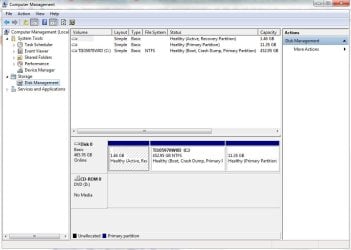
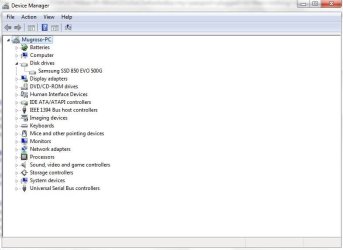
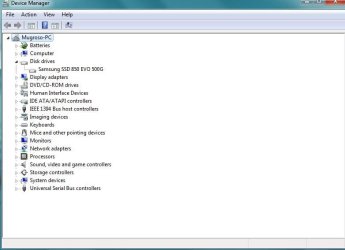
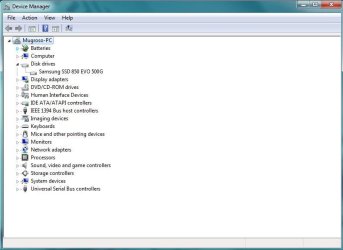
I am posting picture:
1. before being plugged
2. once being plugged
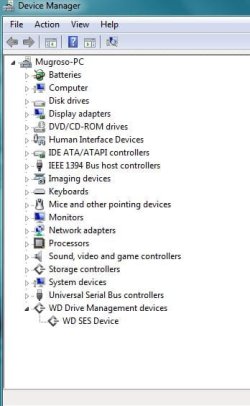
3. Device manger read WD but goes off

Note:

I have try use other PC, Laptops same fail and cables as well


Thank you for your help to my post
 

Attachments
  • My Passport plugged in - 1.JPG
    My Passport plugged in - 1.JPG
    42.1 KB · Views: 2
  • My Passport plugged in -2.JPG
    My Passport plugged in -2.JPG
    67.9 KB · Views: 0
  • my passport plugged in then nothing shows up.JPG
    my passport plugged in then nothing shows up.JPG
    40.1 KB · Views: 0
  • original nothing plugged in -1.JPG
    original nothing plugged in -1.JPG
    39.1 KB · Views: 0
  • original nothing plugged in -2.JPG
    original nothing plugged in -2.JPG
    68.4 KB · Views: 0

My Computer My Computer

At a glance

Windows 10 Pro Version 22H2 64-bit EditionIntel(R) Core(TM) i7-10875H CPU @ 2.30GHz 2.3...2.0 GB (31.8 GB usable)
Computer type
Laptop
Computer Manufacturer/Model Number
Azure Blade 15.6
OS
Windows 10 Pro Version 22H2 64-bit Edition
CPU
Intel(R) Core(TM) i7-10875H CPU @ 2.30GHz 2.30 GHz
Memory
2.0 GB (31.8 GB usable)
Monitor(s) Displays
4K UHD OLED TOUCH
Screen Resolution
3840 x 2160
Hard Drives
1 TB
Mouse
Logitech MX Master 3S
Antivirus
Windows Security
Browser
Google Chrome
Other Info
______________________________________________


______________________________________________
Hi squirtmph,

Click on Start --> In search box, type cmd, right-click cmd and choose run as administrator. Now type or copy paste, the below commands
set devmgr_show_nonpresent_devices=1
and press Enter
cd \
and press Enter
cd windows\system32
and press Enter
start devmgmt.msc
and press Enter
"Device Manager" window will be opened. Now in the device manager, click on "View" --> Select "Show hidden devices".
Expand all the nodes by clicking on "+" symbol. If you find any greyed or UNKNOWN entries --> Right click on it --> Select "Uninstall".
Restart your PC --> Now try connecting your external drive.
Good Luck
 

My Computer My Computer

At a glance

Win 10 x64, Linux Lite, Win 7 x64, BlackArch,...
Computer type
PC/Desktop
Computer Manufacturer/Model Number
HP Desktop & Compaq Laptop
OS
Win 10 x64, Linux Lite, Win 7 x64, BlackArch, & Kali
Hard Drives
Samsung 850 Pro 256Gb,
Hitachi HDD 1Tb,
Crucial MX SSD 250Gb
Segate 3Tb USB 3.0 Ext. Backup HDD
Internet Speed
150Mbps dn, 20Mbps up
Antivirus
Avast Free, Malwarebytes Anti-Exploit & Anti-Ransomware
Browser
Firefox, Chrome, Opera, & VPN
If it doesn't show on disk management, I would say that the SATA to USB or other controller is dead.
 

My Computers My Computers

  • At a glance

    Windows 7 HP 64i5 6600K - 800MHz to 4200MHz4+4G GSkill DDR4 3000IG - Intel 530
    Computer type
    PC/Desktop
    Computer Manufacturer/Model Number
    custom build
    OS
    Windows 7 HP 64
    CPU
    i5 6600K - 800MHz to 4200MHz
    Motherboard
    GA-Z170-HD3P
    Memory
    4+4G GSkill DDR4 3000
    Graphics Card(s)
    IG - Intel 530
    Monitor(s) Displays
    Samsung 226BW
    Screen Resolution
    1680x1050
    Hard Drives
    (1) -1 SM951 – 128GB M.2 AHCI PCIe SSD drive for Windows 7 and Lubuntu
    (2) -1 WD SATA 3 - 1T for Data
    (3) -1 WD SATA 3 - 1T for backup
    PSU
    Thermaltake 450W TR2 gold
    Keyboard
    Old and good Chicony mechanical keyboard
    Mouse
    Logitech mX performance - 9 buttons (had to disable some)
    Internet Speed
    500Mb/s
    Browser
    Firefox 64
    Other Info
    TinyWall firewall
  • At a glance

    Windows 7 Proi7-4500U 800MHz to 3.0GHz(4+4)G DDR3 1600IG intel 4400 + NVIDIA GeForce GT 745M
    Computer type
    Laptop
    System Manufacturer/Model Number
    Asus Q550LF
    OS
    Windows 7 Pro
    CPU
    i7-4500U 800MHz to 3.0GHz
    Motherboard
    Asus Q550LF
    Memory
    (4+4)G DDR3 1600
    Graphics Card(s)
    IG intel 4400 + NVIDIA GeForce GT 745M
    Sound Card
    Realtek
    Monitor(s) Displays
    LG Display LP156WF4-SPH1
    Screen Resolution
    1920 x 1080
    Hard Drives
    BX500 120G SSD for Windows and programs +
    1T HDD for data
    Internet Speed
    500 Mb/s
    Browser
    Firefox
    Other Info
    TinyWall firewall
Megahertz07

Everything work, when I use USB.

Only WD Passport wont work and they're two of them
 

My Computer My Computer

At a glance

Windows 10 Pro Version 22H2 64-bit EditionIntel(R) Core(TM) i7-10875H CPU @ 2.30GHz 2.3...2.0 GB (31.8 GB usable)
Computer type
Laptop
Computer Manufacturer/Model Number
Azure Blade 15.6
OS
Windows 10 Pro Version 22H2 64-bit Edition
CPU
Intel(R) Core(TM) i7-10875H CPU @ 2.30GHz 2.30 GHz
Memory
2.0 GB (31.8 GB usable)
Monitor(s) Displays
4K UHD OLED TOUCH
Screen Resolution
3840 x 2160
Hard Drives
1 TB
Mouse
Logitech MX Master 3S
Antivirus
Windows Security
Browser
Google Chrome
Other Info
______________________________________________

______________________________________________
Inside the WD Passport you have a SATA to USB to convert Serial ATA to USB.
If it doesn't show on disk management, I would say that the SATA to USB or other controller is dead.
 

My Computers My Computers

  • At a glance

    Windows 7 HP 64i5 6600K - 800MHz to 4200MHz4+4G GSkill DDR4 3000IG - Intel 530
    Computer type
    PC/Desktop
    Computer Manufacturer/Model Number
    custom build
    OS
    Windows 7 HP 64
    CPU
    i5 6600K - 800MHz to 4200MHz
    Motherboard
    GA-Z170-HD3P
    Memory
    4+4G GSkill DDR4 3000
    Graphics Card(s)
    IG - Intel 530
    Monitor(s) Displays
    Samsung 226BW
    Screen Resolution
    1680x1050
    Hard Drives
    (1) -1 SM951 – 128GB M.2 AHCI PCIe SSD drive for Windows 7 and Lubuntu
    (2) -1 WD SATA 3 - 1T for Data
    (3) -1 WD SATA 3 - 1T for backup
    PSU
    Thermaltake 450W TR2 gold
    Keyboard
    Old and good Chicony mechanical keyboard
    Mouse
    Logitech mX performance - 9 buttons (had to disable some)
    Internet Speed
    500Mb/s
    Browser
    Firefox 64
    Other Info
    TinyWall firewall
  • At a glance

    Windows 7 Proi7-4500U 800MHz to 3.0GHz(4+4)G DDR3 1600IG intel 4400 + NVIDIA GeForce GT 745M
    Computer type
    Laptop
    System Manufacturer/Model Number
    Asus Q550LF
    OS
    Windows 7 Pro
    CPU
    i7-4500U 800MHz to 3.0GHz
    Motherboard
    Asus Q550LF
    Memory
    (4+4)G DDR3 1600
    Graphics Card(s)
    IG intel 4400 + NVIDIA GeForce GT 745M
    Sound Card
    Realtek
    Monitor(s) Displays
    LG Display LP156WF4-SPH1
    Screen Resolution
    1920 x 1080
    Hard Drives
    BX500 120G SSD for Windows and programs +
    1T HDD for data
    Internet Speed
    500 Mb/s
    Browser
    Firefox
    Other Info
    TinyWall firewall
Thank you!

Hi squirtmph,

Click on Start --> In search box, type cmd, right-click cmd and choose run as administrator. Now type or copy paste, the below commands
set devmgr_show_nonpresent_devices=1
and press Enter
cd \
and press Enter
cd windows\system32
and press Enter
start devmgmt.msc
and press Enter
"Device Manager" window will be opened. Now in the device manager, click on "View" --> Select "Show hidden devices".
Expand all the nodes by clicking on "+" symbol. If you find any greyed or UNKNOWN entries --> Right click on it --> Select "Uninstall".
Restart your PC --> Now try connecting your external drive.
Good Luck

I all try these when I get back to laptop & keep you posted with result found
Thanks again!
 

My Computer My Computer

At a glance

Windows 10 Pro Version 22H2 64-bit EditionIntel(R) Core(TM) i7-10875H CPU @ 2.30GHz 2.3...2.0 GB (31.8 GB usable)
Computer type
Laptop
Computer Manufacturer/Model Number
Azure Blade 15.6
OS
Windows 10 Pro Version 22H2 64-bit Edition
CPU
Intel(R) Core(TM) i7-10875H CPU @ 2.30GHz 2.30 GHz
Memory
2.0 GB (31.8 GB usable)
Monitor(s) Displays
4K UHD OLED TOUCH
Screen Resolution
3840 x 2160
Hard Drives
1 TB
Mouse
Logitech MX Master 3S
Antivirus
Windows Security
Browser
Google Chrome
Other Info
______________________________________________

______________________________________________
Megahertz07;3379870]Inside the WD Passport you have a SATA to USB to convert Serial ATA to USB.

They are External Hardrives with out power resources

If it doesn't show on disk management,
No
they show on Device manager, but ONLY few second's

I would say that the SATA to USB or other controller is dead.

Well Other external hardrives I have different brand with power source works fine,
the only one w/ the problem I have is with WD

Thanks again
 

My Computer My Computer

At a glance

Windows 10 Pro Version 22H2 64-bit EditionIntel(R) Core(TM) i7-10875H CPU @ 2.30GHz 2.3...2.0 GB (31.8 GB usable)
Computer type
Laptop
Computer Manufacturer/Model Number
Azure Blade 15.6
OS
Windows 10 Pro Version 22H2 64-bit Edition
CPU
Intel(R) Core(TM) i7-10875H CPU @ 2.30GHz 2.30 GHz
Memory
2.0 GB (31.8 GB usable)
Monitor(s) Displays
4K UHD OLED TOUCH
Screen Resolution
3840 x 2160
Hard Drives
1 TB
Mouse
Logitech MX Master 3S
Antivirus
Windows Security
Browser
Google Chrome
Other Info
______________________________________________


______________________________________________
You didn't understand what I wrote.
External USB 3.0 Portable Hard Drive, like your Passport 1TB, has basically two parts:
- An 2.5" HDD with a SATA interface.
- A case that holds the HDD and connects to the HDD SATA interface. This case has a circuit that converts Serial ATA to USB 3.0.

If the disk doesn't show on disk management (not device manager) is a sign that the circuit that converts Serial ATA to USB 3.0 isn't working, and your disk is dead.
Worst is that some WD external disks use hardware encryption. This means that you cant take the disk out from the case and install directly to a SATA port or use it on another case.
 

My Computers My Computers

  • At a glance

    Windows 7 HP 64i5 6600K - 800MHz to 4200MHz4+4G GSkill DDR4 3000IG - Intel 530
    Computer type
    PC/Desktop
    Computer Manufacturer/Model Number
    custom build
    OS
    Windows 7 HP 64
    CPU
    i5 6600K - 800MHz to 4200MHz
    Motherboard
    GA-Z170-HD3P
    Memory
    4+4G GSkill DDR4 3000
    Graphics Card(s)
    IG - Intel 530
    Monitor(s) Displays
    Samsung 226BW
    Screen Resolution
    1680x1050
    Hard Drives
    (1) -1 SM951 – 128GB M.2 AHCI PCIe SSD drive for Windows 7 and Lubuntu
    (2) -1 WD SATA 3 - 1T for Data
    (3) -1 WD SATA 3 - 1T for backup
    PSU
    Thermaltake 450W TR2 gold
    Keyboard
    Old and good Chicony mechanical keyboard
    Mouse
    Logitech mX performance - 9 buttons (had to disable some)
    Internet Speed
    500Mb/s
    Browser
    Firefox 64
    Other Info
    TinyWall firewall
  • At a glance

    Windows 7 Proi7-4500U 800MHz to 3.0GHz(4+4)G DDR3 1600IG intel 4400 + NVIDIA GeForce GT 745M
    Computer type
    Laptop
    System Manufacturer/Model Number
    Asus Q550LF
    OS
    Windows 7 Pro
    CPU
    i7-4500U 800MHz to 3.0GHz
    Motherboard
    Asus Q550LF
    Memory
    (4+4)G DDR3 1600
    Graphics Card(s)
    IG intel 4400 + NVIDIA GeForce GT 745M
    Sound Card
    Realtek
    Monitor(s) Displays
    LG Display LP156WF4-SPH1
    Screen Resolution
    1920 x 1080
    Hard Drives
    BX500 120G SSD for Windows and programs +
    1T HDD for data
    Internet Speed
    500 Mb/s
    Browser
    Firefox
    Other Info
    TinyWall firewall
Megahertz07

Thank you for your response and explaining to me technical detail.
I know understood what you say, now!

crossing fingers Snick post, will help to repair fault connection

Thank you!
 

My Computer My Computer

At a glance

Windows 10 Pro Version 22H2 64-bit EditionIntel(R) Core(TM) i7-10875H CPU @ 2.30GHz 2.3...2.0 GB (31.8 GB usable)
Computer type
Laptop
Computer Manufacturer/Model Number
Azure Blade 15.6
OS
Windows 10 Pro Version 22H2 64-bit Edition
CPU
Intel(R) Core(TM) i7-10875H CPU @ 2.30GHz 2.30 GHz
Memory
2.0 GB (31.8 GB usable)
Monitor(s) Displays
4K UHD OLED TOUCH
Screen Resolution
3840 x 2160
Hard Drives
1 TB
Mouse
Logitech MX Master 3S
Antivirus
Windows Security
Browser
Google Chrome
Other Info
______________________________________________


______________________________________________
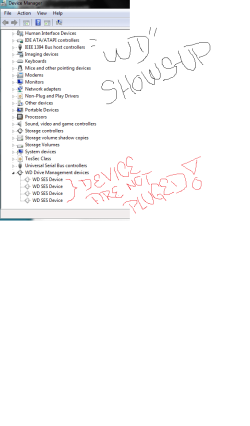
Q1. Device are not plugged WD show there. (following your suggestion)
I am going to do restart now hoping when I plugged them will show up

Thank you
 

Attachments

  • Device Unpluged.png
    Device Unpluged.png
    17.9 KB · Views: 0

My Computer My Computer

At a glance

Windows 10 Pro Version 22H2 64-bit EditionIntel(R) Core(TM) i7-10875H CPU @ 2.30GHz 2.3...2.0 GB (31.8 GB usable)
Computer type
Laptop
Computer Manufacturer/Model Number
Azure Blade 15.6
OS
Windows 10 Pro Version 22H2 64-bit Edition
CPU
Intel(R) Core(TM) i7-10875H CPU @ 2.30GHz 2.30 GHz
Memory
2.0 GB (31.8 GB usable)
Monitor(s) Displays
4K UHD OLED TOUCH
Screen Resolution
3840 x 2160
Hard Drives
1 TB
Mouse
Logitech MX Master 3S
Antivirus
Windows Security
Browser
Google Chrome
Other Info
______________________________________________


______________________________________________
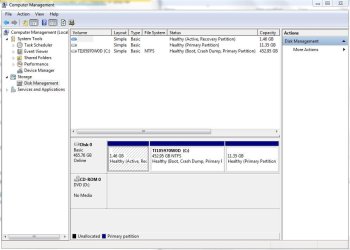
You're looking on the wrong place.
Device Manager is to show windows drivers related to hardware.
The right place to look for disks is on Disk Management. Any healthy disks, even raw or linux type, will show up.
 

My Computers My Computers

  • At a glance

    Windows 7 HP 64i5 6600K - 800MHz to 4200MHz4+4G GSkill DDR4 3000IG - Intel 530
    Computer type
    PC/Desktop
    Computer Manufacturer/Model Number
    custom build
    OS
    Windows 7 HP 64
    CPU
    i5 6600K - 800MHz to 4200MHz
    Motherboard
    GA-Z170-HD3P
    Memory
    4+4G GSkill DDR4 3000
    Graphics Card(s)
    IG - Intel 530
    Monitor(s) Displays
    Samsung 226BW
    Screen Resolution
    1680x1050
    Hard Drives
    (1) -1 SM951 – 128GB M.2 AHCI PCIe SSD drive for Windows 7 and Lubuntu
    (2) -1 WD SATA 3 - 1T for Data
    (3) -1 WD SATA 3 - 1T for backup
    PSU
    Thermaltake 450W TR2 gold
    Keyboard
    Old and good Chicony mechanical keyboard
    Mouse
    Logitech mX performance - 9 buttons (had to disable some)
    Internet Speed
    500Mb/s
    Browser
    Firefox 64
    Other Info
    TinyWall firewall
  • At a glance

    Windows 7 Proi7-4500U 800MHz to 3.0GHz(4+4)G DDR3 1600IG intel 4400 + NVIDIA GeForce GT 745M
    Computer type
    Laptop
    System Manufacturer/Model Number
    Asus Q550LF
    OS
    Windows 7 Pro
    CPU
    i7-4500U 800MHz to 3.0GHz
    Motherboard
    Asus Q550LF
    Memory
    (4+4)G DDR3 1600
    Graphics Card(s)
    IG intel 4400 + NVIDIA GeForce GT 745M
    Sound Card
    Realtek
    Monitor(s) Displays
    LG Display LP156WF4-SPH1
    Screen Resolution
    1920 x 1080
    Hard Drives
    BX500 120G SSD for Windows and programs +
    1T HDD for data
    Internet Speed
    500 Mb/s
    Browser
    Firefox
    Other Info
    TinyWall firewall
Device plugged but still not show.
I have done everything you say preview post from start to end, no result

Light is on
Vibrate
No Noise coming out
 

Attachments

  • Capture.JPG
    Capture.JPG
    33.4 KB · Views: 12

My Computer My Computer

At a glance

Windows 10 Pro Version 22H2 64-bit EditionIntel(R) Core(TM) i7-10875H CPU @ 2.30GHz 2.3...2.0 GB (31.8 GB usable)
Computer type
Laptop
Computer Manufacturer/Model Number
Azure Blade 15.6
OS
Windows 10 Pro Version 22H2 64-bit Edition
CPU
Intel(R) Core(TM) i7-10875H CPU @ 2.30GHz 2.30 GHz
Memory
2.0 GB (31.8 GB usable)
Monitor(s) Displays
4K UHD OLED TOUCH
Screen Resolution
3840 x 2160
Hard Drives
1 TB
Mouse
Logitech MX Master 3S
Antivirus
Windows Security
Browser
Google Chrome
Other Info
______________________________________________


______________________________________________
Nothing Show, I don't understand nothing at all why WD Passport its not working at all.

I only hear beeping sound when its something being plugged from USB
 

Attachments

  • Capture.JPG
    Capture.JPG
    67.6 KB · Views: 0

My Computer My Computer

At a glance

Windows 10 Pro Version 22H2 64-bit EditionIntel(R) Core(TM) i7-10875H CPU @ 2.30GHz 2.3...2.0 GB (31.8 GB usable)
Computer type
Laptop
Computer Manufacturer/Model Number
Azure Blade 15.6
OS
Windows 10 Pro Version 22H2 64-bit Edition
CPU
Intel(R) Core(TM) i7-10875H CPU @ 2.30GHz 2.30 GHz
Memory
2.0 GB (31.8 GB usable)
Monitor(s) Displays
4K UHD OLED TOUCH
Screen Resolution
3840 x 2160
Hard Drives
1 TB
Mouse
Logitech MX Master 3S
Antivirus
Windows Security
Browser
Google Chrome
Other Info
______________________________________________


______________________________________________
Back
Top