2 problems with build 7068 x86

minamfm

New member
Local time
9:07 AM
Messages
16
1) When i read the reviews about builds 7068 n 7057 they said that these builds expire in march 2010 however mine was just a 30 day evaluation copy for 30 days, anyone knows how can i activate it??

2)i noticed WMP12 won't pause when i click the pause button that appears when i hover over it in the task bar

Anyone knows a solution to these probs??
 

My Computer

Computer Manufacturer/Model Number
HP pavilion dv6580ee
OS
Windows 7
CPU
Intel Core2duo 2.2 Ghz 4mb l2 cache
Memory
2 GB DDR2
Graphics Card(s)
Nvidia Geforce 8400M GS
Screen Resolution
1280x800
Hard Drives
225 GB
Internet Speed
512 kbps
Hi,
I'm guessing that maybe you didnt get a 25-digit Key code for Win7?
If you used a previous build such as build 7000, then just use the same key code that you obtained from the microsoft website and use it for you new build.
If you havent activated your copy of windows, then right click on 'Computer', selecting properties and at the bottom of the page, click activate windows.

Hope i'm helping!
Sorry i can't suggest anything on your WMP problem
 

My Computer

Computer Manufacturer/Model Number
Crafted from sweat and blood
OS
XP service pack 3 & Windows 7068 64-Bit
CPU
Intel Q6600 Core 2 Quad 2.4 GHz
Motherboard
MSI P6N Diamond Nforce 680i
Memory
2 x 1 GB Patriot 800Mhz
Graphics Card(s)
Inno 3D Geforce 260GTX 216-SP 896Mb
Sound Card
Creative Sound Blaster
Monitor(s) Displays
HP w1907V 19" Widescreen
Screen Resolution
1440 x 900
Hard Drives
1TB Samsung 7200 Rpm
200GB Seagate Barracuda 7200 Rpm
PSU
Cooler Master 600W
Case
Asus TA210
Cooling
Arctic Cooling CPU fan
Keyboard
HP wireless
Mouse
HP wireless
Internet Speed
8mbps
Yes i used builds 7000, 7022, 7048, 7057 and 7068 the beta keys i have will only give me to august i think??
 

My Computer

Computer Manufacturer/Model Number
HP pavilion dv6580ee
OS
Windows 7
CPU
Intel Core2duo 2.2 Ghz 4mb l2 cache
Memory
2 GB DDR2
Graphics Card(s)
Nvidia Geforce 8400M GS
Screen Resolution
1280x800
Hard Drives
225 GB
Internet Speed
512 kbps
Well from the microsoft website it says this:
The Beta will stop working on August 1, 2009. To continue using your PC, please be prepared to reinstall a prior version of Windows or a subsequent release of Windows 7 before the expiration date. You won't be able to upgrade from the Beta to the final retail version of Windows 7.

I'm guessing by this that it means that any version of windows 7 succeeding the beta, i.e. the evaluation copies, will continue to work. i activated my original key that i obtainted from using the beta when i upgraded to 7057 because it asked for it agian but maybe it will run out in August?
:huh:
 

My Computer

Computer Manufacturer/Model Number
Crafted from sweat and blood
OS
XP service pack 3 & Windows 7068 64-Bit
CPU
Intel Q6600 Core 2 Quad 2.4 GHz
Motherboard
MSI P6N Diamond Nforce 680i
Memory
2 x 1 GB Patriot 800Mhz
Graphics Card(s)
Inno 3D Geforce 260GTX 216-SP 896Mb
Sound Card
Creative Sound Blaster
Monitor(s) Displays
HP w1907V 19" Widescreen
Screen Resolution
1440 x 900
Hard Drives
1TB Samsung 7200 Rpm
200GB Seagate Barracuda 7200 Rpm
PSU
Cooler Master 600W
Case
Asus TA210
Cooling
Arctic Cooling CPU fan
Keyboard
HP wireless
Mouse
HP wireless
Internet Speed
8mbps
Yes i used builds 7000, 7022, 7048, 7057 and 7068 the beta keys i have will only give me to august i think??
They will work until 2010 - I have used my beta keys from 7000 and I have until March 2010.
 

My Computer

Computer Manufacturer/Model Number
Acer Travelmate 4600
OS
Windows 7 post RC1 7227 32bit
CPU
Intel Centrino 1.60GHz
Memory
1.25GB
Graphics Card(s)
Mobile Intel(R) 915GM/GMS,910GML Express Chipset Family
Sound Card
Realtek High Definition Audio
Monitor(s) Displays
Inbuilt Laptop Display
Screen Resolution
1400x1050
Hard Drives
80gb split (25GB/50GB)
500GB Seagate external
Cooling
Inbuilt
Keyboard
Logitech Elite
Mouse
Old Dell optical thing
Internet Speed
10mb Virginmedia
well i just tried another key, n no luck..... btw do u have the WMP 12 problem i got or is it just me??
 

My Computer

Computer Manufacturer/Model Number
HP pavilion dv6580ee
OS
Windows 7
CPU
Intel Core2duo 2.2 Ghz 4mb l2 cache
Memory
2 GB DDR2
Graphics Card(s)
Nvidia Geforce 8400M GS
Screen Resolution
1280x800
Hard Drives
225 GB
Internet Speed
512 kbps
I think... WMP+taskbar issue is bug!
My friend has got same issue.
 

My Computer

OS
Seven 7077 x86
CPU
1.6 Ghz
Memory
1GB
Graphics Card(s)
128 MB
Monitor(s) Displays
19"
Hard Drives
20 for seven and 80 for stuff
well i just tried another key, n no luck..... btw do u have the WMP 12 problem i got or is it just me??

Did you install Ultimate version? If you tried one of the others ie Professional then the Beta keys will not work for activation.
 

My Computer

Computer Manufacturer/Model Number
Home Build
OS
Windows 7 RTM Ultimate - Activated (Technet)
CPU
Athlon 4800+
Motherboard
Gigabyte M56S-S3
Memory
2 gig
Graphics Card(s)
ATI Radeon 2400+
Sound Card
On board
Monitor(s) Displays
Samsung 22" LCD
Screen Resolution
1680 x 1050
Hard Drives
WD 250 gig Sata
PSU
550 w
Case
Antec LS100
Keyboard
Logitech MX5000 BT
Mouse
Logitech MX 5000 BT
Internet Speed
ADSL 2+
Yes, i installed the ultimate version, i never tried professional, the keys work just not to March 2010 but August 2009
 

My Computer

Computer Manufacturer/Model Number
HP pavilion dv6580ee
OS
Windows 7
CPU
Intel Core2duo 2.2 Ghz 4mb l2 cache
Memory
2 GB DDR2
Graphics Card(s)
Nvidia Geforce 8400M GS
Screen Resolution
1280x800
Hard Drives
225 GB
Internet Speed
512 kbps
I have too this WMP+taskbar pause button not working issue on my 7068 x64
 

My Computer

OS
7232 x64
CPU
athlon x2 x64 5000+
Memory
4gb
Graphics Card(s)
ati hd 3650
Yes, i installed the ultimate version, i never tried professional, the keys work just not to March 2010 but August 2009

The WMP12 Taskbar pause issue is known & there currently is no workaround for it. As far as the keys go, it's quite strange as I've used the keys sent to me from Microsoft & they work fine till march 2010. If you wish I can PM you the key I used, so long as it doesn't conflict with the T+Cs (any moderator input to clarify this would be cool)....
 

My Computer

Computer Manufacturer/Model Number
Compaq Desktop
OS
Windows 7 Ultimate x64
CPU
AMD Sempron Dual Core
Memory
3GB
Graphics Card(s)
NVIDIA GeForce 6150SE nForce 430
Screen Resolution
1024x768
Hard Drives
150GB Sata

My Computer

Computer Manufacturer/Model Number
Custom Build.
OS
Windows 7 Ultimate x64.
CPU
i5 760 @ 4.2Ghz. 1.18v
Motherboard
Gigabyte - H55M-USB3
Memory
4g Corsair xms3 ddr3, 1600Mhz.
Graphics Card(s)
Gigabyte GTX-560Ti soc edition
Sound Card
Asus Xonar Dx - Logitech Z5500.
Monitor(s) Displays
Acer 22" LCD Wide screen 1680-1050 -Samsung 42" Plasma....
Screen Resolution
1680/1050 -----1920/1080p.
Hard Drives
2x 2TB Seagate Go Flex,
1x 1TB Seagate,
1x 640WD Black,
x16 Gig sandisc flash drive,
1x8Gig sandisc flash drive.
PSU
XigmaTek 80plus NRP-PC702 - 700w dual 30a.
Case
Venus Gamers Midi Tower Case with LED Display
Cooling
Arctic Freezer 7 Pro Rev 2... x2 Arctic F8 case fans........
Keyboard
Logitech G15-v2 Gaming.
Mouse
Microsoft Sidewinder X8.
Internet Speed
Virgin Media - 50mb down- 8mb up.
Other Info
x2 Xbox 360 wireless controllers...

Dual layer optical disc drive...

Chrome 79million

A.V = MSE
Yes, i installed the ultimate version, i never tried professional, the keys work just not to March 2010 but August 2009

Just to be sure, open a command prompt and type in winver
It should bring up your activation details which will tell you when it expires.
Mine definitely says March 2010.
 

My Computer

Computer Manufacturer/Model Number
Home Build
OS
Windows 7 RTM Ultimate - Activated (Technet)
CPU
Athlon 4800+
Motherboard
Gigabyte M56S-S3
Memory
2 gig
Graphics Card(s)
ATI Radeon 2400+
Sound Card
On board
Monitor(s) Displays
Samsung 22" LCD
Screen Resolution
1680 x 1050
Hard Drives
WD 250 gig Sata
PSU
550 w
Case
Antec LS100
Keyboard
Logitech MX5000 BT
Mouse
Logitech MX 5000 BT
Internet Speed
ADSL 2+
I used my 64-bit key for 7068 that i had used for the Beta build 7000 and it says that it expires on 2nd march 2010.
 

My Computer

Computer Manufacturer/Model Number
Crafted from sweat and blood
OS
XP service pack 3 & Windows 7068 64-Bit
CPU
Intel Q6600 Core 2 Quad 2.4 GHz
Motherboard
MSI P6N Diamond Nforce 680i
Memory
2 x 1 GB Patriot 800Mhz
Graphics Card(s)
Inno 3D Geforce 260GTX 216-SP 896Mb
Sound Card
Creative Sound Blaster
Monitor(s) Displays
HP w1907V 19" Widescreen
Screen Resolution
1440 x 900
Hard Drives
1TB Samsung 7200 Rpm
200GB Seagate Barracuda 7200 Rpm
PSU
Cooler Master 600W
Case
Asus TA210
Cooling
Arctic Cooling CPU fan
Keyboard
HP wireless
Mouse
HP wireless
Internet Speed
8mbps
Same here, my keys for build 7000 work just fine up to March 2010, in both x86 & x64 7068 builds :)
 

My Computer

OS
XP
Thanks Alot for the help people, for some reason when i open about windows in my computer it doesn't show anything but when i open Winver it tells me 2/March/2009 thx again for the help hopefully the WMP Issue will b fixed soon :D
 

My Computer

Computer Manufacturer/Model Number
HP pavilion dv6580ee
OS
Windows 7
CPU
Intel Core2duo 2.2 Ghz 4mb l2 cache
Memory
2 GB DDR2
Graphics Card(s)
Nvidia Geforce 8400M GS
Screen Resolution
1280x800
Hard Drives
225 GB
Internet Speed
512 kbps
You can request the keys again from the Microsoft site (even though the BETA is no longer available for download). All these should work (provided you activate Windows properly within the 30 day period. No "Expiry" or "activation" Hacks.

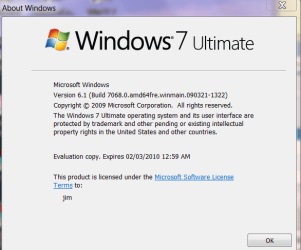
Check the REAL expiry date by running WINVER from the RUN command.

If you these don't work then "as sure as eggs is eggs" your copy of Windows is corrupted or "modified".

Here's my Build 7068 X-64 expiry output from winver command.

Cheers
jimbo
 

Attachments

  • winver.png
    winver.png
    20.1 KB · Views: 31

My Computer

Computer type
PC/Desktop
Computer Manufacturer/Model Number
Custom built, several laptops HP/ASUS
OS
Linux CENTOS 7 / various Windows OS'es and servers
CPU
Intel i7 Intel i5
Memory
8GB, 16GB
Graphics Card(s)
On Motherboard
Sound Card
Realtek HD audio
Monitor(s) Displays
Apple Cinema display, Samsung LCD
Screen Resolution
1920 X 1080
Hard Drives
4 X 1TB SATA
Mouse
Toshiba wireless laser
Internet Speed
> 20MB up
Back
Top