2 questions about Microsoft Security Essentials

kuurt

New member
Member
VIP
Local time
10:44 PM
Messages
106
A couple of different times on this forum people have recommended that I use Microsoft Security Essentials as my antivirus. I just have a couple of questions about it.

1. Some of the antivirus softwares out there have like constant guard protection where it stops things before you download it. I have never noticed MSE do that, so why would they recommend an antivirus that doesn't do that? Isn't that important?

2. When I do a full scan it always takes at least 8 hours to scan. My brother is also using MSE on his computer and he said a full scan only takes him about 30 minutes. And yet he has more stuff stored on his hard drive than I do. So why does it always take more than 8 hours for me to do a full scan? All the other antivirus and maleware programs I've used don't take very long, but MSE takes forever.
 

My Computer

Computer type
PC/Desktop
Computer Manufacturer/Model Number
No idea, some website built it. Not a name brand.
OS
Windows 7 64 bit
CPU
AMD Athlon (tm) 64x2 dual core processor 2400+
Motherboard
ASUS
Memory
4 gigs
Graphics Card(s)
NVIDIA GeForce GT 610
Sound Card
C-Media PCI Audio Device
Monitor(s) Displays
HP vs17x
Screen Resolution
1280x1024
Hard Drives
IDE ATA
PSU
What's that stand for?
Case
I don't know.
Cooling
Dont' know
Keyboard
logitech k120
Mouse
HP
Internet Speed
around 70 megabite download speed
Antivirus
MSE + Malewarebites
Browser
Firefox, Chrome, EI
I'm not a security expert so this is simply what I've experienced.

1. MSE does have real-time protection. On one of my test machines, if MSE is the only antivirus installed, it does prevent malware from downloading and it shows a pop-up display in the system tray. MSE will also quarantine the suspicious download and prevent it from installing. But I've also noticed that if I install a second anti-malware product such as Malwarebytes, it seems that MSE will let the secondary software handle the blocking, quarantining, and notifications.

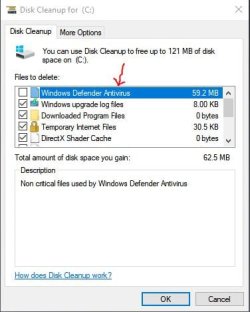
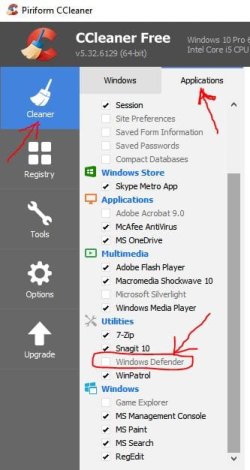
2. Generally speaking, it takes about 30 minutes to run a full scan with MSE. However, if you're running a full scan for the first time (like on a clean install of Windows 7) it could take several hours for that first full scan to complete. Or if you use any kind of disk cleanup utility (Windows built in Disk Cleanup, Piriform's CCleaner, etc) and you let it clean up the MSE files, then MSE thinks it's running the full scan for the very first time and it will again take hours to complete the scan.

Just to avoid any confusion, I'm using my Windows 10 computer. In Windows 10 MSE is called Windows Defender but they are the same thing. So if you're using Disk Cleanup, or CCleaner, or any other file cleaning software, make sure you uncheck MSE before cleaning. Hope this helps. If I misunderstood your questions I'm sorry for wasting your time.

mse1.JPG mse2.JPG
 

My Computer

Computer type
Laptop
Computer Manufacturer/Model Number
Sony Vaio VPCEB47GM Laptop
OS
Win 7 Pro 64-bit
CPU
Intel i5 2.4 Ghz
Memory
8GB DDR3
Graphics Card(s)
Intel HD 3000
Sound Card
IDT High Definition
Monitor(s) Displays
15.6 WGXA Anti-Glare LED
Screen Resolution
1280x800
Hard Drives
640Gb 7200rpm
Antivirus
MSE
Browser
Opera (primary) with IE9 backup
Any Antivirus you use should be complimented by Malwarebytes....IMHO. If you upgrade your primary disk with the OS and software to an SSD then these quick and deep AV and Malware scans are done much faster.
 

My Computer

Computer type
PC/Desktop
Computer Manufacturer/Model Number
A blend of brains, brawn and dumb luck.
OS
Windows 7 Ultimate 64
CPU
i7 3770k OC'd 4.6 @ 1.17v, also FX 8120 & i5 miniITX
Motherboard
MSI P67A-GD80 b3
Memory
32 gb G.Skill Sniper DDR3 10-12-12-31 @ 2133
Graphics Card(s)
XFX Radeon 7870 2GB DDR5
Sound Card
Sound Blaster Z Series Card
Monitor(s) Displays
(2) LG LED 23" 1920 x 1080 2ms Monitors via mini d-port
Screen Resolution
1680 X 1050 p
Hard Drives
Samsung 256 gb 830 SSD sata III
(1) 1 tb WD Black
(2) 1 tb Hitachi deskmates/sata II
(2) 1 tb WD green/sata II
(2) 3 tb Seagate Barracuda
(1) 120 gb OCZ Vertex SS
(1) Drobo 5N w/5 Seagate 3tb
PSU
EVGA modular 1000G2 80% gold rating & APC 1200 RS
Case
CoolerMaster Storm Styker
Cooling
7 case fans 140mm & 120mm, NZXT Kraken X60
Keyboard
(2) Logitech Illuminated Keyboards (1) usb (1) wireless
Mouse
Logitech G700 & T-BC21 - nano nx for the laptop
Internet Speed
Basic 120mbps down
Antivirus
Trend Micro Titanium Max Security & Malwarebytes Premium
Browser
Chrome and IE 10
Other Info
5 Noctua case fans + 3 Noctua in p/p on NZXT cooler
Integrated hot swap drive bays for 2.5" Drives
(2) Lite-on dvd/cd/Blu Ray optical 22X
Integrated fan controller and led on/off
HP Officejet Pro 8630 all-n-one
Hot-swappable 3.5" hard drive bay
Netgear Nighthawk router
Asus USB 3 & sata 6 PCIe card
Vantec IDE to sata adptr./Ultra sata adptr
Lenovo L420 i5 lappy with m sata
Drobo 5N advanced NAS
I do use malewarebytes with MSE. It's not the first time I'm running a scan with MSE, I've used it many times, and it always takes like 8 hours to do a full scan. I don't use any of those other programs mentioned like Ccleaner. So I have to wonder why it always takes 8+ hours to do a scan.

I have noticed if you go into the settings you can change how much CPU usage the program uses, but that is just for scheduled scans. I don't do scheduled scans, I just scan once a week usually. And I see no way to change the CPU usage that way, so I don't know how much of it it's using.

I also see in the settings that it does supposedly have real time protection, but I've never noticed it stop a "bad" webpage the way Avast does. I don't have two antiviruses installed at the same time btw, i've just used Avast before.
 

My Computer

Computer type
PC/Desktop
Computer Manufacturer/Model Number
No idea, some website built it. Not a name brand.
OS
Windows 7 64 bit
CPU
AMD Athlon (tm) 64x2 dual core processor 2400+
Motherboard
ASUS
Memory
4 gigs
Graphics Card(s)
NVIDIA GeForce GT 610
Sound Card
C-Media PCI Audio Device
Monitor(s) Displays
HP vs17x
Screen Resolution
1280x1024
Hard Drives
IDE ATA
PSU
What's that stand for?
Case
I don't know.
Cooling
Dont' know
Keyboard
logitech k120
Mouse
HP
Internet Speed
around 70 megabite download speed
Antivirus
MSE + Malewarebites
Browser
Firefox, Chrome, EI
Let me tell you some things about this antivirus, because it's wrong to compare it with "Avast".

1. MSE does have a real-time protection against malware, but as you said that "it can't stop a bad webpage the way Avast does"... Well, Avast on the other side is filled with features like "bad webpage blocking" or similar, unlike MSE. MSE is just a simple antivirus which will protect you against most kind of malware. It's wrong to compare a "light" antivirus (MSE) with a huge featured antivirus (Avast).

2. The real-time protection can stop a malware in real time, but that's only valid for running applications (let's say you run an .exe installer, if the installer does "look" like malware or do malicious things, a notification from MSE will pop on the screen and it can tell you 2 things: the file is malicious and it's stopped for safety (most likely), or that it does "cleaning threads in program". So, it seems that the real-time protection is weak, eh? Well, that's a "light" antivirus, so don't expect some big features like "heuristic scan" and others.

3. For the +8 full scan... I don't know what cause it, but I think there's a conflict between MSE and another program, so this slows the scanning process... But it's just my opinion, I used MSE for a long time, it scans +8 hours like yours, that's why I think there's a conflict.

off-topic:
MSE is maybe the most fastest antivirus for "low config" computers, that's why it doesn't have some of the features other AV's have. I am sure Microsoft know that their antivirus isn't the best, but their target is to make the antivirus to run smooth and fast on every machine. :)
 
Figures. I was told more than once to use MSE because it doesn't conflict with other programs the way some of these other antivirus programs do. And now I'm finding out that it's probably conflicting with another program too.

I have read somewhere that MSE does have heuristic scanning.
 

My Computer

Computer type
PC/Desktop
Computer Manufacturer/Model Number
No idea, some website built it. Not a name brand.
OS
Windows 7 64 bit
CPU
AMD Athlon (tm) 64x2 dual core processor 2400+
Motherboard
ASUS
Memory
4 gigs
Graphics Card(s)
NVIDIA GeForce GT 610
Sound Card
C-Media PCI Audio Device
Monitor(s) Displays
HP vs17x
Screen Resolution
1280x1024
Hard Drives
IDE ATA
PSU
What's that stand for?
Case
I don't know.
Cooling
Dont' know
Keyboard
logitech k120
Mouse
HP
Internet Speed
around 70 megabite download speed
Antivirus
MSE + Malewarebites
Browser
Firefox, Chrome, EI
So, if you have a computer which can handle antivirus with many features without slowing it, then move on and don't use MSE. I currently use another antivirus, it's not like I hate MSE, but there's better alternative of AV's (if your computer can handle them).

For the heuristic scan... Even if MSE have it, it seems that it is completely hidden, because there's no options or info in the program about it. Although if it have, it doesn't seem effective (I know it from very good personal experience). :geek:
 
Back
Top