2 Questions About Task Manager

timlab1955

New member
Member
VIP
Local time
4:21 PM
Messages
186
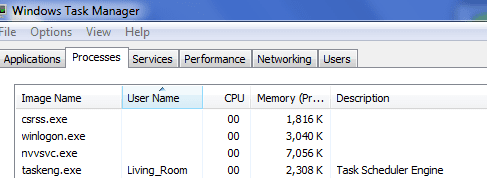
I've noticed that when I bring up Task Manager that there are 3 entries without any information. But the rest of the entires have all the information. Should I worry about these processess? See attachment Task. Then there are a few entries that have a name *32. What does the *32 mean. See 32 attachment.
 

Attachments

  • Task.PNG
    Task.PNG
    7.5 KB · Views: 19
  • 32.PNG
    32.PNG
    4.7 KB · Views: 14

My Computer

Computer Manufacturer/Model Number
Dell XPS 17
OS
Windows Professional 64bit
CPU
Intel Core i7 2820QM @ 2.30GHz, Sandy Bridge 32nm
Motherboard
03RG89, Intel Ver: A12
Memory
16GB
Graphics Card(s)
Generic PnP Monitor (1600x900@60Hz), NVIDIA GeForce GT 555m
Sound Card
High Definition Audio Device
Monitor(s) Displays
NVIDIA 3D
Screen Resolution
1600 x 900 3d
Hard Drives
250GB SAMSUNG SAMSUNG SSD PM810 2.5" 256GB ATA Device (SATA-SSD)
625GB SAMSUNG SAMSUNG HM640JJ ATA Device (SATA)
Other Info
Transend 64GB Memory Card, Lexar Echo ZE 32GB USB 2.0 Backup DriveLEHZE32GASBNA <---Newest thing and very small.
The three process you're concerned about should be legitimate. However, some malware will try to disguise iteself by using legitimate names.

csrss.exe - What is csrss.exe?

winlogon.exe - What is winlogon.exe?

nvvsvc.exe - What is nvvsvc.exe?

It's a good idea to run independent malware scans in addition to having an up-to-date antivirus and antispyware installed. A lot of people here recommend the free Microsoft Security Essentials with supplemental on-demand scans with the free Malwarebytes.

The *32 probably refers to System32 files.

System32
 

My Computer

Computer type
Laptop
Computer Manufacturer/Model Number
Sony Vaio VPCEB47GM Laptop
OS
Win 7 Pro 64-bit
CPU
Intel i5 2.4 Ghz
Memory
8GB DDR3
Graphics Card(s)
Intel HD 3000
Sound Card
IDT High Definition
Monitor(s) Displays
15.6 WGXA Anti-Glare LED
Screen Resolution
1280x800
Hard Drives
640Gb 7200rpm
Antivirus
MSE
Browser
Opera (primary) with IE9 backup
the *32 refers to a 32bit process running on your 64 bit system - nothing to worry about.

i don't know about the blank user names - on my pc, those processes are under 'SYSTEM' user name, and have a description.

i don't have nvvsvc - it's probably an nvidia thingy.
 

Attachments

  • serv.PNG
    serv.PNG
    4.6 KB · Views: 7

My Computer

Computer Manufacturer/Model Number
mickey megabyte 1234
OS
ultimate 64 sp1
CPU
i5 2500K [email protected]
Motherboard
MSI P67A-GD53
Memory
8 gigs GSkill Ripjaws 1600
Graphics Card(s)
amd hd6950
Sound Card
creative x-fi gamer
Monitor(s) Displays
samsung 24"
Screen Resolution
1920x1080
Hard Drives
ocz vertex 2e 60 gig, samsung f3 1tb, buffalo 2tb ext
PSU
antec 550
Case
antec three hundred
Cooling
i'm a cooling fan
Keyboard
saitek eclipse ii
Mouse
logitech g3
Internet Speed
about 4 Mbps
Other Info
i love win7
nvvsvc.exe (NVIDIA Driver Helper Service)
 

My Computer

Computer type
PC/Desktop
OS
Microsoft Windows 7 Home Premium 64-bit 7601 Multiprocessor Free Service Pack 1
CPU
Intel(R) Core(TM) i7-3770 CPU @ 3.40GHz
Motherboard
ASUSTeK COMPUTER INC. P8H77-M
Memory
8.00 GB
Graphics Card(s)
Intel(R) HD Graphics 4000
Sound Card
On Board
Monitor(s) Displays
Dell 24"
Screen Resolution
1920 x 1080
Hard Drives
(1) INTEL SSDSC2CT180A3 ATA Device (2) ST500DM002-1BD142 ATA Device (3) WDC WD3200AAKS-75L9A0 ATA Device (4) Generic- Compact Flash USB Device (5) Generic- MS/MS-Pro USB Device (6) Generic- SD/MMC USB Device (7) Generic- SM/xD-Picture USB
PSU
500w Corsair
Case
Cooler Master
Cooling
3 Fans
Keyboard
Logitech MK300
Mouse
Logitech WOM
Internet Speed
75Mb
Antivirus
Norton 360
Browser
Firefox, Opera, IE
Interesting. If I load task manager these processes have a blank user. If I then show processes for all users they show as SYSTEM.
 

My Computer

Computer type
Laptop
Computer Manufacturer/Model Number
Hewlett-Packard/G62-107SA Notebook
OS
Microsoft Windows 7 Home Premium 64-bit Service Pack 1
CPU
Intel(R) Core(TM) i3 CPU M 330 @ 2.13GHz
Motherboard
Hewlett-Packard 1425
Memory
8 GB DDR3
Graphics Card(s)
Intel(R) HD Graphics
Sound Card
Realtek High Definition Audio
Monitor(s) Displays
Builtin
Screen Resolution
1366 x 768 x 32 bits (4294967296 colors) @ 60 Hz
Hard Drives
250 GB SATA Hard Disk Drive 7200 rpm
2TB Seagate GoFlex USB 2 Drive
1TB Iomega Prestige USB 2 Drive
1.5TB Iomega Prestige USB 2 Drive (Samsung)
2TB WD MyBook Live NAS.
Mouse
Logitech Anywhere MX
Internet Speed
152 Mbs download 10 Mbs upload
Antivirus
Norton 360
Browser
Chrome
After I turned on "Show All Users" this is what I saw. Why do I have two of them?
 

Attachments

  • csrss.PNG
    csrss.PNG
    1.6 KB · Views: 8

My Computer

Computer Manufacturer/Model Number
Dell XPS 17
OS
Windows Professional 64bit
CPU
Intel Core i7 2820QM @ 2.30GHz, Sandy Bridge 32nm
Motherboard
03RG89, Intel Ver: A12
Memory
16GB
Graphics Card(s)
Generic PnP Monitor (1600x900@60Hz), NVIDIA GeForce GT 555m
Sound Card
High Definition Audio Device
Monitor(s) Displays
NVIDIA 3D
Screen Resolution
1600 x 900 3d
Hard Drives
250GB SAMSUNG SAMSUNG SSD PM810 2.5" 256GB ATA Device (SATA-SSD)
625GB SAMSUNG SAMSUNG HM640JJ ATA Device (SATA)
Other Info
Transend 64GB Memory Card, Lexar Echo ZE 32GB USB 2.0 Backup DriveLEHZE32GASBNA <---Newest thing and very small.
I don't know but I also have two. One of the has a sub process of conhost the other is stand alone according to sysinternals process explorer so i guess they are doing different jobs.
 

My Computer

Computer type
Laptop
Computer Manufacturer/Model Number
Hewlett-Packard/G62-107SA Notebook
OS
Microsoft Windows 7 Home Premium 64-bit Service Pack 1
CPU
Intel(R) Core(TM) i3 CPU M 330 @ 2.13GHz
Motherboard
Hewlett-Packard 1425
Memory
8 GB DDR3
Graphics Card(s)
Intel(R) HD Graphics
Sound Card
Realtek High Definition Audio
Monitor(s) Displays
Builtin
Screen Resolution
1366 x 768 x 32 bits (4294967296 colors) @ 60 Hz
Hard Drives
250 GB SATA Hard Disk Drive 7200 rpm
2TB Seagate GoFlex USB 2 Drive
1TB Iomega Prestige USB 2 Drive
1.5TB Iomega Prestige USB 2 Drive (Samsung)
2TB WD MyBook Live NAS.
Mouse
Logitech Anywhere MX
Internet Speed
152 Mbs download 10 Mbs upload
Antivirus
Norton 360
Browser
Chrome
Thanks. The only reason why I'm asking is because I have checked with two anti virs programs and they are clear. So I'm kinda of looking why my system is taking so long to boot up, meaning I get the blue screen, and then it seems like it just waits until all the processors load in first before anything happens. Gosh, my old xp machine would boot up faster than that. Any Clue?
 

My Computer

Computer Manufacturer/Model Number
Dell XPS 17
OS
Windows Professional 64bit
CPU
Intel Core i7 2820QM @ 2.30GHz, Sandy Bridge 32nm
Motherboard
03RG89, Intel Ver: A12
Memory
16GB
Graphics Card(s)
Generic PnP Monitor (1600x900@60Hz), NVIDIA GeForce GT 555m
Sound Card
High Definition Audio Device
Monitor(s) Displays
NVIDIA 3D
Screen Resolution
1600 x 900 3d
Hard Drives
250GB SAMSUNG SAMSUNG SSD PM810 2.5" 256GB ATA Device (SATA-SSD)
625GB SAMSUNG SAMSUNG HM640JJ ATA Device (SATA)
Other Info
Transend 64GB Memory Card, Lexar Echo ZE 32GB USB 2.0 Backup DriveLEHZE32GASBNA <---Newest thing and very small.
The length of time it takes to start depends on how may startup items there are. With all the drivers and services that start for various installed programs that can be a frighteningly high number as time goes on. It sounds from your description that the delay is after the logon screen. At that time it is loading and configuring the desktop, user services and tray icons. You may want to check if you have an excessive number of these.

I'm not really an expert in this area so someone else might like to comment.
 

My Computer

Computer type
Laptop
Computer Manufacturer/Model Number
Hewlett-Packard/G62-107SA Notebook
OS
Microsoft Windows 7 Home Premium 64-bit Service Pack 1
CPU
Intel(R) Core(TM) i3 CPU M 330 @ 2.13GHz
Motherboard
Hewlett-Packard 1425
Memory
8 GB DDR3
Graphics Card(s)
Intel(R) HD Graphics
Sound Card
Realtek High Definition Audio
Monitor(s) Displays
Builtin
Screen Resolution
1366 x 768 x 32 bits (4294967296 colors) @ 60 Hz
Hard Drives
250 GB SATA Hard Disk Drive 7200 rpm
2TB Seagate GoFlex USB 2 Drive
1TB Iomega Prestige USB 2 Drive
1.5TB Iomega Prestige USB 2 Drive (Samsung)
2TB WD MyBook Live NAS.
Mouse
Logitech Anywhere MX
Internet Speed
152 Mbs download 10 Mbs upload
Antivirus
Norton 360
Browser
Chrome
Type in msconfig and see what comes up....
 

My Computer

Computer type
PC/Desktop
Computer Manufacturer/Model Number
Custom
OS
windows 10 pro 64 bit
CPU
i5 4690K@4500 COOLER MASTER Seidon 120M water cooler
Motherboard
ASUS SABERTOOTH Z87 LGA 1150 Intel
Memory
16gb Kingston HyperX DDR3 1600
Graphics Card(s)
EVGA GTX 1070 sc
Monitor(s) Displays
BenQ GL2760H Black 27" 2ms HDMI Widescreen LED 1920X1080
Screen Resolution
DSR 2103X1183
Hard Drives
ADATA 256 gig SSD + 4 junk
PSU
EVGA supernova 750
Case
coolermaster
Cooling
many...
Keyboard
z merc
Mouse
Logitech wireless G602
Internet Speed
2.5mbs cable
I just copied this from a site:

Resolving Csrss.exe 100% CPU Usage Problems

Purpose of Csrss.exe
The csrss.exe file belongs to the Microsoft Client Server Runtime Server subsystem that is used by Windows to manage most of the graphical instruction sets. This feature makes csrss.exe a critical component of your Windows computer and terminating this process may lead to a stop error, commonly known as Blue Screen of Death or BSOD error.
By default, the csrss.exe file is located in C:\Windows\System32. The process was first introduced with Windows NT. Therefore, you will not find the csrss.exe file in Windows 98 or any other Windows operating systems that were released before Windows NT.
The csrss.exe process is the controller of the Win32 console and threading features. In the Windows API (Application Programming Interface) system, Win32 is a plain text window that can be used by programs without requiring the display of images. Threading happens when an application splits into multiple tasks that are run simultaneously. Threads that csrss.exe supports are not the same as the processes.
Usually, a process is split into multiple threads and all threads share the resources within the same process and they run at CPU level. Csrsss.exe helps in creating and deleting threads as and when required. Certain portions of the 16-bit virtual MS-DOS environment are also controlled by the csrss.exe process.
Problems with Csrss.exe
One common problem that users face is that when you right-click something in the Windows Explorer window or the Desktop, the csrss.exe process shows 100% CPU usage.
Note: You can check the CPU usage of a process on the Processes tab of the Windows Task Manager. In Windows XP, you can display Task Manager by pressing the Ctrl + Alt + Delete. You may also right-click on the taskbar and then select Task Manager.
Cause of the Error
This 100% CPU usage problem by the Csrss.exe process occurs if the user profile with which you are logged on to your computer is corrupt.
Resolution Method
To resolve this issue, you need to delete your existing profile. Before deleting, remember to make a backup of your files in the My Documents folder because once a profile is deleted, you will not be able to recover these items. If you use the default locations to save your content, then the following are a few more things that you may choose to backup:

  • Emails
  • Address Book
  • Favorites
  • Any document templates that you would have created
  • Any files stored on your Desktop
Next, log off and then log on to the system as an administrator. Now, on the Desktop or in Windows Explorer right-click My Computer and then, select Properties. Display the Advanced tab page, and then, in the User Profiles section, click Settings. Select the corrupt profile from the list and then click the Delete button.
Csrss.exe is also registered as a Trojan that enables hackers and attackers to gain access to your PC from a remote location and then steal your personal and confidential data, such as passwords, Internet Banking details, and other personal files and folders.
To ensure that the csrss.exe file running on your computer is legitimate and not a virus, you are recommended to use an antivirus tool, such as Antivirus Plus and an Antispyware tool, such as StopZilla to search for any malicious data on your PC and remove them.
Virus and spyware are known to add malicious registry entries, as well as new registry entries that may be used to prevent various applications on your computer from functioning properly. These malicious programs may also add entries that enable them to load at system Startup.
To combat these harmful entries, we recommend that you use a registry tool, such as RegGenie to perform a thorough registry scan and delete all unwanted and malicious information residing in your system registry.

 

My Computer

Computer Manufacturer/Model Number
Custom built be me
OS
Windows 7 Ultimate x64
CPU
Amd dual-core 4400 Socket 979
Motherboard
Asus A8N-SLI
Memory
Kingston 3gb ddr 3200
Graphics Card(s)
Radeon Sapphire HD5670 1gb GDDR5 Artic cooling
Sound Card
Standard Motherboards Realtec
Monitor(s) Displays
IC Power
Screen Resolution
1280 x 1024
Hard Drives
Seagate Barracuda 500gb Sata 16mb Cache 7200 rpm Primary Drive
300gb Maxtor IDE
Seagate 500gb usb freeagent backup drive
PSU
600 watt power star
Case
Lian-Li Aluminum
Cooling
MassCool Socket 979
Keyboard
Microsoft Comfort Curve
Mouse
Microsoft Basic Optical Mouse 2.0
Internet Speed
5mb
Other Info
The system as of now is about a year old and the OS was installed on 11/30/2010..
Back
Top