
Solved 2 Separate Windows 7 Options During Boot

sereneione

New member
Local time
8:46 AM
Messages
16
Hello everyone.

The C partition of my hard disk was slowly dying of bad sectors, so I had the 'bright' idea of wiping it out and doing a clean install of Windows 7 on the D partition of the same hard disk. I thought that choosing to format the C partition during the installation would do the trick of getting rid of the old Windows 7. This does not seem to be the case as I now have 2 Windows 7 listed during boot.

Looking at the Boot tab of System Configuration, I can see a Windows folder in each partition. I also noticed that the partitions have switched over. What used to be the D partition is now the C partition with the new Windows, and what used to be the C partition with the old Windows is now the D partition and shows as empty.

Can anyone please advise me on the next best course of action? Any suggestions or thoughts would be very much appreaciated.

Thanks a bunch.
 

My Computer

Computer type
Laptop
Computer Manufacturer/Model Number
Toshiba Notebook Satellite L840
OS
Windows 7 Home Premium 64-bit
CPU
Intel(R) Core(TM) i3-2350M CPU @ 2.30GHz
Memory
4.00 GB
Graphics Card(s)
AMD Radeon HD 7670M
Monitor(s) Displays
Generic PnP Monitor
Screen Resolution
1366x768 with 32 bit color depth
Keyboard
Standard PS/2 Keyboard
Mouse
Synaptics PS/2 Port TouchPad
Antivirus
Microsoft Security Essentials
Browser
Google Chrome, Internet Explorer 11
My Computer

Computer type
PC/Desktop
Computer Manufacturer/Model Number
Dell optiplex 740
OS
Win 7 Home Premium SP1 32 bit
CPU
AMD Athlon 64 X2 5000B
Motherboard
Dell Inc. 0YP696 (Socket M2 )
Memory
4.00 GB Dual-Channel DDR2 @ 370MHz (6-6-6-18)
Graphics Card(s)
Acer E181H (1366x768@60Hz) 64MB GeForce 6150 LE (Dell)
Sound Card
SigmaTel High Definition Audio CODEC
Monitor(s) Displays
Acer E181H (1366x768@60Hz) 64MB GeForce 6150 LE (Dell)
Hard Drives
699GB Seagate ST375064 0NS SCSI Disk Device (ATA)
Case
Mini tower
Internet Speed
Ping 36 ms, Download 57.71 mbps , Upload 11.79mbps
Antivirus
Free Avast. Pro paid Mbam , Free Sas
Browser
Palemoon .
Re installing windows will not help bad sectors, you need a new hard drive.

You should have installed windows on what you call the C partition, not the D partition.

Windows will always be C when you`re in it and the other partition/s will have another letter.

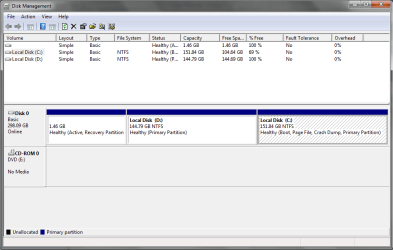
Post a shot of disk management.
 

My Computer

Computer type
PC/Desktop
Computer Manufacturer/Model Number
Skylake Special #666
OS
Windows 10 Pro x64
CPU
Intel Core i7 6700K
Motherboard
Asus Sabertooth Z170 Mark 1
Memory
GSkill TridentZ RGB 16GB 3600 16-16-16-36
Graphics Card(s)
EVGA GTX 980 Ti SC x2
Sound Card
Realtek High Definition
Monitor(s) Displays
AOC G2460PG
Screen Resolution
1920 x 1080 144Hz
Hard Drives
Samsung 860 Pro 256GB, Seagate Barracuda 4TB x2
PSU
EVGA 1000 P2, EVGA White Custom Braided Cables
Case
Corsair Vengeance C70 Gunmetal Black
Cooling
Corsair H100i v2, Corsair ML120 x2, Thermal Grizzly Kryonaut
Keyboard
Logitech G910 Orion Spectrum
Mouse
Logitech G700s
Internet Speed
Verizon Fios Quantum Gateway 75/75
Antivirus
Windows Defender, Malwarebytes Free 3.8.3
Browser
Chrome
Other Info
Corsair SP120 x4, LG Blu-ray Drive, Durabrand HT-395 100 Watt Dolby Digital Amp, Corsair H2100 Wireless 7.1 Headset
Disk Management Screenshot

Hello everyone. Thanks for replying.

I do realise now that what I had done is not the brightest thing in the world. I also realise that I should have been referring to the Clean Install Factory OEM Windows 7 post instead of the Clean Install Windows 7 post. Again, not the brightest thing in the world.

Anyway, here is a screenshot of my disk management.

Capture.PNG
 

My Computer

Computer type
Laptop
Computer Manufacturer/Model Number
Toshiba Notebook Satellite L840
OS
Windows 7 Home Premium 64-bit
CPU
Intel(R) Core(TM) i3-2350M CPU @ 2.30GHz
Memory
4.00 GB
Graphics Card(s)
AMD Radeon HD 7670M
Monitor(s) Displays
Generic PnP Monitor
Screen Resolution
1366x768 with 32 bit color depth
Keyboard
Standard PS/2 Keyboard
Mouse
Synaptics PS/2 Port TouchPad
Antivirus
Microsoft Security Essentials
Browser
Google Chrome, Internet Explorer 11
Determine the actual physical condition of the hard drive by running the maker's HD Diagnostic
extended CD scan, burning the DOS ISO in the blue link for your model to CD with Windows Image burner, boot disk to run full scan. If your make is not listed or unavailable use Seatools. Back up files first.

If your HD passes then do a Clean Reinstall - Factory OEM Windows 7 deleting all partitions during the booted install using the Drive Options in Steps 7 and 8 of Clean Install Windows 7.

If your HD fails then replace it with an SSD which is the best upgrade one can have for Win7, then do the reinstall above.

You will get and keep a perfect Win7 install to the exact extent you stick with the steps, tools and methods in Clean Reinstall - Factory OEM Windows 7
 
The recovery tools partition is most likely toast now, as stated re install again. This time delete all the partitions and create 1 298 GB partition, then install windows on that.

Or, you can format both C and D, during the install, then install windows on the 144.79 GB partition, not the 151.84 GB partition.

But, if you have no data you need to keep, I would wipe out the entire drive. (This is what you should do)

http://www.sevenforums.com/tutorials/1649-clean-install-windows-7-a.html

Use step 7 to click on drive options to delete or format the partitions.

You can always make another partition later with Partition Wizard.
 

My Computer

Computer type
PC/Desktop
Computer Manufacturer/Model Number
Skylake Special #666
OS
Windows 10 Pro x64
CPU
Intel Core i7 6700K
Motherboard
Asus Sabertooth Z170 Mark 1
Memory
GSkill TridentZ RGB 16GB 3600 16-16-16-36
Graphics Card(s)
EVGA GTX 980 Ti SC x2
Sound Card
Realtek High Definition
Monitor(s) Displays
AOC G2460PG
Screen Resolution
1920 x 1080 144Hz
Hard Drives
Samsung 860 Pro 256GB, Seagate Barracuda 4TB x2
PSU
EVGA 1000 P2, EVGA White Custom Braided Cables
Case
Corsair Vengeance C70 Gunmetal Black
Cooling
Corsair H100i v2, Corsair ML120 x2, Thermal Grizzly Kryonaut
Keyboard
Logitech G910 Orion Spectrum
Mouse
Logitech G700s
Internet Speed
Verizon Fios Quantum Gateway 75/75
Antivirus
Windows Defender, Malwarebytes Free 3.8.3
Browser
Chrome
Other Info
Corsair SP120 x4, LG Blu-ray Drive, Durabrand HT-395 100 Watt Dolby Digital Amp, Corsair H2100 Wireless 7.1 Headset
Thanks

Thanks everyone for your help. Very much appreciated.
 

My Computer

Computer type
Laptop
Computer Manufacturer/Model Number
Toshiba Notebook Satellite L840
OS
Windows 7 Home Premium 64-bit
CPU
Intel(R) Core(TM) i3-2350M CPU @ 2.30GHz
Memory
4.00 GB
Graphics Card(s)
AMD Radeon HD 7670M
Monitor(s) Displays
Generic PnP Monitor
Screen Resolution
1366x768 with 32 bit color depth
Keyboard
Standard PS/2 Keyboard
Mouse
Synaptics PS/2 Port TouchPad
Antivirus
Microsoft Security Essentials
Browser
Google Chrome, Internet Explorer 11
Back
Top