2 Tasks Running and it's not letting me open file location (VIRUS?)

angelt

New member
Local time
12:01 PM
Messages
1
winlogon.exe
csrss.exe

I tried to open the file location and nothing happens.
I googled the files and the 2 MAY be potenttial viruses.
Any comments?
Maby I hope that they are just normal Win7 Tasks and not viruses
Instructions on how to know if they are not viruses.

THANKS :D
 

My Computer My Computer

At a glance

Win7 Home Premium 64bit
Computer type
Laptop
Computer Manufacturer/Model Number
Sony VAIO
OS
Win7 Home Premium 64bit
Welcome to our forum angelt.

Could you put in your (My System Specs) what security programs you have installed.

Could you also let us know exactly what files are in question?
 

My Computer My Computer

At a glance

Windows 10 Pro. 64/ version 1709 Windows 7 Pr...Intel i7-6800K @ 4.3Corsair Platinum 16 gig @2400EVGA GTX 1070 OC
Computer type
PC/Desktop
Computer Manufacturer/Model Number
Home made Desktop
OS
Windows 10 Pro. 64/ version 1709 Windows 7 Pro/64
CPU
Intel i7-6800K @ 4.3
Motherboard
ASUS X-99 Deluxe II
Memory
Corsair Platinum 16 gig @2400
Graphics Card(s)
EVGA GTX 1070 OC
Monitor(s) Displays
Asus 27" LED LCD/VE278Q
Screen Resolution
1920-1080 or 1280-720 HDMI
Hard Drives
INTEL SSD 730-240 Gb Sata 3.0/
PSU
EVGA Platium 1200W
Case
Phanteks Luxe Tempered Glass 8 fans/ one radiator
Cooling
XSPC/ Water Cooled CPU
Keyboard
Das 4 Professional
Mouse
Logitech M705/MX Anywhere 2-S
Internet Speed
100 mbits
Antivirus
Microsoft Security Essentials/ Malwarebytes Premium 3.0/ SAS
Browser
I.E. 11 default/Firefox/ ISP Time Warner Cable/Spectrum
Other Info
LG BluRay Burner/
Sound system-KLipsch-THX/
Icy Dock ssd Hot Swap bays.
winlogon.exe and csrss.exe are both critical system processes. With UAC enabled and using an admin account you really only have the rights of a standard account. This is a good thing. Such an account does not have the rights to access the file location and some other information for system processes. To see this information you must select "Show processes from all users". Task Manager will then be running under an elevated account that has such rights. Even then some information may be inaccessible for some high privilege system processes.

Viruses go to great lengths to hide their presence and are unlikely to be detected by such simple means. Sufficiently sophisticated malware (and these days most of it is) has the ability to manipulate the information shown by Task Manager and similar utilities to show what it wants you to see.
 

My Computer My Computer

At a glance

Windows 7 Pro 64 bitXeon W35208 GBNvidia Geforce 210
Computer type
PC/Desktop
Computer Manufacturer/Model Number
HP
OS
Windows 7 Pro 64 bit
CPU
Xeon W3520
Memory
8 GB
Graphics Card(s)
Nvidia Geforce 210
> I tried to open the file location and nothing happens.
I am going to guess that you tried to "open the file location" from within Task Manager. If you do as LMiller7 says, you will see even more processes running for which "nothing happens" when you select Open File Location. Task Manger can be set to show a column named Image Path Name. In the screenshot below, I sorted the processes by that column. If the Image Path Name is blank, then "nothing happens" when you select Open File Location.
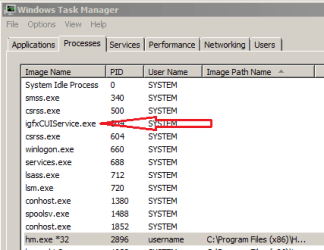
tm.PNG

The process that the arrow is pointing to is from Intel. Simply put: Task Manager asks for the location using code that does not always work.

msinfo32 is another tool that comes with Windows 7. Simply put: that tool asks for the location using code that works a bit better.

Process Explorer does an even better job of getting the location of a process that is running. You might want to use the info in this post (http://www.sevenforums.com/system-security/320426-process-explorer-16-a.html#post2681060) to setup Process Monitor to check each process with Google's Virus Total website.


> I googled the files and the 2 MAY be potenttial viruses.
Almost every file that you Google will have many websites that tell you it could be infected. The websites want to scare you into visiting. They get paid when you visit.


> Maby I hope that they are just normal Win7 Tasks and not viruses
They are probably not infected... but you cannot know for sure.


> Instructions on how to know if they are not viruses.
After you scan the files using various security related tools (antivirus, anti-malware and/or offline scanners), all that you can say is: the tools did not find any infections. Sadly, some infections cannot be detected at this time.

 

My Computer My Computer

At a glance

W7 Pro SP1 64biti78GBIntel HD Graphics
Computer type
Laptop
Computer Manufacturer/Model Number
Employer provided Dell Latitude
OS
W7 Pro SP1 64bit
CPU
i7
Memory
8GB
Graphics Card(s)
Intel HD Graphics
Hard Drives
crappy SSD
Antivirus
Employer mandated Symantec Endpoint Protection
Browser
Pale Moon 64bit, IE11 64bit & Chrome 64bit
The two processes you listed are indeed typical; my advice....don't worry about them
 

My Computer My Computer

At a glance

Windows 7 Home Premium 64 bitAMD A45 GBIntegrated Radeon
Computer type
PC/Desktop
Computer Manufacturer/Model Number
HP
OS
Windows 7 Home Premium 64 bit
CPU
AMD A4
Memory
5 GB
Graphics Card(s)
Integrated Radeon
Hard Drives
500 gb WD
Antivirus
360 TS
Browser
IE
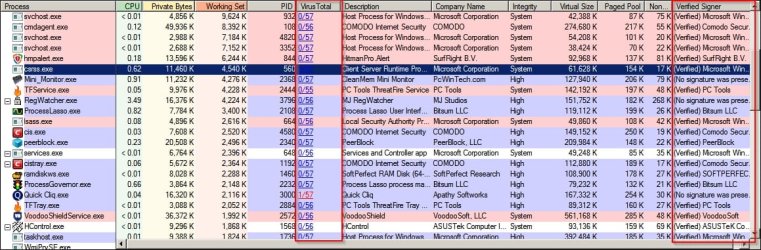
In addition to what Usernameissues suggests it is also possible to set Process Explorer to verify file signatures. If either of those processes you mentioned are unsigned it would indicate problems. They should be signed by Microsoft.

Process Explorer.jpg

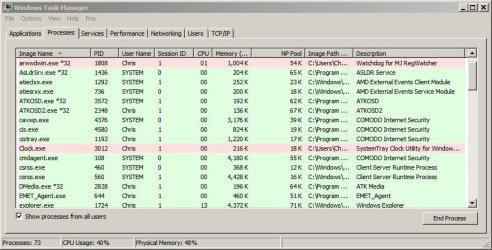
Currently I also use a task manager add on that highlights unsigned running processes in red.

Windows Task Manager.jpg
 

My Computer My Computer

At a glance

Microsoft Windows 7 Home Premium 64-bit 7601 ...AMD C-60 APU with Radeon(tm) HD Graphics4.00 GBAMD Radeon HD 6290 Graphics
Computer type
Laptop
Computer Manufacturer/Model Number
ASUS
OS
Microsoft Windows 7 Home Premium 64-bit 7601 Multiprocessor Free Service Pack 1
CPU
AMD C-60 APU with Radeon(tm) HD Graphics
Motherboard
ASUSTeK COMPUTER INC. X501U
Memory
4.00 GB
Graphics Card(s)
AMD Radeon HD 6290 Graphics
Sound Card
(1) AMD High Definition Audio Device (2) Realtek High Defi
Screen Resolution
1366 x 768 x 32 bits (4294967296 colors) @ 60 Hz
Hard Drives
Hitachi HTS545050A7E380 SATA Disk Device
Antivirus
Comodo CIS & FW, SecureAplus App Whitelisting, Threatfire
Browser
Cyberfox 64bit, Opera 64bit, Airfox
Other Info
Spy-The-Spy, HitmanPro.Alert, Norton Connect Safe, MJRegWatcher, BitDefender TrafficLight, Voodoo Shield, Zemana AntiMalware
That is exactly why I asked for a list of security programs.
Using proper security programs to check for infection is the best way to know whether something is a infection and trying to hide and that is not 100%.
Their is no 100%. Their are just best practices one should follow.
Everything in a computer can hide a infection. The people who create these infection are not dumb. They know Windows and programs a lot better than I do or ever will.
 

My Computer My Computer

At a glance

Windows 10 Pro. 64/ version 1709 Windows 7 Pr...Intel i7-6800K @ 4.3Corsair Platinum 16 gig @2400EVGA GTX 1070 OC
Computer type
PC/Desktop
Computer Manufacturer/Model Number
Home made Desktop
OS
Windows 10 Pro. 64/ version 1709 Windows 7 Pro/64
CPU
Intel i7-6800K @ 4.3
Motherboard
ASUS X-99 Deluxe II
Memory
Corsair Platinum 16 gig @2400
Graphics Card(s)
EVGA GTX 1070 OC
Monitor(s) Displays
Asus 27" LED LCD/VE278Q
Screen Resolution
1920-1080 or 1280-720 HDMI
Hard Drives
INTEL SSD 730-240 Gb Sata 3.0/
PSU
EVGA Platium 1200W
Case
Phanteks Luxe Tempered Glass 8 fans/ one radiator
Cooling
XSPC/ Water Cooled CPU
Keyboard
Das 4 Professional
Mouse
Logitech M705/MX Anywhere 2-S
Internet Speed
100 mbits
Antivirus
Microsoft Security Essentials/ Malwarebytes Premium 3.0/ SAS
Browser
I.E. 11 default/Firefox/ ISP Time Warner Cable/Spectrum
Other Info
LG BluRay Burner/
Sound system-KLipsch-THX/
Icy Dock ssd Hot Swap bays.
Back
Top