2 (Web) Servers on 1 PC

iceangel89

New member
can i setup 2 servers to use 2 different Loopback IPs?

eg
127.0.0.1 IIS7.5
127.0.0.2 Apache

something like that? this is so that i can specify in the hosts file something like

127.0.0.1 iis
127.0.0.2 apache

i cant do something like ... cant specify ports in hosts file ...

127.0.0.1:80 iis
127.0.0.1:81 apache
 

My Computer

OS
Windows Vista/7RC
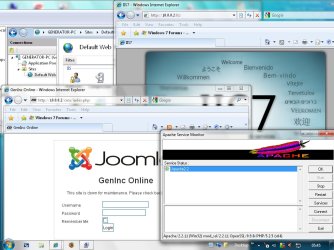
Yeah sure you can...

ServersGoneMad.jpg


I'm not sure why you would want to though. Twice the resources, twice the risks, twice the amount of things to go wrong... I could go on but I won't. :)

Don't know the in's & out's of IIS but with Apache you could just use one server and setup a virtual host on port 81 in the vhosts config file as well as the default document root on port 80. Like so...
Code:
    <VirtualHost *:81>
    DocumentRoot "c:/server/site2"
    ServerName [URL="http://www.site2.com"]www.site2.com[/URL]
    </VirtualHost>

Theres no need to edit the windows host file at all aswell for this. If you want both sites 'live' don't forget to port forward if your machine sits behind a router, and dont forget your firewall exceptions.

Hope this helps somewhat! :D
 
Last edited:

My Computer

Computer Manufacturer/Model Number
Self Built
OS
XP Pro SP3 x86/Vista SP2 x64/Win7 x64 Triple-boot
CPU
AMD64 X2 AM2 5000+
Motherboard
Asus MSN-X Plus
Memory
Corsair TWX 2Gb (2x1Gb) DDR2 800Mhz
Graphics Card(s)
PCI-X 2.0 Inno3D (NVidia) 9500GT 1Gb DDR2
Sound Card
Onboard Realtec ALC662-GR
Monitor(s) Displays
Relisys 17' CRT (model unknown)
Screen Resolution
1024x768
Hard Drives
750Gb Samsung 7200-3Gb/s 32Mb Cache SATA
PSU
500W
Cooling
Standard AMD CPU Fan, One side, front and rear case fan.
Keyboard
Microsoft Multimedia Keyboard
Mouse
Samsung Optical
Internet Speed
10M
hmm the reason why i want that is just for testing ... and i sometimes feel like trying out ASP.NET MVC apart from just PHP
 

My Computer

OS
Windows Vista/7RC
Back
Top