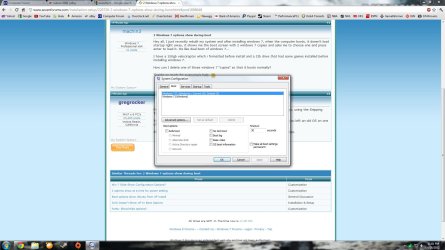
Hey all, I just recently rebuilt my system and after installing windows 7, when the computer boots, it doesn't load startup right away, it shows me the boot screen with 2 windows 7 copies and asks me to choose one and press enter to load it. Its like dual boot of windows 7...
I have a 150gb velociraptor which i formatted before install and a 2tb drive that had some games installed before installing windows 7.
How can I delete one of those windows 7 "copies" so that it boots normally?
Thanks so much for everyone's help.
Last edited:
My Computer
OS
Windows 7 Professional x64
CPU
Intel Core i7 930 @2.8
Motherboard
Gigabyte G.1 Guerrilla X58
Memory
Corsair Vengeance 12GB
Graphics Card(s)
EVGA GTX 570HD
Sound Card
Diamond Multimedia Xtreme Sound XS51
Monitor(s) Displays
Acer X233H
Screen Resolution
1920 x 1080
Hard Drives
Mushkin 40GB SSD
Western Digital Velociraptor 150GB
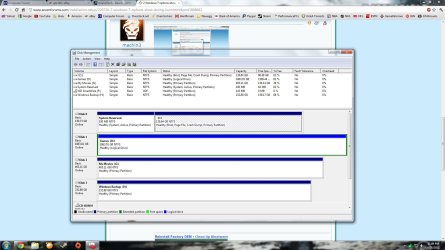
Please post back a screenshot of your maximized Disk management drive map with listings, using the Snipping Tool in Start Menu: Screen Shots
You wouldn't have a Dual Boot menu if you didn't have two OS's installed. Is it possible you left an old OS on one of the HD partitions? Tell us what is on each partition.
Also type msconfig in Start Search box and post back a screenshot of the boot tab listings.
Yes you can delete the extra OS listing but it doesn't solve the question whether it exists somewhere on one of your drives which it really would if it made a Dual Boot menu.
Can you post back a screenshot of your Disk Mgmt drive map and listings as requested?
When you do this, rightclick on each of the other partitions to see if you see a Windows folder on any besides C. Do you remember having Win7 installed anywhere else? Did you start your install over again and perhaps choose another partition?
To access Disk Management type it in the Start Search box.
Oh I'm sorry, I forgot to take the other screenshot. I had an SSD besides the other 2 drives I mentioned, and I removed it, its not in the system anymore.
The Velociraptor had only programs installed before but I reformatted it before installing Win 7 on it. The 2tb drive only had games on it before so I didn't even reformat that and i just carried it over to the new system.
When I right click on C: what does it mean, "mark partition as active"?
My Computer
OS
Windows 7 Professional x64
CPU
Intel Core i7 930 @2.8
Motherboard
Gigabyte G.1 Guerrilla X58
Memory
Corsair Vengeance 12GB
Graphics Card(s)
EVGA GTX 570HD
Sound Card
Diamond Multimedia Xtreme Sound XS51
Monitor(s) Displays
Acer X233H
Screen Resolution
1920 x 1080
Hard Drives
Mushkin 40GB SSD
Western Digital Velociraptor 150GB