200mb partition?

drazenn

New member
Power User
Local time
10:31 PM
Messages
177
Location
zagreb,croatia
I had Windows 7 beta 7000 on C partition,and of course,extra partition 200mb big.After that I messed up something,wasn't able to boot from that partition and because of that I installed Windows 7 again but on D partition,and without formatting that C partition or that new created 200mb big partition.Now I had one more partition free,and I want install build 7100 on that partition,
so my question is may I format that 200mb partition what was created with first installation of Windows 7 together with that first,now nonbootable partition of Windows 7?
 

My Computer

Computer type
PC/Desktop
Computer Manufacturer/Model Number
intel x58 selfmade
OS
Windows 7 Ultimate x64
CPU
[email protected] (non overclocked)
Motherboard
x58
Memory
8gb DDR3
Graphics Card(s)
Asus 6850
Monitor(s) Displays
lg 22"
Hard Drives
1TB
PSU
Corsair 650w
Case
Gigabyte
Cooling
Scytech
Keyboard
noname
Mouse
Logitech wireless xy
Internet Speed
70GB
Antivirus
Windows Defender
Browser
Chrome (default)
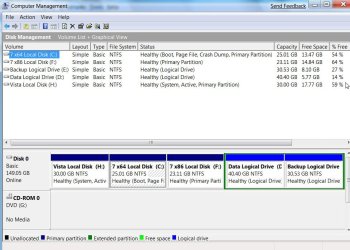
Pretty sure you will find the 200mb is listed as System in Disk Management.

Post a screenshot of Disk Management. like this:

DISKMANAGEMENT2009-02-04_031947.jpg

If that is the case, and you want to remove it , as well as stop 7100 making another - you need to make D the System partition.
 

My Computers

System One System Two

  • Computer type
    PC/Desktop
    OS
    7 X64
    CPU
    i5 8400
    Motherboard
    gigabyte b365m ds3h
    Memory
    2x8gb 3200mhz
    Hard Drives
    various
    PSU
    pure power 11 400w cm
    Case
    Coolermaster
    Cooling
    cryorig m9i
  • Computer type
    PC/Desktop
    OS
    7x64
    CPU
    g5400
    Motherboard
    ga b365m ds3h
    Memory
    8gb ddr4 2400
    PSU
    xfx pro 450w
any reason it does that in the first place?
 

My Computer

Computer Manufacturer/Model Number
eMachines W3502
OS
Windows 7 Ultimate x32
CPU
Intel Celeron D 3.2 Ghz 533 fsb (LGA 775)
Motherboard
Intel D101GGC
Memory
1 GB (2x512MB) PC-3200 DDR @ 200Mhz
Graphics Card(s)
Nvidia GeForce 9400GT- 1GB
Sound Card
Sound Blaster X-Fi Xtreame Gamer
Monitor(s) Displays
19" LCD HDtv
Screen Resolution
1360x768 @ 60Htz
Hard Drives
SeaGate Barracuda 750GB
SeaGate Barracuda 100GB
Toshiba CD/DVDW/ TS-H552D [DVD+R, DL]
PSU
stock (idk)
Case
The busted remains of the stock case
Cooling
Dust cooled, waitwut?
Keyboard
Stock. Missing a few keys.
Mouse
Logitech LX8 5-btn mouse (wireless)
Internet Speed
TWC 10Mb
Other Info
Keeps going, and going, and going.......
I had Windows 7 beta 7000 on C partition,and of course,extra partition 200mb big.After that I messed up something,wasn't able to boot from that partition and because of that I installed Windows 7 again but on D partition,and without formatting that C partition or that new created 200mb big partition.Now I had one more partition free,and I want install build 7100 on that partition,
so my question is may I format that 200mb partition what was created with first installation of Windows 7 together with that first,now nonbootable partition of Windows 7?

I would have deleted that failed install partition before doing the new partition.
 

My Computer

Computer Manufacturer/Model Number
Dell Inspiron 1520 (Laptop)/ Home (Desktop)
OS
Windows 7 x64 / Same
CPU
Intel Core 2 Duo T7250 / Intel Core i7 930
Motherboard
Intel 945 / Asus P6X58D-E
Memory
4GB / 6GB
Graphics Card(s)
NVIDIA GeForce 8400M GS / ASUS 1GB
Sound Card
Whatever Dell gave me :-( / Onboard
Monitor(s) Displays
15.4" LCD / Crappy CRT
Hard Drives
Seagate 500GB SATA; 7200 RPM / Seagate 1TB SATA; 7200 RPM
PSU
N/A / OCZ Fatal1ty 550W Modular
Case
N/A / Antec 900
Cooling
Air
Mouse
Microsoft Presenter (Bluetooth)
Yep,I found it,but my question is(knowing that in that partition are system files),may I format it together with first nonbootable instalation without consequences for another,working installation of windows 7 which I made after this.
If there is no consequences,I would certainly delet it.
 

My Computer

Computer type
PC/Desktop
Computer Manufacturer/Model Number
intel x58 selfmade
OS
Windows 7 Ultimate x64
CPU
[email protected] (non overclocked)
Motherboard
x58
Memory
8gb DDR3
Graphics Card(s)
Asus 6850
Monitor(s) Displays
lg 22"
Hard Drives
1TB
PSU
Corsair 650w
Case
Gigabyte
Cooling
Scytech
Keyboard
noname
Mouse
Logitech wireless xy
Internet Speed
70GB
Antivirus
Windows Defender
Browser
Chrome (default)
Yep,I found it,but my question is(knowing that in that partition are system files),may I format it together with first nonbootable instalation without consequences for another,working installation of windows 7 which I made after this.
If there is no consequences,I would certainly delet it.

You can delete that partition if you are not booting an OS from it. Correct me if I'm wrong, but you are booting from a good install on D:\ ?
 

My Computer

Computer Manufacturer/Model Number
Dell Inspiron 1520 (Laptop)/ Home (Desktop)
OS
Windows 7 x64 / Same
CPU
Intel Core 2 Duo T7250 / Intel Core i7 930
Motherboard
Intel 945 / Asus P6X58D-E
Memory
4GB / 6GB
Graphics Card(s)
NVIDIA GeForce 8400M GS / ASUS 1GB
Sound Card
Whatever Dell gave me :-( / Onboard
Monitor(s) Displays
15.4" LCD / Crappy CRT
Hard Drives
Seagate 500GB SATA; 7200 RPM / Seagate 1TB SATA; 7200 RPM
PSU
N/A / OCZ Fatal1ty 550W Modular
Case
N/A / Antec 900
Cooling
Air
Mouse
Microsoft Presenter (Bluetooth)
Yes,I also believe that this partition is not connected with this another new Win7 partition from which I boot now,but I needed confirm.I wasn't sure if system files for both partitions are inside it(inside 200mb) or this new D partition has it's own system files stored all inside D.
So,thank you very much,after all,I actually don't need neither that D partition,I just want to copy some files from it after I install 7100 (or maybe even 7127,I'll see),and I believe I can copy files from it when I take ownership from new 7100,even if the old one is not bootable.
Once again,thank you all.
Cheers
 

My Computer

Computer type
PC/Desktop
Computer Manufacturer/Model Number
intel x58 selfmade
OS
Windows 7 Ultimate x64
CPU
[email protected] (non overclocked)
Motherboard
x58
Memory
8gb DDR3
Graphics Card(s)
Asus 6850
Monitor(s) Displays
lg 22"
Hard Drives
1TB
PSU
Corsair 650w
Case
Gigabyte
Cooling
Scytech
Keyboard
noname
Mouse
Logitech wireless xy
Internet Speed
70GB
Antivirus
Windows Defender
Browser
Chrome (default)
issue is basic disk

Tried to install 7 on a hard drive with no partitions.
It wanted to setup the disk with a 100mb partition probably to use it as a dynamic disk. I hate dynamic disks. Serve no real purpose at all.

Had to use an XP CD to create partitions. So lost only 8MB and not 100MB.

dont know why MS likes setting up new hdd's as dynamic disks.
After the database table got lost while setting up a 1TB disk.
I always use simple disks....
 

My Computer

Computer Manufacturer/Model Number
I built it!
OS
Windows 7 64Bit RC (Dual Boot with XP)
CPU
Intel Core2 CPU 6600 @2.40GHz 2400 Mhz, 4MBCache (3 Yrs Old)
Motherboard
Gigabyte GA-965P-DS3
Memory
4GB 4 * 1GB Corsair Value Select DDR2 Ram
Graphics Card(s)
Gigabyte NVIDIA GeoForce 7600GT(Silent Heatsink)
Sound Card
Gigabyte 7 Channel
Monitor(s) Displays
BenQ E2400HD
Screen Resolution
1920 * 1080 (Full HD)
PSU
Antec Tru Power Trio 550 Watts
Keyboard
Microsoft
Mouse
Microsoft
Internet Speed
ADSL2+ 1.4MBPS (11 Mbps)
Yes,I also believe that this partition is not connected with this another new Win7 partition from which I boot now,but I needed confirm.I wasn't sure if system files for both partitions are inside it(inside 200mb) or this new D partition has it's own system files stored all inside D.
So,thank you very much,after all,I actually don't need neither that D partition,I just want to copy some files from it after I install 7100 (or maybe even 7127,I'll see),and I believe I can copy files from it when I take ownership from new 7100,even if the old one is not bootable.
Once again,thank you all.
Cheers

The 200MB partition (system partition) is tied to one install. They are not mixed or combined. So deleting one does not badly effect the other. It is merely what each particular install sets aside.

Cheers!
 

My Computer

Computer Manufacturer/Model Number
Dell Inspiron 1520 (Laptop)/ Home (Desktop)
OS
Windows 7 x64 / Same
CPU
Intel Core 2 Duo T7250 / Intel Core i7 930
Motherboard
Intel 945 / Asus P6X58D-E
Memory
4GB / 6GB
Graphics Card(s)
NVIDIA GeForce 8400M GS / ASUS 1GB
Sound Card
Whatever Dell gave me :-( / Onboard
Monitor(s) Displays
15.4" LCD / Crappy CRT
Hard Drives
Seagate 500GB SATA; 7200 RPM / Seagate 1TB SATA; 7200 RPM
PSU
N/A / OCZ Fatal1ty 550W Modular
Case
N/A / Antec 900
Cooling
Air
Mouse
Microsoft Presenter (Bluetooth)
Had to use an XP CD to create partitions. So lost only 8MB and not 100MB.

And the 7 install runs fine with only 8MB allocated for that system partition?
 

My Computer

Computer Manufacturer/Model Number
Dell Inspiron 1520 (Laptop)/ Home (Desktop)
OS
Windows 7 x64 / Same
CPU
Intel Core 2 Duo T7250 / Intel Core i7 930
Motherboard
Intel 945 / Asus P6X58D-E
Memory
4GB / 6GB
Graphics Card(s)
NVIDIA GeForce 8400M GS / ASUS 1GB
Sound Card
Whatever Dell gave me :-( / Onboard
Monitor(s) Displays
15.4" LCD / Crappy CRT
Hard Drives
Seagate 500GB SATA; 7200 RPM / Seagate 1TB SATA; 7200 RPM
PSU
N/A / OCZ Fatal1ty 550W Modular
Case
N/A / Antec 900
Cooling
Air
Mouse
Microsoft Presenter (Bluetooth)
This partition is created if you dont create a partition but point the installer to a raw hard disk. It then creates the extra partition. In beta this was 200mb but in rc its 100mb.

The partition holds system files and bootable files that are essential to boot the Windows 7 properly in the event of the need to recover the OS in the event of corruption.
 

My Computer

Computer Manufacturer/Model Number
self built
OS
Windows 7 Professional 64-bit
CPU
Intel E8400 3GHz
Motherboard
Intel DX48BT2
Memory
Kingston PC3-10700H 4Gb
Graphics Card(s)
XFX Radeon HD 5850 BlackEd.
Sound Card
Asus Xonar DG
Monitor(s) Displays
2x Samsung SM-T220HD 22"
Screen Resolution
1680x1050 on two monitors
Hard Drives
OCZ Vertex 2 120gb 3.5" (OS)
Seagate Momentus XT 500gb
Samsung F3 1Tb (games)
2x Samsung F1 1Tb
PSU
Thermaltake ToughPower 850w
Case
Thermaltake Armor
Cooling
Scythe Mugen II
Keyboard
Microsoft Comfort Curve USB
Mouse
Razer Diamondback 3G
Internet Speed
8128/443
Mine is 93MB with 28MB used. Seems to contain boot info and some recovery/test items as Swarfega states.

Gary
 

My Computer

Computer Manufacturer/Model Number
Dell XPS420
OS
Vista Ult 64 bit Seven Ult RTM x64
CPU
Intel Core2 Quad Q6600 2.40 gigahertz
Memory
Crucial Ballistix 4x2GB PC2 6400
Graphics Card(s)
NVIDIA GeForce 8600 GTS 256 MB
Sound Card
Creative SB X-Fi audio
Monitor(s) Displays
HP w2207 + HPvs15
Screen Resolution
1680x1050 + 1024x768
Hard Drives
2-WD5000AAKS-500 GB
WD5000AAV-500 GB external
Keyboard
Microsoft Comfort Curve
Mouse
MX Revolution
Other Info
Wacom Intuos 2 Graphics Tablet
Experience Index=5.5
Yes... Perfectly.. well. That 8MB is the standard XP creates for one physical drive.. Irrespective of the number of partitions on it .

I think it is linked to the number of Primary Partitions(System.Boot)
 

My Computer

Computer Manufacturer/Model Number
I built it!
OS
Windows 7 64Bit RC (Dual Boot with XP)
CPU
Intel Core2 CPU 6600 @2.40GHz 2400 Mhz, 4MBCache (3 Yrs Old)
Motherboard
Gigabyte GA-965P-DS3
Memory
4GB 4 * 1GB Corsair Value Select DDR2 Ram
Graphics Card(s)
Gigabyte NVIDIA GeoForce 7600GT(Silent Heatsink)
Sound Card
Gigabyte 7 Channel
Monitor(s) Displays
BenQ E2400HD
Screen Resolution
1920 * 1080 (Full HD)
PSU
Antec Tru Power Trio 550 Watts
Keyboard
Microsoft
Mouse
Microsoft
Internet Speed
ADSL2+ 1.4MBPS (11 Mbps)
This partition is created if you dont create a partition but point the installer to a raw hard disk. It then creates the extra partition. In beta this was 200mb but in rc its 100mb.

The partition holds system files and bootable files that are essential to boot the Windows 7 properly in the event of the need to recover the OS in the event of corruption.

I just installed 7137 to a raw disk (desktop computer, 750GB HDD) and it DIDN'T create the System Reserved Partition. I would have preferred it did. Any ideas why it didn't create one? I can't see that as something new to this build since MS talks so much about how great the ideas is.

EDIT: I may have formatted it. I remember wiping it clean, resetting to all "zeros" with Acronis Disk Director, then I may have done a quick format. Getting too old for multitasking, I guess. Anyway, would formatting it have made it not establish the 100MB partition?
 

My Computer

Computer type
PC/Desktop
Computer Manufacturer/Model Number
Dell: XPS 420 (2), XPS M1330 (several), XPS 14z, Mini 9, Mini 10v
OS
W8 Pro, W7 Ultimate, XP Pro x64, Vista x64, Ubuntu
CPU
Q6600, Q6700, T7500, T7500, N270, N270
Motherboard
Dell
Memory
8GB, 8GB, 4GB, 4GB, 2GB, 2GB
Graphics Card(s)
ATI, nVidia, nVidia, nVidia, Intel, Intel
Monitor(s) Displays
Dell 2408WFP
Hard Drives
A drawer full. OCZ Vertex's in RAID 0. Vertex 3's, Vertex 4, Samsung 830's, Samsung 840's, Intel 330. Don't use dino drives any more except for servers.
Keyboard
Logitech Wave
Internet Speed
29 Mbps DL / .95 Mbps UL
Other Info
New project(2013)...Another low power server. Zotac H67ITX, i3-2100T, Windows Server 2012 Essentials on Samsung SSD.
Previous project...Low power (38-40 watts using Kill-a-Watt) Windows Home Server. Zotac ION (Atom 330, GeForce9400), 4GB RAM, 2x2TB WD Green, IN WIM miniITX Case. Fits on a shelf in laundry closet, practically silent.
Back
Top