2nd disk causes boot to fail

mcquam

New member
Local time
4:47 PM
Messages
21
I installed Windows 7 64 bit to replace Vista 32 bit. I have 2 physical disks and did the install with both disks installed. Now when I remove the 2nd disk it boots fine but won't boot with the 2nd disk installed.

My first disk has 2 partitions: c: (where vista was installed) and d: for everything else. When I boot from the installation disk to do a repair, the os field is blank. When I use bootsect.exe it only offers d:

I have read plenty of examples win this forum and others for replacing the mbr but none have worked. I also tried formatting the 2nd drive but that didn't work either.

I just want to use the 2nd drive without the system files as a backup. What can I do?
 

My Computer

Computer Manufacturer/Model Number
Shuttle SP35P2
OS
windows 7 64bit
CPU
Intel E8400
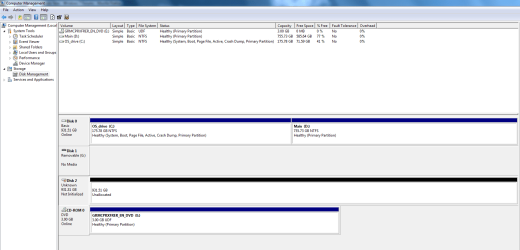
Does this help?
 

Attachments

  • Capture.PNG
    Capture.PNG
    23.9 KB · Views: 37

My Computer

Computer Manufacturer/Model Number
Shuttle SP35P2
OS
windows 7 64bit
CPU
Intel E8400
Hello mcquam, welcome to Seven Forums!


The thing to do is to disconnect the other Hard Disk Drive (HDD) and do at least 3 separate startup repairs with system restarts between each repair to finish creating the boot files to the Windows 7 C: partition; when finished power down the PC and reconnect the other HDD and all should be ok.

Have a look at this tutorial at the link below for some info; be sure to post back with any questions you may have and to keep us informed.


Startup Repair - Run 3 Separate Times
 

My Computer

Computer Manufacturer/Model Number
* BFK Customs *
OS
W 7 64-bit Ultimate
CPU
Intel Q9550 Yorkfield
Motherboard
ASUS P5Q Pro
Memory
8GB Dominator 8500C5D
Graphics Card(s)
ATI : XFX 5870
Sound Card
Realtek HD Audio 7-1
Monitor(s) Displays
1x 47" LCD HDMI & 3x 26" LCD HDMI
Screen Resolution
1920x1080P & 1920x1200
Hard Drives
1x 80GB Intel X25-M G2 SSD : 1x 500GB & 1x 640GB WD Caviar Black(s)
PSU
Corsair 620HX
Case
Cooler Master RC-690
Cooling
Tuniq Tower 120, 2x 140mm and 3x 120mm case fans
Keyboard
Microsoft 500
Mouse
Razer Diamondback 3G
Internet Speed
14 Mb/s
Other Info
1x Koutech 3Gb/s SATA HDD Hot Swap Rack
Many thanks Bare Foot Kid. I had actually tried that before but I did it again. No change except that the os appears correctly in c: during the repair.

When I install the 2nd HDD and reboot it boots straight to the ODD. I checked the BIOS and the boot order shows the 2nd drive correctly as third. When I look at the disk mgmt the 2nd HDD is not shown as system but there is a locked system information folder in it in explorer.
 

My Computer

Computer Manufacturer/Model Number
Shuttle SP35P2
OS
windows 7 64bit
CPU
Intel E8400
Why is your C HD showing as both DISK0 and DISK1 in screenshot? Are you using RAID0? Which port is plugged into if single HD is used?

As the M:Backup drive seems to be causing the problem and is empty according to DMgmt, I would delete, create new and format it in Disk Mgmt.

If this doesn't solve the problem, try plugging Win7 HD into different SATA port to see how it registers. Be sure to set it as first HD to boot in BIOS setup.
 
Disk1 is an SD card reader.

I tried to delete the system folder in M:Backup but it won't let me. I tried giving myself full permission but still couldn't do it (I may have got this wrong of course).

You suggest I put the 2nd drive in first - I haven't tried that as I wouldn't expect it to boot. Wouldn't it just repair into the main os?
 

My Computer

Computer Manufacturer/Model Number
Shuttle SP35P2
OS
windows 7 64bit
CPU
Intel E8400
Thanks, that seems to have made progress. However, the cleaned disk does not give me the option to format or partition. Did I do something wrong?
 

Attachments

  • Capture2.PNG
    Capture2.PNG
    32.7 KB · Views: 10

My Computer

Computer Manufacturer/Model Number
Shuttle SP35P2
OS
windows 7 64bit
CPU
Intel E8400
You now have to click where the red box is to initialize the HDD before you can install to it.


If I were you I would not try to install to the whole HDD as Windows sometime "chokes" when trying to install to so large a space, create a partition of at least 100GB to install to.


NA.png
 

My Computer

Computer Manufacturer/Model Number
* BFK Customs *
OS
W 7 64-bit Ultimate
CPU
Intel Q9550 Yorkfield
Motherboard
ASUS P5Q Pro
Memory
8GB Dominator 8500C5D
Graphics Card(s)
ATI : XFX 5870
Sound Card
Realtek HD Audio 7-1
Monitor(s) Displays
1x 47" LCD HDMI & 3x 26" LCD HDMI
Screen Resolution
1920x1080P & 1920x1200
Hard Drives
1x 80GB Intel X25-M G2 SSD : 1x 500GB & 1x 640GB WD Caviar Black(s)
PSU
Corsair 620HX
Case
Cooler Master RC-690
Cooling
Tuniq Tower 120, 2x 140mm and 3x 120mm case fans
Keyboard
Microsoft 500
Mouse
Razer Diamondback 3G
Internet Speed
14 Mb/s
Other Info
1x Koutech 3Gb/s SATA HDD Hot Swap Rack
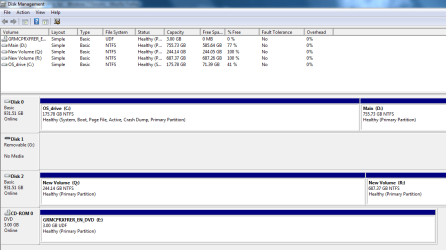
OK thanks to your advice I managed to get the disk initialized with 2 partitions as you suggest.

However, when I reboot I get the same result - straight to the DVD. When it goes through the repair procedure the OS is blank. I can still only boot without the 2nd HDD.
 

Attachments

  • Capture3.PNG
    Capture3.PNG
    23.1 KB · Views: 1

My Computer

Computer Manufacturer/Model Number
Shuttle SP35P2
OS
windows 7 64bit
CPU
Intel E8400
Did you move the SATA cable from the HDD that had the original Windows install to another port when you added the second HDD to the PC?

Please remove the DVD from the DVD-Rom.


Is the "Disk 0" listed as the first boot device in the PC BIOS, if you changed the SATA cable around it may no longer be the first boot device in the BIOS and that may be causing the issue.
 

My Computer

Computer Manufacturer/Model Number
* BFK Customs *
OS
W 7 64-bit Ultimate
CPU
Intel Q9550 Yorkfield
Motherboard
ASUS P5Q Pro
Memory
8GB Dominator 8500C5D
Graphics Card(s)
ATI : XFX 5870
Sound Card
Realtek HD Audio 7-1
Monitor(s) Displays
1x 47" LCD HDMI & 3x 26" LCD HDMI
Screen Resolution
1920x1080P & 1920x1200
Hard Drives
1x 80GB Intel X25-M G2 SSD : 1x 500GB & 1x 640GB WD Caviar Black(s)
PSU
Corsair 620HX
Case
Cooler Master RC-690
Cooling
Tuniq Tower 120, 2x 140mm and 3x 120mm case fans
Keyboard
Microsoft 500
Mouse
Razer Diamondback 3G
Internet Speed
14 Mb/s
Other Info
1x Koutech 3Gb/s SATA HDD Hot Swap Rack
Worked perfectly! Thank you vey much.
 

My Computer

Computer Manufacturer/Model Number
Shuttle SP35P2
OS
windows 7 64bit
CPU
Intel E8400
Worked perfectly! Thank you vey much.


Does this mean my last suggestions solved the boot issues and it's booting good now?


Please be specific what you did so we'll know.
 

My Computer

Computer Manufacturer/Model Number
* BFK Customs *
OS
W 7 64-bit Ultimate
CPU
Intel Q9550 Yorkfield
Motherboard
ASUS P5Q Pro
Memory
8GB Dominator 8500C5D
Graphics Card(s)
ATI : XFX 5870
Sound Card
Realtek HD Audio 7-1
Monitor(s) Displays
1x 47" LCD HDMI & 3x 26" LCD HDMI
Screen Resolution
1920x1080P & 1920x1200
Hard Drives
1x 80GB Intel X25-M G2 SSD : 1x 500GB & 1x 640GB WD Caviar Black(s)
PSU
Corsair 620HX
Case
Cooler Master RC-690
Cooling
Tuniq Tower 120, 2x 140mm and 3x 120mm case fans
Keyboard
Microsoft 500
Mouse
Razer Diamondback 3G
Internet Speed
14 Mb/s
Other Info
1x Koutech 3Gb/s SATA HDD Hot Swap Rack
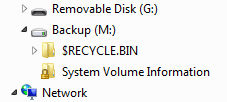
Ah, you are right. I can now boot with the 2nd drive attached but I can't back up as I get an access denied message and when I look at the drive contents it has a system folder again.

I initialised using the MBR choice - perhaps that was wrong?
 

Attachments

  • Capture4.PNG
    Capture4.PNG
    2.6 KB · Views: 28

My Computer

Computer Manufacturer/Model Number
Shuttle SP35P2
OS
windows 7 64bit
CPU
Intel E8400
Back
Top