
2nd Disk Drive Causes Boot to Hang

mikeshinobi

New member
Local time
4:43 AM
Messages
3
Alright so, here's a rundown

Built a new computer using a 120GB SSD as the "main drive" where I installed Windows 7. Then for storage I have a 1TB HDD. I had these two drives running side by side just fine for quite a while (over a month at least).

Then suddenly, yesterday, I installed a few windows updates that had been sitting in my task bar for quite a while. I rebooted, but it hung at the "Starting Windows" screen. I rebooted it again in safe mode and found it was hanging at classpnp.sys (or rather, the file that comes after it - disksomething.sys or something like that).

After much tooling around, I came to find that I was able to get the PC to boot by disconnecting the HDD. I don't think the HDD is bad or dead, though I have nothing to back up that belief. But it had been working perfectly fine and wasn't exhibiting any of the signs of a dying hard drive - slowness, clicking, etc.

I've tried a lot of things to fix this:

- system restored to 2 days ago
- changed settings around in BIOS (particulary the IDE/AHCI setting - changing it to AHCI gave me BSODs so I left it on IDE)
- updated the BIOS to the latest version
- tried multiple ports/cables for both drives

I read somewhere else (though I don't have a link) where someone said something about Windows 7 having problems with PCs that have both a HDD and an SSD in the same build, so I really think that has something to do with this.

So um... any suggestions?
 

My Computer My Computer

Computer type
PC/Desktop
Computer Manufacturer/Model Number
custom
OS
Windows 7 Ultimate x64
CPU
Intel 3570k
Memory
Corsair 8GB Single Channel
Graphics Card(s)
660 GT
Hard Drives
Corsair 120GB SSD
Seagate 1TB HDD
Antivirus
MSE
Browser
Chrome

My Computer My Computer

Computer type
PC/Desktop
Computer Manufacturer/Model Number
Own build (new) Desk1 / Asus ROG Win 7 / Desk2 1st build
OS
Desk1 7 Home Prem / Desk2 10 Pro / Main lap Asus ROG 10 Pro 2 laptop Toshiba 7 Pro Asus P2520 7 & 10
CPU
Desk1 i5 3750K / Laptop i7 GTX 860M / Desk2 i5 2500
Motherboard
Desk1 Asus P877-V / Desk2 Gigabyte H67 UD3H / Laptop ?
Memory
Desk1 8GB (1866) / Desk2 16GB (1333) / Laptop 8Gb DDR3
Graphics Card(s)
Desk 1& 2NVidia GTX 650 & Laptops on board Intel
Sound Card
Desk 1 & 2 -XONAR DG Realtek High Def audio Laptop
Monitor(s) Displays
Desk 1 Benq HD 2450 / Desk2 Philips 24" / Laptop 17.5"
Screen Resolution
1920x1080 D1 & D2 & Laptop 1
Hard Drives
Desk1 Samsung 120GB 830 SSD
Asus ROG 256GB 850 Pro SSD
Desk2 Samsung 840 256 SSD
Toshiba 120GB EVO
PSU
Desk 1 Corsair HX 1050/ Laptop ? / Desk 2 Corsair HX 650
Case
Desk 1 Cooler HAF XM ? Toshiba laptop / Desk2 Coolermaster
Cooling
Fans on all Desk1 -2 Desk2 - all Coolermasters 5 Laptop ?
Keyboard
Desk 1 MS Sidewinder X6 Desk 2 MS Sidewinder X 4
Mouse
Desk 1&2 - Gigabyte MS 900 gamer - laptop - Logitec wireless
Internet Speed
ADSL2+
Other Info
One other Desktop (tester) and spare Toshba laptop both with SSD's
Running Kaspersky 2016 ISS on all machines config'd identically
Logitec audio stereo systems on each machine (x3)
Canon MG5250MFC
Router/modem TP-Link running WPA2SK
Hello and welcome Mike I shall assume you have the SSD set as the boot drive?

There is this too Windows 7 fails to go into safe mode. Stuck at classpnp.sys

and you might try a look at this too http://www.sevenforums.com/tutorials/220165-troubleshooting-steps-windows-7-a.html

Hey, thanks for the response. I haven't tried to mess with it for the past few days just because after trying to fix it for 8+ hours, I just didn't have the energy or patience to try and deal with it again.

However now I'm gonna take another stab at it.

Yes I have the SSD set as the boot drive. The first link you gave I've already looked over a few times :) I've been to pretty much every thing on the internet with even slight relevance to my problem or so it seems. I'll try some of the stuff on that second link though!
 

My Computer My Computer

Computer type
PC/Desktop
Computer Manufacturer/Model Number
custom
OS
Windows 7 Ultimate x64
CPU
Intel 3570k
Memory
Corsair 8GB Single Channel
Graphics Card(s)
660 GT
Hard Drives
Corsair 120GB SSD
Seagate 1TB HDD
Antivirus
MSE
Browser
Chrome
Ok mate let us know how you go - I do realise those net refs can be a tad convoluted sometimes.

Looking at your post#1 too you updated the BIOS too was that for a reason? as it could be part of your problems - I don't know for sure but a possibility.
 

My Computer My Computer

Computer type
PC/Desktop
Computer Manufacturer/Model Number
Own build (new) Desk1 / Asus ROG Win 7 / Desk2 1st build
OS
Desk1 7 Home Prem / Desk2 10 Pro / Main lap Asus ROG 10 Pro 2 laptop Toshiba 7 Pro Asus P2520 7 & 10
CPU
Desk1 i5 3750K / Laptop i7 GTX 860M / Desk2 i5 2500
Motherboard
Desk1 Asus P877-V / Desk2 Gigabyte H67 UD3H / Laptop ?
Memory
Desk1 8GB (1866) / Desk2 16GB (1333) / Laptop 8Gb DDR3
Graphics Card(s)
Desk 1& 2NVidia GTX 650 & Laptops on board Intel
Sound Card
Desk 1 & 2 -XONAR DG Realtek High Def audio Laptop
Monitor(s) Displays
Desk 1 Benq HD 2450 / Desk2 Philips 24" / Laptop 17.5"
Screen Resolution
1920x1080 D1 & D2 & Laptop 1
Hard Drives
Desk1 Samsung 120GB 830 SSD
Asus ROG 256GB 850 Pro SSD
Desk2 Samsung 840 256 SSD
Toshiba 120GB EVO
PSU
Desk 1 Corsair HX 1050/ Laptop ? / Desk 2 Corsair HX 650
Case
Desk 1 Cooler HAF XM ? Toshiba laptop / Desk2 Coolermaster
Cooling
Fans on all Desk1 -2 Desk2 - all Coolermasters 5 Laptop ?
Keyboard
Desk 1 MS Sidewinder X6 Desk 2 MS Sidewinder X 4
Mouse
Desk 1&2 - Gigabyte MS 900 gamer - laptop - Logitec wireless
Internet Speed
ADSL2+
Other Info
One other Desktop (tester) and spare Toshba laptop both with SSD's
Running Kaspersky 2016 ISS on all machines config'd identically
Logitec audio stereo systems on each machine (x3)
Canon MG5250MFC
Router/modem TP-Link running WPA2SK
Well I updated the BIOS after I was having the problem, just to see if it would fix anything.

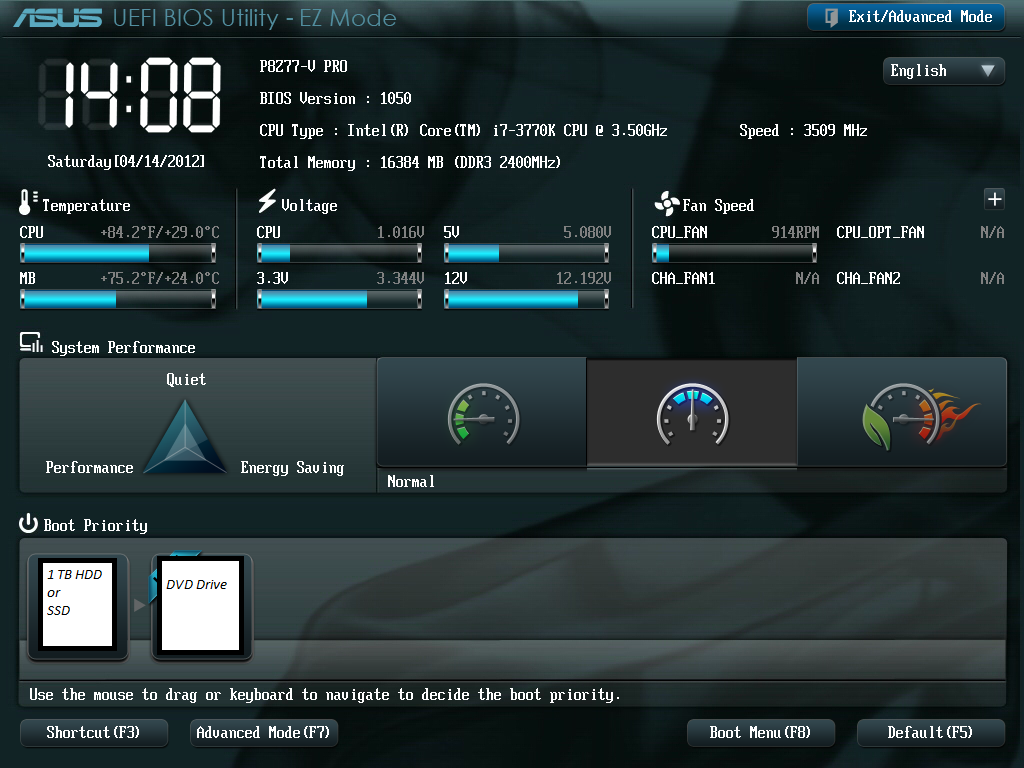
Anyways, I managed to fix it! I don't really know what the deal is... anyways here's a pic of what my BIOS looks like

8Addgsg.png


Before when I would go into my BIOS, it would only have my 1 TB HDD there alongside my DVD drive with no option to set my SSD as the #1 priority. Like, it wasn't even listed. However if I went into the advanced BIOS, I could see the SSD there, and could set it as #1 in the boot priority there, and could also "force boot" from it, which is what I would usually do. It seems weird that it could obviously detect both drives but wouldn't list them both on the basic BIOS screen...

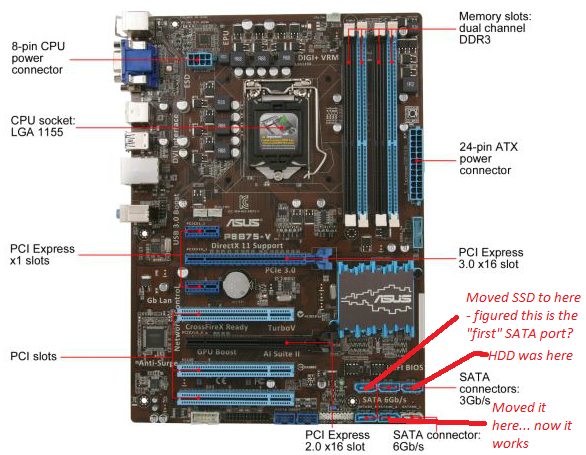
Anyways, I decided to do some more cable shifting despite me thinking I already had my SSD "in front" and it should therefore take whatever kind of priority there is to take. Pic related:

wqIa6v7.png


I guess moving my HDD to "the back" made my BIOS switch it out for my SSD on that basic BIOS screen, and it booted successfully.

The main weird thing here is that it was working just fine before with whatever configuration I had with my cables previously, and then just suddenly stopped. Now I switched it around and it works again?

Whatever; I'm just happy it works!
 

My Computer My Computer

Computer type
PC/Desktop
Computer Manufacturer/Model Number
custom
OS
Windows 7 Ultimate x64
CPU
Intel 3570k
Memory
Corsair 8GB Single Channel
Graphics Card(s)
660 GT
Hard Drives
Corsair 120GB SSD
Seagate 1TB HDD
Antivirus
MSE
Browser
Chrome

My Computers My Computers

System One System Two

  • Computer type
    PC/Desktop
    Computer Manufacturer/Model Number
    ALWAYS UNDER CONSTRUCTION
    OS
    Windows 11 Pro
    CPU
    Ryzen 9 5900X
    Motherboard
    Asus X570 Crosshair Viii Hero
    Memory
    32GB G Skill DDR4-3600
    Graphics Card(s)
    EVGA RTX 3080 FTW 3 Ultra
    Sound Card
    On Board/Sennheiser PC37X Headset
    Monitor(s) Displays
    3 X Asus 27"
    Screen Resolution
    2560x1440
    Hard Drives
    2 X 1 TB NVME drives
    PSU
    EVGA 850
    Case
    Phanteks Eclipse P400A
    Cooling
    EVGA 280 AIO
    Keyboard
    Logitech G510s/ Logitech G13
    Mouse
    Logitech G502
    Internet Speed
    24/1
    Antivirus
    ESET/MBAM Pro/SAS Pro
    Browser
    Chrome/ Firefox/ Edge
  • Computer type
    Laptop
    System Manufacturer/Model Number
    Dell 16 Plus
    OS
    Windows 11 Pro
    CPU
    Intel Ultra 9 288V
    Memory
    32 GB LPDDR5X 8533
    Monitor(s) Displays
    16" Mini-LED HDR600 Touch 90 Hz
    Screen Resolution
    2560X1600
    Hard Drives
    1 TB NVME
Back
Top