
2nd HDD gone after clone & boot from new drive

gb315

New member
Member
Local time
10:16 AM
Messages
5
I used Acronis True Image (WD edition) to clone my old HDD. For cloning, old_HDD was drive 0, new_HDD was drive 1. Before cloning, both drives were visible in Disk Manager. After cloning, I disabled drive 0 (old_HDD) in setup (F2). The system booted on drive 1 (new_HDD).

I next connected new_HDD as drive 0, and booted again. This too worked.

I then connected old_HDD as drive 1 and re-enabled it in Setup (F2). After booting, old_HDD/drive 1 is nowhere to be seen: Disk Manager just shows new_HDD/drive 0. I have re-booted a couple of times, with the same results.

Additional info:
- The drives are the same: WD5000 SATA
- I had a lot of trouble getting a bootable clone. I think this was because the current True Image WD edition "does not provide a booting feature" I 'succeeded' when using an old (2013?) version, running from a USB flash drive.
 

Attachments
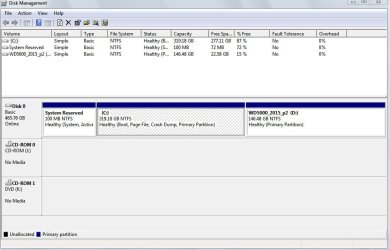
  • diskManager_screen.JPG
    diskManager_screen.JPG
    63.9 KB · Views: 0

My Computer My Computer

Computer type
PC/Desktop
Computer Manufacturer/Model Number
Dell
OS
Windows 7 Home Premium 32bit
CPU
Pentium 4 CPU 570 3.80 Ghz
Hard Drives
2x WD Blue 500 MB SATA
Browser
Firefox
Welcome to the forum. Do both drives show in the BIOS OK? If they don't show in BIOS it's either faulty cable,port or drive. If it shows in BIOS OK then ideally you need to boot a Linux free disk or acronis boot disk to see if they see the drive. If they see it OK delete partitions on the drive and reformat it should then show in Windows. Windows writes a signature to each disk so if you clone the drive you have two with the same signature so it gets confused at times and thinks it's the same disk as c. Did you try disk part to see if it sees it
 

My Computer My Computer

Computer type
PC/Desktop
OS
win 8 32 bit
Never fails to amaze me when I hear these stories, as to why people continue to use Acronis when Macrium Reflect Free is available and is 100% reliable and NEVER causes this type of problem where the volume signature is improperly "duplicated" during the cloning process. Obviously this should NEVER be done, and the resulting problems are to be expected.

There's no comparison between the "understandable and completely intuitive" GUI of Macrium Reflect Free, and the [in my opinion] incomprehensible and off-putting GUI of Acronis (which I tried twice, and gave up twice, when I was investigating backup software). I can't understand how they're still in business.

Macrium Reflect Free FTW.
 

My Computer My Computer

Computer type
PC/Desktop
Computer Manufacturer/Model Number
Home-built, two systems (1) and (2)
OS
Windows 7 Pro x64 (1), Win7 Pro X64 (2)
CPU
i5-3350p 3.1Ghz/6MB-cache (1); E8400 3.0Ghz/6MB-cache (2)
Motherboard
ASUS P8Z77-V Pro (1); ASUS P5Q3 (2)
Memory
8GB PC3-12800 DDR3 (1); 4GB PC3-10600 DDR3 (2)
Graphics Card(s)
ATI HD7750 (1), (see TV cards); ATI R7 250 (2)
Sound Card
Realtek ALC892 HD Audio (1); Realtek ALC1200 HD Audio (2)
Monitor(s) Displays
Eizo HD2441W LCD, Eizo S2433W (1); Eizo 24" S2433W (2)
Screen Resolution
1920x1200, 1920x1200 (1); 1920x1200 (2)
Hard Drives
(1) 1TB SATA-II (7200RPM), 2x2TB SATA-III (7200RPM), 250GB SATA-III (10000RPM) for OS; 2x2TB external USB 3.0

(2) 320GB SATA-II (7200RPM), 750GB SATA-II (7200RPM), 150GB SATA-II (10000RPM) for OS; 2TB external USB 3.0
PSU
Nesteq ECS-6001 600W (1); Nesteq ECS-5001 500W (2)
Case
Acousti-Case 360 (1) and (2)
Cooling
Noctua NH-U12P SE2 for CPU, 2x120mm case fans (1) and (2)
Keyboard
IBM PS/2 (1) and (2)
Mouse
Logitech MX Revolution wireless (1); Microsoft wired (2)
Internet Speed
100mbps down / 10mbps up
Antivirus
Microsoft Security Essentials; Malwarebyte Anti-Malware Pro
Browser
Firefox
Other Info
Ceton InfiniTV 4-tuner cablecard-enabled TV card as well as Hauppauge HVR-2250 OTA/ATSC 2-tuner TV card in (1), running under Win7 WMC
Back
Top