
Solved 2nd Windows 7 removing problem

Magy357

New member
Local time
9:21 PM
Messages
16
here is situation:
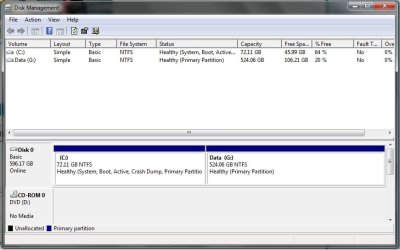
Notebook Dell 1555, hdd 640GB splitted on 2 partitions as you can see on picture


there are 2 installations of W7x64. one on each partition.
i need use w7 on (currently) C: and erase w7 installation from G: drive as simply as possible way.
BUT! don't suggest me to format or unmount G: drive. :eek:
i have there too many important personal data, photos, source files for video-editing, documents and many more and have no chance nor time to move them somewhere else, then format whole drive and transfer data back.
any suggestion? :huh:
thanks for any reasonable help.
 

My Computer

OS
Windows 7 Ultimate x64
Not a single one. As if it was my computer I would erase/format the complete drive and start fresh.

C drive then G drive? What happened to D, E & F drives?
No System Reserved? Not that it is really needed but it is a normal install.
No Dell Recovery partition? That means you at one time Re-Partitioned the drive. Again not a Bad thing if you created a ISO file of the OS or burned it to DVD when the system was new.
And just how did you end up with 2 Windows installs?

In any event make sure the system is booting from the Win install on the C drive then open Win Explorer, Highlight Windows on the G drive and press the Delete key. When Prompted, or if Prompted, that the folder is to big for the Recycle Bin and or Are you sure you want to Delete this folder select YES/OK/APPPLY/Whatever to get rid of it. Then reboot.
If all goes well the Windows install on the G drive will be gone. If not then you will be looking at reinstalling Windows.

EDIT:
And then Empty the Recycle Bin to really have it gone.
 

My Computer

OS
7 x64
to: edwar

"c: drive then g:" - whatever, letters of drives are not important.
"no dell recov. patition"- why? i have dell recovery disc, so i don't waste couple gb from hdd
just "delete" windows on g - doesn't work.
that's why i asking for help.
 

My Computer

OS
Windows 7 Ultimate x64
a quick question, are there virus or other dangerous things in the partition you want to clean? Why you want to remove that Win7?

But anyway, since you are looking for a quick-and-dangerous route, I'll tell one that works for sure. But you must be very careful as you can end up screwing up everything.
I warned you, so let's get back to business. :cool:

For those things I always used a Linux distro installed on my USB (Linux Puppy). But you can do it just fine with say an Ubuntu live-cd. Runs without leaving any trace whatsoever and isn't horribly concerned about what files Windows needs to run, so removing everything you don't want is a breeze. For the same reason, screwing up everything is a breeze as well. You need to be very very sure of the partition you are working in, as it does have a slightly different way of naming the drives (check the partition size and the partition contents to make sure you're in the right place), and have a slightly different GUI and filemanager as well. Experiment a bit with a bunch of non-critical files first, and take your time to be sure. And do so at your own risk, as always.
 

My Computer

Computer type
PC/Desktop
Computer Manufacturer/Model Number
custom built
OS
Win 7 Pro 64-bit 7601
CPU
AMD Phenom 9650 QuadCore, revision DR-B3
Motherboard
ASUS M4A78
Memory
5 GB yes I run 2x 2GB and 1x 1GB, different brand, spank me.
Graphics Card(s)
NVIDIA GeForce 9800 GT 512 Mb, unknown manufacturer.
Sound Card
Crappy Realtek Integrated Audio
Monitor(s) Displays
Fujitsu Siemens P19-3P
Screen Resolution
1280 x 1024 x 32 bits @ 60 Hz Oh yeah, 4:3 rocks!
Hard Drives
(1) MAXTOR S TM3320613AS SATA Disk Device (2) STM35004 18AS SATA Disk Device (3) TOSHIBA USB 2.5"-HDD
PSU
whatever, around 450w
Case
Scavenged from old company PC, 10+ years old
Cooling
CPU fan, GPU fan, case fan, nothing fancy
Keyboard
Microsoft, PS/2, white.
Mouse
Optical, logitec.
Internet Speed
effective max speeds: 70-ish kB/s down 30-ish kB/s up
Antivirus
Avira, free edition.
Browser
Firefox with FXChrome to make it look like Google Chrome :P
Other Info
Was discarded by previous owner due to "horrible performance".
Was running Win Xp from a IDE drive. Yeah. Was a pain.
SATA II drive and Win7 and it zips away! Yay!
to: bobafetthotmail

hi. answer for your first question - no. 2nd - is here.
i installed 2nd copy in some past, because:
i installed vodafone usb mobile broadband, but data doesn't flow. all drivers working, no highlight, no warning... i was desperate and under time pressure (was on fiji), so i installed 2nd copy of w7 on G: drive. vodafone internet working straight away after installation on this new w7 copy.
only after couple months i recognized, that some drivers from Connectify application had conflict with vodafone broadband. so i uninstall connectify from 2st copy of w7 and vodafone broadband instantly working well.
now i don't need 2nd copy and also, as you can see, it take such amount of hdd space.
i'll try ubuntu live cd, but before that - if i start w7 (the one which i want to keep) in "safe mode with command prompt" , can i erase folders one by one by dos commands?
or any similar way...
 

My Computer

OS
Windows 7 Ultimate x64
"c: drive then g:" - whatever, letters of drives are not important.
"no dell recov. patition"- why? i have dell recovery disc, so i don't waste couple gb from hdd
just "delete" windows on g - doesn't work.
that's why i asking for help.

Right click on the G drive and select Properties then the security tab. Click the Advanced button on the security tab then the Owner tab on the window that comes up. What is the owner listed as? Is your Username listed ion the Change owner to: section? If so select edit then highlight your username then the Apply or OK button.

You should then be able to delete that install of Windows on the G drive.

But after you do that and you still can't delete it then more then likely the computer is running from that install.

Good Luck
 

My Computer

OS
7 x64
to: edwar

I did your suggestion about ownership, but when i deleting windows folder, it show me THIS message.
 

My Computer

OS
Windows 7 Ultimate x64
Sorry I have nothing to add.
I suspect when the second install was done, for whatever reason, with the first install on the drive, even in another partition, the new install files got crossed with some of the old and the system is protecting itself. If you are successful in deleting the Windows folder on the G drive the system might not work at all anymore. Don't really know, never been in this situation.

IMHO you really need to start fresh. Save all your personal files, collect all you program install files, have the license key for them, backup your emails that you want to save and WIPE that drive and re-install clean.
 

My Computer

OS
7 x64
to: edwar

thank you.

i had luck to catch one friend and he helped me via teamviewer. hi did almost same thing, as you suggest, but a bit different and it's working, now i deleeeeting... :party:
 

My Computer

OS
Windows 7 Ultimate x64
Have a Win7 Recovery USB/CD ready - if you don't have one -> create it.

To be sure that no system files are on G:
hide drive g: by using diskpart.exe.

diskpart.exe
>list disk (you should get one disk)
>select disk 0
>list partitions (you should get 2 partitions)
>sel par 2 (this must be the bigger par)
>detail par (you get ... type: 07)
>set id=17 (this will make it hidden)
>exit

Reboot to c: to check OS works well - there will be no g: ! (as its hidden)

Now unhide g: (set id=07 (on partition 2)) and reboot.

Take ownership of g:\windows - delete
Take ownership of g:\program files - delete
Take ownership of g:\program files (x86)- delete
Take ownership of g:\users - delete

This will free 10-20 GB depending on installed programs on g:

To introduce another level of checking before deleting
rename folders on g:
\windows, \program files, \users
then after some time if everything is ok - delete.
 

My Computer

Computer Manufacturer/Model Number
Acer Notebook
OS
Win 8 RP, Win 7, XP
CPU
Intel
Please post back a screenshot of your maximized Disk Management drive map and listings:

1. Type Disk Management in Start Search box.
2. Open Disk Mgmt. window and maximize it.
3. Type Snipping Tool in Start Search box.
4. Open Snipping Tool, choose Rectangular Snip, draw a box around full map and all listings.
5, Save Snip, attach using paper clip in Reply Box.

Tell us what is on each partition.

The correct way to uninstall an OS if of course to delete its partition after assuring the remaining OS has it's System Active boot files intact. To do it piecemeal requires deleting the Windows folder by Taking Ownership down to it's most uncooperative children. It is not easy but can be done.

But don't imply that advising to back up your files to correctly delete the partition is unreasonable, since operating without your files backed up is reckless to begin with.
 
here is situation:
Notebook Dell 1555, hdd 640GB splitted on 2 partitions as you can see on picture


there are 2 installations of W7x64. one on each partition.
i need use w7 on (currently) C: and erase w7 installation from G: drive as simply as possible way.
BUT! don't suggest me to format or unmount G: drive. :eek:
i have there too many important personal data, photos, source files for video-editing, documents and many more and have no chance nor time to move them somewhere else, then format whole drive and transfer data back.
any suggestion? :huh:
thanks for any reasonable help.

My advice, leave it alone if you don`t have the time.
 

My Computer

Computer type
PC/Desktop
Computer Manufacturer/Model Number
Skylake Special #666
OS
Windows 10 Pro x64
CPU
Intel Core i7 6700K
Motherboard
Asus Sabertooth Z170 Mark 1
Memory
GSkill TridentZ RGB 16GB 3600 16-16-16-36
Graphics Card(s)
EVGA GTX 980 Ti SC x2
Sound Card
Realtek High Definition
Monitor(s) Displays
AOC G2460PG
Screen Resolution
1920 x 1080 144Hz
Hard Drives
Samsung 860 Pro 256GB, Seagate Barracuda 4TB x2
PSU
EVGA 1000 P2, EVGA White Custom Braided Cables
Case
Corsair Vengeance C70 Gunmetal Black
Cooling
Corsair H100i v2, Corsair ML120 x2, Thermal Grizzly Kryonaut
Keyboard
Logitech G910 Orion Spectrum
Mouse
Logitech G700s
Internet Speed
Verizon Fios Quantum Gateway 75/75
Antivirus
Windows Defender, Malwarebytes Free 3.8.3
Browser
Chrome
Other Info
Corsair SP120 x4, LG Blu-ray Drive, Durabrand HT-395 100 Watt Dolby Digital Amp, Corsair H2100 Wireless 7.1 Headset
Hi all

thanks for all advices and help. Already done.

the tricky part was about proper taking ownership. :huh:

Right click on folder to be deleted - Properties/Security/Advanced/Owner/Edit - select Administrators - Apply - confirm pop-up window, OK, go back to Permissions - Change Permissions, select Administrators and DO NOT FORGET tick option "Replace all child objects..." - click on Apply, confirm pop-up window. (I ticked both options there, just for sure:o)
It take some time, depends how many files are inside folder, then go back to Security window and be sure there is Full control for Administrators (if not, click on Edit and allow it). Final click on OK and now is folder ready to erase.

then i used EasyBCD for edit boot menu, erase link to W7 installation what exist no more, then used Disk Cleaner and go through cleaning process, also system files and old recovery data (even on G:) and that's it. no single unnecessary (visible or invisible) byte on G:/
Thanks for you all again. ;)

Bye!
 

My Computer

OS
Windows 7 Ultimate x64
If you want to post requested Disk Mgmt screenshot we can look it over to see if there are potential problems. Your new OS drive should read System Active Boot Page File in Disk Mgmt.
 
to: gregrocker
thanks, but problem was solved. check my previous post.
 

My Computer

OS
Windows 7 Ultimate x64
I read the post and how you "Solved" this by rooting out the Windows folder manually which as I stated earlier is not a recommended practice.

One reason for this is that the old OS partition may retain System flags unless they are moved to the remaining OS partition. The only way to check this and for other potential pitfalls is to see the Disk Mgmt output. You have the top experts in the field here to do this, so why not?
 
gregrocker - what i used as final solution - one friend demonstrated to me via teamviewer. He insist, that i have to do one thing before i started deleting system folders on G:. Ghost of whole C: partition and checked, if it's working well without G:. And it's worked! so i've been not afraid of deleting "by force" each system folder in G:, because i knew, i can't damage running W7.
 

My Computer

OS
Windows 7 Ultimate x64
Then let us see the Disk Mgmt screenshot. Use the Snipping Tool in Start menu, attach using Paper Clip in reply box.
 
here is it.
 

Attachments

  • win7diskmgmt.jpg
    win7diskmgmt.jpg
    47.2 KB · Views: 5

My Computer

OS
Windows 7 Ultimate x64
It looks correct.

If you have User folders or other data you want to link from G it is easiest to rightclick on the User folder to link it to the related Win7 Library - Include a Folder - Windows 7 Forums.

Then all data will show up in an organized fashion when you select Documents, Pictures, etc. in Start Menu or under Libraries in Explorer. You only have to create a Downloads folder, which is a good place to store all of your installers and other downloads.

If there's nothing else, you can mark the thread Solved at top.
 
Back
Top