2TB 3 partition bootable MBR to 3 partition bootable GPT 4TB drive

videobruce

Member
Member
VIP
Local time
4:43 PM
Messages
182
I have a 2TB MBR drive w/ W7 in the 1st partition. Partitions 2 & 3 are used as separate storage.
I want to xfer all of that to a 4TB GPT drive including resizing the 2nd & 3rd partitions. Most of that storage material are mp4 movies.

I realize the MBR to GPT problem due to the drive sizes, but I wanted to use a 'image' of Win7 to go in the 1st 32GB active partition. Transferring that data isn't a issue, it's xfering the MBR W7 to a GPT W7 in that 1st partition w/o the hassle of re-installing Windows ;).

I have AOMEI Partition Assistant which I just got, but my images are from True Image 2019 that I've been using for some time now. Can I setup a clean HDD to GPT, making it bootable & active then using one of the other programs restore that image to that 1st partition?

Hope all of that made sense. :confused:
 

My Computers My Computers

  • At a glance

    Win7 x64AMD
    Computer type
    Laptop
    Computer Manufacturer/Model Number
    Toshiba
    OS
    Win7 x64
    CPU
    AMD
  • At a glance

    Win 7 Pro x64AMD FX-835016GBnVidia GeForce 1060
    Computer type
    PC/Desktop
    System Manufacturer/Model Number
    AMD based MB
    OS
    Win 7 Pro x64
    CPU
    AMD FX-8350
    Motherboard
    Gigabyte GA-970A-D3P
    Memory
    16GB
    Graphics Card(s)
    nVidia GeForce 1060
    Monitor(s) Displays
    25"
    Screen Resolution
    1920x1200
    Hard Drives
    two SSD;
    two 4TB HDD
    PSU
    700watt Seasonic
    Internet Speed
    300MB up & down
    Browser
    Firefox
    Other Info
    BD Recorder
You could.

1. initialize the target 4tb disk to gpt and create esp and msr partitions on it.

2. mount your acronis image as a physical disk

3. use something like winntsetup wincopy to migrate from the mounted image to the gpt disk.
I haven't tried using diskgenius os migration to migrate from mounted mbr image to gpt disk, that might also be a way to do it.

************************************************************************************************************

A different way is to restore the mbr image to the the 4 tb disk. Then convert the 4tb to gpt afterwards and adjust the partition sizes. Unless you know what you are doing, you might end up with the esp partition in an awkward place.
 

My Computers My Computers

  • At a glance

    7 X64i5 84002x8gb 3200mhz
    Computer type
    PC/Desktop
    OS
    7 X64
    CPU
    i5 8400
    Motherboard
    gigabyte b365m ds3h
    Memory
    2x8gb 3200mhz
    Hard Drives
    various
    PSU
    pure power 11 400w cm
    Case
    Coolermaster
    Cooling
    cryorig m9i
  • At a glance

    7x64g54008gb ddr4 2400
    Computer type
    PC/Desktop
    OS
    7x64
    CPU
    g5400
    Motherboard
    ga b365m ds3h
    Memory
    8gb ddr4 2400
    PSU
    xfx pro 450w
That maybe over the top for me.
This AOMEI Partition Assistant seems to have the ability to do this, if I can figure out the steps. I believe if I create an current image using this program instead of 'True Image', it would help with the conversion, it's just it's another of these 'it does everything' programs that winds up being more confusing.. :confused:
 

My Computers My Computers

  • At a glance

    Win7 x64AMD
    Computer type
    Laptop
    Computer Manufacturer/Model Number
    Toshiba
    OS
    Win7 x64
    CPU
    AMD
  • At a glance

    Win 7 Pro x64AMD FX-835016GBnVidia GeForce 1060
    Computer type
    PC/Desktop
    System Manufacturer/Model Number
    AMD based MB
    OS
    Win 7 Pro x64
    CPU
    AMD FX-8350
    Motherboard
    Gigabyte GA-970A-D3P
    Memory
    16GB
    Graphics Card(s)
    nVidia GeForce 1060
    Monitor(s) Displays
    25"
    Screen Resolution
    1920x1200
    Hard Drives
    two SSD;
    two 4TB HDD
    PSU
    700watt Seasonic
    Internet Speed
    300MB up & down
    Browser
    Firefox
    Other Info
    BD Recorder
I dont think aomei partition assistant is for creating images. It is a partition manager. It can be used to intialize a disk to gpt

Aomei backupper can create images. Apparently it can restore system image from mbr disk image to gpt disk.

Restoring MBR System Image to GPT/UEFI (Safe Boot)
 

My Computers My Computers

  • At a glance

    7 X64i5 84002x8gb 3200mhz
    Computer type
    PC/Desktop
    OS
    7 X64
    CPU
    i5 8400
    Motherboard
    gigabyte b365m ds3h
    Memory
    2x8gb 3200mhz
    Hard Drives
    various
    PSU
    pure power 11 400w cm
    Case
    Coolermaster
    Cooling
    cryorig m9i
  • At a glance

    7x64g54008gb ddr4 2400
    Computer type
    PC/Desktop
    OS
    7x64
    CPU
    g5400
    Motherboard
    ga b365m ds3h
    Memory
    8gb ddr4 2400
    PSU
    xfx pro 450w
AOMEI Partition can convert drives from mbr to gpt etc
 

My Computer My Computer

At a glance

win 8 32 bit
Computer type
PC/Desktop
OS
win 8 32 bit
It can "Clone" partitions, but apparently can't image them like True Image can. :(
 

My Computers My Computers

  • At a glance

    Win7 x64AMD
    Computer type
    Laptop
    Computer Manufacturer/Model Number
    Toshiba
    OS
    Win7 x64
    CPU
    AMD
  • At a glance

    Win 7 Pro x64AMD FX-835016GBnVidia GeForce 1060
    Computer type
    PC/Desktop
    System Manufacturer/Model Number
    AMD based MB
    OS
    Win 7 Pro x64
    CPU
    AMD FX-8350
    Motherboard
    Gigabyte GA-970A-D3P
    Memory
    16GB
    Graphics Card(s)
    nVidia GeForce 1060
    Monitor(s) Displays
    25"
    Screen Resolution
    1920x1200
    Hard Drives
    two SSD;
    two 4TB HDD
    PSU
    700watt Seasonic
    Internet Speed
    300MB up & down
    Browser
    Firefox
    Other Info
    BD Recorder
The computer has UEFI BIOS - GA-970A-D3P (rev. 1.0) Overview | Motherboard - GIGABYTE U.S.A.
You can convert the 2T Legacy- MBR drive to UEFI-GPT booting a Win 10 installation drive and on a CMD windows run mbr2gpt.exe . Then clone the 2T UEFI-GPT drive to the 4T drive

Why don't you install a small SSD (MBR or GPT) just for Win 7 and programs and use the 4T HDD (GPT) for data only?
You will have the speed of a SSD and the space of a HDD at low cost.
 

My Computers My Computers

  • At a glance

    Windows 7 HP 64i5 6600K - 800MHz to 4200MHz4+4G GSkill DDR4 3000IG - Intel 530
    Computer type
    PC/Desktop
    Computer Manufacturer/Model Number
    custom build
    OS
    Windows 7 HP 64
    CPU
    i5 6600K - 800MHz to 4200MHz
    Motherboard
    GA-Z170-HD3P
    Memory
    4+4G GSkill DDR4 3000
    Graphics Card(s)
    IG - Intel 530
    Monitor(s) Displays
    Samsung 226BW
    Screen Resolution
    1680x1050
    Hard Drives
    (1) -1 SM951 – 128GB M.2 AHCI PCIe SSD drive for Windows 7 and Lubuntu
    (2) -1 WD SATA 3 - 1T for Data
    (3) -1 WD SATA 3 - 1T for backup
    PSU
    Thermaltake 450W TR2 gold
    Keyboard
    Old and good Chicony mechanical keyboard
    Mouse
    Logitech mX performance - 9 buttons (had to disable some)
    Internet Speed
    500Mb/s
    Browser
    Firefox 64
    Other Info
    TinyWall firewall
  • At a glance

    Windows 7 Proi7-4500U 800MHz to 3.0GHz(4+4)G DDR3 1600IG intel 4400 + NVIDIA GeForce GT 745M
    Computer type
    Laptop
    System Manufacturer/Model Number
    Asus Q550LF
    OS
    Windows 7 Pro
    CPU
    i7-4500U 800MHz to 3.0GHz
    Motherboard
    Asus Q550LF
    Memory
    (4+4)G DDR3 1600
    Graphics Card(s)
    IG intel 4400 + NVIDIA GeForce GT 745M
    Sound Card
    Realtek
    Monitor(s) Displays
    LG Display LP156WF4-SPH1
    Screen Resolution
    1920 x 1080
    Hard Drives
    BX500 120G SSD for Windows and programs +
    1T HDD for data
    Internet Speed
    500 Mb/s
    Browser
    Firefox
    Other Info
    TinyWall firewall
My SSD drive has W7 with all my programs on the 2nd partition which is my main O/S
The backup drive is on this 2TD HDD that I'm replacing with a 4TB, that will have 3 partitions also, still w/ W7.
W10 is way too bloated even after slimming it down. 10x the number of service hosts running for starters. And forget W11. :devil:
 

My Computers My Computers

  • At a glance

    Win7 x64AMD
    Computer type
    Laptop
    Computer Manufacturer/Model Number
    Toshiba
    OS
    Win7 x64
    CPU
    AMD
  • At a glance

    Win 7 Pro x64AMD FX-835016GBnVidia GeForce 1060
    Computer type
    PC/Desktop
    System Manufacturer/Model Number
    AMD based MB
    OS
    Win 7 Pro x64
    CPU
    AMD FX-8350
    Motherboard
    Gigabyte GA-970A-D3P
    Memory
    16GB
    Graphics Card(s)
    nVidia GeForce 1060
    Monitor(s) Displays
    25"
    Screen Resolution
    1920x1200
    Hard Drives
    two SSD;
    two 4TB HDD
    PSU
    700watt Seasonic
    Internet Speed
    300MB up & down
    Browser
    Firefox
    Other Info
    BD Recorder
My SSD drive has W7 with all my programs on the 2nd partition which is my main O/S
The backup drive is on this 2TD HDD that I'm replacing with a 4TB, that will have 3 partitions also, still w/ W7.
W10 is way too bloated even after slimming it down. 10x the number of service hosts running for starters. And forget W11. :devil:

I think you didn't understand what I proposed. I never said to install Win 10.
What I said is to use a Win 10 installation drive to convert the 2T Legacy - MBR into a UEFI - GPT drive.

You can convert all legacy - mbr boot able drives to UEFI-GPT using mbr2gpt.exe

You can have ALL your drives (boot able or not) as GPT

This is my Disk manager image. All my drives are GPT
413667d1619120855-why-gpt-partition-content-change-after-installing-sp1-windows-7-a-dm2.jpg
 

My Computers My Computers

  • At a glance

    Windows 7 HP 64i5 6600K - 800MHz to 4200MHz4+4G GSkill DDR4 3000IG - Intel 530
    Computer type
    PC/Desktop
    Computer Manufacturer/Model Number
    custom build
    OS
    Windows 7 HP 64
    CPU
    i5 6600K - 800MHz to 4200MHz
    Motherboard
    GA-Z170-HD3P
    Memory
    4+4G GSkill DDR4 3000
    Graphics Card(s)
    IG - Intel 530
    Monitor(s) Displays
    Samsung 226BW
    Screen Resolution
    1680x1050
    Hard Drives
    (1) -1 SM951 – 128GB M.2 AHCI PCIe SSD drive for Windows 7 and Lubuntu
    (2) -1 WD SATA 3 - 1T for Data
    (3) -1 WD SATA 3 - 1T for backup
    PSU
    Thermaltake 450W TR2 gold
    Keyboard
    Old and good Chicony mechanical keyboard
    Mouse
    Logitech mX performance - 9 buttons (had to disable some)
    Internet Speed
    500Mb/s
    Browser
    Firefox 64
    Other Info
    TinyWall firewall
  • At a glance

    Windows 7 Proi7-4500U 800MHz to 3.0GHz(4+4)G DDR3 1600IG intel 4400 + NVIDIA GeForce GT 745M
    Computer type
    Laptop
    System Manufacturer/Model Number
    Asus Q550LF
    OS
    Windows 7 Pro
    CPU
    i7-4500U 800MHz to 3.0GHz
    Motherboard
    Asus Q550LF
    Memory
    (4+4)G DDR3 1600
    Graphics Card(s)
    IG intel 4400 + NVIDIA GeForce GT 745M
    Sound Card
    Realtek
    Monitor(s) Displays
    LG Display LP156WF4-SPH1
    Screen Resolution
    1920 x 1080
    Hard Drives
    BX500 120G SSD for Windows and programs +
    1T HDD for data
    Internet Speed
    500 Mb/s
    Browser
    Firefox
    Other Info
    TinyWall firewall
I'll have to wait until I get the new 4TB HDD. I will experiment with setting it up as a GPT bootable.

I partly bypass the process that creates those extra partitions that waste space. I use the 'hack' that fools that install process and loads the files into only one partition instead of three. I've never had a problem with doing it that way as I have had good images of the O/S; initial with no programs and current.
 
Last edited:

My Computers My Computers

  • At a glance

    Win7 x64AMD
    Computer type
    Laptop
    Computer Manufacturer/Model Number
    Toshiba
    OS
    Win7 x64
    CPU
    AMD
  • At a glance

    Win 7 Pro x64AMD FX-835016GBnVidia GeForce 1060
    Computer type
    PC/Desktop
    System Manufacturer/Model Number
    AMD based MB
    OS
    Win 7 Pro x64
    CPU
    AMD FX-8350
    Motherboard
    Gigabyte GA-970A-D3P
    Memory
    16GB
    Graphics Card(s)
    nVidia GeForce 1060
    Monitor(s) Displays
    25"
    Screen Resolution
    1920x1200
    Hard Drives
    two SSD;
    two 4TB HDD
    PSU
    700watt Seasonic
    Internet Speed
    300MB up & down
    Browser
    Firefox
    Other Info
    BD Recorder
I'll have to wait until I get the new 4TB HDD. I will experiment with setting it up as a GPT bootable.

I partly bypass the process that creates those extra partitions that waste space. I use the 'hack' that fools that install process and loads the files into only one partition instead of three. I've never had a problem with doing it that way as I have had good images of the O/S; initial with no programs and current.

Not on a GPT drive.
Normally, on a GPT drive you have:
EFI - 100M Fat32
MSR - 16M RAW
C: - Big NTFS
NTFS Data partitions

As you are converting from Legacy - MBR you probably will have
C: - Big NTFS
EFI - 100M Fat32
NTFS Data partitions

The EFI - 100M Fat32 is needed to boot as UEFI. Don't delete it or you won't boot.

- I suggest you clone the 2T MBR drive into the 4T as a MBR drive to have a backup.
- Detach all other drives from the MB leaving on only the 2T drive.
- Boot from a Win 10 installation drive and at the Windows Setup screen, press Shift+F10 simultaneously to open a command line prompt and type:
mbr2gpt /validate
It may not validate as you don't have the System partition.
if ok type:
mbr2gpt /convert
If successful, shut down, change BIOS to boot as UEFI
 

My Computers My Computers

  • At a glance

    Windows 7 HP 64i5 6600K - 800MHz to 4200MHz4+4G GSkill DDR4 3000IG - Intel 530
    Computer type
    PC/Desktop
    Computer Manufacturer/Model Number
    custom build
    OS
    Windows 7 HP 64
    CPU
    i5 6600K - 800MHz to 4200MHz
    Motherboard
    GA-Z170-HD3P
    Memory
    4+4G GSkill DDR4 3000
    Graphics Card(s)
    IG - Intel 530
    Monitor(s) Displays
    Samsung 226BW
    Screen Resolution
    1680x1050
    Hard Drives
    (1) -1 SM951 – 128GB M.2 AHCI PCIe SSD drive for Windows 7 and Lubuntu
    (2) -1 WD SATA 3 - 1T for Data
    (3) -1 WD SATA 3 - 1T for backup
    PSU
    Thermaltake 450W TR2 gold
    Keyboard
    Old and good Chicony mechanical keyboard
    Mouse
    Logitech mX performance - 9 buttons (had to disable some)
    Internet Speed
    500Mb/s
    Browser
    Firefox 64
    Other Info
    TinyWall firewall
  • At a glance

    Windows 7 Proi7-4500U 800MHz to 3.0GHz(4+4)G DDR3 1600IG intel 4400 + NVIDIA GeForce GT 745M
    Computer type
    Laptop
    System Manufacturer/Model Number
    Asus Q550LF
    OS
    Windows 7 Pro
    CPU
    i7-4500U 800MHz to 3.0GHz
    Motherboard
    Asus Q550LF
    Memory
    (4+4)G DDR3 1600
    Graphics Card(s)
    IG intel 4400 + NVIDIA GeForce GT 745M
    Sound Card
    Realtek
    Monitor(s) Displays
    LG Display LP156WF4-SPH1
    Screen Resolution
    1920 x 1080
    Hard Drives
    BX500 120G SSD for Windows and programs +
    1T HDD for data
    Internet Speed
    500 Mb/s
    Browser
    Firefox
    Other Info
    TinyWall firewall
Again, there is only one partition in my MBR drives (including the SSB & HDD drives), there is no "EFI - 100M Fat32" partition.

This is what I'm talking about;
partitioning - Avoiding the pesky Windows 7 System Reserved Partition - Super User

I'm confused about cloning a GPT drive it as a MBR drive
Are you saying w/o those hidden additional partitions it won't boot using a GPT format? if so, that's a HUGE problem.
 

My Computers My Computers

  • At a glance

    Win7 x64AMD
    Computer type
    Laptop
    Computer Manufacturer/Model Number
    Toshiba
    OS
    Win7 x64
    CPU
    AMD
  • At a glance

    Win 7 Pro x64AMD FX-835016GBnVidia GeForce 1060
    Computer type
    PC/Desktop
    System Manufacturer/Model Number
    AMD based MB
    OS
    Win 7 Pro x64
    CPU
    AMD FX-8350
    Motherboard
    Gigabyte GA-970A-D3P
    Memory
    16GB
    Graphics Card(s)
    nVidia GeForce 1060
    Monitor(s) Displays
    25"
    Screen Resolution
    1920x1200
    Hard Drives
    two SSD;
    two 4TB HDD
    PSU
    700watt Seasonic
    Internet Speed
    300MB up & down
    Browser
    Firefox
    Other Info
    BD Recorder
Are you saying w/o those hidden additional partitions it won't boot using a GPT format?

Most bios will only search fat32 partitions for \EFI\MICROSOFT\BOOT\BOOTMGFW.EFI ( or some other .efi file)

some bios will search ntfs partitions, but then there are problems with bcdedit unable to find the bcd store.

If you want to boot windows in uefi mode, you want a fat32 Efi System Partition (esp) which is where the boot critical files live
 
Last edited:

My Computers My Computers

  • At a glance

    7 X64i5 84002x8gb 3200mhz
    Computer type
    PC/Desktop
    OS
    7 X64
    CPU
    i5 8400
    Motherboard
    gigabyte b365m ds3h
    Memory
    2x8gb 3200mhz
    Hard Drives
    various
    PSU
    pure power 11 400w cm
    Case
    Coolermaster
    Cooling
    cryorig m9i
  • At a glance

    7x64g54008gb ddr4 2400
    Computer type
    PC/Desktop
    OS
    7x64
    CPU
    g5400
    Motherboard
    ga b365m ds3h
    Memory
    8gb ddr4 2400
    PSU
    xfx pro 450w
Again, there is only one partition in my MBR drives (including the SSB & HDD drives), there is no "EFI - 100M Fat32" partition.

Why would it. An EFI System Partition is specific to GPT.

You may not have a dedicated System partition on MBR, but you do have a System partition as otherwise you would have no boot manager. Your System partition is drive C, and it's marked as active.

You cannot have a partition marked as active on a GPT disk, so you cannot have drive C as the System partition. Your System partition on GPT must be formatted FAT32, so it must be separate.
 

My Computer My Computer

At a glance

Windows 7 Home Premium
Computer type
PC/Desktop
OS
Windows 7 Home Premium
I was responding to SIW2 post.

Can I get this boot/FAT32 partition (whatever it is called) without doing a full Windows installed, or is that the only way?
If so, can I forceably stop the full install after it creates the additional partition, or won't that work? Then load my saved W7 image file?
Or;
If I have to go thru the entire install, can I then restore my backup image of W7 that I already have to the main partition w/o disturbing that FAT partition? (assuming all of that I described correctly)
 

My Computers My Computers

  • At a glance

    Win7 x64AMD
    Computer type
    Laptop
    Computer Manufacturer/Model Number
    Toshiba
    OS
    Win7 x64
    CPU
    AMD
  • At a glance

    Win 7 Pro x64AMD FX-835016GBnVidia GeForce 1060
    Computer type
    PC/Desktop
    System Manufacturer/Model Number
    AMD based MB
    OS
    Win 7 Pro x64
    CPU
    AMD FX-8350
    Motherboard
    Gigabyte GA-970A-D3P
    Memory
    16GB
    Graphics Card(s)
    nVidia GeForce 1060
    Monitor(s) Displays
    25"
    Screen Resolution
    1920x1200
    Hard Drives
    two SSD;
    two 4TB HDD
    PSU
    700watt Seasonic
    Internet Speed
    300MB up & down
    Browser
    Firefox
    Other Info
    BD Recorder
On a Legacy-MBR, BIOS transfer the boot sequence to the BIOS priority boot drive MBR that will transfer to a master boot manager on an Active partition. This master boot manager (like Linux Grub) can transfer the boot sequence to a partition (like Linux) or to another boot manager in another partition (like Windows). It is a serial chain mode.
On an UEFI-GPT, BIOS transfer the boot sequence to the BIOS priority boot manager on a Fat32 Partition and then to a OS on a partition (same drive or even to a different drive). On the FAT32 partition you may have one or many boot manager (Linux and Windows etc). It is not a serial chain mode. It is a parallel mode.

You're seeing a problem where it isn't. Let's put this way.
- Any drive bigger than 2.2T, normally formatted must be initialized as GPT to be able to use all available space. If it is initialized as MBR you will have a 2.2T partition and the remaining space will be set as unallocated and can't be used.
- GPT drive can be used as data drive in Win 7, 8, 10 (32 or 64 bits) and Win 11 (64 bits)
- GPT drive can be used as a boot able drive in Win 7, 8, 10 &11 (64 bits only )
- A GPT drive don't have a MBR so it can't be used to boot as Legacy.

In other words: to use the 4T drive it must be initialized as GPT and as a Win 7 boot able drive it must have a EFI -100M - FAT32 partition. On a 4T drive that is a little more than nothing
 

My Computers My Computers

  • At a glance

    Windows 7 HP 64i5 6600K - 800MHz to 4200MHz4+4G GSkill DDR4 3000IG - Intel 530
    Computer type
    PC/Desktop
    Computer Manufacturer/Model Number
    custom build
    OS
    Windows 7 HP 64
    CPU
    i5 6600K - 800MHz to 4200MHz
    Motherboard
    GA-Z170-HD3P
    Memory
    4+4G GSkill DDR4 3000
    Graphics Card(s)
    IG - Intel 530
    Monitor(s) Displays
    Samsung 226BW
    Screen Resolution
    1680x1050
    Hard Drives
    (1) -1 SM951 – 128GB M.2 AHCI PCIe SSD drive for Windows 7 and Lubuntu
    (2) -1 WD SATA 3 - 1T for Data
    (3) -1 WD SATA 3 - 1T for backup
    PSU
    Thermaltake 450W TR2 gold
    Keyboard
    Old and good Chicony mechanical keyboard
    Mouse
    Logitech mX performance - 9 buttons (had to disable some)
    Internet Speed
    500Mb/s
    Browser
    Firefox 64
    Other Info
    TinyWall firewall
  • At a glance

    Windows 7 Proi7-4500U 800MHz to 3.0GHz(4+4)G DDR3 1600IG intel 4400 + NVIDIA GeForce GT 745M
    Computer type
    Laptop
    System Manufacturer/Model Number
    Asus Q550LF
    OS
    Windows 7 Pro
    CPU
    i7-4500U 800MHz to 3.0GHz
    Motherboard
    Asus Q550LF
    Memory
    (4+4)G DDR3 1600
    Graphics Card(s)
    IG intel 4400 + NVIDIA GeForce GT 745M
    Sound Card
    Realtek
    Monitor(s) Displays
    LG Display LP156WF4-SPH1
    Screen Resolution
    1920 x 1080
    Hard Drives
    BX500 120G SSD for Windows and programs +
    1T HDD for data
    Internet Speed
    500 Mb/s
    Browser
    Firefox
    Other Info
    TinyWall firewall
I have known and understood drives larger than 2TB have to be GPT. I have had a 4TB storage drive in the tower for a few years now. What I didn't know until now Windows needs that xtra partition which (purposely at the time) wasn't created on my 2 MBR drives (with NO issue up to now).

If I initialize this new HDD, re-install W7 (x64) then, can I restore a MBR image I have from the existing install on the 2TB drive which will be removed? Will that work?
 

My Computers My Computers

  • At a glance

    Win7 x64AMD
    Computer type
    Laptop
    Computer Manufacturer/Model Number
    Toshiba
    OS
    Win7 x64
    CPU
    AMD
  • At a glance

    Win 7 Pro x64AMD FX-835016GBnVidia GeForce 1060
    Computer type
    PC/Desktop
    System Manufacturer/Model Number
    AMD based MB
    OS
    Win 7 Pro x64
    CPU
    AMD FX-8350
    Motherboard
    Gigabyte GA-970A-D3P
    Memory
    16GB
    Graphics Card(s)
    nVidia GeForce 1060
    Monitor(s) Displays
    25"
    Screen Resolution
    1920x1200
    Hard Drives
    two SSD;
    two 4TB HDD
    PSU
    700watt Seasonic
    Internet Speed
    300MB up & down
    Browser
    Firefox
    Other Info
    BD Recorder
If I initialize this new HDD, re-install W7 (x64) then, can I restore a MBR image I have from the existing install on the 2TB drive which will be removed? Will that work?

Yes you can. That is one way to convert a Legacy-MBR into a UEFI-GPT.

- Detach all other boot able drives. It is important or Win 7 can be installed on one drive and the boot manager on another
- Boot the Win 7 installation drive as UEFI and install Win 7 as UEFI-GPT
- It will create 3 partitions:
EFI - 100M Fat32
MSR - 16M RAW
C: - Big NTFS

When done, boot from the other main drive
- Delete the Win 7 partition just created. It will create a big unallocated space
- Clone the old Win 7 partition and data partition to the unallocated space created above.

Using Diskpart commands you can also initialize the new drive as GPT, create the EFI and the MSR partition, clone actual Win 7 and data partitions from the 2T drive and then load the boot manager on the EFI partition. It is faster then the previous option.
I can give you the commands.
 

My Computers My Computers

  • At a glance

    Windows 7 HP 64i5 6600K - 800MHz to 4200MHz4+4G GSkill DDR4 3000IG - Intel 530
    Computer type
    PC/Desktop
    Computer Manufacturer/Model Number
    custom build
    OS
    Windows 7 HP 64
    CPU
    i5 6600K - 800MHz to 4200MHz
    Motherboard
    GA-Z170-HD3P
    Memory
    4+4G GSkill DDR4 3000
    Graphics Card(s)
    IG - Intel 530
    Monitor(s) Displays
    Samsung 226BW
    Screen Resolution
    1680x1050
    Hard Drives
    (1) -1 SM951 – 128GB M.2 AHCI PCIe SSD drive for Windows 7 and Lubuntu
    (2) -1 WD SATA 3 - 1T for Data
    (3) -1 WD SATA 3 - 1T for backup
    PSU
    Thermaltake 450W TR2 gold
    Keyboard
    Old and good Chicony mechanical keyboard
    Mouse
    Logitech mX performance - 9 buttons (had to disable some)
    Internet Speed
    500Mb/s
    Browser
    Firefox 64
    Other Info
    TinyWall firewall
  • At a glance

    Windows 7 Proi7-4500U 800MHz to 3.0GHz(4+4)G DDR3 1600IG intel 4400 + NVIDIA GeForce GT 745M
    Computer type
    Laptop
    System Manufacturer/Model Number
    Asus Q550LF
    OS
    Windows 7 Pro
    CPU
    i7-4500U 800MHz to 3.0GHz
    Motherboard
    Asus Q550LF
    Memory
    (4+4)G DDR3 1600
    Graphics Card(s)
    IG intel 4400 + NVIDIA GeForce GT 745M
    Sound Card
    Realtek
    Monitor(s) Displays
    LG Display LP156WF4-SPH1
    Screen Resolution
    1920 x 1080
    Hard Drives
    BX500 120G SSD for Windows and programs +
    1T HDD for data
    Internet Speed
    500 Mb/s
    Browser
    Firefox
    Other Info
    TinyWall firewall
Understood about disconnecting bootable drives, I got caught probably 15 or more years ago once, with another bootable drive connected and it messed up that drive. :o
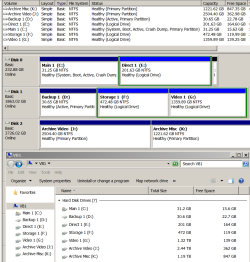
When you say "Clone the old Win 7 partition" are you referring to using an image (True Image 2019 in my case) of my 2nd drives active/bootable partition? Note the attachment, Disc2 is the GPT 4TB existing drive which will stay that way after the new 4TB HDD arrives. Disc 1 is the older 2TB bootable drive that is getting replaced.
 

Attachments

  • Existing PC drives.png
    Existing PC drives.png
    33.8 KB · Views: 0

My Computers My Computers

  • At a glance

    Win7 x64AMD
    Computer type
    Laptop
    Computer Manufacturer/Model Number
    Toshiba
    OS
    Win7 x64
    CPU
    AMD
  • At a glance

    Win 7 Pro x64AMD FX-835016GBnVidia GeForce 1060
    Computer type
    PC/Desktop
    System Manufacturer/Model Number
    AMD based MB
    OS
    Win 7 Pro x64
    CPU
    AMD FX-8350
    Motherboard
    Gigabyte GA-970A-D3P
    Memory
    16GB
    Graphics Card(s)
    nVidia GeForce 1060
    Monitor(s) Displays
    25"
    Screen Resolution
    1920x1200
    Hard Drives
    two SSD;
    two 4TB HDD
    PSU
    700watt Seasonic
    Internet Speed
    300MB up & down
    Browser
    Firefox
    Other Info
    BD Recorder
I don't see the new 4T drive or it is disk 2 on your disk manager image?

Normally a disk image program can recover a partition from a saved image or it can copy a drive partition from the source drive (2T) to the target drive (4T).
I use to have Acronis true image but I don't remember what it was capable of. Now I have Macrium Reflect, that I like it very much, and it can just drag and drop a partition from source to target.

Dont worry. Diskgenius (free) can clone a partition from one drive to another.
Clone / Copy Partition with Best Cloning Software - DiskGenius

Aomei Partition Assistant (free) can also clone a partition from one drive to another.
Safely Copy Partition to Another New Drive in Windows 7, 8, 10, 11

Is your Win 7 on a DVD or on a USB drive? If USB, is it Fat32 and did you add the \efi\boot folder to be able to boot as UEFI?
 
Last edited:

My Computers My Computers

  • At a glance

    Windows 7 HP 64i5 6600K - 800MHz to 4200MHz4+4G GSkill DDR4 3000IG - Intel 530
    Computer type
    PC/Desktop
    Computer Manufacturer/Model Number
    custom build
    OS
    Windows 7 HP 64
    CPU
    i5 6600K - 800MHz to 4200MHz
    Motherboard
    GA-Z170-HD3P
    Memory
    4+4G GSkill DDR4 3000
    Graphics Card(s)
    IG - Intel 530
    Monitor(s) Displays
    Samsung 226BW
    Screen Resolution
    1680x1050
    Hard Drives
    (1) -1 SM951 – 128GB M.2 AHCI PCIe SSD drive for Windows 7 and Lubuntu
    (2) -1 WD SATA 3 - 1T for Data
    (3) -1 WD SATA 3 - 1T for backup
    PSU
    Thermaltake 450W TR2 gold
    Keyboard
    Old and good Chicony mechanical keyboard
    Mouse
    Logitech mX performance - 9 buttons (had to disable some)
    Internet Speed
    500Mb/s
    Browser
    Firefox 64
    Other Info
    TinyWall firewall
  • At a glance

    Windows 7 Proi7-4500U 800MHz to 3.0GHz(4+4)G DDR3 1600IG intel 4400 + NVIDIA GeForce GT 745M
    Computer type
    Laptop
    System Manufacturer/Model Number
    Asus Q550LF
    OS
    Windows 7 Pro
    CPU
    i7-4500U 800MHz to 3.0GHz
    Motherboard
    Asus Q550LF
    Memory
    (4+4)G DDR3 1600
    Graphics Card(s)
    IG intel 4400 + NVIDIA GeForce GT 745M
    Sound Card
    Realtek
    Monitor(s) Displays
    LG Display LP156WF4-SPH1
    Screen Resolution
    1920 x 1080
    Hard Drives
    BX500 120G SSD for Windows and programs +
    1T HDD for data
    Internet Speed
    500 Mb/s
    Browser
    Firefox
    Other Info
    TinyWall firewall
Back
Top