2TB 3 partition bootable MBR to 3 partition bootable GPT 4TB drive

RT7 Lite

I don't have it yet.
The W7 is on a USB I believe it's been many years since I used it last. Also my W7 Pro x64 version has been sized down (thru hours of trial and error and research) using RT7 Lite which was done around 6-8 years ago to get rid of the unnecessary and annoying M$ bloat and tweaking it to the 'classic' look of XP and before which proved successful.
 
Last edited:

My Computers My Computers

  • At a glance

    Win7 x64AMD
    Computer type
    Laptop
    Computer Manufacturer/Model Number
    Toshiba
    OS
    Win7 x64
    CPU
    AMD
  • At a glance

    Win 7 Pro x64AMD FX-835016GBnVidia GeForce 1060
    Computer type
    PC/Desktop
    System Manufacturer/Model Number
    AMD based MB
    OS
    Win 7 Pro x64
    CPU
    AMD FX-8350
    Motherboard
    Gigabyte GA-970A-D3P
    Memory
    16GB
    Graphics Card(s)
    nVidia GeForce 1060
    Monitor(s) Displays
    25"
    Screen Resolution
    1920x1200
    Hard Drives
    two SSD;
    two 4TB HDD
    PSU
    700watt Seasonic
    Internet Speed
    300MB up & down
    Browser
    Firefox
    Other Info
    BD Recorder
I don't have it yet.
The W7 is on a USB I believe it's been many years since I used it last, I rely on 1st generation images w/o all the add ons.

It doesn't matter. You're going to discard it anyway.

To make a Win 7 USB boot able drive:

Open a CMD window as administrator and type:

diskpart
list disk (it will list all drives. Identify the USB drive number)
select disk n (replace n by the USB drive number obtained with list disk)
clean
convert mbr
create part primary
select part 1
format fs=fat32 quick
assign
active
exit (to exit diskpart)

If you have a Win 7 installation iso file
On Win 7 use 7Zip to extract all files and folders from the Win 7 iso file to the USB drive.

If you have a Win 7 installation DVD
On a computer that has ODD, copy all files and folders from the DVD to the USB drive

To make it UEFI boot able you must add the \efi\boot folder
419872-windows-7-laptop-users-why-my-laptop-slow-efi-boot.jpg


Installation
Windows can be installed in two ways: Legacy-MBR or UEFI-GPT
To install as Legacy-MBR you must boot the installation drive as Legacy
To install as UEFI-GPT you must boot the installation drive as UEFI.

As you have a UEFI BIOS, you should install as UEFI-GPT
Detach any other drives (SATA or Power cable) from the MB.

During POST, press F12 to launch the boot menu. You will see two options for the USB drive. USB UEFI (Name) and USB (Name). Select USB UEFI (Name) if you want to install as UEFI-GPT or select USB (name) if you want to install as Legacy-MBR.
Go to install and delete ALL partitions on the main drive till you have one and only one unallocated space and then proceed.


To make it universal (all Win 7 versions), go to \sources on the USB drive and delete \sources\ei.cfg
 

My Computers My Computers

  • At a glance

    Windows 7 HP 64i5 6600K - 800MHz to 4200MHz4+4G GSkill DDR4 3000IG - Intel 530
    Computer type
    PC/Desktop
    Computer Manufacturer/Model Number
    custom build
    OS
    Windows 7 HP 64
    CPU
    i5 6600K - 800MHz to 4200MHz
    Motherboard
    GA-Z170-HD3P
    Memory
    4+4G GSkill DDR4 3000
    Graphics Card(s)
    IG - Intel 530
    Monitor(s) Displays
    Samsung 226BW
    Screen Resolution
    1680x1050
    Hard Drives
    (1) -1 SM951 – 128GB M.2 AHCI PCIe SSD drive for Windows 7 and Lubuntu
    (2) -1 WD SATA 3 - 1T for Data
    (3) -1 WD SATA 3 - 1T for backup
    PSU
    Thermaltake 450W TR2 gold
    Keyboard
    Old and good Chicony mechanical keyboard
    Mouse
    Logitech mX performance - 9 buttons (had to disable some)
    Internet Speed
    500Mb/s
    Browser
    Firefox 64
    Other Info
    TinyWall firewall
  • At a glance

    Windows 7 Proi7-4500U 800MHz to 3.0GHz(4+4)G DDR3 1600IG intel 4400 + NVIDIA GeForce GT 745M
    Computer type
    Laptop
    System Manufacturer/Model Number
    Asus Q550LF
    OS
    Windows 7 Pro
    CPU
    i7-4500U 800MHz to 3.0GHz
    Motherboard
    Asus Q550LF
    Memory
    (4+4)G DDR3 1600
    Graphics Card(s)
    IG intel 4400 + NVIDIA GeForce GT 745M
    Sound Card
    Realtek
    Monitor(s) Displays
    LG Display LP156WF4-SPH1
    Screen Resolution
    1920 x 1080
    Hard Drives
    BX500 120G SSD for Windows and programs +
    1T HDD for data
    Internet Speed
    500 Mb/s
    Browser
    Firefox
    Other Info
    TinyWall firewall
ms official installation iso files can be found easily, browse internet for:

English Version Details.
~~~~~~~~~~~~~~~~~~~~~~~~~~~~~

Windows 7 Ultimate SP1-U ISO (Refresh)
~~~~~~~~~~~~~~~~~~~~~~~~~~~
x86
Part- X17-59463
en_windows_7_ultimate_with_sp1_x86_dvd_u_677460.iso
SHA1: 65FCE0F445D9BF7E78E43F17E441E08C63722657
ISO/CRC: 35511F11
X17-59463.iso

x64
Part- X17-59465
en_windows_7_ultimate_with_sp1_x64_dvd_u_677332.iso
SHA1: 36AE90DEFBAD9D9539E649B193AE573B77A71C83
ISO/CRC: 992B8FCD
X17-59465.iso

Windows 7 Professional SP1-U ISO (Refresh)
~~~~~~~~~~~~~~~~~~~~~~~~~~~~~
x86
Part- X17-59183
en_windows_7_professional_with_sp1_x86_dvd_u_677056.iso
SHA1: D89937DF3A9BC2EC1A1486195FD308CD3DADE928
ISO/CRC: E8C2AD67
X17-59183.iso

x64
Part- X17-59186
en_windows_7_professional_with_sp1_x64_dvd_u_676939.iso
SHA1: 0BCFC54019EA175B1EE51F6D2B207A3D14DD2B58
ISO/CRC: AD44DB36
X17-59186.iso

Windows 7 Home Premium SP1-U ISO (Refresh)
~~~~~~~~~~~~~~~~~~~~~~~~~~~~~~~
x86
Part- X17-58996
en_windows_7_home_premium_with_sp1_x86_dvd_u_676701.iso
SHA1: 6071B4553FCF0EA53D589A846B5AE76743DD68FC
ISO/CRC: 85B5EF4A
X17-58996.iso

x64
Part- X17-58997
en_windows_7_home_premium_with_sp1_x64_dvd_u_676549.iso
SHA1: 6C9058389C1E2E5122B7C933275F963EDF1C07B9
ISO/CRC: 4A182640
X17-58997.iso
 

My Computers My Computers

  • At a glance

    7 X64i5 84002x8gb 3200mhz
    Computer type
    PC/Desktop
    OS
    7 X64
    CPU
    i5 8400
    Motherboard
    gigabyte b365m ds3h
    Memory
    2x8gb 3200mhz
    Hard Drives
    various
    PSU
    pure power 11 400w cm
    Case
    Coolermaster
    Cooling
    cryorig m9i
  • At a glance

    7x64g54008gb ddr4 2400
    Computer type
    PC/Desktop
    OS
    7x64
    CPU
    g5400
    Motherboard
    ga b365m ds3h
    Memory
    8gb ddr4 2400
    PSU
    xfx pro 450w
Can I get this boot/FAT32 partition (whatever it is called) without doing a full Windows installed, or is that the only way?
It's just a few lines in command prompt.

diskpart
select disk 3
create partition efi size=100
format fs=fat32 quick

Could be done from within your current installation.
 

My Computer My Computer

At a glance

Windows 7 Home Premium
Computer type
PC/Desktop
OS
Windows 7 Home Premium
I updated my previous post regarding RT7Lite if that matters.

There is text in Gigabytes MB manual regarding installing W7 and GPT partitions.;
" If you want to install a O/S like W7 x64 that supports GPT, select the optical drive w/ the W7 disk that is prefixed with UEFI string."
 

My Computers My Computers

  • At a glance

    Win7 x64AMD
    Computer type
    Laptop
    Computer Manufacturer/Model Number
    Toshiba
    OS
    Win7 x64
    CPU
    AMD
  • At a glance

    Win 7 Pro x64AMD FX-835016GBnVidia GeForce 1060
    Computer type
    PC/Desktop
    System Manufacturer/Model Number
    AMD based MB
    OS
    Win 7 Pro x64
    CPU
    AMD FX-8350
    Motherboard
    Gigabyte GA-970A-D3P
    Memory
    16GB
    Graphics Card(s)
    nVidia GeForce 1060
    Monitor(s) Displays
    25"
    Screen Resolution
    1920x1200
    Hard Drives
    two SSD;
    two 4TB HDD
    PSU
    700watt Seasonic
    Internet Speed
    300MB up & down
    Browser
    Firefox
    Other Info
    BD Recorder
Why oh why would you do all this for a small stretch of FAT32. You could even create the partition in disk management and then change the partition ID. Basically you could shrink a partition of your GPT disk and start to practice right now.
 

My Computer My Computer

At a glance

Windows 7 Home Premium
Computer type
PC/Desktop
OS
Windows 7 Home Premium
Are you referring to RT7 Lite or that quote I took out of the MB manual? :huh:
 

My Computers My Computers

  • At a glance

    Win7 x64AMD
    Computer type
    Laptop
    Computer Manufacturer/Model Number
    Toshiba
    OS
    Win7 x64
    CPU
    AMD
  • At a glance

    Win 7 Pro x64AMD FX-835016GBnVidia GeForce 1060
    Computer type
    PC/Desktop
    System Manufacturer/Model Number
    AMD based MB
    OS
    Win 7 Pro x64
    CPU
    AMD FX-8350
    Motherboard
    Gigabyte GA-970A-D3P
    Memory
    16GB
    Graphics Card(s)
    nVidia GeForce 1060
    Monitor(s) Displays
    25"
    Screen Resolution
    1920x1200
    Hard Drives
    two SSD;
    two 4TB HDD
    PSU
    700watt Seasonic
    Internet Speed
    300MB up & down
    Browser
    Firefox
    Other Info
    BD Recorder
It's just a few lines in command prompt.

diskpart
select disk 3
create partition efi size=100
format fs=fat32 quick

Could be done from within your current installation.
Volume Z, OP doesn't have a OS on the 4T drive.


I updated my previous post regarding RT7Lite if that matters.

There is text in Gigabytes MB manual regarding installing W7 and GPT partitions.;
" If you want to install a O/S like W7 x64 that supports GPT, select the optical drive w/ the W7 disk that is prefixed with UEFI string."

That is correct but if you follow the instructions above you will end with a Win 7 USB installation drive.

I can give you a link to a Win 7 SP1 installation files
 

My Computers My Computers

  • At a glance

    Windows 7 HP 64i5 6600K - 800MHz to 4200MHz4+4G GSkill DDR4 3000IG - Intel 530
    Computer type
    PC/Desktop
    Computer Manufacturer/Model Number
    custom build
    OS
    Windows 7 HP 64
    CPU
    i5 6600K - 800MHz to 4200MHz
    Motherboard
    GA-Z170-HD3P
    Memory
    4+4G GSkill DDR4 3000
    Graphics Card(s)
    IG - Intel 530
    Monitor(s) Displays
    Samsung 226BW
    Screen Resolution
    1680x1050
    Hard Drives
    (1) -1 SM951 – 128GB M.2 AHCI PCIe SSD drive for Windows 7 and Lubuntu
    (2) -1 WD SATA 3 - 1T for Data
    (3) -1 WD SATA 3 - 1T for backup
    PSU
    Thermaltake 450W TR2 gold
    Keyboard
    Old and good Chicony mechanical keyboard
    Mouse
    Logitech mX performance - 9 buttons (had to disable some)
    Internet Speed
    500Mb/s
    Browser
    Firefox 64
    Other Info
    TinyWall firewall
  • At a glance

    Windows 7 Proi7-4500U 800MHz to 3.0GHz(4+4)G DDR3 1600IG intel 4400 + NVIDIA GeForce GT 745M
    Computer type
    Laptop
    System Manufacturer/Model Number
    Asus Q550LF
    OS
    Windows 7 Pro
    CPU
    i7-4500U 800MHz to 3.0GHz
    Motherboard
    Asus Q550LF
    Memory
    (4+4)G DDR3 1600
    Graphics Card(s)
    IG intel 4400 + NVIDIA GeForce GT 745M
    Sound Card
    Realtek
    Monitor(s) Displays
    LG Display LP156WF4-SPH1
    Screen Resolution
    1920 x 1080
    Hard Drives
    BX500 120G SSD for Windows and programs +
    1T HDD for data
    Internet Speed
    500 Mb/s
    Browser
    Firefox
    Other Info
    TinyWall firewall
Thanks, I have had that file since 2016. That new drive won't be here until next week probably. :(
 

My Computers My Computers

  • At a glance

    Win7 x64AMD
    Computer type
    Laptop
    Computer Manufacturer/Model Number
    Toshiba
    OS
    Win7 x64
    CPU
    AMD
  • At a glance

    Win 7 Pro x64AMD FX-835016GBnVidia GeForce 1060
    Computer type
    PC/Desktop
    System Manufacturer/Model Number
    AMD based MB
    OS
    Win 7 Pro x64
    CPU
    AMD FX-8350
    Motherboard
    Gigabyte GA-970A-D3P
    Memory
    16GB
    Graphics Card(s)
    nVidia GeForce 1060
    Monitor(s) Displays
    25"
    Screen Resolution
    1920x1200
    Hard Drives
    two SSD;
    two 4TB HDD
    PSU
    700watt Seasonic
    Internet Speed
    300MB up & down
    Browser
    Firefox
    Other Info
    BD Recorder
As I already wrote, you don't need to install Win 7 on the new drive just to create the EFI and the MSR partition.
You can create both with diskpart commands, copy the Win 7 partition from the 2T drive and load the boot manager on the EFI partition.
 

My Computers My Computers

  • At a glance

    Windows 7 HP 64i5 6600K - 800MHz to 4200MHz4+4G GSkill DDR4 3000IG - Intel 530
    Computer type
    PC/Desktop
    Computer Manufacturer/Model Number
    custom build
    OS
    Windows 7 HP 64
    CPU
    i5 6600K - 800MHz to 4200MHz
    Motherboard
    GA-Z170-HD3P
    Memory
    4+4G GSkill DDR4 3000
    Graphics Card(s)
    IG - Intel 530
    Monitor(s) Displays
    Samsung 226BW
    Screen Resolution
    1680x1050
    Hard Drives
    (1) -1 SM951 – 128GB M.2 AHCI PCIe SSD drive for Windows 7 and Lubuntu
    (2) -1 WD SATA 3 - 1T for Data
    (3) -1 WD SATA 3 - 1T for backup
    PSU
    Thermaltake 450W TR2 gold
    Keyboard
    Old and good Chicony mechanical keyboard
    Mouse
    Logitech mX performance - 9 buttons (had to disable some)
    Internet Speed
    500Mb/s
    Browser
    Firefox 64
    Other Info
    TinyWall firewall
  • At a glance

    Windows 7 Proi7-4500U 800MHz to 3.0GHz(4+4)G DDR3 1600IG intel 4400 + NVIDIA GeForce GT 745M
    Computer type
    Laptop
    System Manufacturer/Model Number
    Asus Q550LF
    OS
    Windows 7 Pro
    CPU
    i7-4500U 800MHz to 3.0GHz
    Motherboard
    Asus Q550LF
    Memory
    (4+4)G DDR3 1600
    Graphics Card(s)
    IG intel 4400 + NVIDIA GeForce GT 745M
    Sound Card
    Realtek
    Monitor(s) Displays
    LG Display LP156WF4-SPH1
    Screen Resolution
    1920 x 1080
    Hard Drives
    BX500 120G SSD for Windows and programs +
    1T HDD for data
    Internet Speed
    500 Mb/s
    Browser
    Firefox
    Other Info
    TinyWall firewall
You could.
1. initialize the target 4tb disk to gpt and create esp and msr partitions on it.
2. mount your acronis image as a physical disk
3. use something like winntsetup wincopy to migrate from the mounted image to the gpt disk.
I haven't tried using diskgenius os migration to migrate from mounted mbr image to gpt disk, that might also be a way to do it. ************************************************************************************************************ A different way is to restore the mbr image to the the 4 tb disk. Then convert the 4tb to gpt afterwards and adjust the partition sizes. Unless you know what you are doing, you might end up with the esp partition in an awkward place.
That seems to make the most sense if I can figure out the details. :o
A friend of mine wants to use Macrum Reflect. I'm not familiar with it so I ran a trial copy. It looks like all it is is another image/file copy which I can't see working. No provision to change any type of formats or anything else, just backups or similar. I explained the situation, but he must of missed alot of the details. Anyone know anything about this from the UK?
 

My Computers My Computers

  • At a glance

    Win7 x64AMD
    Computer type
    Laptop
    Computer Manufacturer/Model Number
    Toshiba
    OS
    Win7 x64
    CPU
    AMD
  • At a glance

    Win 7 Pro x64AMD FX-835016GBnVidia GeForce 1060
    Computer type
    PC/Desktop
    System Manufacturer/Model Number
    AMD based MB
    OS
    Win 7 Pro x64
    CPU
    AMD FX-8350
    Motherboard
    Gigabyte GA-970A-D3P
    Memory
    16GB
    Graphics Card(s)
    nVidia GeForce 1060
    Monitor(s) Displays
    25"
    Screen Resolution
    1920x1200
    Hard Drives
    two SSD;
    two 4TB HDD
    PSU
    700watt Seasonic
    Internet Speed
    300MB up & down
    Browser
    Firefox
    Other Info
    BD Recorder
That seems to make the most sense if I can figure out the details. :o
A friend of mine wants to use Macrum Reflect. I'm not familiar with it so I ran a trial copy. It looks like all it is is another image/file copy which I can't see working. No provision to change any type of formats or anything else, just backups or similar. I explained the situation, but he must of missed alot of the details. Anyone know anything about this from the UK?

Once again
You create the EFI and the MSR partition with diskpart commands, and use Macrium Reflect to copy the Win 7 partition from the 2T drive and load the boot manager on the EFI partition using bcdboot command.
 

My Computers My Computers

  • At a glance

    Windows 7 HP 64i5 6600K - 800MHz to 4200MHz4+4G GSkill DDR4 3000IG - Intel 530
    Computer type
    PC/Desktop
    Computer Manufacturer/Model Number
    custom build
    OS
    Windows 7 HP 64
    CPU
    i5 6600K - 800MHz to 4200MHz
    Motherboard
    GA-Z170-HD3P
    Memory
    4+4G GSkill DDR4 3000
    Graphics Card(s)
    IG - Intel 530
    Monitor(s) Displays
    Samsung 226BW
    Screen Resolution
    1680x1050
    Hard Drives
    (1) -1 SM951 – 128GB M.2 AHCI PCIe SSD drive for Windows 7 and Lubuntu
    (2) -1 WD SATA 3 - 1T for Data
    (3) -1 WD SATA 3 - 1T for backup
    PSU
    Thermaltake 450W TR2 gold
    Keyboard
    Old and good Chicony mechanical keyboard
    Mouse
    Logitech mX performance - 9 buttons (had to disable some)
    Internet Speed
    500Mb/s
    Browser
    Firefox 64
    Other Info
    TinyWall firewall
  • At a glance

    Windows 7 Proi7-4500U 800MHz to 3.0GHz(4+4)G DDR3 1600IG intel 4400 + NVIDIA GeForce GT 745M
    Computer type
    Laptop
    System Manufacturer/Model Number
    Asus Q550LF
    OS
    Windows 7 Pro
    CPU
    i7-4500U 800MHz to 3.0GHz
    Motherboard
    Asus Q550LF
    Memory
    (4+4)G DDR3 1600
    Graphics Card(s)
    IG intel 4400 + NVIDIA GeForce GT 745M
    Sound Card
    Realtek
    Monitor(s) Displays
    LG Display LP156WF4-SPH1
    Screen Resolution
    1920 x 1080
    Hard Drives
    BX500 120G SSD for Windows and programs +
    1T HDD for data
    Internet Speed
    500 Mb/s
    Browser
    Firefox
    Other Info
    TinyWall firewall
He only referred to this one program to do all of that which didn't make sense to me unlike what you posted earlier (which is over my head).
 

My Computers My Computers

  • At a glance

    Win7 x64AMD
    Computer type
    Laptop
    Computer Manufacturer/Model Number
    Toshiba
    OS
    Win7 x64
    CPU
    AMD
  • At a glance

    Win 7 Pro x64AMD FX-835016GBnVidia GeForce 1060
    Computer type
    PC/Desktop
    System Manufacturer/Model Number
    AMD based MB
    OS
    Win 7 Pro x64
    CPU
    AMD FX-8350
    Motherboard
    Gigabyte GA-970A-D3P
    Memory
    16GB
    Graphics Card(s)
    nVidia GeForce 1060
    Monitor(s) Displays
    25"
    Screen Resolution
    1920x1200
    Hard Drives
    two SSD;
    two 4TB HDD
    PSU
    700watt Seasonic
    Internet Speed
    300MB up & down
    Browser
    Firefox
    Other Info
    BD Recorder
As I already wrote before you have two options to make the new 4T byte drive boot able:
- Do a Win 7 clean install as UEFI and then replace the windows partition with the Windows partition of the 2T drive
or
- Create a EFI and the MSR partition with diskpart commands, and use Macrium Reflect to copy the Win 7 partition from the 2T drive and load the boot manager on the EFI partition using bcdboot command.

What you want to do? Do you need our help to execute one of the two options?
 

My Computers My Computers

  • At a glance

    Windows 7 HP 64i5 6600K - 800MHz to 4200MHz4+4G GSkill DDR4 3000IG - Intel 530
    Computer type
    PC/Desktop
    Computer Manufacturer/Model Number
    custom build
    OS
    Windows 7 HP 64
    CPU
    i5 6600K - 800MHz to 4200MHz
    Motherboard
    GA-Z170-HD3P
    Memory
    4+4G GSkill DDR4 3000
    Graphics Card(s)
    IG - Intel 530
    Monitor(s) Displays
    Samsung 226BW
    Screen Resolution
    1680x1050
    Hard Drives
    (1) -1 SM951 – 128GB M.2 AHCI PCIe SSD drive for Windows 7 and Lubuntu
    (2) -1 WD SATA 3 - 1T for Data
    (3) -1 WD SATA 3 - 1T for backup
    PSU
    Thermaltake 450W TR2 gold
    Keyboard
    Old and good Chicony mechanical keyboard
    Mouse
    Logitech mX performance - 9 buttons (had to disable some)
    Internet Speed
    500Mb/s
    Browser
    Firefox 64
    Other Info
    TinyWall firewall
  • At a glance

    Windows 7 Proi7-4500U 800MHz to 3.0GHz(4+4)G DDR3 1600IG intel 4400 + NVIDIA GeForce GT 745M
    Computer type
    Laptop
    System Manufacturer/Model Number
    Asus Q550LF
    OS
    Windows 7 Pro
    CPU
    i7-4500U 800MHz to 3.0GHz
    Motherboard
    Asus Q550LF
    Memory
    (4+4)G DDR3 1600
    Graphics Card(s)
    IG intel 4400 + NVIDIA GeForce GT 745M
    Sound Card
    Realtek
    Monitor(s) Displays
    LG Display LP156WF4-SPH1
    Screen Resolution
    1920 x 1080
    Hard Drives
    BX500 120G SSD for Windows and programs +
    1T HDD for data
    Internet Speed
    500 Mb/s
    Browser
    Firefox
    Other Info
    TinyWall firewall
I will know when I get the drive, probably in a few days. I will see what he has to say. I'm not impressed with that Macrium Reflect so far, it's images are 1/3 larger then what True Image produces. That AOMEI Partition Assistant has it over MR for the preparation functions.
One step at a time.
 

My Computers My Computers

  • At a glance

    Win7 x64AMD
    Computer type
    Laptop
    Computer Manufacturer/Model Number
    Toshiba
    OS
    Win7 x64
    CPU
    AMD
  • At a glance

    Win 7 Pro x64AMD FX-835016GBnVidia GeForce 1060
    Computer type
    PC/Desktop
    System Manufacturer/Model Number
    AMD based MB
    OS
    Win 7 Pro x64
    CPU
    AMD FX-8350
    Motherboard
    Gigabyte GA-970A-D3P
    Memory
    16GB
    Graphics Card(s)
    nVidia GeForce 1060
    Monitor(s) Displays
    25"
    Screen Resolution
    1920x1200
    Hard Drives
    two SSD;
    two 4TB HDD
    PSU
    700watt Seasonic
    Internet Speed
    300MB up & down
    Browser
    Firefox
    Other Info
    BD Recorder
Update;

Long story short, with the help of a tech friend he finally got the drive switched over to GPT with a added, hidden partition and boot as a UEFI drive ok.
BUT,
Only by itself, when I connect the MBR SSD drive and try to boot from the GPT drive it errors our with a supposed hardware like error. That is selecting the UEFI drive as the boot drive in the BIOS boot menu. The MBR SSD 'Main system drive still boots fine. The MB is a Gigabyte GA-970A-D3P v2.

Any ideas?
 

My Computers My Computers

  • At a glance

    Win7 x64AMD
    Computer type
    Laptop
    Computer Manufacturer/Model Number
    Toshiba
    OS
    Win7 x64
    CPU
    AMD
  • At a glance

    Win 7 Pro x64AMD FX-835016GBnVidia GeForce 1060
    Computer type
    PC/Desktop
    System Manufacturer/Model Number
    AMD based MB
    OS
    Win 7 Pro x64
    CPU
    AMD FX-8350
    Motherboard
    Gigabyte GA-970A-D3P
    Memory
    16GB
    Graphics Card(s)
    nVidia GeForce 1060
    Monitor(s) Displays
    25"
    Screen Resolution
    1920x1200
    Hard Drives
    two SSD;
    two 4TB HDD
    PSU
    700watt Seasonic
    Internet Speed
    300MB up & down
    Browser
    Firefox
    Other Info
    BD Recorder
We don't know what your a tech friend did.
You received a clean 4T drive.
- Did he do a win 7 clean install as UEFI-GPT and then replaced the Win 7 partition created with the other on the 2 T?
or
Did he converted the 4T drive to GPT, created the EFI and MSR partition and cloned Win 7 partition from the 2 T and then loaded the boot manager on the EFI partition?

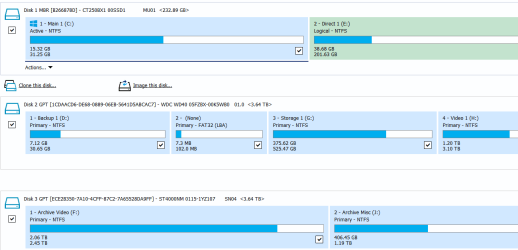
Please post a whole window Disk Manager image of ALL your drives. Don't forget to expand the columns so we can read them. How to Post a Screenshot of Disk Management
If you have a MiniTool or AOMEI Partition use it instead or Windows disk manager.
 

My Computers My Computers

  • At a glance

    Windows 7 HP 64i5 6600K - 800MHz to 4200MHz4+4G GSkill DDR4 3000IG - Intel 530
    Computer type
    PC/Desktop
    Computer Manufacturer/Model Number
    custom build
    OS
    Windows 7 HP 64
    CPU
    i5 6600K - 800MHz to 4200MHz
    Motherboard
    GA-Z170-HD3P
    Memory
    4+4G GSkill DDR4 3000
    Graphics Card(s)
    IG - Intel 530
    Monitor(s) Displays
    Samsung 226BW
    Screen Resolution
    1680x1050
    Hard Drives
    (1) -1 SM951 – 128GB M.2 AHCI PCIe SSD drive for Windows 7 and Lubuntu
    (2) -1 WD SATA 3 - 1T for Data
    (3) -1 WD SATA 3 - 1T for backup
    PSU
    Thermaltake 450W TR2 gold
    Keyboard
    Old and good Chicony mechanical keyboard
    Mouse
    Logitech mX performance - 9 buttons (had to disable some)
    Internet Speed
    500Mb/s
    Browser
    Firefox 64
    Other Info
    TinyWall firewall
  • At a glance

    Windows 7 Proi7-4500U 800MHz to 3.0GHz(4+4)G DDR3 1600IG intel 4400 + NVIDIA GeForce GT 745M
    Computer type
    Laptop
    System Manufacturer/Model Number
    Asus Q550LF
    OS
    Windows 7 Pro
    CPU
    i7-4500U 800MHz to 3.0GHz
    Motherboard
    Asus Q550LF
    Memory
    (4+4)G DDR3 1600
    Graphics Card(s)
    IG intel 4400 + NVIDIA GeForce GT 745M
    Sound Card
    Realtek
    Monitor(s) Displays
    LG Display LP156WF4-SPH1
    Screen Resolution
    1920 x 1080
    Hard Drives
    BX500 120G SSD for Windows and programs +
    1T HDD for data
    Internet Speed
    500 Mb/s
    Browser
    Firefox
    Other Info
    TinyWall firewall
The 2nd route, except only one additional hidden partition was created, not counting the 2 data partitions duplicating the 2TD drive. The work was done remotely thru 'TeamViewer' which he has done from many years and a land line.
He used AOMEI Partition Assistant DiskPart and Macrium Reflect. He created the 'Hidden Partition' with DiskPart IIRC.

Here is the screen shot of the 3 drives, #2 is the new 4TB and the created partition.
 

Attachments

  • Current drive & partition lineup.png
    Current drive & partition lineup.png
    15.1 KB · Views: 2
Last edited:

My Computers My Computers

  • At a glance

    Win7 x64AMD
    Computer type
    Laptop
    Computer Manufacturer/Model Number
    Toshiba
    OS
    Win7 x64
    CPU
    AMD
  • At a glance

    Win 7 Pro x64AMD FX-835016GBnVidia GeForce 1060
    Computer type
    PC/Desktop
    System Manufacturer/Model Number
    AMD based MB
    OS
    Win 7 Pro x64
    CPU
    AMD FX-8350
    Motherboard
    Gigabyte GA-970A-D3P
    Memory
    16GB
    Graphics Card(s)
    nVidia GeForce 1060
    Monitor(s) Displays
    25"
    Screen Resolution
    1920x1200
    Hard Drives
    two SSD;
    two 4TB HDD
    PSU
    700watt Seasonic
    Internet Speed
    300MB up & down
    Browser
    Firefox
    Other Info
    BD Recorder
Something isn't right. The drive 2 , partition 2 (efi) has only 7 M on it.

Would you like to recreate the partition and reload the boot manager on it?
 

My Computers My Computers

  • At a glance

    Windows 7 HP 64i5 6600K - 800MHz to 4200MHz4+4G GSkill DDR4 3000IG - Intel 530
    Computer type
    PC/Desktop
    Computer Manufacturer/Model Number
    custom build
    OS
    Windows 7 HP 64
    CPU
    i5 6600K - 800MHz to 4200MHz
    Motherboard
    GA-Z170-HD3P
    Memory
    4+4G GSkill DDR4 3000
    Graphics Card(s)
    IG - Intel 530
    Monitor(s) Displays
    Samsung 226BW
    Screen Resolution
    1680x1050
    Hard Drives
    (1) -1 SM951 – 128GB M.2 AHCI PCIe SSD drive for Windows 7 and Lubuntu
    (2) -1 WD SATA 3 - 1T for Data
    (3) -1 WD SATA 3 - 1T for backup
    PSU
    Thermaltake 450W TR2 gold
    Keyboard
    Old and good Chicony mechanical keyboard
    Mouse
    Logitech mX performance - 9 buttons (had to disable some)
    Internet Speed
    500Mb/s
    Browser
    Firefox 64
    Other Info
    TinyWall firewall
  • At a glance

    Windows 7 Proi7-4500U 800MHz to 3.0GHz(4+4)G DDR3 1600IG intel 4400 + NVIDIA GeForce GT 745M
    Computer type
    Laptop
    System Manufacturer/Model Number
    Asus Q550LF
    OS
    Windows 7 Pro
    CPU
    i7-4500U 800MHz to 3.0GHz
    Motherboard
    Asus Q550LF
    Memory
    (4+4)G DDR3 1600
    Graphics Card(s)
    IG intel 4400 + NVIDIA GeForce GT 745M
    Sound Card
    Realtek
    Monitor(s) Displays
    LG Display LP156WF4-SPH1
    Screen Resolution
    1920 x 1080
    Hard Drives
    BX500 120G SSD for Windows and programs +
    1T HDD for data
    Internet Speed
    500 Mb/s
    Browser
    Firefox
    Other Info
    TinyWall firewall
Don't take this the wrong way, yes, but I'd rather have him do it. If I do it and it's wrong for whatever reason I'll get the blame.
IOW's I don't want to 'break it any more. ;)
I would like to see the procedure with the file package if that is ok with you..
 

My Computers My Computers

  • At a glance

    Win7 x64AMD
    Computer type
    Laptop
    Computer Manufacturer/Model Number
    Toshiba
    OS
    Win7 x64
    CPU
    AMD
  • At a glance

    Win 7 Pro x64AMD FX-835016GBnVidia GeForce 1060
    Computer type
    PC/Desktop
    System Manufacturer/Model Number
    AMD based MB
    OS
    Win 7 Pro x64
    CPU
    AMD FX-8350
    Motherboard
    Gigabyte GA-970A-D3P
    Memory
    16GB
    Graphics Card(s)
    nVidia GeForce 1060
    Monitor(s) Displays
    25"
    Screen Resolution
    1920x1200
    Hard Drives
    two SSD;
    two 4TB HDD
    PSU
    700watt Seasonic
    Internet Speed
    300MB up & down
    Browser
    Firefox
    Other Info
    BD Recorder
Back
Top