Solved 3 BSOD This Week

Deathtitan77

New member
Local time
3:48 PM
Messages
12
I got 3 BSODs this week from 3 different reasons. I am looking for help to find out what is causing this problem.
 

My Computer

Computer type
PC/Desktop
Computer Manufacturer/Model Number
Custom build
OS
Windows 7 Ultimate x64
Welcome

Update the Driver Description: C-Media sound driver :ar: Driver Reference Table - CM10864.sys
Code:
Image name: CM10864.sys
Timestamp:        Wed Nov 18 15:55:47 2009 (4B03C4A3)

Avast! contributes in BSOD's please uninstall it using its removal tool from here:

:ar: Uninstallers (removal tools) for common antivirus software - ESET Knowledgebase
Code:
Start Menu\Programs\avast! EasyPass	Public:Start Menu\Programs\avast! EasyPass	Public
Start Menu\Programs\avast! Free Antivirus	Public:Start Menu\Programs\avast! Free Antivirus	Public
We recommended Microsoft Security Essentials from a strict BSOD perspective.

:ar: Microsoft Security Essentials, Free antivirus for windows
:ar: Malwarebytes Anti-Malware Free
:ar: Good and Free system security combination

   Warning
Do not start the free trial of Malware Bytes; remember to deselect that option when prompted.

2013-03-09_224312_zps62dc7c23.jpg

Run a full scan with both (separately) once downloaded, installed and updated.

This tutorial :ar: http://www.sevenforums.com/tutorials/147369-usb-selective-suspend-turn-off.html may help you:

To Disable Selective Suspend:
  • open the control panel
  • go to power options (you may have to set view to small icons)
  • click change plan settings
  • in the window that opens:
  • click change plan settings
  • click change advanced power settings, expand usb and ensure usb selective suspend is disabled.

Update your BIOS:
Code:
BIOS Version/Date	Award Software International, Inc. FF, 10/12/2009

Let us know the results
 

My Computer

Computer type
PC/Desktop
Computer Manufacturer/Model Number
Self assembled
OS
Windows 10 Home 64Bit
CPU
Intel Core i5 10400 @ 2.90GHz
Motherboard
Intel Corporation DG41WV (PROCESSOR)
Memory
8.00GB Single-Channel Unknown @ 1329MHz (16-20-20-38)
Sound Card
Realtek High Definition Audio
Monitor(s) Displays
DELL E170S
Screen Resolution
1280x1024 pixels
Hard Drives
931GB TOSHIBA DT01ACA100 (SATA)
238GB TEAM TM8PS7256G (SATA SSD)
Case
Nothing Fancy
Cooling
Fans
Keyboard
A4 Tech Co LTD
Mouse
A4 Tech Co Ltd/Logitech
Internet Speed
25 Mbps
The C-Media sound driver; where do I download the update on the website?

Sames goes to BIOS, how do I update it?
 

My Computer

Computer type
PC/Desktop
Computer Manufacturer/Model Number
Custom build
OS
Windows 7 Ultimate x64

My Computer

Computer type
PC/Desktop
Computer Manufacturer/Model Number
Self assembled
OS
Windows 10 Home 64Bit
CPU
Intel Core i5 10400 @ 2.90GHz
Motherboard
Intel Corporation DG41WV (PROCESSOR)
Memory
8.00GB Single-Channel Unknown @ 1329MHz (16-20-20-38)
Sound Card
Realtek High Definition Audio
Monitor(s) Displays
DELL E170S
Screen Resolution
1280x1024 pixels
Hard Drives
931GB TOSHIBA DT01ACA100 (SATA)
238GB TEAM TM8PS7256G (SATA SSD)
Case
Nothing Fancy
Cooling
Fans
Keyboard
A4 Tech Co LTD
Mouse
A4 Tech Co Ltd/Logitech
Internet Speed
25 Mbps
Which windows 7 C-Media Electronics audio update file do I download? I am not very sure.

Edit:

I downloaded this version:
WrDpmEl.png


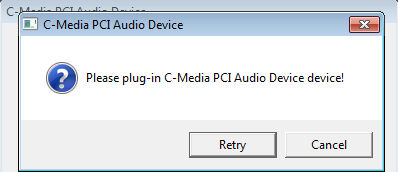
Then when I ran the setup and got this error:
uS2HWgZ.png


Another edit:

I am starting to get BSODs more often..
 
Last edited:

My Computer

Computer type
PC/Desktop
Computer Manufacturer/Model Number
Custom build
OS
Windows 7 Ultimate x64
Please help.
 

My Computer

Computer type
PC/Desktop
Computer Manufacturer/Model Number
Custom build
OS
Windows 7 Ultimate x64
Have you completed the other steps on my first post?
Upload new BSOD reports.
 

My Computer

Computer type
PC/Desktop
Computer Manufacturer/Model Number
Self assembled
OS
Windows 10 Home 64Bit
CPU
Intel Core i5 10400 @ 2.90GHz
Motherboard
Intel Corporation DG41WV (PROCESSOR)
Memory
8.00GB Single-Channel Unknown @ 1329MHz (16-20-20-38)
Sound Card
Realtek High Definition Audio
Monitor(s) Displays
DELL E170S
Screen Resolution
1280x1024 pixels
Hard Drives
931GB TOSHIBA DT01ACA100 (SATA)
238GB TEAM TM8PS7256G (SATA SSD)
Case
Nothing Fancy
Cooling
Fans
Keyboard
A4 Tech Co LTD
Mouse
A4 Tech Co Ltd/Logitech
Internet Speed
25 Mbps
I will be posting back when I start getting it again.
 

My Computer

Computer type
PC/Desktop
Computer Manufacturer/Model Number
Custom build
OS
Windows 7 Ultimate x64
Back
Top