JavaScript is disabled. For a better experience, please enable JavaScript in your browser before proceeding.
You are using an out of date browser. It may not display this or other websites correctly.
You should upgrade or use an
alternative browser .
The Combine
Power User
VIP
I installed Speccy on my work desktop, and was browsing through it just for kicks and noticed something very odd. Under the RAM tab, it says I have -3 ram slots available? Everything works fine, there's no real problem, just curious as to why this says that? Any clues?
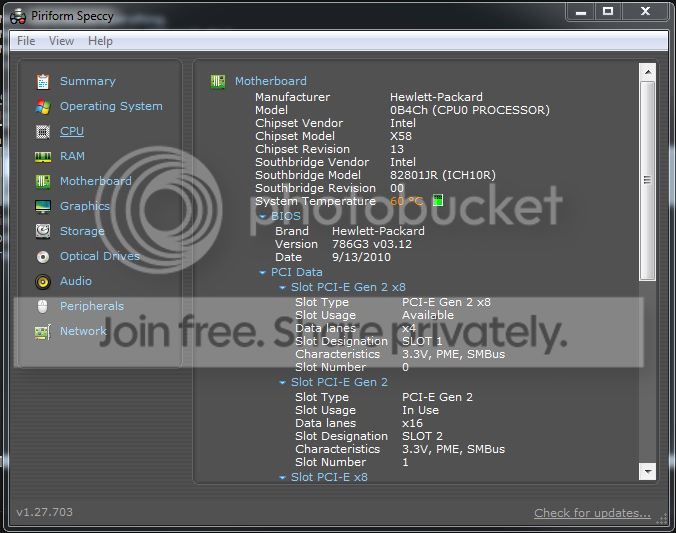
This is a HP Z400 workstation PC, and I don't really have the spec's under my info because it's not my main PC, just a work one, but I will post a pic of the mobo stats. Using Windows 7 Pro 64 bit.
Computer type PC/Desktop Computer Manufacturer/Model Number Dell XPS 8700 OS Microsoft Windows 10 Professional 64-bit CPU Intel(R) Core(TM) i7-4790 CPU @ 3.60GHz Motherboard Dell Inc. Memory 8.00 GB Graphics Card(s) NVIDIA GeForce GT 720 Monitor(s) Displays 3 x LG Flatron E2350 Screen Resolution 1920 x 1080 x 32 bits (4294967296 colors) @ 60 Hz Hard Drives 1 TB Seagate Keyboard Dell Wired Keyboard Mouse Logitech M705 Antivirus Trend Micro
Aspiring Gnome
Guru
Gold Member
VIP
What do you see on the HP Z 400 when you poke the RAM icon on the left side of Speccy?
Computer type PC/Desktop Computer Manufacturer/Model Number Ignatz Special; 4 speed manual gearbox; factory air conditioning; one of one OS Windows 7 Home Premium SP1, 64-bit CPU Intel Skylake i5-6600K, not overclocked Motherboard AsRock Z170M Extreme 4, micro ATX Memory 8 GB HyperX DDR4-2666 (2 x 4 GB) Graphics Card(s) none; graphics are integrated on CPU Sound Card onboard: Realtek ALC1150; external: USB Behringer UF0-202 Monitor(s) Displays Dell S2340M 23 inch IPS Screen Resolution 1600 x 900 Hard Drives System: Crucial MX100 series SSD, 128 GB; PSU Rosewill SilentNight 500 watt fanless, semi-modular Case Antec Solo II Cooling Noctua NH-U12S; Noctua F12 intake, Noctua S12A exhaust Keyboard Microsoft 200 6JH-00001 USB Mouse Dell or Microsoft optical wired; USB Antivirus Microsoft Security Essentials and Malwarebytes Premium Browser Pale Moon Other Info All fans PWM; speeds at idle: CPU circa 500 rpm; intake circa 600 rpm; exhaust circa 600 rpm; CPU temps 27 idle and 47 C load in a warm room (27 C/81 F) when running Intel Extreme Tuning Utility stress test.
The Combine
Power User
VIP
Thread Starter
What do you see on the HP Z 400 when you poke the RAM icon on the left side of Speccy?
The RAM section of Speccy above is the HP Z400 workstation, and yes I am wondering why I am seeing -3 Free memory Slots.....that's all.
Computer type PC/Desktop Computer Manufacturer/Model Number Dell XPS 8700 OS Microsoft Windows 10 Professional 64-bit CPU Intel(R) Core(TM) i7-4790 CPU @ 3.60GHz Motherboard Dell Inc. Memory 8.00 GB Graphics Card(s) NVIDIA GeForce GT 720 Monitor(s) Displays 3 x LG Flatron E2350 Screen Resolution 1920 x 1080 x 32 bits (4294967296 colors) @ 60 Hz Hard Drives 1 TB Seagate Keyboard Dell Wired Keyboard Mouse Logitech M705 Antivirus Trend Micro
The Combine
Power User
VIP
Thread Starter
I've just updated the BIOS to no avail! Still says -3 slots free. This is just odd! Like I said, it's having no ill effects on the computer that I can tell.
Computer type PC/Desktop Computer Manufacturer/Model Number Dell XPS 8700 OS Microsoft Windows 10 Professional 64-bit CPU Intel(R) Core(TM) i7-4790 CPU @ 3.60GHz Motherboard Dell Inc. Memory 8.00 GB Graphics Card(s) NVIDIA GeForce GT 720 Monitor(s) Displays 3 x LG Flatron E2350 Screen Resolution 1920 x 1080 x 32 bits (4294967296 colors) @ 60 Hz Hard Drives 1 TB Seagate Keyboard Dell Wired Keyboard Mouse Logitech M705 Antivirus Trend Micro
3 Brain Cells
Guru
Gold Member
VIP
I really don't have a answer for such a Speccy report.
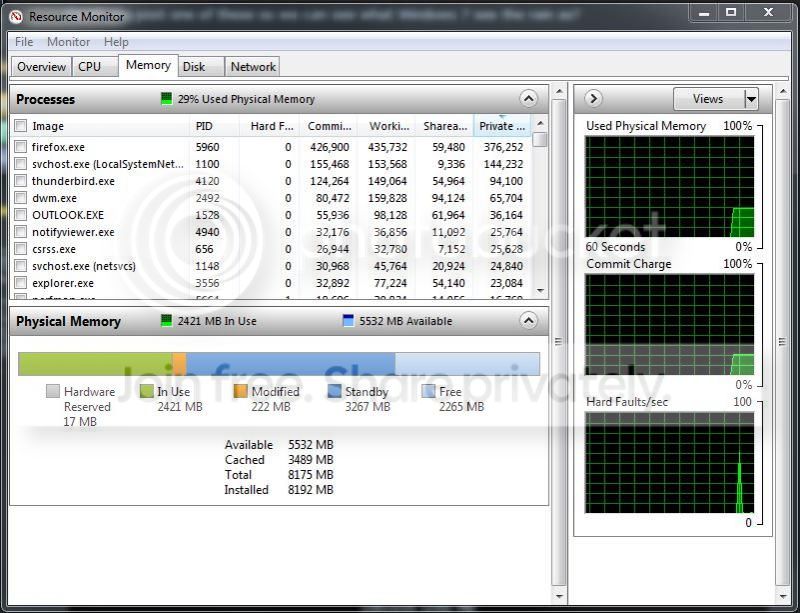
Could you post one of these so we can see what Windows 7 see the ram as?
Computer type PC/Desktop Computer Manufacturer/Model Number Home made Desktop OS Windows 10 Pro. 64/ version 1709 Windows 7 Pro/64 CPU Intel i7-6800K @ 4.3 Motherboard ASUS X-99 Deluxe II Memory Corsair Platinum 16 gig @2400 Graphics Card(s) EVGA GTX 1070 OC Monitor(s) Displays Asus 27" LED LCD/VE278Q Screen Resolution 1920-1080 or 1280-720 HDMI Hard Drives INTEL SSD 730-240 Gb Sata 3.0/ PSU EVGA Platium 1200W Case Phanteks Luxe Tempered Glass 8 fans/ one radiator Cooling XSPC/ Water Cooled CPU Keyboard Das 4 Professional Mouse Logitech M705/MX Anywhere 2-S Internet Speed 100 mbits Antivirus Microsoft Security Essentials/ Malwarebytes Premium 3.0/ SAS Browser I.E. 11 default/Firefox/ ISP Time Warner Cable/Spectrum Other Info LG BluRay Burner/
The Combine
Power User
VIP
Thread Starter
Computer type PC/Desktop Computer Manufacturer/Model Number Dell XPS 8700 OS Microsoft Windows 10 Professional 64-bit CPU Intel(R) Core(TM) i7-4790 CPU @ 3.60GHz Motherboard Dell Inc. Memory 8.00 GB Graphics Card(s) NVIDIA GeForce GT 720 Monitor(s) Displays 3 x LG Flatron E2350 Screen Resolution 1920 x 1080 x 32 bits (4294967296 colors) @ 60 Hz Hard Drives 1 TB Seagate Keyboard Dell Wired Keyboard Mouse Logitech M705 Antivirus Trend Micro
3 Brain Cells
Guru
Gold Member
VIP
That looks normal to me.
Computer type PC/Desktop Computer Manufacturer/Model Number Home made Desktop OS Windows 10 Pro. 64/ version 1709 Windows 7 Pro/64 CPU Intel i7-6800K @ 4.3 Motherboard ASUS X-99 Deluxe II Memory Corsair Platinum 16 gig @2400 Graphics Card(s) EVGA GTX 1070 OC Monitor(s) Displays Asus 27" LED LCD/VE278Q Screen Resolution 1920-1080 or 1280-720 HDMI Hard Drives INTEL SSD 730-240 Gb Sata 3.0/ PSU EVGA Platium 1200W Case Phanteks Luxe Tempered Glass 8 fans/ one radiator Cooling XSPC/ Water Cooled CPU Keyboard Das 4 Professional Mouse Logitech M705/MX Anywhere 2-S Internet Speed 100 mbits Antivirus Microsoft Security Essentials/ Malwarebytes Premium 3.0/ SAS Browser I.E. 11 default/Firefox/ ISP Time Warner Cable/Spectrum Other Info LG BluRay Burner/
The Combine
Power User
VIP
Thread Starter
That looks normal to me.
Speccy is up to date, I'm guessing you're right that it's just mis-reporting. I have not changed any settings in the Advanced Boot Options, I've not done a whole lot to the machine since getting it as I plan to upgrade in the coming months.
Thanks for the replies!
Computer type PC/Desktop Computer Manufacturer/Model Number Dell XPS 8700 OS Microsoft Windows 10 Professional 64-bit CPU Intel(R) Core(TM) i7-4790 CPU @ 3.60GHz Motherboard Dell Inc. Memory 8.00 GB Graphics Card(s) NVIDIA GeForce GT 720 Monitor(s) Displays 3 x LG Flatron E2350 Screen Resolution 1920 x 1080 x 32 bits (4294967296 colors) @ 60 Hz Hard Drives 1 TB Seagate Keyboard Dell Wired Keyboard Mouse Logitech M705 Antivirus Trend Micro
3 Brain Cells
Guru
Gold Member
VIP
Remove and reinstall Speccy and see what happens.
Computer type PC/Desktop Computer Manufacturer/Model Number Home made Desktop OS Windows 10 Pro. 64/ version 1709 Windows 7 Pro/64 CPU Intel i7-6800K @ 4.3 Motherboard ASUS X-99 Deluxe II Memory Corsair Platinum 16 gig @2400 Graphics Card(s) EVGA GTX 1070 OC Monitor(s) Displays Asus 27" LED LCD/VE278Q Screen Resolution 1920-1080 or 1280-720 HDMI Hard Drives INTEL SSD 730-240 Gb Sata 3.0/ PSU EVGA Platium 1200W Case Phanteks Luxe Tempered Glass 8 fans/ one radiator Cooling XSPC/ Water Cooled CPU Keyboard Das 4 Professional Mouse Logitech M705/MX Anywhere 2-S Internet Speed 100 mbits Antivirus Microsoft Security Essentials/ Malwarebytes Premium 3.0/ SAS Browser I.E. 11 default/Firefox/ ISP Time Warner Cable/Spectrum Other Info LG BluRay Burner/
The Combine
Power User
VIP
Thread Starter
Remove and reinstall Speccy and see what happens.
Still getting the same thing. It's no big deal, don't work too hard on this, as I don't believe there's anything actually wrong with my computer, it's not acting funny, I was just curious as to why this was happening and if anyone had seen it before.
Computer type PC/Desktop Computer Manufacturer/Model Number Dell XPS 8700 OS Microsoft Windows 10 Professional 64-bit CPU Intel(R) Core(TM) i7-4790 CPU @ 3.60GHz Motherboard Dell Inc. Memory 8.00 GB Graphics Card(s) NVIDIA GeForce GT 720 Monitor(s) Displays 3 x LG Flatron E2350 Screen Resolution 1920 x 1080 x 32 bits (4294967296 colors) @ 60 Hz Hard Drives 1 TB Seagate Keyboard Dell Wired Keyboard Mouse Logitech M705 Antivirus Trend Micro
3 Brain Cells
Guru
Gold Member
VIP
Just thinking.
Computer type PC/Desktop Computer Manufacturer/Model Number Home made Desktop OS Windows 10 Pro. 64/ version 1709 Windows 7 Pro/64 CPU Intel i7-6800K @ 4.3 Motherboard ASUS X-99 Deluxe II Memory Corsair Platinum 16 gig @2400 Graphics Card(s) EVGA GTX 1070 OC Monitor(s) Displays Asus 27" LED LCD/VE278Q Screen Resolution 1920-1080 or 1280-720 HDMI Hard Drives INTEL SSD 730-240 Gb Sata 3.0/ PSU EVGA Platium 1200W Case Phanteks Luxe Tempered Glass 8 fans/ one radiator Cooling XSPC/ Water Cooled CPU Keyboard Das 4 Professional Mouse Logitech M705/MX Anywhere 2-S Internet Speed 100 mbits Antivirus Microsoft Security Essentials/ Malwarebytes Premium 3.0/ SAS Browser I.E. 11 default/Firefox/ ISP Time Warner Cable/Spectrum Other Info LG BluRay Burner/