
3 Monitors - ATI eyefinity

ZenixNet

Student IT
Power User
Local time
12:24 AM
Messages
331
Location
Ohio - U.S.A
For a while I have been using 3 1600x900 displays, that works fine. Now I have upgrade to 3 1920x1080 displays and I have a problem. 2 displays work at 1920x1080 but the display-port display only works at 1440x900. I have a ATI certified display port adapter. My card is ATI Radeon HD 5770.
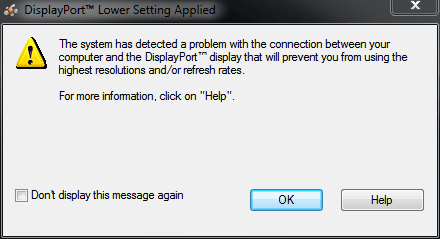
Capture.PNG
 

My Computer

Computer Manufacturer/Model Number
Dell XPS 8100
OS
Windows 7 Home Premium 64-bit
CPU
Intel Core i7 860 @ 2.80GHz
Motherboard
Dell Inc. 0T568R
Memory
8.0GB Dual-Channel DDR3 @ 529MHz 4-7-7-20
Graphics Card(s)
ATI Radeon HD 5770
Sound Card
Realtek High Definition Audio
Monitor(s) Displays
3 Widescreen HD Monitors
Screen Resolution
1600x800
Hard Drives
1000GB Seagate ST31000528AS (SCSI)
1500GB Western Digital WDC WD1001FALS-00J7B1 (SCSI)
PSU
750W
Case
-
Cooling
Fans
Keyboard
Logitech Illuminated Keyboard
Mouse
Logitech MX
Internet Speed
6MBS-15MBS Upload
Other Info
Laptop (Dell Studio 1537)
Intel Mobile Core 2 Duo T6400 @ 2.00GHz
4.0GB Dual-Channel DDR2
Are all 3 monitors the same make/model/resolution?
Have you installed drivers for each monitor? You can check in Device Manager in Control Panel.
 

My Computer

Computer Manufacturer/Model Number
N/A
OS
Windows 7 Ultimate x64
CPU
Intel i7 [email protected]
Motherboard
Asus Maximus IV Extreme-Z
Memory
G Skill DDR3 12800 DDR3 RipJaws 16Gb
Graphics Card(s)
EVGA GTX480 Tri SLI
Sound Card
SoundBlaster X-Fi Surround 5.1 Pro
Monitor(s) Displays
3 * Dell U2711
Screen Resolution
7680x1440
Hard Drives
2 * OCZ Vertex 3 120Gb
4 * Seagate Barracuda XT 2Tb
1 * WD Caviar Black 1Tb
PSU
Silverstone ST1500
Case
Corsair Obsidian 800D
Cooling
Koolance CPU-360 : Koolance VID-480 : Koolance 360x3 + 120x1
Keyboard
Microsoft Sidewinder X4
Mouse
Logitech G1 Optical
Internet Speed
100Mb
get a different adapter.
 

My Computer

Computer Manufacturer/Model Number
HAL-9000
OS
Windows 7 Ultimate 64bit
CPU
Intel i7 3770K
Motherboard
Asus Sabertooth Z77
Memory
16GB DDR3 1333 Corsair XMS3
Graphics Card(s)
XFX HD6950 2GB EyeFinity
Sound Card
Logitech G35 & Sennheiser PC135 & VIA HD
Monitor(s) Displays
23" HP 2310e, 23" Samsung B2230, 21.5" Viewsonic
Screen Resolution
5760x1080
Hard Drives
16TB of Storage
128GB & 256GB Crucial M4 SSD's, 2X 1TB WD Black, 3x 2TB WD, 3x 2TB Samsung F4, 1.5TB Seagate, WD 500GB,
PSU
Antec True Power New 650watt
Case
Cooler Master HAF-932
Cooling
Corsair H60 Hydro Cooler, 3x 230mm Fans, 2x120mm Fan
Keyboard
Logitech G15 and G13
Mouse
Logitech G700 Gaming Mouse
Internet Speed
50/10 Mbit
Other Info
Speakers : Alesis M1 Active Mk2 Studio Monitors , APC RS 1200 UPS, HP 4500DN Color Laser, HP P1006 mono Laser, Kodak 8500 Dye-Sub, Epson 1280 inkjet, Epson Worforce 610 MFC
Are all 3 monitors the same make/model/resolution?
Have you installed drivers for each monitor? You can check in Device Manager in Control Panel.

2 are 21.5" HP LED same model, the other is a 25" HP led (same model as others, just different size) I have also installed the drivers.
 

My Computer

Computer Manufacturer/Model Number
Dell XPS 8100
OS
Windows 7 Home Premium 64-bit
CPU
Intel Core i7 860 @ 2.80GHz
Motherboard
Dell Inc. 0T568R
Memory
8.0GB Dual-Channel DDR3 @ 529MHz 4-7-7-20
Graphics Card(s)
ATI Radeon HD 5770
Sound Card
Realtek High Definition Audio
Monitor(s) Displays
3 Widescreen HD Monitors
Screen Resolution
1600x800
Hard Drives
1000GB Seagate ST31000528AS (SCSI)
1500GB Western Digital WDC WD1001FALS-00J7B1 (SCSI)
PSU
750W
Case
-
Cooling
Fans
Keyboard
Logitech Illuminated Keyboard
Mouse
Logitech MX
Internet Speed
6MBS-15MBS Upload
Other Info
Laptop (Dell Studio 1537)
Intel Mobile Core 2 Duo T6400 @ 2.00GHz
4.0GB Dual-Channel DDR2
Well, I bought a new adapter and it works. However, every time I reboot the resolution and placement of every monitor changes.
 

My Computer

Computer Manufacturer/Model Number
Dell XPS 8100
OS
Windows 7 Home Premium 64-bit
CPU
Intel Core i7 860 @ 2.80GHz
Motherboard
Dell Inc. 0T568R
Memory
8.0GB Dual-Channel DDR3 @ 529MHz 4-7-7-20
Graphics Card(s)
ATI Radeon HD 5770
Sound Card
Realtek High Definition Audio
Monitor(s) Displays
3 Widescreen HD Monitors
Screen Resolution
1600x800
Hard Drives
1000GB Seagate ST31000528AS (SCSI)
1500GB Western Digital WDC WD1001FALS-00J7B1 (SCSI)
PSU
750W
Case
-
Cooling
Fans
Keyboard
Logitech Illuminated Keyboard
Mouse
Logitech MX
Internet Speed
6MBS-15MBS Upload
Other Info
Laptop (Dell Studio 1537)
Intel Mobile Core 2 Duo T6400 @ 2.00GHz
4.0GB Dual-Channel DDR2
Try removing all but the main monitor, then uninstall them all in Device Mangler.

Reboot.

Add in one monitor (I'd suggest the Display Port one), let it be identified and installed, then reboot and see if the settings hold.

If you are still good with two monitors, add in the third one, let it be identified and installed, then reboot and see if the settings hold.

For what it's worth, my housemate experienced three-monitor weirdness with the latest ATI driver. (As of two weeks ago - they move pretty fast these days...) She never had any trouble before that.

I also have three monitors, and though I didn't have any trouble after I loaded the new video driver I did have to re-sort them all out after the first post-install reboot.
 

My Computer

Computer Manufacturer/Model Number
Self
OS
Main - Windows 7 Pro SP1 64-Bit; 2nd - Windows Server 2008 R2
CPU
Main - Core i7 2600K; 2nd - Core i7 920
Motherboard
Main - Asus P8Z68-V Pro/Gen3; 2nd - Gigabyte GA-EX58-UDR3
Memory
Main - 16GB Corsair Vengeance; 2nd - 12GB Corsair Vengeance
Graphics Card(s)
Main - XFX Radeon 6870 1GB; 2nd - XFX Radeon 4870 1GB
Sound Card
Both: Onboard Realtek Azalia
Monitor(s) Displays
Main - Hann 25" + I-INC 25" + Acer 23"; 2nd - Upgrading Soon
Screen Resolution
Main - 1920x1080 (All Three Monitors); 2nd - Upgrading Soon
Hard Drives
Main - (1) Crucial M4 128GB (Boot)
Main - (1) Seagate 2TB 64MB Cache (Data)
Main - (1) Seagate 2TB 64MB Cache (Data Backup)
2nd - (1) Intel X25-M SSD 80GB (Boot)
2nd - (3) Seagate 1TB 32MB Cache (Data Backup)
2nd - (1) Seagate 320GB (Because)
PSU
Main - OCZ 600W Modular; 2nd - OCZ 600W
Case
Main - Thermaltake Element G; 2nd - NZXT something or other
Cooling
Main - Corsair H80; 2nd - Prolimatech Megahalems
Keyboard
Main - Razer Reclusa; 2nd - Old MS Keyboard
Mouse
Main - Logitech MX Revolution; 2nd - Old MS Mouse
Internet Speed
20Mbps Time-Warner Cable
I have one more problem, after screen saver the middle monitor doesn't come on for a few seconds, the left (display port) says 'Input out of range' and I have to wait until the monitor goes to sleep then press a button on the monitor for it to come on. The right works fine.
 

My Computer

Computer Manufacturer/Model Number
Dell XPS 8100
OS
Windows 7 Home Premium 64-bit
CPU
Intel Core i7 860 @ 2.80GHz
Motherboard
Dell Inc. 0T568R
Memory
8.0GB Dual-Channel DDR3 @ 529MHz 4-7-7-20
Graphics Card(s)
ATI Radeon HD 5770
Sound Card
Realtek High Definition Audio
Monitor(s) Displays
3 Widescreen HD Monitors
Screen Resolution
1600x800
Hard Drives
1000GB Seagate ST31000528AS (SCSI)
1500GB Western Digital WDC WD1001FALS-00J7B1 (SCSI)
PSU
750W
Case
-
Cooling
Fans
Keyboard
Logitech Illuminated Keyboard
Mouse
Logitech MX
Internet Speed
6MBS-15MBS Upload
Other Info
Laptop (Dell Studio 1537)
Intel Mobile Core 2 Duo T6400 @ 2.00GHz
4.0GB Dual-Channel DDR2
Have you tried playing around with the Power settings in Control Panel?

What about the other problems, like the resolution changes - any luck there?

You might try a free 30-Day trial of DisplayFusion and see if it helps you sort this stuff out. :)
 

My Computer

Computer Manufacturer/Model Number
Self
OS
Main - Windows 7 Pro SP1 64-Bit; 2nd - Windows Server 2008 R2
CPU
Main - Core i7 2600K; 2nd - Core i7 920
Motherboard
Main - Asus P8Z68-V Pro/Gen3; 2nd - Gigabyte GA-EX58-UDR3
Memory
Main - 16GB Corsair Vengeance; 2nd - 12GB Corsair Vengeance
Graphics Card(s)
Main - XFX Radeon 6870 1GB; 2nd - XFX Radeon 4870 1GB
Sound Card
Both: Onboard Realtek Azalia
Monitor(s) Displays
Main - Hann 25" + I-INC 25" + Acer 23"; 2nd - Upgrading Soon
Screen Resolution
Main - 1920x1080 (All Three Monitors); 2nd - Upgrading Soon
Hard Drives
Main - (1) Crucial M4 128GB (Boot)
Main - (1) Seagate 2TB 64MB Cache (Data)
Main - (1) Seagate 2TB 64MB Cache (Data Backup)
2nd - (1) Intel X25-M SSD 80GB (Boot)
2nd - (3) Seagate 1TB 32MB Cache (Data Backup)
2nd - (1) Seagate 320GB (Because)
PSU
Main - OCZ 600W Modular; 2nd - OCZ 600W
Case
Main - Thermaltake Element G; 2nd - NZXT something or other
Cooling
Main - Corsair H80; 2nd - Prolimatech Megahalems
Keyboard
Main - Razer Reclusa; 2nd - Old MS Keyboard
Mouse
Main - Logitech MX Revolution; 2nd - Old MS Mouse
Internet Speed
20Mbps Time-Warner Cable
I havent had any luck. When I just have one monitor hooked up, its 1080p when it reaches the log in screen but quickly changes to 1600x900.
I think I'm just going to try a clean install. Something I have installed (or maybe ATI drivers are messed up, probably are) is doing something.
 

My Computer

Computer Manufacturer/Model Number
Dell XPS 8100
OS
Windows 7 Home Premium 64-bit
CPU
Intel Core i7 860 @ 2.80GHz
Motherboard
Dell Inc. 0T568R
Memory
8.0GB Dual-Channel DDR3 @ 529MHz 4-7-7-20
Graphics Card(s)
ATI Radeon HD 5770
Sound Card
Realtek High Definition Audio
Monitor(s) Displays
3 Widescreen HD Monitors
Screen Resolution
1600x800
Hard Drives
1000GB Seagate ST31000528AS (SCSI)
1500GB Western Digital WDC WD1001FALS-00J7B1 (SCSI)
PSU
750W
Case
-
Cooling
Fans
Keyboard
Logitech Illuminated Keyboard
Mouse
Logitech MX
Internet Speed
6MBS-15MBS Upload
Other Info
Laptop (Dell Studio 1537)
Intel Mobile Core 2 Duo T6400 @ 2.00GHz
4.0GB Dual-Channel DDR2
Are all 3 monitors the same make/model/resolution?
Have you installed drivers for each monitor? You can check in Device Manager in Control Panel.
Have you done the part in bold? :)
 

My Computer

Computer Manufacturer/Model Number
Self
OS
Main - Windows 7 Pro SP1 64-Bit; 2nd - Windows Server 2008 R2
CPU
Main - Core i7 2600K; 2nd - Core i7 920
Motherboard
Main - Asus P8Z68-V Pro/Gen3; 2nd - Gigabyte GA-EX58-UDR3
Memory
Main - 16GB Corsair Vengeance; 2nd - 12GB Corsair Vengeance
Graphics Card(s)
Main - XFX Radeon 6870 1GB; 2nd - XFX Radeon 4870 1GB
Sound Card
Both: Onboard Realtek Azalia
Monitor(s) Displays
Main - Hann 25" + I-INC 25" + Acer 23"; 2nd - Upgrading Soon
Screen Resolution
Main - 1920x1080 (All Three Monitors); 2nd - Upgrading Soon
Hard Drives
Main - (1) Crucial M4 128GB (Boot)
Main - (1) Seagate 2TB 64MB Cache (Data)
Main - (1) Seagate 2TB 64MB Cache (Data Backup)
2nd - (1) Intel X25-M SSD 80GB (Boot)
2nd - (3) Seagate 1TB 32MB Cache (Data Backup)
2nd - (1) Seagate 320GB (Because)
PSU
Main - OCZ 600W Modular; 2nd - OCZ 600W
Case
Main - Thermaltake Element G; 2nd - NZXT something or other
Cooling
Main - Corsair H80; 2nd - Prolimatech Megahalems
Keyboard
Main - Razer Reclusa; 2nd - Old MS Keyboard
Mouse
Main - Logitech MX Revolution; 2nd - Old MS Mouse
Internet Speed
20Mbps Time-Warner Cable

My Computer

Computer Manufacturer/Model Number
Dell XPS 8100
OS
Windows 7 Home Premium 64-bit
CPU
Intel Core i7 860 @ 2.80GHz
Motherboard
Dell Inc. 0T568R
Memory
8.0GB Dual-Channel DDR3 @ 529MHz 4-7-7-20
Graphics Card(s)
ATI Radeon HD 5770
Sound Card
Realtek High Definition Audio
Monitor(s) Displays
3 Widescreen HD Monitors
Screen Resolution
1600x800
Hard Drives
1000GB Seagate ST31000528AS (SCSI)
1500GB Western Digital WDC WD1001FALS-00J7B1 (SCSI)
PSU
750W
Case
-
Cooling
Fans
Keyboard
Logitech Illuminated Keyboard
Mouse
Logitech MX
Internet Speed
6MBS-15MBS Upload
Other Info
Laptop (Dell Studio 1537)
Intel Mobile Core 2 Duo T6400 @ 2.00GHz
4.0GB Dual-Channel DDR2
After almost a year of problems with drivers, video card, and other stuff I decided to do a clean install. Hopefully this fresh slate wont get messed up like before.
 

My Computer

Computer Manufacturer/Model Number
Dell XPS 8100
OS
Windows 7 Home Premium 64-bit
CPU
Intel Core i7 860 @ 2.80GHz
Motherboard
Dell Inc. 0T568R
Memory
8.0GB Dual-Channel DDR3 @ 529MHz 4-7-7-20
Graphics Card(s)
ATI Radeon HD 5770
Sound Card
Realtek High Definition Audio
Monitor(s) Displays
3 Widescreen HD Monitors
Screen Resolution
1600x800
Hard Drives
1000GB Seagate ST31000528AS (SCSI)
1500GB Western Digital WDC WD1001FALS-00J7B1 (SCSI)
PSU
750W
Case
-
Cooling
Fans
Keyboard
Logitech Illuminated Keyboard
Mouse
Logitech MX
Internet Speed
6MBS-15MBS Upload
Other Info
Laptop (Dell Studio 1537)
Intel Mobile Core 2 Duo T6400 @ 2.00GHz
4.0GB Dual-Channel DDR2
It's a shame you have to do that, but I think you've made the right choice. :)
 

My Computer

Computer Manufacturer/Model Number
Self
OS
Main - Windows 7 Pro SP1 64-Bit; 2nd - Windows Server 2008 R2
CPU
Main - Core i7 2600K; 2nd - Core i7 920
Motherboard
Main - Asus P8Z68-V Pro/Gen3; 2nd - Gigabyte GA-EX58-UDR3
Memory
Main - 16GB Corsair Vengeance; 2nd - 12GB Corsair Vengeance
Graphics Card(s)
Main - XFX Radeon 6870 1GB; 2nd - XFX Radeon 4870 1GB
Sound Card
Both: Onboard Realtek Azalia
Monitor(s) Displays
Main - Hann 25" + I-INC 25" + Acer 23"; 2nd - Upgrading Soon
Screen Resolution
Main - 1920x1080 (All Three Monitors); 2nd - Upgrading Soon
Hard Drives
Main - (1) Crucial M4 128GB (Boot)
Main - (1) Seagate 2TB 64MB Cache (Data)
Main - (1) Seagate 2TB 64MB Cache (Data Backup)
2nd - (1) Intel X25-M SSD 80GB (Boot)
2nd - (3) Seagate 1TB 32MB Cache (Data Backup)
2nd - (1) Seagate 320GB (Because)
PSU
Main - OCZ 600W Modular; 2nd - OCZ 600W
Case
Main - Thermaltake Element G; 2nd - NZXT something or other
Cooling
Main - Corsair H80; 2nd - Prolimatech Megahalems
Keyboard
Main - Razer Reclusa; 2nd - Old MS Keyboard
Mouse
Main - Logitech MX Revolution; 2nd - Old MS Mouse
Internet Speed
20Mbps Time-Warner Cable
It's a shame you have to do that, but I think you've made the right choice. :)
Sure hope so, I have spent the past 3 hours restoring files, installing programs, updates, and I am still far from done. I haven't had a chance to restart because of Windows Backup restoringso I have yet to see if this changes anything with my monitor set up.
 

My Computer

Computer Manufacturer/Model Number
Dell XPS 8100
OS
Windows 7 Home Premium 64-bit
CPU
Intel Core i7 860 @ 2.80GHz
Motherboard
Dell Inc. 0T568R
Memory
8.0GB Dual-Channel DDR3 @ 529MHz 4-7-7-20
Graphics Card(s)
ATI Radeon HD 5770
Sound Card
Realtek High Definition Audio
Monitor(s) Displays
3 Widescreen HD Monitors
Screen Resolution
1600x800
Hard Drives
1000GB Seagate ST31000528AS (SCSI)
1500GB Western Digital WDC WD1001FALS-00J7B1 (SCSI)
PSU
750W
Case
-
Cooling
Fans
Keyboard
Logitech Illuminated Keyboard
Mouse
Logitech MX
Internet Speed
6MBS-15MBS Upload
Other Info
Laptop (Dell Studio 1537)
Intel Mobile Core 2 Duo T6400 @ 2.00GHz
4.0GB Dual-Channel DDR2
Just got done re-installing and re-setting up. All that work and.... nothing changed.
My monitors are still in the wrong configuration on reboot, the display port monitor still says "Input signal out of range" until I turn it off and on.
Could my card be bad? I have had issues with it for almost a year now (BSOD, screens turning green, settings change after every reboot, etc.)
 

My Computer

Computer Manufacturer/Model Number
Dell XPS 8100
OS
Windows 7 Home Premium 64-bit
CPU
Intel Core i7 860 @ 2.80GHz
Motherboard
Dell Inc. 0T568R
Memory
8.0GB Dual-Channel DDR3 @ 529MHz 4-7-7-20
Graphics Card(s)
ATI Radeon HD 5770
Sound Card
Realtek High Definition Audio
Monitor(s) Displays
3 Widescreen HD Monitors
Screen Resolution
1600x800
Hard Drives
1000GB Seagate ST31000528AS (SCSI)
1500GB Western Digital WDC WD1001FALS-00J7B1 (SCSI)
PSU
750W
Case
-
Cooling
Fans
Keyboard
Logitech Illuminated Keyboard
Mouse
Logitech MX
Internet Speed
6MBS-15MBS Upload
Other Info
Laptop (Dell Studio 1537)
Intel Mobile Core 2 Duo T6400 @ 2.00GHz
4.0GB Dual-Channel DDR2
Do you have someone who could loan you an Eyefinity-capable card to try it out?
 

My Computer

Computer Manufacturer/Model Number
Self
OS
Main - Windows 7 Pro SP1 64-Bit; 2nd - Windows Server 2008 R2
CPU
Main - Core i7 2600K; 2nd - Core i7 920
Motherboard
Main - Asus P8Z68-V Pro/Gen3; 2nd - Gigabyte GA-EX58-UDR3
Memory
Main - 16GB Corsair Vengeance; 2nd - 12GB Corsair Vengeance
Graphics Card(s)
Main - XFX Radeon 6870 1GB; 2nd - XFX Radeon 4870 1GB
Sound Card
Both: Onboard Realtek Azalia
Monitor(s) Displays
Main - Hann 25" + I-INC 25" + Acer 23"; 2nd - Upgrading Soon
Screen Resolution
Main - 1920x1080 (All Three Monitors); 2nd - Upgrading Soon
Hard Drives
Main - (1) Crucial M4 128GB (Boot)
Main - (1) Seagate 2TB 64MB Cache (Data)
Main - (1) Seagate 2TB 64MB Cache (Data Backup)
2nd - (1) Intel X25-M SSD 80GB (Boot)
2nd - (3) Seagate 1TB 32MB Cache (Data Backup)
2nd - (1) Seagate 320GB (Because)
PSU
Main - OCZ 600W Modular; 2nd - OCZ 600W
Case
Main - Thermaltake Element G; 2nd - NZXT something or other
Cooling
Main - Corsair H80; 2nd - Prolimatech Megahalems
Keyboard
Main - Razer Reclusa; 2nd - Old MS Keyboard
Mouse
Main - Logitech MX Revolution; 2nd - Old MS Mouse
Internet Speed
20Mbps Time-Warner Cable

My Computer

Computer Manufacturer/Model Number
Dell XPS 8100
OS
Windows 7 Home Premium 64-bit
CPU
Intel Core i7 860 @ 2.80GHz
Motherboard
Dell Inc. 0T568R
Memory
8.0GB Dual-Channel DDR3 @ 529MHz 4-7-7-20
Graphics Card(s)
ATI Radeon HD 5770
Sound Card
Realtek High Definition Audio
Monitor(s) Displays
3 Widescreen HD Monitors
Screen Resolution
1600x800
Hard Drives
1000GB Seagate ST31000528AS (SCSI)
1500GB Western Digital WDC WD1001FALS-00J7B1 (SCSI)
PSU
750W
Case
-
Cooling
Fans
Keyboard
Logitech Illuminated Keyboard
Mouse
Logitech MX
Internet Speed
6MBS-15MBS Upload
Other Info
Laptop (Dell Studio 1537)
Intel Mobile Core 2 Duo T6400 @ 2.00GHz
4.0GB Dual-Channel DDR2
Is the card under warranty? After a year of putting up with this I'd exchange it if I could.

If it's not under warranty, would you definitely buy a new one if you knew the one you have now was bad? If that's the case I would buy one from a store with a money-back return policy and try it out. If the problem goes away, keep it. If not, you get your money back and head back to the ol' drawing board.

EDIT:

Sorry if I missed it, but are you sure your PSU is up to snuff? I don't know that it would cause this exact problem, but a card which is barely getting enough power might do all sorts of weird things.
 

My Computer

Computer Manufacturer/Model Number
Self
OS
Main - Windows 7 Pro SP1 64-Bit; 2nd - Windows Server 2008 R2
CPU
Main - Core i7 2600K; 2nd - Core i7 920
Motherboard
Main - Asus P8Z68-V Pro/Gen3; 2nd - Gigabyte GA-EX58-UDR3
Memory
Main - 16GB Corsair Vengeance; 2nd - 12GB Corsair Vengeance
Graphics Card(s)
Main - XFX Radeon 6870 1GB; 2nd - XFX Radeon 4870 1GB
Sound Card
Both: Onboard Realtek Azalia
Monitor(s) Displays
Main - Hann 25" + I-INC 25" + Acer 23"; 2nd - Upgrading Soon
Screen Resolution
Main - 1920x1080 (All Three Monitors); 2nd - Upgrading Soon
Hard Drives
Main - (1) Crucial M4 128GB (Boot)
Main - (1) Seagate 2TB 64MB Cache (Data)
Main - (1) Seagate 2TB 64MB Cache (Data Backup)
2nd - (1) Intel X25-M SSD 80GB (Boot)
2nd - (3) Seagate 1TB 32MB Cache (Data Backup)
2nd - (1) Seagate 320GB (Because)
PSU
Main - OCZ 600W Modular; 2nd - OCZ 600W
Case
Main - Thermaltake Element G; 2nd - NZXT something or other
Cooling
Main - Corsair H80; 2nd - Prolimatech Megahalems
Keyboard
Main - Razer Reclusa; 2nd - Old MS Keyboard
Mouse
Main - Logitech MX Revolution; 2nd - Old MS Mouse
Internet Speed
20Mbps Time-Warner Cable
Is the card under warranty? After a year of putting up with this I'd exchange it if I could.

If it's not under warranty, would you definitely buy a new one if you knew the one you have now was bad? If that's the case I would buy one from a store with a money-back return policy and try it out. If the problem goes away, keep it. If not, you get your money back and head back to the ol' drawing board.

EDIT:

Sorry if I missed it, but are you sure your PSU is up to snuff? I don't know that it would cause this exact problem, but a card which is barely getting enough power might do all sorts of weird things.

I bought the computer through Best Buy so in order to get anything under warranty Freak Squad has to "fix" it first. Unless ATI has there own warranty, I don't have a warranty option.

I upgraded to a 750W PSU a few months ago thinking that was my problem, but it didn't change much. (The computer came with a 350W PSU, though the card requires 400W)

I have been considering buying a new higher model and better card. Any suggestions?
 

My Computer

Computer Manufacturer/Model Number
Dell XPS 8100
OS
Windows 7 Home Premium 64-bit
CPU
Intel Core i7 860 @ 2.80GHz
Motherboard
Dell Inc. 0T568R
Memory
8.0GB Dual-Channel DDR3 @ 529MHz 4-7-7-20
Graphics Card(s)
ATI Radeon HD 5770
Sound Card
Realtek High Definition Audio
Monitor(s) Displays
3 Widescreen HD Monitors
Screen Resolution
1600x800
Hard Drives
1000GB Seagate ST31000528AS (SCSI)
1500GB Western Digital WDC WD1001FALS-00J7B1 (SCSI)
PSU
750W
Case
-
Cooling
Fans
Keyboard
Logitech Illuminated Keyboard
Mouse
Logitech MX
Internet Speed
6MBS-15MBS Upload
Other Info
Laptop (Dell Studio 1537)
Intel Mobile Core 2 Duo T6400 @ 2.00GHz
4.0GB Dual-Channel DDR2
I'd go to ATI's website and check their RMA policy. Fortunately, I haven't had to return a video card, but most companies have you enter your part# and serial# and will tell you right away if it qualifies. Worth a shot. :)
 

My Computer

Computer Manufacturer/Model Number
Self
OS
Main - Windows 7 Pro SP1 64-Bit; 2nd - Windows Server 2008 R2
CPU
Main - Core i7 2600K; 2nd - Core i7 920
Motherboard
Main - Asus P8Z68-V Pro/Gen3; 2nd - Gigabyte GA-EX58-UDR3
Memory
Main - 16GB Corsair Vengeance; 2nd - 12GB Corsair Vengeance
Graphics Card(s)
Main - XFX Radeon 6870 1GB; 2nd - XFX Radeon 4870 1GB
Sound Card
Both: Onboard Realtek Azalia
Monitor(s) Displays
Main - Hann 25" + I-INC 25" + Acer 23"; 2nd - Upgrading Soon
Screen Resolution
Main - 1920x1080 (All Three Monitors); 2nd - Upgrading Soon
Hard Drives
Main - (1) Crucial M4 128GB (Boot)
Main - (1) Seagate 2TB 64MB Cache (Data)
Main - (1) Seagate 2TB 64MB Cache (Data Backup)
2nd - (1) Intel X25-M SSD 80GB (Boot)
2nd - (3) Seagate 1TB 32MB Cache (Data Backup)
2nd - (1) Seagate 320GB (Because)
PSU
Main - OCZ 600W Modular; 2nd - OCZ 600W
Case
Main - Thermaltake Element G; 2nd - NZXT something or other
Cooling
Main - Corsair H80; 2nd - Prolimatech Megahalems
Keyboard
Main - Razer Reclusa; 2nd - Old MS Keyboard
Mouse
Main - Logitech MX Revolution; 2nd - Old MS Mouse
Internet Speed
20Mbps Time-Warner Cable
Back
Top