32-bit or 64-bit?

drazenn

New member
Power User
Local time
11:39 PM
Messages
177
Location
zagreb,croatia
I am going to do a clean install,and I am thinking about installing 64-bit version.I have never used 64-bit version of any OS,so can you tell me will I feel the difference,is it faster,is there any problems with drivers?That are the things I am affraid of so I am still not sure.Or maybe it's better to install 32-bit version again?
Thanks
 

My Computer

Computer type
PC/Desktop
Computer Manufacturer/Model Number
intel x58 selfmade
OS
Windows 7 Ultimate x64
CPU
[email protected] (non overclocked)
Motherboard
x58
Memory
8gb DDR3
Graphics Card(s)
Asus 6850
Monitor(s) Displays
lg 22"
Hard Drives
1TB
PSU
Corsair 650w
Case
Gigabyte
Cooling
Scytech
Keyboard
noname
Mouse
Logitech wireless xy
Internet Speed
70GB
Antivirus
Windows Defender
Browser
Chrome (default)
There are differences and advantages when using 64bit versions, but there are also complications.

In order to use all 64bit featured improvements, you should have at least 4GB of RAM. Less RAM is bad for 64bit, and better for 32bit. Now if you do have 4GB of RAM, 64bit will take you a leap ahead to personal computing.
If not, stick with 32, it manages less RAM better. (besides, 32bit Windows doesn't manage more than 4GB anyway, only ~3.32GB will be available.

Feel the difference? With more than 4GB of RAM.
Is it Faster? yes, but 4GB of RAM are still needed to see that.
Driver problems? Most of them are covered and work fine.

Will it run with less that 4GB? Of course! Only problem is that 64bit OS need larger memory "blocks" for the same process that a 32bit system does, so it will consume more memory of your 2GB that 32bit will, making 32bit slightly faster and more proper solution in this case.
 

My Computer

Computer Manufacturer/Model Number
ENIAC
OS
Windows 7 RC 7100 32bit/64bit
CPU
Intel Core2Duo E4500 2.20 GHz
Motherboard
ASUS P5LD2-X/1333
Memory
2x1GB Kinsgston DDR2 800MHz
Graphics Card(s)
Nvidia 8500GT
Sound Card
Onboard High Definition Audio Device
Monitor(s) Displays
Sony Bravia 42"
Case
LINKW 2222
Cooling
Standard Intel
Keyboard
Some cheap one
Mouse
Microsoft Intellimouse something
Internet Speed
24MBps ADSL
Thank you,since I have 4GB RAM,and after your explanation,I'll try 64-bit.
 

My Computer

Computer type
PC/Desktop
Computer Manufacturer/Model Number
intel x58 selfmade
OS
Windows 7 Ultimate x64
CPU
[email protected] (non overclocked)
Motherboard
x58
Memory
8gb DDR3
Graphics Card(s)
Asus 6850
Monitor(s) Displays
lg 22"
Hard Drives
1TB
PSU
Corsair 650w
Case
Gigabyte
Cooling
Scytech
Keyboard
noname
Mouse
Logitech wireless xy
Internet Speed
70GB
Antivirus
Windows Defender
Browser
Chrome (default)
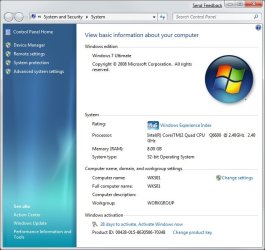
Interestingly enough I overlooked the 32/64 bit option in the installation and installed the 32 bit version and it picked up all 8GB of RAM. A screen shot is attached. Not really sure how that happened.
 

Attachments

  • screenshot 5.JPG
    screenshot 5.JPG
    53.5 KB · Views: 2,139

My Computer

OS
Windows 7, XP Pro, Home Server
CPU
Intel Core 2 Quad Q6600 2.4Ghz
Motherboard
ASUS P5N32-E SLI plus
Memory
8GB Mushkin EM2 (4 x 2GB DIMMS)
Graphics Card(s)
2 x NVidia Geforce 8500 GT 512MB PCIe
Sound Card
SupremeFX Audio Card
Monitor(s) Displays
2 x Acer 17'' LCD monitors, 1 CTX Ultra 18'' CRT monitor
Screen Resolution
1280 x 1024
Hard Drives
4 x WD2500JB Caviar SE 250GB 7200RPM 8MB EIDE
1 x WD Caviar GP 500GB SATA 3.0Gb/s 16MB Cache
1 x WD800JB SE 80GB 7200RPM Special Edition IDE Hard (for the OSs)
PSU
Thermaltake Toughpower 750w
Case
Black Gigabyte 3D Mars
Internet Speed
8Mbps
Not really sure how that happened.


As Vista SP1, le system show to you the available memory in your computer. That's not mean it can use this memory.

Go to the task manager -> performance. You will see the real amount of RAM it use.
 

My Computer

OS
Vista H.P. SP1 x32 Seven RC x64
CPU
Q6600 @ 3.4Ghz
Motherboard
GA-EP45-DS3L
Memory
4Go PC2-6400
Graphics Card(s)
8500GT @ 700/500
Sound Card
Audigy Platinium
Monitor(s) Displays
Mitsubishi Diamond Pro 920 + Mitsubishi Diamond Pro 720
Screen Resolution
1600x1200 twice
Hard Drives
Hitachi 160Go
Maxtor 160Go (system drive)
Maxtor 200Go in Antec MX-1 EC external box (eSATA-USB2.0)
PSU
Corsair VX550W
Case
Thermaltake Xaser III
Cooling
Watercooling (CPU, GPU, HDD, NB)
Keyboard
MS Wireless Multimedia 6000 V2.0
Mouse
IntellEye Explorer 3.0
Internet Speed
ADSL 18Mbit/s/1Mbit/s
Oh ok I see now. I don't have too much experience with Vista. I had it on my laptop (which has 3GB of RAM) and didn't like it so I put XP on it.

I was thinking of reinstalling Windows 7 anyway once I find my drivers again.
 

My Computer

OS
Windows 7, XP Pro, Home Server
CPU
Intel Core 2 Quad Q6600 2.4Ghz
Motherboard
ASUS P5N32-E SLI plus
Memory
8GB Mushkin EM2 (4 x 2GB DIMMS)
Graphics Card(s)
2 x NVidia Geforce 8500 GT 512MB PCIe
Sound Card
SupremeFX Audio Card
Monitor(s) Displays
2 x Acer 17'' LCD monitors, 1 CTX Ultra 18'' CRT monitor
Screen Resolution
1280 x 1024
Hard Drives
4 x WD2500JB Caviar SE 250GB 7200RPM 8MB EIDE
1 x WD Caviar GP 500GB SATA 3.0Gb/s 16MB Cache
1 x WD800JB SE 80GB 7200RPM Special Edition IDE Hard (for the OSs)
PSU
Thermaltake Toughpower 750w
Case
Black Gigabyte 3D Mars
Internet Speed
8Mbps
Is the choice of installing the x32 or x64 version of Windows in any way dictated by the motherboard architecture?

roadtrip
 

My Computer

Computer Manufacturer/Model Number
I bolted it together myself
OS
Windows 7 Professional
CPU
Intel Core i7 920 with stock cooler
Motherboard
ASUS P6T Deluxe with OC Palm Remote (BIOS 1102)
Memory
Corsair Dominator 6GB (3 x 2GB) TR3XG1600C8D DDR3 1600
Graphics Card(s)
EVGA NVIDIA GeForce 9800 GTX (G92) 512MB 256-bit GDDR3
Monitor(s) Displays
Samsung SyncMaster 953BW 19"
Screen Resolution
1440 x 900
Hard Drives
Intel X25-M 80GB SSD G1 x 2EA in a RAID 0 configuration 128 KB stripe
PSU
Cooler Master 700W 80 PLUS SILVER Certified PSU
Case
Antec Nine Hundred ATX Mid Tower Case (it has blue LEDs)
Cooling
case has 5 fans, stock CPU fan, graphic card and PSU fans
Keyboard
Logitech cordless keyboard
Mouse
Logitech V22 cordless optical
Internet Speed
Wildblue Satellite (1.5 mbps)
Is the choice of installing the x32 or x64 version of Windows in any way dictated by the motherboard architecture?


What do you mean exactly ?

The major argument for x64 is the ability of using 4Go of RAM and more .. that's all.

In a certain way the motherboard is important, it must be able to accept this amount of RAM.
 

My Computer

OS
Vista H.P. SP1 x32 Seven RC x64
CPU
Q6600 @ 3.4Ghz
Motherboard
GA-EP45-DS3L
Memory
4Go PC2-6400
Graphics Card(s)
8500GT @ 700/500
Sound Card
Audigy Platinium
Monitor(s) Displays
Mitsubishi Diamond Pro 920 + Mitsubishi Diamond Pro 720
Screen Resolution
1600x1200 twice
Hard Drives
Hitachi 160Go
Maxtor 160Go (system drive)
Maxtor 200Go in Antec MX-1 EC external box (eSATA-USB2.0)
PSU
Corsair VX550W
Case
Thermaltake Xaser III
Cooling
Watercooling (CPU, GPU, HDD, NB)
Keyboard
MS Wireless Multimedia 6000 V2.0
Mouse
IntellEye Explorer 3.0
Internet Speed
ADSL 18Mbit/s/1Mbit/s
What do you mean exactly ?

The major argument for x64 is the ability of using 4Go of RAM and more .. that's all.

In a certain way the motherboard is important, it must be able to accept this amount of RAM.


Well, CPUs have an inherent bus width (the 'architecture'). They started as 8-bit, then increased to 16-bit, 32-bit and some of the more recent CPUs are designed with 64-bit bus width. I thought there might be rules associated with the motherboard architecture which influence which version of Windows (x32 or x64) is better suited to a motherboard bus width.

roadtrip
 

My Computer

Computer Manufacturer/Model Number
I bolted it together myself
OS
Windows 7 Professional
CPU
Intel Core i7 920 with stock cooler
Motherboard
ASUS P6T Deluxe with OC Palm Remote (BIOS 1102)
Memory
Corsair Dominator 6GB (3 x 2GB) TR3XG1600C8D DDR3 1600
Graphics Card(s)
EVGA NVIDIA GeForce 9800 GTX (G92) 512MB 256-bit GDDR3
Monitor(s) Displays
Samsung SyncMaster 953BW 19"
Screen Resolution
1440 x 900
Hard Drives
Intel X25-M 80GB SSD G1 x 2EA in a RAID 0 configuration 128 KB stripe
PSU
Cooler Master 700W 80 PLUS SILVER Certified PSU
Case
Antec Nine Hundred ATX Mid Tower Case (it has blue LEDs)
Cooling
case has 5 fans, stock CPU fan, graphic card and PSU fans
Keyboard
Logitech cordless keyboard
Mouse
Logitech V22 cordless optical
Internet Speed
Wildblue Satellite (1.5 mbps)
There's no direct link between x64 CPU and motherboard architecture (for x64 purpose).

You can compare:

AMD Athlon 64 and Intel Core 2 Duo use the same x64 model (Emt64 is a copy-paste of AMD64 instruction), but they are associate to really different architeture: FSB and memory controll on Northbridge for Core2.. Hypertransport and memory controleur on CPU for Athlon.

The x64 is only a "CPU technologie" which mean that registrer and instructions in the CPU are made for 64bit. Outside the CPU there is no difference.

FSB and hypertransport are both max 32bit bus
QPI is 16 to 20bit width
And DDR-SDRAM use a ... 64bit width bus :p (funny isn't it?)
 

My Computer

OS
Vista H.P. SP1 x32 Seven RC x64
CPU
Q6600 @ 3.4Ghz
Motherboard
GA-EP45-DS3L
Memory
4Go PC2-6400
Graphics Card(s)
8500GT @ 700/500
Sound Card
Audigy Platinium
Monitor(s) Displays
Mitsubishi Diamond Pro 920 + Mitsubishi Diamond Pro 720
Screen Resolution
1600x1200 twice
Hard Drives
Hitachi 160Go
Maxtor 160Go (system drive)
Maxtor 200Go in Antec MX-1 EC external box (eSATA-USB2.0)
PSU
Corsair VX550W
Case
Thermaltake Xaser III
Cooling
Watercooling (CPU, GPU, HDD, NB)
Keyboard
MS Wireless Multimedia 6000 V2.0
Mouse
IntellEye Explorer 3.0
Internet Speed
ADSL 18Mbit/s/1Mbit/s
Thanks for explaining that.

roadtrip
 

My Computer

Computer Manufacturer/Model Number
I bolted it together myself
OS
Windows 7 Professional
CPU
Intel Core i7 920 with stock cooler
Motherboard
ASUS P6T Deluxe with OC Palm Remote (BIOS 1102)
Memory
Corsair Dominator 6GB (3 x 2GB) TR3XG1600C8D DDR3 1600
Graphics Card(s)
EVGA NVIDIA GeForce 9800 GTX (G92) 512MB 256-bit GDDR3
Monitor(s) Displays
Samsung SyncMaster 953BW 19"
Screen Resolution
1440 x 900
Hard Drives
Intel X25-M 80GB SSD G1 x 2EA in a RAID 0 configuration 128 KB stripe
PSU
Cooler Master 700W 80 PLUS SILVER Certified PSU
Case
Antec Nine Hundred ATX Mid Tower Case (it has blue LEDs)
Cooling
case has 5 fans, stock CPU fan, graphic card and PSU fans
Keyboard
Logitech cordless keyboard
Mouse
Logitech V22 cordless optical
Internet Speed
Wildblue Satellite (1.5 mbps)
you're welcom
 

My Computer

OS
Vista H.P. SP1 x32 Seven RC x64
CPU
Q6600 @ 3.4Ghz
Motherboard
GA-EP45-DS3L
Memory
4Go PC2-6400
Graphics Card(s)
8500GT @ 700/500
Sound Card
Audigy Platinium
Monitor(s) Displays
Mitsubishi Diamond Pro 920 + Mitsubishi Diamond Pro 720
Screen Resolution
1600x1200 twice
Hard Drives
Hitachi 160Go
Maxtor 160Go (system drive)
Maxtor 200Go in Antec MX-1 EC external box (eSATA-USB2.0)
PSU
Corsair VX550W
Case
Thermaltake Xaser III
Cooling
Watercooling (CPU, GPU, HDD, NB)
Keyboard
MS Wireless Multimedia 6000 V2.0
Mouse
IntellEye Explorer 3.0
Internet Speed
ADSL 18Mbit/s/1Mbit/s
Back
Top