32 or 64 bit OS

roehrle

New member
Member
Local time
8:01 PM
Messages
52
Location
Edgewater Park NJ
I recently got a new computer with Win 7. I believe that it is running 64 bit but I am not sure. How does one determine which mode their computer is running ?
Is it possible to select 32 bit rather than 64 bit ?
I have a program that will only run in a 32Bit OS ,so I am told by the company offering the program. I would like to run this one program occasionally if it isn't too complicated to switch to 32 bit. I have been told by people on this forum that I should be able to run a program in either 32 or 64 bit but like I said the company that offers this said it will not run on my 64 bit OS. Any suggestions ??
 

My Computer

Computer Manufacturer/Model Number
HP
OS
Win 7
CPU
AMD
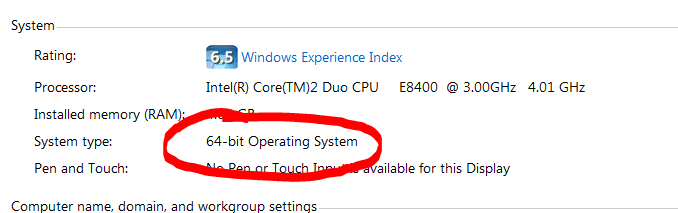
to see which os you are running: start-menu >> right-click on computer >> properties - about half way down the page.

64.PNG

most 32bit programs will run quite happily in a 64 bit os - 64bit operating systems wouldn't be very useful otherwise.

to revert to 32bit would mean a complete re-install. have you tried this 32bit only program yet?
 

My Computer

Computer Manufacturer/Model Number
mickey megabyte 1234
OS
ultimate 64 sp1
CPU
i5 2500K [email protected]
Motherboard
MSI P67A-GD53
Memory
8 gigs GSkill Ripjaws 1600
Graphics Card(s)
amd hd6950
Sound Card
creative x-fi gamer
Monitor(s) Displays
samsung 24"
Screen Resolution
1920x1080
Hard Drives
ocz vertex 2e 60 gig, samsung f3 1tb, buffalo 2tb ext
PSU
antec 550
Case
antec three hundred
Cooling
i'm a cooling fan
Keyboard
saitek eclipse ii
Mouse
logitech g3
Internet Speed
about 4 Mbps
Other Info
i love win7
to see if you have 32-bit or 64-bit windows version, press the windows key and the pause|break key at the same time. (win + pause|break).

Just about any 32-bit program can run in a 64-bit windows OS thanks to a function called WoW (WindowsOnWindows). It emulates a 32-bit environment so 32-bit application can run. This is why you will see that you have two "Program Files" folders on your c:\ drive on a computer running a 64-bit OS. One of those folders contains the added text of "(x86)". All software in the (x86) folder will run in WoW mode, as they are 32-bit only.

To the best of my knowledge, there are 32-bit applications that will not run in WoW, and those would be applications that are not true 32-bit apps. They are 16-bit apps that can operate in a 32-bit operating system. These programs are typically very old, as the time frame of 16-bit apps needing tricks to run in a 32-bit OS stems from around windows 95 or 98?....

If your app flat out will not run on your x64 OS, you may try using a "virtual machine". Sun's Virtual Box is a piece of software that you do not need to buy. Pay software that does this is VMWare. Both softwares will probably require you to do a fair amount of web reading to understand terminology and techniques and methods.

You may also contact the company and see if using a "virtual machine" is a viable alternative. And if they give the go-ahead, ask them their recommendations as far as product to use, and recommended settings.
 

My Computer

OS
all of them
If it was me, I would rather virtualize XP to run the program than downgrade to x86. I call it a downgrade because I feel that it is a lesser platform than x64, and given today's systems where 4 GB is the normal (if not more), Windows 7 x64 should be the default platform.

What's the program in question? Chances are, someone else has tried to install it. There may be a workaround, but if not, it would likely run in any of the VM software apps.

What version of Windows 7 x86 do you have installed?
 

My Computer

OS
Windows 7 Ultimate x64 SP1
CPU
Intel Core i7-2600
Motherboard
Gigabyte GA-P67A-UD3P-B3
Memory
12 GB Patriot Extreme DDR3-1333
Graphics Card(s)
Nvidia GTX 470
Monitor(s) Displays
Dell UltraSharp 2209WA
Hard Drives
OCZ Agility3 240 GB, WD5001AALS, WD7501AALS
PSU
OCZ ModStream 700W
Case
CoolerMaster HAF 912 Advanced
Cooling
CoolerMaster Hyper 212 Plus
I definitely have a 64 bit OS. I am running Windows 7 Home Premium. The program I am trying to get to run is from a Federal Credit Union which is probably buying or leasing the program from another company. That's why it has been difficult trying to get this resolved. I was able to download the program and get all the necessary files and open the *.exe program which I believe is the main program. When I try to access the program the only icon's that works is the logoff icon.
Apparently the program has to communicate with the Credit union software but isn't doing it properly. The Tech at the Credit Union has been working with me to get the program working and I am not sure what his level of experience is.
 

My Computer

Computer Manufacturer/Model Number
HP
OS
Win 7
CPU
AMD
Since the program isn't something that relies heavily, or at all, on 3D graphics, I'd definitely virtualize it. XP Mode isn't an option since you only have Home Premium, but VirtualBox is free, and would definitely do the trick. It's also very easy to setup.
 

My Computer

OS
Windows 7 Ultimate x64 SP1
CPU
Intel Core i7-2600
Motherboard
Gigabyte GA-P67A-UD3P-B3
Memory
12 GB Patriot Extreme DDR3-1333
Graphics Card(s)
Nvidia GTX 470
Monitor(s) Displays
Dell UltraSharp 2209WA
Hard Drives
OCZ Agility3 240 GB, WD5001AALS, WD7501AALS
PSU
OCZ ModStream 700W
Case
CoolerMaster HAF 912 Advanced
Cooling
CoolerMaster Hyper 212 Plus
Since the program isn't something that relies heavily, or at all, on 3D graphics, I'd definitely virtualize it. XP Mode isn't an option since you only have Home Premium, but VirtualBox is free, and would definitely do the trick. It's also very easy to setup.

I definitely have a 64 bit OS. I am running Windows 7 Home Premium. The program I am trying to get to run is from a Federal Credit Union which is probably buying or leasing the program from another company. That's why it has been difficult trying to get this resolved. I was able to download the program and get all the necessary files and open the *.exe program which I believe is the main program. When I try to access the program the only icon's that works is the logoff icon.
Apparently the program has to communicate with the Credit union software but isn't doing it properly. The Tech at the Credit Union has been working with me to get the program working and I am not sure what his level of experience is.

I'll agree with DeaconFrost on this one, and go the virtualization route.

It sounds to me as though the program installs a proprietary driver to use for communication, and therin lies the problem of why you cannot get a 32-bit app to work on 64-bit Windows. You cannot use 32-bit drivers on a 64-bit operating system.

Your only choices are to either downgrade to a 32-bit version of Windows, or to run the program in question within a virtual Windows XP environment. You can get Virtualbox here.
 

My Computer

Computer type
PC/Desktop
Computer Manufacturer/Model Number
Virtual Machine
OS
Windows 7 Professional 32-bit SP1
CPU
AMD A4/A6
Motherboard
Intel Corporation 440BX Desktop Reference Platform
Memory
3.00GB EDO
Graphics Card(s)
VMware SVGA 3D
Sound Card
High Definition Audio Device
Monitor(s) Displays
Generic Non-PnP Monitor on VMware SVGA 3D
Screen Resolution
1440x900
Hard Drives
1 x 60GB VMware Virtual SATA Hard Drive ATA Device
Antivirus
Kaspersky Total Security
Hi Guys:
I took your advice and D/L-ed the Virualbox. It appears to me that I would need a copy of Windows XP to install to get this to work. I think when I was running XP the OS was installed on the computer when I bought it. I don't think I got CD's with the OS. It seems to me that this is a lot of work and I am not sure the program will run after I go and install XP. Am I right in assuming that I need and OS like XP to have a chance of getting this thing to work ???
 

My Computer

Computer Manufacturer/Model Number
HP
OS
Win 7
CPU
AMD
Yes, you'll need a copy of XP, or you'll need to upgrade your current Home Premium to Pro so you can use XP Mode. Do you have any friends with XP licenses sitting around?
 

My Computer

OS
Windows 7 Ultimate x64 SP1
CPU
Intel Core i7-2600
Motherboard
Gigabyte GA-P67A-UD3P-B3
Memory
12 GB Patriot Extreme DDR3-1333
Graphics Card(s)
Nvidia GTX 470
Monitor(s) Displays
Dell UltraSharp 2209WA
Hard Drives
OCZ Agility3 240 GB, WD5001AALS, WD7501AALS
PSU
OCZ ModStream 700W
Case
CoolerMaster HAF 912 Advanced
Cooling
CoolerMaster Hyper 212 Plus
Back
Top