3rd SATA hard drive won't format correctly

apex2000

New member
Local time
11:02 AM
Messages
18
Location
Northeast Thailand
m/b: ASUS P5Q-EM CPU: Intel Core 2 Duo E8400, 3000 MHz (9 x 333) O/S: Microsoft Windows 7 Ultimate RAM: 8GB Hard Drive: 2 x SATA 250GB - Hitachi Deskstar T7K250; Seagate Barracuda 7200.10 250310 DVDROM: ASUS DRW-2014S1 ATA Device x 1; ASUS DRW-24B1LT ATA Device x 1 I have two SATA hard drives as can be seen above, and today bought a third drive - a Samsung 1TB SATA drive. I attached the drive and booted the machine. BIOS can see the drive. Windows Disk Management can see the drive. But... When I format the drive, it always comes up as a RAW partition and Windows cannot see it. Can someone help me to solve this problem? How can I successfully format this drive with, say, 4 partitions that are NTFS, not RAW?
 

My Computer My Computer

OS
Windows 7 Ultimate RTM X64

My Computer My Computer

Computer type
PC/Desktop
Computer Manufacturer/Model Number
76~2.0
OS
Windows 7 Ult x64 - SP1/ Windows 8 Pro x64
CPU
Intel Core i5-3570K 4.6GHz
Motherboard
Gigabyte GA-Z77X UD3H, f18
Memory
8GB (2X4GB) DDR3 1600 Corsair Vengeance CL8 1.5v
Graphics Card(s)
Sapphire HD 7770 Vapor-X OC 1GB DDR5
Sound Card
Onboard VIA VT2021
Monitor(s) Displays
22" LCD Dell
Screen Resolution
1680x1050
Hard Drives
Samsung 840Pro 128GB SSD,
Seagate Barracuda 500GB SATA2 7200rpm 32MB cache, Seagate Barracuda 1TB SATA2 7200rpm 32MB cache,
PSU
Corsair HX650W
Case
Cooler Master Storm Scout
Cooling
Corsair H80 2x12cm Noctua NF P12 , 2x14cm case fans
Keyboard
Logitech Wave
Mouse
CM Sentinel
Internet Speed
Dismal
Antivirus
Avast
Browser
Opera Next
Other Info
Haswell laptop: HP Envy 17t-j, i7-4700MQ, GeForce 740M 2GB DDR3, 17.3" Full HD 1920x1080, 16GB RAM, Samsung 840 Pro 128GB, 1TB Hitachi 7200 HDD,
Desktop: eSATA ports,
External eSATA Seagate 500GB SATA2 7200rpm,
External WD USB 500GB
  • Like
Reactions: JMH
Try a full clean & full format in command prompt.

http://www.sevenforums.com/tutorials/52129-disk-clean-clean-all-diskpart-command.html
http://www.sevenforums.com/tutorials/2668-partition-volume-delete.html?ltr=P
http://www.sevenforums.com/tutorials/2674-partition-volume-create-new.html?ltr=P

1) http://www.sevenforums.com/tutorials/783-elevated-command-prompt.html (for command prompt)
2) Boot DVD, & Press Shift+F10 (for command prompt)
3) http://www.sevenforums.com/tutorials/682-command-prompt-startup.html (for command prompt)

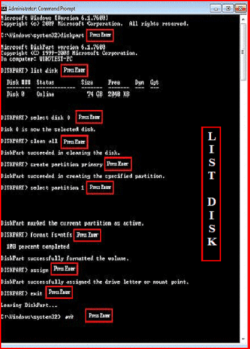
Type in command line
DISKPART
LIST DISK OR List Volume (If you have partitions)
SELECT DISK #
CLEAN ALL
CREATE PARTITION PRIMARY
SELECT PARTITION 1
FORMAT=NTFS
ASSIGN
EXIT
EXIT

List Diskina.PNG

http://www.sevenforums.com/tutorials/91339-ssd-optimize-windows-re-installation.html
 

My Computer My Computer

OS
ME/XP/Vista/Win7
Back
Top