Recently had a problem with my external hard drive. Finally got all my files off it and did a format as that was the only way windows would pick it up.
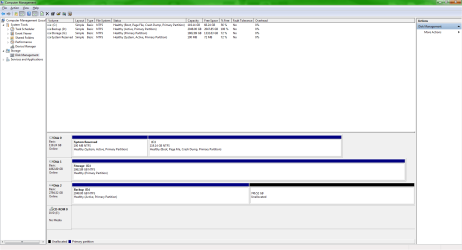
However since i did the format it is only showing 2TB allocated and 700Gb unallocated and wont let me extend the drive.
Couple of screens attached. hope they help.
Overall View of Disk Management
Right Click options i get
My Computer
Computer type
PC/Desktop
Computer Manufacturer/Model Number
Custom Build
OS
Windows 7 Home Premium 64Bit (Service Pack 1)
CPU
Intel i5 3570k @ 3.4Ghz - Cooler: Corsair H80i
Motherboard
Asus P8Z77-V
Memory
Crucial Ballistix Tactical 8gb 1866Mhz
Graphics Card(s)
XFX HD 7950 3Gb
Sound Card
On Board
Monitor(s) Displays
2 X Acer G225HQVbd 21.5"
Screen Resolution
1920 x 1080
Hard Drives
1 x 128Gb Corsair Force
1 x 2Tb Seagate Barracuda
1 x 3Tb Toshiba External (Everything Else)
Do you know how and if the hard drive was originally set up; whether or not there was a partition set up on the drive or is it just a normal setup?
My Computer
Computer type
PC/Desktop
Computer Manufacturer/Model Number
custom built
OS
Windows 7 ultimate 64-bit
CPU
Intel I7 2600K 3.4ghz
Motherboard
Asus Evo P8P67
Memory
Corsair 16gb ddr3 1600mhz
Graphics Card(s)
Nvidia Geforce gt 430
Sound Card
Sound Blaster Titanium x-fi pci express
Monitor(s) Displays
Dell E198WFP
Hard Drives
1 western digital 2TB drive.
PSU
Antec 1200 watt
Case
Inwin Dragon Rider
Cooling
6 case supplied cooling fans
Keyboard
logitech mk700
Mouse
logitech m705
Internet Speed
25-50mbps download; 10mbps upload(i think)
Antivirus
avg free 2014
Browser
mozilla firefox
Other Info
Also have a pretty bad speaker setup which is a klipsch promedia 5.1 surround speaker setup with huge subwoofer and lg blu ray player/writer. Also a hp officejet pro 8600 plus wireless all in one and a logitech s7500 webcam.
You have the drive marked "Active" so Windows placed boot files on it. Legacy boot (standard BIOS) can only boot from a 2T drive or less so Windows made the partition 2T.
I'll let the brainy install guys tell you how to get rid of it.
My Computer
Computer type
PC/Desktop
Computer Manufacturer/Model Number
Built 2/11/2011
OS
Windows 7 Pro-x64
CPU
i7-2600 3.4GHz - 3.8GHz Turbo
Motherboard
Intel DH67BL-B3
Memory
8Gb - 2x4GB, Muskin 991770 PC3-1333
Graphics Card(s)
Integrated Intel HD 2000
Sound Card
Integrated Intel 10.1 HD, RealTek ALC892
Monitor(s) Displays
Asus LCD VH222H, Haier HL24XSL2a
Screen Resolution
1920x1080, 1920x1080
Hard Drives
Crucial SSD C300-128Gb,
Western Digital WD5002AALX - 500Gb,
Western Digital WD7501AALS - 750Gb
PSU
Seasonic 650W 80+ Gold Modular
Case
Rosewill Defender
Cooling
Stock CPU, Four 120mm case fans, PCH fan added
Keyboard
Logitech EX100 Y-RBH94 Wireless
Mouse
Logitech EX100 M-RCE95 Wireless
Internet Speed
3.0/1.5 Mbs
Antivirus
Microsoft Security Essentials
Browser
Microsoft Internet Explorer 11
Other Info
Antec Veris Premier-Multimedia IR Station,
Cyber Accoustics-3602 Speakers,
AFT XM-5U Card Reader,
Hauppauge TV-HVR-2250,
Sony LX300 USB Turntable
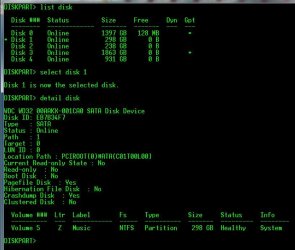
if you currently have no data on it and just want to be able to use it for just storage. the fast way to make it un-active and usable is to use diskpart just select it in disk part then clean that disk (make sure you only clean the disk you want.)
you can see my pics below for an example but basically do this ina elevated command prompt:
diskpart
list disk
select disk # (# being the disk you want)
list part (to make sure it's the one you want, you can also do detail disk like my pic to see more info if your not sure it's the right one.)
clean (only clean it once your sure it is the right one)
exit
then in disk management it will show unallocated for the whole thing and windows can format it how you want.
rvcjew
EDIT: as carwiz said if that drive was in your system when you installed windows they your BCD is currently on that drive and must be moved with something like EASY BCD, or else your OS will not boot once you erase it. If you pull that drive out of your system with the machine off and then try to boot your OS will it boot? If you look at the picture that is my music drive and it was in my pc when i installed 7 on my ssd and is why it is listed as a system disk on the right side. it had MY BCD on it before i moved it to C:\