Solved 3TB HDD Question

lehnerus2000

New member
Guru
Gold Member
VIP
Local time
12:02 AM
Messages
4,058
Location
Adelaide
One of my 2TB HDDs has developed some bad sectors.
The most cost effective replacement HDD that my regular supplier sells is 3TB.

My ASRock 880GMH-LE/USB3 motherboard uses BIOS (not EFI).

My HDD setup currently is:

  • 1.5TB (Boot HDD)
  • 2x 2TB (Data HDDs)
I have the following operating systems installed:

  • W7 Ultimate SP1 (64 bit)
  • XP Pro SP3 (32 Bit)
  • Linux Mint 17 MATE (64 bit)
I realise that XP may have problems.
I have downloaded a utility from ASRock (3TB+ Unlocker) which is supposed to be able to work around the 32 bit address limitations.
The fantastic 3TB+ Unlocker tool offers a tweak-friendly feature, breaking the limitation of 32-bit operation system that could only detect the hard disk within 2048GB. It also allows ASRock motherboards without UEFI Technology to take advantage of the hidden storage space on 3TB and larger HDDs, helping to fully utilize the wasted spaces.
ASRock 3TB+ Unlocker

I'm not opposed to partitioning the 3TB HDD as 1 TB + 2TB if necessary.

Can I install a 3TB HDD as a data disc (not boot disc) without any other issues?


My Computer

Computer type
PC/Desktop
Computer Manufacturer/Model Number
n/a
OS
W7 Ultimate SP1, LM19.2 MATE, W10 Home 1703, W10 Pro 1703 VM, #All 64 bit
CPU
AMD Phenom II x6 1100T, 3.3 GHz
Motherboard
ASUS M4A88T-M/USB3 (AM3)
Memory
12GB DDR3 1333 G-Skill (4GB x 2), G-Skill (2GB x 2)
Graphics Card(s)
NVIDIA GeForce GTX 660
Sound Card
Realtek?
Monitor(s) Displays
Samsung S23B350
Screen Resolution
1920x1080
Hard Drives
WD Green 2TB (SATA), WD Green 3TB (SATA), WD Blue 4TB (SATA), WD Blue 6TB (SATA)
PSU
Cooler Master
Case
Antec GX300 Tower
Cooling
3x Antec TRICOOL 120mm Fans
Mouse
Wired Optical
Internet Speed
DSL
Antivirus
Avast
Browser
Pale Moon (64 bit)
Other Info
2018-12-27 Upgraded HDDs
2015-12-10 Upgraded case, graphics card, storage
2015-08-15 Upgraded motherboard & RAM
2015-07-15 Upgraded LM17.1 to LM17.2
Can I install a 3TB HDD as a data disc (not boot disc) without any other issues?
To use it as a 3TB drive, you must format it (and possibly partition it) as GPT... not MBR (which is limited to 2TB).

Otherwise, using it as a data disc will be no problem, at least not to Win7.
 

My Computer

Computer type
PC/Desktop
Computer Manufacturer/Model Number
Home-built, two systems (1) and (2)
OS
Windows 7 Pro x64 (1), Win7 Pro X64 (2)
CPU
i5-3350p 3.1Ghz/6MB-cache (1); E8400 3.0Ghz/6MB-cache (2)
Motherboard
ASUS P8Z77-V Pro (1); ASUS P5Q3 (2)
Memory
8GB PC3-12800 DDR3 (1); 4GB PC3-10600 DDR3 (2)
Graphics Card(s)
ATI HD7750 (1), (see TV cards); ATI R7 250 (2)
Sound Card
Realtek ALC892 HD Audio (1); Realtek ALC1200 HD Audio (2)
Monitor(s) Displays
Eizo HD2441W LCD, Eizo S2433W (1); Eizo 24" S2433W (2)
Screen Resolution
1920x1200, 1920x1200 (1); 1920x1200 (2)
Hard Drives
(1) 1TB SATA-II (7200RPM), 2x2TB SATA-III (7200RPM), 250GB SATA-III (10000RPM) for OS; 2x2TB external USB 3.0

(2) 320GB SATA-II (7200RPM), 750GB SATA-II (7200RPM), 150GB SATA-II (10000RPM) for OS; 2TB external USB 3.0
PSU
Nesteq ECS-6001 600W (1); Nesteq ECS-5001 500W (2)
Case
Acousti-Case 360 (1) and (2)
Cooling
Noctua NH-U12P SE2 for CPU, 2x120mm case fans (1) and (2)
Keyboard
IBM PS/2 (1) and (2)
Mouse
Logitech MX Revolution wireless (1); Microsoft wired (2)
Internet Speed
100mbps down / 10mbps up
Antivirus
Microsoft Security Essentials; Malwarebyte Anti-Malware Pro
Browser
Firefox
Other Info
Ceton InfiniTV 4-tuner cablecard-enabled TV card as well as Hauppauge HVR-2250 OTA/ATSC 2-tuner TV card in (1), running under Win7 WMC
Thanks dsperber

Can I install a 3TB HDD as a data disc (not boot disc) without any other issues?
To use it as a 3TB drive, you must format it (and possibly partition it) as GPT... not MBR (which is limited to 2TB).

Otherwise, using it as a data disc will be no problem, at least not to Win7.
Thanks. :)

That was my understanding, but I wanted some opinions from other people to be sure.

I am still confused about MBR vs GPT though.

My Linux Expert friend looked confused when I questioned him about the issue.
He recently installed a 3TB HDD and formatted it as EXT4.
He has not noticed any issues.
 

My Computer

Computer type
PC/Desktop
Computer Manufacturer/Model Number
n/a
OS
W7 Ultimate SP1, LM19.2 MATE, W10 Home 1703, W10 Pro 1703 VM, #All 64 bit
CPU
AMD Phenom II x6 1100T, 3.3 GHz
Motherboard
ASUS M4A88T-M/USB3 (AM3)
Memory
12GB DDR3 1333 G-Skill (4GB x 2), G-Skill (2GB x 2)
Graphics Card(s)
NVIDIA GeForce GTX 660
Sound Card
Realtek?
Monitor(s) Displays
Samsung S23B350
Screen Resolution
1920x1080
Hard Drives
WD Green 2TB (SATA), WD Green 3TB (SATA), WD Blue 4TB (SATA), WD Blue 6TB (SATA)
PSU
Cooler Master
Case
Antec GX300 Tower
Cooling
3x Antec TRICOOL 120mm Fans
Mouse
Wired Optical
Internet Speed
DSL
Antivirus
Avast
Browser
Pale Moon (64 bit)
Other Info
2018-12-27 Upgraded HDDs
2015-12-10 Upgraded case, graphics card, storage
2015-08-15 Upgraded motherboard & RAM
2015-07-15 Upgraded LM17.1 to LM17.2
I am still confused about MBR vs GPT though.
As well described in this article:

"MBR (Master Boot Record) and GPT (GUID Partition Table) are two different ways of storing the partitioning information on a drive. This information includes where partitions start and begin, so your operating system knows which sectors belong to each partition and which partition is bootable. This is why you have to choose MBR or GPT before creating partitions on a drive."

"GPT brings with it many advantages, but MBR is still the most compatible and is still necessary in some cases. This isn’t a Windows-only standard — Mac OS X, Linux, and other operating systems can also use GPT."

"MBR works with disks up to 2 TB in size, but it can’t handle disks with more than 2 TB of space. MBR also only supports up to four primary partitions — if you want more, you have to make one of your primary partitions an “extended partition” and create logical partitions inside it."

"GPT stands for GUID Partition Table. It’s a new standard that’s gradually replacing MBR. This system doesn’t have MBR’s limits. Drives can be much, much larger and size limits will depend on the operating system and its file systems. GPT allows for a nearly unlimited amount of partitions, and the limit here will be your operating system — Windows allows up to 128 partitions on a GPT drive, and you don’t have to create an extended partition."


My Linux Expert friend looked confused when I questioned him about the issue.
He recently installed a 3TB HDD and formatted it as EXT4.
He has not noticed any issues.
Apples and oranges. Nothing to do with MBR vs. GPT, which is really a discussion about drive partitioning technique.

EXT4 is a Linux file system used for data storage on a given partition on a drive, like NTFS, FAT32, for Windows, etc., and can exist on drives partitioned with either MBR or GPT.
 

My Computer

Computer type
PC/Desktop
Computer Manufacturer/Model Number
Home-built, two systems (1) and (2)
OS
Windows 7 Pro x64 (1), Win7 Pro X64 (2)
CPU
i5-3350p 3.1Ghz/6MB-cache (1); E8400 3.0Ghz/6MB-cache (2)
Motherboard
ASUS P8Z77-V Pro (1); ASUS P5Q3 (2)
Memory
8GB PC3-12800 DDR3 (1); 4GB PC3-10600 DDR3 (2)
Graphics Card(s)
ATI HD7750 (1), (see TV cards); ATI R7 250 (2)
Sound Card
Realtek ALC892 HD Audio (1); Realtek ALC1200 HD Audio (2)
Monitor(s) Displays
Eizo HD2441W LCD, Eizo S2433W (1); Eizo 24" S2433W (2)
Screen Resolution
1920x1200, 1920x1200 (1); 1920x1200 (2)
Hard Drives
(1) 1TB SATA-II (7200RPM), 2x2TB SATA-III (7200RPM), 250GB SATA-III (10000RPM) for OS; 2x2TB external USB 3.0

(2) 320GB SATA-II (7200RPM), 750GB SATA-II (7200RPM), 150GB SATA-II (10000RPM) for OS; 2TB external USB 3.0
PSU
Nesteq ECS-6001 600W (1); Nesteq ECS-5001 500W (2)
Case
Acousti-Case 360 (1) and (2)
Cooling
Noctua NH-U12P SE2 for CPU, 2x120mm case fans (1) and (2)
Keyboard
IBM PS/2 (1) and (2)
Mouse
Logitech MX Revolution wireless (1); Microsoft wired (2)
Internet Speed
100mbps down / 10mbps up
Antivirus
Microsoft Security Essentials; Malwarebyte Anti-Malware Pro
Browser
Firefox
Other Info
Ceton InfiniTV 4-tuner cablecard-enabled TV card as well as Hauppauge HVR-2250 OTA/ATSC 2-tuner TV card in (1), running under Win7 WMC
You shouldn't have any issues with the new disk.

I recently replaced a 1.5 TB data backup drive with a 3.0 TB drive. The only change I had to make was to use GPT on the new drive. I still use BIOS and my boot drive is still MBR. I haven't noticed anything unusual at all.

I think that Asus tool you downloaded would allow you to format and use the entire 3.0 TB disc, even if you used MBR--the device driver mounts the capacity above 2.2 TB with another MBR which looks to the system as a second virtual “physical” device. You’d have a 2.2 TB partition and another for the remainder.

If you don’t use that tool, you’d be limited to 2.2 TB on that 3.0 TB drive---regardless of the number of partitions. The alternative is to use GPT.

A system with BIOS cannot boot a GPT disk, which is no problem for you since this is strictly a data disc.

Since this is a data disc, there's no over-riding reason for you to use that Asus download.

I'm speaking only about Win 7. I have no idea if any other OS would bark.
 

My Computer

Computer type
PC/Desktop
Computer Manufacturer/Model Number
Ignatz Special; 4 speed manual gearbox; factory air conditioning; one of one
OS
Windows 7 Home Premium SP1, 64-bit
CPU
Intel Skylake i5-6600K, not overclocked
Motherboard
AsRock Z170M Extreme 4, micro ATX
Memory
8 GB HyperX DDR4-2666 (2 x 4 GB)
Graphics Card(s)
none; graphics are integrated on CPU
Sound Card
onboard: Realtek ALC1150; external: USB Behringer UF0-202
Monitor(s) Displays
Dell S2340M 23 inch IPS
Screen Resolution
1600 x 900
Hard Drives
System: Crucial MX100 series SSD, 128 GB;
Data: Samsung Spinpoint 103SJ, 1 TB;
Backup: WD Caviar Green WD30EZRX-00D8PB0, 3 TB
PSU
Rosewill SilentNight 500 watt fanless, semi-modular
Case
Antec Solo II
Cooling
Noctua NH-U12S; Noctua F12 intake, Noctua S12A exhaust
Keyboard
Microsoft 200 6JH-00001 USB
Mouse
Dell or Microsoft optical wired; USB
Antivirus
Microsoft Security Essentials and Malwarebytes Premium
Browser
Pale Moon
Other Info
All fans PWM; speeds at idle: CPU circa 500 rpm; intake circa 600 rpm; exhaust circa 600 rpm; CPU temps 27 idle and 47 C load in a warm room (27 C/81 F) when running Intel Extreme Tuning Utility stress test.
"MBR works with disks up to 2 TB in size, but it can’t handle disks with more than 2 TB of space. MBR also only supports up to four primary partitions — if you want more, you have to make one of your primary partitions an “extended partition” and create logical partitions inside it."

"GPT stands for GUID Partition Table. It’s a new standard that’s gradually replacing MBR. This system doesn’t have MBR’s limits. Drives can be much, much larger and size limits will depend on the operating system and its file systems. GPT allows for a nearly unlimited amount of partitions, and the limit here will be your operating system — Windows allows up to 128 partitions on a GPT drive, and you don’t have to create an extended partition."
I am aware of the general blurb. :)

What I don't understand is, if Windows only functions with drive letters how can you have a massive number of partitions?
Do you have to create a "folder with a drive letter" and then mount all of the other partitions inside it?

Apples and oranges. Nothing to do with MBR vs. GPT, which is really a discussion about drive partitioning technique.

EXT4 is a Linux file system used for data storage on a given partition on a drive, like NTFS, FAT32, for Windows, etc., and can exist on drives partitioned with either MBR or GPT.
Poor phrasing on my part.:o
I am also aware that EXT is a file system (I use EXT4 for my Linux partitions).

What was confusing was that when I asked how he set up up his 3TB HDD and mentioned GPT, he looked at me like I was speaking gibberish.

You shouldn't have any issues with the new disk.

I recently replaced a 1.5 TB data backup drive with a 3.0 TB drive. The only change I had to make was to use GPT on the new drive. I still use BIOS and my boot drive is still MBR. I haven't noticed anything unusual at all.

I think that Asus tool you downloaded would allow you to format and use the entire 3.0 TB disc, even if you used MBR--the device driver mounts the capacity above 2.2 TB with another MBR which looks to the system as a second virtual “physical” device. You’d have a 2.2 TB partition and another for the remainder.

If you don’t use that tool, you’d be limited to 2.2 TB on that 3.0 TB drive---regardless of the number of partitions. The alternative is to use GPT.

A system with BIOS cannot boot a GPT disk, which is no problem for you since this is strictly a data disc.

Since this is a data disc, there's no over-riding reason for you to use that Asus download.
I assume (based on the marketing blurb) that the ASRock utility is supposed to enable XP (32 bit) to use the entire disk.

The end result is that you have both posted that using the disc for data should cause no issues. :)

I didn't want to buy a 3TB (or larger) HDD only to discover it won't run correctly in my system.
 
Last edited:

My Computer

Computer type
PC/Desktop
Computer Manufacturer/Model Number
n/a
OS
W7 Ultimate SP1, LM19.2 MATE, W10 Home 1703, W10 Pro 1703 VM, #All 64 bit
CPU
AMD Phenom II x6 1100T, 3.3 GHz
Motherboard
ASUS M4A88T-M/USB3 (AM3)
Memory
12GB DDR3 1333 G-Skill (4GB x 2), G-Skill (2GB x 2)
Graphics Card(s)
NVIDIA GeForce GTX 660
Sound Card
Realtek?
Monitor(s) Displays
Samsung S23B350
Screen Resolution
1920x1080
Hard Drives
WD Green 2TB (SATA), WD Green 3TB (SATA), WD Blue 4TB (SATA), WD Blue 6TB (SATA)
PSU
Cooler Master
Case
Antec GX300 Tower
Cooling
3x Antec TRICOOL 120mm Fans
Mouse
Wired Optical
Internet Speed
DSL
Antivirus
Avast
Browser
Pale Moon (64 bit)
Other Info
2018-12-27 Upgraded HDDs
2015-12-10 Upgraded case, graphics card, storage
2015-08-15 Upgraded motherboard & RAM
2015-07-15 Upgraded LM17.1 to LM17.2
What I don't understand is, if Windows only functions with drive letters how can you have a massive number of partitions?
Do you have to create a "folder with a drive letter" and then mount all of the other partitions inside it?
Yes, except that the folder doesn't have a drive letter. It's just a folder. And all the other partitions are mounted inside it.

So you get to all the partitions and their contents not with letters, but simply symbolically as part of a folder structure. Kind of like how you access removable devices (like phones) that connect through MTP and appear in Windows Explorer symbolically, but also without drive letters.


I am also aware that EXT is a file system (I use EXT4 for my Linux partitions).

What was confusing was that when I asked how he set up up his 3TB HDD and mentioned GPT, he looked at me like I was speaking gibberish.
Well, I would venture to guess that while he might not have realized it (and perhaps didn't do something explicit to create it that way), if he set up his 3TB drive with one 3TB EXT4 partition then that drive had to have been partitioned (perhaps automatically) with GPT, as it had to be in order to support more than 2TB of size.

If you use Partition Wizard (either from the standalone boot CD, or from the installed program running under Windows) to view your hard drives it will be plainly seen from the GUI whether the partitions on a drive are MBR-primary or MBR-logical, or GPT. His 3TB EXT4 partition would have to be GPT. Note that Partition Wizard can do lots of magic things, including converting an MBR-partitioned disk into a GPT-partitioned disk.
 

My Computer

Computer type
PC/Desktop
Computer Manufacturer/Model Number
Home-built, two systems (1) and (2)
OS
Windows 7 Pro x64 (1), Win7 Pro X64 (2)
CPU
i5-3350p 3.1Ghz/6MB-cache (1); E8400 3.0Ghz/6MB-cache (2)
Motherboard
ASUS P8Z77-V Pro (1); ASUS P5Q3 (2)
Memory
8GB PC3-12800 DDR3 (1); 4GB PC3-10600 DDR3 (2)
Graphics Card(s)
ATI HD7750 (1), (see TV cards); ATI R7 250 (2)
Sound Card
Realtek ALC892 HD Audio (1); Realtek ALC1200 HD Audio (2)
Monitor(s) Displays
Eizo HD2441W LCD, Eizo S2433W (1); Eizo 24" S2433W (2)
Screen Resolution
1920x1200, 1920x1200 (1); 1920x1200 (2)
Hard Drives
(1) 1TB SATA-II (7200RPM), 2x2TB SATA-III (7200RPM), 250GB SATA-III (10000RPM) for OS; 2x2TB external USB 3.0

(2) 320GB SATA-II (7200RPM), 750GB SATA-II (7200RPM), 150GB SATA-II (10000RPM) for OS; 2TB external USB 3.0
PSU
Nesteq ECS-6001 600W (1); Nesteq ECS-5001 500W (2)
Case
Acousti-Case 360 (1) and (2)
Cooling
Noctua NH-U12P SE2 for CPU, 2x120mm case fans (1) and (2)
Keyboard
IBM PS/2 (1) and (2)
Mouse
Logitech MX Revolution wireless (1); Microsoft wired (2)
Internet Speed
100mbps down / 10mbps up
Antivirus
Microsoft Security Essentials; Malwarebyte Anti-Malware Pro
Browser
Firefox
Other Info
Ceton InfiniTV 4-tuner cablecard-enabled TV card as well as Hauppauge HVR-2250 OTA/ATSC 2-tuner TV card in (1), running under Win7 WMC
Thanks again

Do you have to create a "folder with a drive letter" and then mount all of the other partitions inside it?
Yes, except that the folder doesn't have a drive letter. It's just a folder. And all the other partitions are mounted inside it.
I'm not sure what I was trying to say (I need to get more sleep). :o :D

I have mounted VHDs in folders on Windows (once for each W8 Preview).

I've had to do it in Linux (fstab) to auto-mount my NTFS partitions during boot up.

So you get to all the partitions and their contents not with letters, but simply symbolically as part of a folder structure. Kind of like how you access removable devices (like phones) that connect through MTP and appear in Windows Explorer symbolically, but also without drive letters.
I've never tried to connect a phone (or similar device) to Windows.

Well, I would venture to guess that while he might not have realized it (and perhaps didn't do something explicit to create it that way), if he set up his 3TB drive with one 3TB EXT4 partition then that drive had to have been partitioned (perhaps automatically) with GPT, as it had to be in order to support more than 2TB of size.
I was wondering if the partitioning tool he used, automatically selected GPT because of the HDD/Partition size (he uses Arch Linux).

I use GParted for all of my partitioning (except in VMs).
 

My Computer

Computer type
PC/Desktop
Computer Manufacturer/Model Number
n/a
OS
W7 Ultimate SP1, LM19.2 MATE, W10 Home 1703, W10 Pro 1703 VM, #All 64 bit
CPU
AMD Phenom II x6 1100T, 3.3 GHz
Motherboard
ASUS M4A88T-M/USB3 (AM3)
Memory
12GB DDR3 1333 G-Skill (4GB x 2), G-Skill (2GB x 2)
Graphics Card(s)
NVIDIA GeForce GTX 660
Sound Card
Realtek?
Monitor(s) Displays
Samsung S23B350
Screen Resolution
1920x1080
Hard Drives
WD Green 2TB (SATA), WD Green 3TB (SATA), WD Blue 4TB (SATA), WD Blue 6TB (SATA)
PSU
Cooler Master
Case
Antec GX300 Tower
Cooling
3x Antec TRICOOL 120mm Fans
Mouse
Wired Optical
Internet Speed
DSL
Antivirus
Avast
Browser
Pale Moon (64 bit)
Other Info
2018-12-27 Upgraded HDDs
2015-12-10 Upgraded case, graphics card, storage
2015-08-15 Upgraded motherboard & RAM
2015-07-15 Upgraded LM17.1 to LM17.2
I've never tried to connect a phone (or similar device) to Windows.
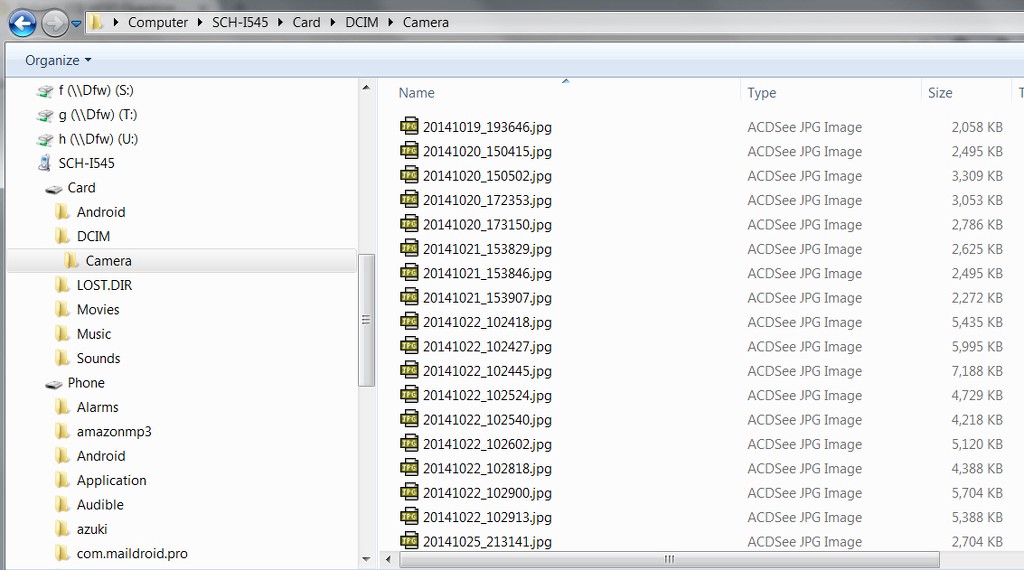
Just for example, here's my Samsung Galaxy S4 connected via USB cable to my PC. The USB configuration on the phone is set to "connect as media device (MTP)", which means "allows you to transfer files in Windows, or using AndroidFileTransfer on a Mac".

RsqCPh.jpg


Note that no drive letters are assigned to the phone itself, or its internal storage or SD card storage. It's all accessed symbolically as either source or target for a folder/file data transfer to/from the PC.
 

My Computer

Computer type
PC/Desktop
Computer Manufacturer/Model Number
Home-built, two systems (1) and (2)
OS
Windows 7 Pro x64 (1), Win7 Pro X64 (2)
CPU
i5-3350p 3.1Ghz/6MB-cache (1); E8400 3.0Ghz/6MB-cache (2)
Motherboard
ASUS P8Z77-V Pro (1); ASUS P5Q3 (2)
Memory
8GB PC3-12800 DDR3 (1); 4GB PC3-10600 DDR3 (2)
Graphics Card(s)
ATI HD7750 (1), (see TV cards); ATI R7 250 (2)
Sound Card
Realtek ALC892 HD Audio (1); Realtek ALC1200 HD Audio (2)
Monitor(s) Displays
Eizo HD2441W LCD, Eizo S2433W (1); Eizo 24" S2433W (2)
Screen Resolution
1920x1200, 1920x1200 (1); 1920x1200 (2)
Hard Drives
(1) 1TB SATA-II (7200RPM), 2x2TB SATA-III (7200RPM), 250GB SATA-III (10000RPM) for OS; 2x2TB external USB 3.0

(2) 320GB SATA-II (7200RPM), 750GB SATA-II (7200RPM), 150GB SATA-II (10000RPM) for OS; 2TB external USB 3.0
PSU
Nesteq ECS-6001 600W (1); Nesteq ECS-5001 500W (2)
Case
Acousti-Case 360 (1) and (2)
Cooling
Noctua NH-U12P SE2 for CPU, 2x120mm case fans (1) and (2)
Keyboard
IBM PS/2 (1) and (2)
Mouse
Logitech MX Revolution wireless (1); Microsoft wired (2)
Internet Speed
100mbps down / 10mbps up
Antivirus
Microsoft Security Essentials; Malwarebyte Anti-Malware Pro
Browser
Firefox
Other Info
Ceton InfiniTV 4-tuner cablecard-enabled TV card as well as Hauppauge HVR-2250 OTA/ATSC 2-tuner TV card in (1), running under Win7 WMC
Interesting

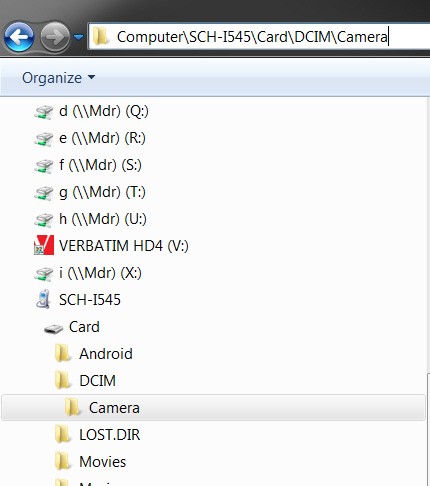
I notice that the screenshot is showing the "breadcrumb" path information.

If you don't mind me asking, what path information does the Address bar show if you click in it (when your phone is connected)? :geek:
 

My Computer

Computer type
PC/Desktop
Computer Manufacturer/Model Number
n/a
OS
W7 Ultimate SP1, LM19.2 MATE, W10 Home 1703, W10 Pro 1703 VM, #All 64 bit
CPU
AMD Phenom II x6 1100T, 3.3 GHz
Motherboard
ASUS M4A88T-M/USB3 (AM3)
Memory
12GB DDR3 1333 G-Skill (4GB x 2), G-Skill (2GB x 2)
Graphics Card(s)
NVIDIA GeForce GTX 660
Sound Card
Realtek?
Monitor(s) Displays
Samsung S23B350
Screen Resolution
1920x1080
Hard Drives
WD Green 2TB (SATA), WD Green 3TB (SATA), WD Blue 4TB (SATA), WD Blue 6TB (SATA)
PSU
Cooler Master
Case
Antec GX300 Tower
Cooling
3x Antec TRICOOL 120mm Fans
Mouse
Wired Optical
Internet Speed
DSL
Antivirus
Avast
Browser
Pale Moon (64 bit)
Other Info
2018-12-27 Upgraded HDDs
2015-12-10 Upgraded case, graphics card, storage
2015-08-15 Upgraded motherboard & RAM
2015-07-15 Upgraded LM17.1 to LM17.2
I notice that the screenshot is showing the "breadcrumb" path information.

If you don't mind me asking, what path information does the Address bar show if you click in it (when your phone is connected)? :geek:
Here's the address info you asked for.

zoiLZR.jpg
 

My Computer

Computer type
PC/Desktop
Computer Manufacturer/Model Number
Home-built, two systems (1) and (2)
OS
Windows 7 Pro x64 (1), Win7 Pro X64 (2)
CPU
i5-3350p 3.1Ghz/6MB-cache (1); E8400 3.0Ghz/6MB-cache (2)
Motherboard
ASUS P8Z77-V Pro (1); ASUS P5Q3 (2)
Memory
8GB PC3-12800 DDR3 (1); 4GB PC3-10600 DDR3 (2)
Graphics Card(s)
ATI HD7750 (1), (see TV cards); ATI R7 250 (2)
Sound Card
Realtek ALC892 HD Audio (1); Realtek ALC1200 HD Audio (2)
Monitor(s) Displays
Eizo HD2441W LCD, Eizo S2433W (1); Eizo 24" S2433W (2)
Screen Resolution
1920x1200, 1920x1200 (1); 1920x1200 (2)
Hard Drives
(1) 1TB SATA-II (7200RPM), 2x2TB SATA-III (7200RPM), 250GB SATA-III (10000RPM) for OS; 2x2TB external USB 3.0

(2) 320GB SATA-II (7200RPM), 750GB SATA-II (7200RPM), 150GB SATA-II (10000RPM) for OS; 2TB external USB 3.0
PSU
Nesteq ECS-6001 600W (1); Nesteq ECS-5001 500W (2)
Case
Acousti-Case 360 (1) and (2)
Cooling
Noctua NH-U12P SE2 for CPU, 2x120mm case fans (1) and (2)
Keyboard
IBM PS/2 (1) and (2)
Mouse
Logitech MX Revolution wireless (1); Microsoft wired (2)
Internet Speed
100mbps down / 10mbps up
Antivirus
Microsoft Security Essentials; Malwarebyte Anti-Malware Pro
Browser
Firefox
Other Info
Ceton InfiniTV 4-tuner cablecard-enabled TV card as well as Hauppauge HVR-2250 OTA/ATSC 2-tuner TV card in (1), running under Win7 WMC
Thanks. :)

I've never seen that type of path before.
 

My Computer

Computer type
PC/Desktop
Computer Manufacturer/Model Number
n/a
OS
W7 Ultimate SP1, LM19.2 MATE, W10 Home 1703, W10 Pro 1703 VM, #All 64 bit
CPU
AMD Phenom II x6 1100T, 3.3 GHz
Motherboard
ASUS M4A88T-M/USB3 (AM3)
Memory
12GB DDR3 1333 G-Skill (4GB x 2), G-Skill (2GB x 2)
Graphics Card(s)
NVIDIA GeForce GTX 660
Sound Card
Realtek?
Monitor(s) Displays
Samsung S23B350
Screen Resolution
1920x1080
Hard Drives
WD Green 2TB (SATA), WD Green 3TB (SATA), WD Blue 4TB (SATA), WD Blue 6TB (SATA)
PSU
Cooler Master
Case
Antec GX300 Tower
Cooling
3x Antec TRICOOL 120mm Fans
Mouse
Wired Optical
Internet Speed
DSL
Antivirus
Avast
Browser
Pale Moon (64 bit)
Other Info
2018-12-27 Upgraded HDDs
2015-12-10 Upgraded case, graphics card, storage
2015-08-15 Upgraded motherboard & RAM
2015-07-15 Upgraded LM17.1 to LM17.2
Back
Top