3TB Seagate Barracuda - Strange problems

andy3471

New member
Local time
10:06 PM
Messages
3
Hey, I recently self built a new PC which contains an AMD 8350, Radeon HD 7850, 32GB of Corsair vengeance ram with a GIGABYTE GA-970A-DS3 Motherboard. I am using the Seagate 3TB HDD as well as a Sandisk ReadyCache SSD. I am running Windows 7 Ultimate 64 Bit.

The HDD is partitioned to be 2TB for windows, with a further 750GB partitioned and mounted to my steam install (I have a lot of games). The disk is in AHCI mode and is usally fully functional. The SSD is running as a cache currently, and does not show as a drive. The problem is every so often mutliple applications freeze simultaniously (this happens more frequently the more I do stuff). It's not really a freeze, but anything to do with file transfers stop, any downloads pause, web browser pages stop loading, file transfers stop, any attempt to open a file will not happen. So I decided to take a look at My Computer when this problem next occurred, and the HDD showed like this :

Untitled.png


Notice how the HDD also says 400GB remaining, considering this is a brand new install on a 2TB HDD. If I refreshed this, I saw a completely different and random amount of storage remaining. About 20 seconds later, the HDD shows the correct amount of storage left, and anything continues again. My external expansion drive shows fine here too.

A long generic check on Seagate Seatools shows a pass on the HDD.

This problem is becoming a huge annoyance and I just wondered if anyone knew what this is about, and how I can go about fixing this.

Thanks in advance!
 

My Computer

OS
Windows 7 Ultimate 64 Bit
CPU
AMD 8350 8 Core 4Ghz
Memory
32GB Corsair Vengance
Graphics Card(s)
AMD Radeon HD 7850
Monitor(s) Displays
Playstation 3D display
Hard Drives
3TB Seagate Barracuda
Sandisk ReadyCache
PSU
Corsair 600W
Case
Vantage Diablo

My Computer

Computer type
PC/Desktop
Computer Manufacturer/Model Number
Golden Mk. I.4
OS
Windows 10 Pro x64 ; Xubuntu x64
CPU
Intel i7 860 @ 2.80 GHz O/C'ed to 4.0GHz
Motherboard
Gigabyte P55A-UD3R Rev.1. Award BIOS F13
Memory
16GB Corsair Vengance DDR3 @ 661 MHz Dual Channel (9-9-9-24)
Graphics Card(s)
EVGA NVidia GTX 560 1024MB
Sound Card
Realtek Integrated
Monitor(s) Displays
Dual Samsung SyncMaster 2494HS
Screen Resolution
1920*1080 and 1920*1080
Hard Drives
1*Samsung 840 EVO 120GB SSD;
1*OCZ Vertex 2 60GB SSD;
2*Samsung F3 SpinPoint 1TB in RAID0;
1*Samsung F1 SpinPoint 1TB;
2*Western Digital 1TB External USB 3.0
1*Western Digital 500GB External USB 3.0
1*Seagate 500GB External USB 2.0
PSU
Thermaltake ToughPower QFan 750W
Case
Thermaltake Element S VK60001W2Z
Cooling
Corsair H60 Water Cooling, 2*230mm and 2*80mm case fans
Keyboard
Logitech G110
Mouse
Logitech MX518
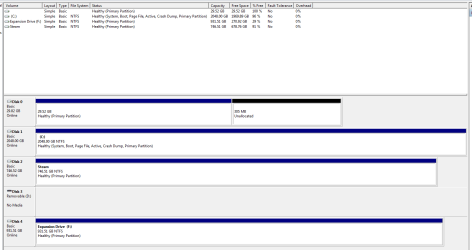
The motherboard uses bios, and this uses MBR. The motherboard says "with Hybrid EFI technology for 3TB HDD support" if that has relevance.

Ignore the first drive, as this is the SSD, and ignore the expansion. The disk shows at 2 drives (The 2TB one, and the 746GB one called "Steam") despite being one, I've had to use the seagate disk tools to do this, however the problem was occurring before doing this.
 

Attachments

  • diskmanagement.PNG
    diskmanagement.PNG
    16.8 KB · Views: 11

My Computer

OS
Windows 7 Ultimate 64 Bit
CPU
AMD 8350 8 Core 4Ghz
Memory
32GB Corsair Vengance
Graphics Card(s)
AMD Radeon HD 7850
Monitor(s) Displays
Playstation 3D display
Hard Drives
3TB Seagate Barracuda
Sandisk ReadyCache
PSU
Corsair 600W
Case
Vantage Diablo
Maybe I don't understand the problem, but you say ignore the Disk 0 it's the SSD. It has no drive letter and neither does the disk 2 'steam' drive. neither will show in explorer without a drive letter.

On your drive that says Steam in the bottom portion of the screen, right click it and select 'change drive letter or path', next screen select add, and give it a drive letter. It should show up then. If it wants to format it, you will lose your data.
 

My Computers

System One System Two

  • Computer type
    PC/Desktop
    Computer Manufacturer/Model Number
    ALWAYS UNDER CONSTRUCTION
    OS
    Windows 11 Pro
    CPU
    Ryzen 9 5900X
    Motherboard
    Asus X570 Crosshair Viii Hero
    Memory
    32GB G Skill DDR4-3600
    Graphics Card(s)
    EVGA RTX 3080 FTW 3 Ultra
    Sound Card
    On Board/Sennheiser PC37X Headset
    Monitor(s) Displays
    3 X Asus 27"
    Screen Resolution
    2560x1440
    Hard Drives
    2 X 1 TB NVME drives
    PSU
    EVGA 850
    Case
    Phanteks Eclipse P400A
    Cooling
    EVGA 280 AIO
    Keyboard
    Logitech G510s/ Logitech G13
    Mouse
    Logitech G502
    Internet Speed
    24/1
    Antivirus
    ESET/MBAM Pro/SAS Pro
    Browser
    Chrome/ Firefox/ Edge
  • Computer type
    Laptop
    System Manufacturer/Model Number
    Dell 16 Plus
    OS
    Windows 11 Pro
    CPU
    Intel Ultra 9 288V
    Memory
    32 GB LPDDR5X 8533
    Monitor(s) Displays
    16" Mini-LED HDR600 Touch 90 Hz
    Screen Resolution
    2560X1600
    Hard Drives
    1 TB NVME
The problem isn't to do with those drives, that's why I said to ignore them. The SSD is being used as a Cache, so I don't need a drive letter, and the "Steam" partition it mounted to my steam directory in program files. The Steam partition is on the same disk as the 2TB windows partition, but this shows incorrectly as I have used seatools to make use of the 3TB on my HDD, as windows could only install to a 2TB partition.

The problem is the fact my main HDD causes crashes on my PC, as all processes that require any sort of download or file transfer simultaneously stops, and my HDD shows a strange amount of storage remaining. After 30 seconds or so it returns to normal. However this problem has become so frequent it is becoming a right pain :/
 

My Computer

OS
Windows 7 Ultimate 64 Bit
CPU
AMD 8350 8 Core 4Ghz
Memory
32GB Corsair Vengance
Graphics Card(s)
AMD Radeon HD 7850
Monitor(s) Displays
Playstation 3D display
Hard Drives
3TB Seagate Barracuda
Sandisk ReadyCache
PSU
Corsair 600W
Case
Vantage Diablo
Have same problem... tested it for months... it`s about how mother board is handling hdd and surge protection of mother board... if you have more "noise" on power network... the mother board will hang up... hang ups is precisely 60sec..
it`s stupid bug... and only thing to do is buy another mother board... or try with ups to negate "noise"
allso this mother board have huge problem with USB 3.0... so recommend everyone , not to by this peace of crap...
 

My Computer

Computer type
PC/Desktop
OS
Windows 7 Ultimate x64
Hi and welcome to SevenForums,
Digging up an old thread :)

Funny reading it I'm wondering why anyone would not install the os on the ssd :confused:
Seems a tad silly installing windows on a 2tb hdd when they have wasted a ssd :/
 

My Computer

Computer type
PC/Desktop
Computer Manufacturer/Model Number
Custom assembled by me :}
OS
Win-7-Pro64bit 7-H-Prem-64bit
CPU
i7-5930K 2nd i9-9940x both water blocked VRM's too
Motherboard
ASUS SABERTOOTH X99 2nd ASUS x299 Apex
Memory
Trident-z 3200C14 2nd Trident-z 3600C16
Graphics Card(s)
EVGA 1080ti ftw3 2nd Titan Xp both water blocked
Sound Card
Built-in Realtek
Monitor(s) Displays
1-AOC G2460PG 24"G-Sync 144Hz/ 2nd 1-ASUS VG248QE 24" 144Hz
Screen Resolution
1920 x 1080 144Hz
Hard Drives
2-Samsung M.2 Evo & Evo Plus
2-Samsung 850 EVO 500GB SSD's/ 3-2.5 W.D. Black 1tb-&3-1tb/3-3.5 WD Black 1tb hdd's
PSU
EVGA SuperNOVA 1000-P2 2nd 1200-P2
Case
2-Corsair Obsidian Series 450D Black ATX Mid Tower
Cooling
Custom water loops
Keyboard
Logitech G710+/ 2nd Logitech G910
Mouse
2-RedDragon M901 Perdition 16400 dpi Gaming mouse = wired
Internet Speed
Comcast Ping 19ms 89.31mbps download speed 6.12mbps upload
Antivirus
Malwarebytes Pro/ Superantispyware Pro
Browser
FireFox & Pale moon
Other Info
2nd ASUS X299 Apex/Intel i9-9940x with Custom water loop/7H-Prem-x64/Corsair 450D case/Ram Trident-z 3600C16 4x8gb / Samsung970Evo plus 500gb SSD/Dual ssd EZ swap evo/PSU EVGA SuperNova 1200w-P2 80+Platinum/GPU Titan Xp /8-ML-140 on push-pull on 2-280GTX rads
Hi and welcome to SevenForums,
Digging up an old thread :)

Funny reading it I'm wondering why anyone would not install the os on the ssd :confused:
Seems a tad silly installing windows on a 2tb hdd when they have wasted a ssd :/

i have system on ssd... but... it`s not it... simply motherboard is bad
 

My Computer

Computer type
PC/Desktop
OS
Windows 7 Ultimate x64
Mike, some motherboards are made to use a 30GB SSD as a cache for the OS. It is similar to a ram disk. It stores the most used progrem .exe files so that those programs start up faster, kind of like the Hybrid hard drives. You get the best of both worlds, speed and a lot of storage. I believe it is called Intel Rapid Start. I've never used it and wouldn't. But that's the way they are designed to work.
 

My Computers

System One System Two

  • Computer type
    PC/Desktop
    Computer Manufacturer/Model Number
    ALWAYS UNDER CONSTRUCTION
    OS
    Windows 11 Pro
    CPU
    Ryzen 9 5900X
    Motherboard
    Asus X570 Crosshair Viii Hero
    Memory
    32GB G Skill DDR4-3600
    Graphics Card(s)
    EVGA RTX 3080 FTW 3 Ultra
    Sound Card
    On Board/Sennheiser PC37X Headset
    Monitor(s) Displays
    3 X Asus 27"
    Screen Resolution
    2560x1440
    Hard Drives
    2 X 1 TB NVME drives
    PSU
    EVGA 850
    Case
    Phanteks Eclipse P400A
    Cooling
    EVGA 280 AIO
    Keyboard
    Logitech G510s/ Logitech G13
    Mouse
    Logitech G502
    Internet Speed
    24/1
    Antivirus
    ESET/MBAM Pro/SAS Pro
    Browser
    Chrome/ Firefox/ Edge
  • Computer type
    Laptop
    System Manufacturer/Model Number
    Dell 16 Plus
    OS
    Windows 11 Pro
    CPU
    Intel Ultra 9 288V
    Memory
    32 GB LPDDR5X 8533
    Monitor(s) Displays
    16" Mini-LED HDR600 Touch 90 Hz
    Screen Resolution
    2560X1600
    Hard Drives
    1 TB NVME
Thanks I did not notice how small the ssd was :o
Glad prices of ssd's dropped over the years made life a lot more straight forward :D
 

My Computer

Computer type
PC/Desktop
Computer Manufacturer/Model Number
Custom assembled by me :}
OS
Win-7-Pro64bit 7-H-Prem-64bit
CPU
i7-5930K 2nd i9-9940x both water blocked VRM's too
Motherboard
ASUS SABERTOOTH X99 2nd ASUS x299 Apex
Memory
Trident-z 3200C14 2nd Trident-z 3600C16
Graphics Card(s)
EVGA 1080ti ftw3 2nd Titan Xp both water blocked
Sound Card
Built-in Realtek
Monitor(s) Displays
1-AOC G2460PG 24"G-Sync 144Hz/ 2nd 1-ASUS VG248QE 24" 144Hz
Screen Resolution
1920 x 1080 144Hz
Hard Drives
2-Samsung M.2 Evo & Evo Plus
2-Samsung 850 EVO 500GB SSD's/ 3-2.5 W.D. Black 1tb-&3-1tb/3-3.5 WD Black 1tb hdd's
PSU
EVGA SuperNOVA 1000-P2 2nd 1200-P2
Case
2-Corsair Obsidian Series 450D Black ATX Mid Tower
Cooling
Custom water loops
Keyboard
Logitech G710+/ 2nd Logitech G910
Mouse
2-RedDragon M901 Perdition 16400 dpi Gaming mouse = wired
Internet Speed
Comcast Ping 19ms 89.31mbps download speed 6.12mbps upload
Antivirus
Malwarebytes Pro/ Superantispyware Pro
Browser
FireFox & Pale moon
Other Info
2nd ASUS X299 Apex/Intel i9-9940x with Custom water loop/7H-Prem-x64/Corsair 450D case/Ram Trident-z 3600C16 4x8gb / Samsung970Evo plus 500gb SSD/Dual ssd EZ swap evo/PSU EVGA SuperNova 1200w-P2 80+Platinum/GPU Titan Xp /8-ML-140 on push-pull on 2-280GTX rads
Back
Top