Solved 4GB ram usage error?

MiserySyndrome

New member
Member
Local time
8:47 PM
Messages
47
Recently, while looking at my performance in Task Manager, I found something strange...
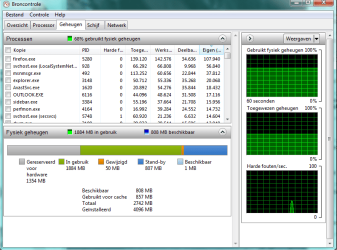
It seems to be only having a total of 2.7 GB of RAM while there is 4GB ram installed in my computer...
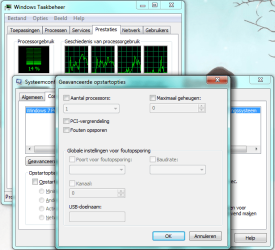
So I then opened the "source check"? (sorry if I got that wrong, I'm using Win7 in Dutch xD so I don't really know what it's called in English :) There's a printscreen in the attachment)
And i then saw that Windows sees that their is acctually having 4GB ram installed but that theirs only a total of 2.7GB ?
How can I solve this to use the full 4GB?
It would really help with my performance with games and such... because i'm actually losing almost 40% of my RAM? :o
Thanks for your help :)
 

Attachments

  • Naamloos2.png
    Naamloos2.png
    30.4 KB · Views: 70

My Computer

Computer Manufacturer/Model Number
Dell Vostro 3700
OS
Microsoft Windows 7 Professional (x64) 6.1.7601
CPU
Intel(R) Core(TM) i5 CPU M 520 @ 2.40GHz (4 CPUs), ~2
Memory
4096MB RAM
Graphics Card(s)
NVIDIA GeForce GT 330M
Sound Card
nVIDIA GT216 - High Definition Audio Controller
Monitor(s) Displays
Integrated 17"
Screen Resolution
1600 x 900
Hard Drives
OS (C:) 451,07 GB
Recovery: 14,65 GB
Case
Standard
Keyboard
integrated
Internet Speed
2.4 Mbps
It seems that your graphic card uses 1 GB of your total RAM..That could be because it uses system RAM as Video RAM.Maybe you can reduce amount of used RAM in your BIOS,don´t know for sure..:huh:
 

My Computer

OS
Windows 7 x64 Build 7600
CPU
AMD FX 6300 Black Edition
Motherboard
GIGABYTE MA990XA-UD3
Memory
2 x 4GB G.Skill Sniper F3 14900CL9-4GBSR
Graphics Card(s)
Sapphire Radeon 6970 2048 MB
Monitor(s) Displays
Dell 23´
Screen Resolution
1920x1080
PSU
COrsair GS700
Mouse
Razor Imperator 2012
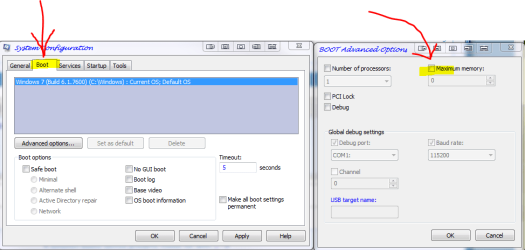
hi and hello first check will be

  1. type msconfig in start menu and click on result
  2. go to boot and click advanced options
  3. in maximum memory make sure the box is UNTICKED
  4. click ok
  5. click apply
  6. click ok
  7. reboot if asked by windows
 

Attachments

  • mem1.PNG
    mem1.PNG
    25.1 KB · Views: 85

My Computer

Computer Manufacturer/Model Number
packard bell IXTREME M5722
OS
Operating System : Windows 7 Home Premium Edition 6.01.7600 SP1 (x64)
CPU
Processor : Intel Core 2 Quad Q8300 @ 2500 MHz
Motherboard
Mainboard : Packard Bell (Acer EG43M )
Memory
Physical Memory :8GB Corsair4x 2GB 800MHz C5 DDR2
Graphics Card(s)
Video Card : XFX 6700 AMD
Monitor(s) Displays
Maestro 234DL - BenQ V2220 - BenQ VW2420H
Screen Resolution
Current Display :1920x1080p pixels at 60 Hz in HD LED
Hard Drives
Hard Disks : WDC (1000 GB)
Drive C: (Hard Disk) : 428 GB available on 491 GB
Drive D: (Hard Disk) : 426 GB available on 492 GB
SAMSUNG spinpoint HD103SJ 1000.2 GB
(X 2) KINGSTON SSD NOW V 30GB
PSU
XFX ProSeries 550W PSU
Case
PACKARD BELL IXTREME
Cooling
System Blower Current: 150mA Air Flow16CFM ;Akasa 90mm rear
Keyboard
Gigabyte Aivia K8100
Mouse
TRUST-Wireless Laser Mouse - Carbon edition MI-7770C
Internet Speed
TP-LINK > TL-WN951N / AV500 Gigabit Powerline Adapters
Browser
chrome dev
Other Info
EXTRA COOLING>(FAN CONTROLLER) PC Bay Cooler 3 x 40mm fans; Akasa AK-HD-BL Blue hard drive cooler 2 x 40 mm fan 4500 rpm 29.7 dBA
Bios> American Megatrends Inc.
Version : P01-A1
Date : 08/31/2009
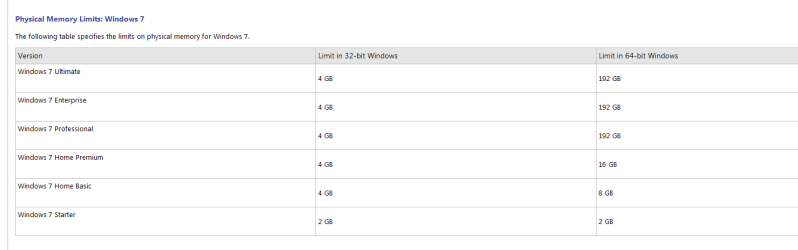
Memory. With 32-bit Windows, you're stuck at 4GB of RAM, and even then, you're only using about 3.3GB
 

Attachments

  • mem2.PNG
    mem2.PNG
    8.8 KB · Views: 40
Last edited:

My Computer

Computer Manufacturer/Model Number
packard bell IXTREME M5722
OS
Operating System : Windows 7 Home Premium Edition 6.01.7600 SP1 (x64)
CPU
Processor : Intel Core 2 Quad Q8300 @ 2500 MHz
Motherboard
Mainboard : Packard Bell (Acer EG43M )
Memory
Physical Memory :8GB Corsair4x 2GB 800MHz C5 DDR2
Graphics Card(s)
Video Card : XFX 6700 AMD
Monitor(s) Displays
Maestro 234DL - BenQ V2220 - BenQ VW2420H
Screen Resolution
Current Display :1920x1080p pixels at 60 Hz in HD LED
Hard Drives
Hard Disks : WDC (1000 GB)
Drive C: (Hard Disk) : 428 GB available on 491 GB
Drive D: (Hard Disk) : 426 GB available on 492 GB
SAMSUNG spinpoint HD103SJ 1000.2 GB
(X 2) KINGSTON SSD NOW V 30GB
PSU
XFX ProSeries 550W PSU
Case
PACKARD BELL IXTREME
Cooling
System Blower Current: 150mA Air Flow16CFM ;Akasa 90mm rear
Keyboard
Gigabyte Aivia K8100
Mouse
TRUST-Wireless Laser Mouse - Carbon edition MI-7770C
Internet Speed
TP-LINK > TL-WN951N / AV500 Gigabit Powerline Adapters
Browser
chrome dev
Other Info
EXTRA COOLING>(FAN CONTROLLER) PC Bay Cooler 3 x 40mm fans; Akasa AK-HD-BL Blue hard drive cooler 2 x 40 mm fan 4500 rpm 29.7 dBA
Bios> American Megatrends Inc.
Version : P01-A1
Date : 08/31/2009
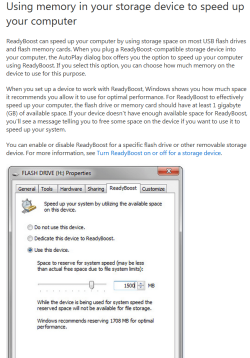
one way you can improve performance is with readyboost (using 4 GIG thumb drive is a good start)

ReadyBoost - Windows 7 features - Microsoft Windows

**quote from Microsoft**

Want a simple way to speed up your PC?

Just plug in a USB flash drive or card and let ReadyBoost borrow it. ReadyBoost is designed to help when your PC's memory is running low. Low memory can make your computer sluggish because Windows, which needs a place to stash data, turns to the hard drive. Flash memory offers a speedier alternative.

  1. To turn ReadyBoost on or off
  2. Plug a flash drive or flash memory card into your computer.
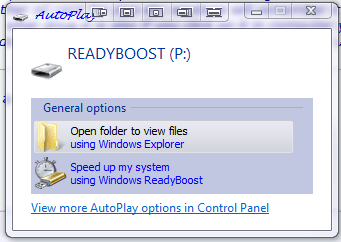
  3. In the Autoplay dialog box, under General options, click Speed up my system.
  4. In the Properties dialog box, click the ReadyBoost tab, and then do one of the following:
  5. To turn ReadyBoost off, click Do not use this device.


To use the maximum available space on the flash drive or memory card for ReadyBoost, click Dedicate this device to ReadyBoost. Windows will leave any files already stored on the device, but it'll use the rest to boost your system speed.

To use less than the maximum available space on the device for ReadyBoost, click Use this device, and then move the slider to choose the amount of available space on the device you want to use.

Click OK.

**NOTE**

For ReadyBoost to effectively speed up your computer, the flash drive or memory card should have at least 1 gigabyte (GB) of available space. If your drive or card doesn't have enough available space for ReadyBoost, you'll see a message telling you to free some space on it. For best results, use a flash drive or flash memory card with at least double the amount of available space as the amount of memory (RAM) in your computer.
 

Attachments

  • rb.PNG
    rb.PNG
    80.7 KB · Views: 17
Last edited:

My Computer

Computer Manufacturer/Model Number
packard bell IXTREME M5722
OS
Operating System : Windows 7 Home Premium Edition 6.01.7600 SP1 (x64)
CPU
Processor : Intel Core 2 Quad Q8300 @ 2500 MHz
Motherboard
Mainboard : Packard Bell (Acer EG43M )
Memory
Physical Memory :8GB Corsair4x 2GB 800MHz C5 DDR2
Graphics Card(s)
Video Card : XFX 6700 AMD
Monitor(s) Displays
Maestro 234DL - BenQ V2220 - BenQ VW2420H
Screen Resolution
Current Display :1920x1080p pixels at 60 Hz in HD LED
Hard Drives
Hard Disks : WDC (1000 GB)
Drive C: (Hard Disk) : 428 GB available on 491 GB
Drive D: (Hard Disk) : 426 GB available on 492 GB
SAMSUNG spinpoint HD103SJ 1000.2 GB
(X 2) KINGSTON SSD NOW V 30GB
PSU
XFX ProSeries 550W PSU
Case
PACKARD BELL IXTREME
Cooling
System Blower Current: 150mA Air Flow16CFM ;Akasa 90mm rear
Keyboard
Gigabyte Aivia K8100
Mouse
TRUST-Wireless Laser Mouse - Carbon edition MI-7770C
Internet Speed
TP-LINK > TL-WN951N / AV500 Gigabit Powerline Adapters
Browser
chrome dev
Other Info
EXTRA COOLING>(FAN CONTROLLER) PC Bay Cooler 3 x 40mm fans; Akasa AK-HD-BL Blue hard drive cooler 2 x 40 mm fan 4500 rpm 29.7 dBA
Bios> American Megatrends Inc.
Version : P01-A1
Date : 08/31/2009
It seems that your graphic card uses 1 GB of your total RAM..That could be because it uses system RAM as Video RAM.Maybe you can reduce amount of used RAM in your BIOS,don´t know for sure..:huh:
I was running a game at that time :P
 

My Computer

Computer Manufacturer/Model Number
Dell Vostro 3700
OS
Microsoft Windows 7 Professional (x64) 6.1.7601
CPU
Intel(R) Core(TM) i5 CPU M 520 @ 2.40GHz (4 CPUs), ~2
Memory
4096MB RAM
Graphics Card(s)
NVIDIA GeForce GT 330M
Sound Card
nVIDIA GT216 - High Definition Audio Controller
Monitor(s) Displays
Integrated 17"
Screen Resolution
1600 x 900
Hard Drives
OS (C:) 451,07 GB
Recovery: 14,65 GB
Case
Standard
Keyboard
integrated
Internet Speed
2.4 Mbps
one way you can improve performance is with readyboost (using 4 GIG thumb drive is a good start)

ReadyBoost - Windows 7 features - Microsoft Windows

**quote from Microsoft**

Want a simple way to speed up your PC?

Just plug in a USB flash drive or card and let ReadyBoost borrow it. ReadyBoost is designed to help when your PC's memory is running low. Low memory can make your computer sluggish because Windows, which needs a place to stash data, turns to the hard drive. Flash memory offers a speedier alternative.

  1. To turn ReadyBoost on or off
  2. Plug a flash drive or flash memory card into your computer.
  3. In the Autoplay dialog box, under General options, click Speed up my system.
  4. In the Properties dialog box, click the ReadyBoost tab, and then do one of the following:
  5. To turn ReadyBoost off, click Do not use this device.


To use the maximum available space on the flash drive or memory card for ReadyBoost, click Dedicate this device to ReadyBoost. Windows will leave any files already stored on the device, but it'll use the rest to boost your system speed.

To use less than the maximum available space on the device for ReadyBoost, click Use this device, and then move the slider to choose the amount of available space on the device you want to use.

Click OK.

**NOTE**

For ReadyBoost to effectively speed up your computer, the flash drive or memory card should have at least 1 gigabyte (GB) of available space. If your drive or card doesn't have enough available space for ReadyBoost, you'll see a message telling you to free some space on it. For best results, use a flash drive or flash memory card with at least double the amount of available space as the amount of memory (RAM) in your computer.
I don't really want to improve the performance.. It's just that I have 4GB installed and that I only can use 2.7GB...
 

My Computer

Computer Manufacturer/Model Number
Dell Vostro 3700
OS
Microsoft Windows 7 Professional (x64) 6.1.7601
CPU
Intel(R) Core(TM) i5 CPU M 520 @ 2.40GHz (4 CPUs), ~2
Memory
4096MB RAM
Graphics Card(s)
NVIDIA GeForce GT 330M
Sound Card
nVIDIA GT216 - High Definition Audio Controller
Monitor(s) Displays
Integrated 17"
Screen Resolution
1600 x 900
Hard Drives
OS (C:) 451,07 GB
Recovery: 14,65 GB
Case
Standard
Keyboard
integrated
Internet Speed
2.4 Mbps
Memory. With 32-bit Windows, you're stuck at 4GB of RAM, and even then, you're only using about 3.3GB
I know that..
But I'm only using 2.7GB?
I'm having win7 Pro..
And a friend of mine has win7 Pro 64-bit and has the same problem with a 4GB RAM
 

My Computer

Computer Manufacturer/Model Number
Dell Vostro 3700
OS
Microsoft Windows 7 Professional (x64) 6.1.7601
CPU
Intel(R) Core(TM) i5 CPU M 520 @ 2.40GHz (4 CPUs), ~2
Memory
4096MB RAM
Graphics Card(s)
NVIDIA GeForce GT 330M
Sound Card
nVIDIA GT216 - High Definition Audio Controller
Monitor(s) Displays
Integrated 17"
Screen Resolution
1600 x 900
Hard Drives
OS (C:) 451,07 GB
Recovery: 14,65 GB
Case
Standard
Keyboard
integrated
Internet Speed
2.4 Mbps
hi and hello first check will be

  1. type msconfig in start menu and click on result
  2. go to boot and click advanced options
  3. in maximum memory make sure the box is UNTICKED
  4. click ok
  5. click apply
  6. click ok
  7. reboot if asked by windows
It it still gives a total of 2.7GB ...
 

Attachments

  • Naamloos3.png
    Naamloos3.png
    42 KB · Views: 11

My Computer

Computer Manufacturer/Model Number
Dell Vostro 3700
OS
Microsoft Windows 7 Professional (x64) 6.1.7601
CPU
Intel(R) Core(TM) i5 CPU M 520 @ 2.40GHz (4 CPUs), ~2
Memory
4096MB RAM
Graphics Card(s)
NVIDIA GeForce GT 330M
Sound Card
nVIDIA GT216 - High Definition Audio Controller
Monitor(s) Displays
Integrated 17"
Screen Resolution
1600 x 900
Hard Drives
OS (C:) 451,07 GB
Recovery: 14,65 GB
Case
Standard
Keyboard
integrated
Internet Speed
2.4 Mbps
Memory. With 32-bit Windows, you're stuck at 4GB of RAM, and even then, you're only using about 3.3GB
I know that..
But I'm only using 2.7GB?
I'm having win7 Pro..
And a friend of mine has win7 Pro 64-bit and has the same problem with a 4GB RAM

that's the architectural design of windows 32 bit you are limited with ram. and windows 7 uses lots of ram reasons being aero etc (try turning these functions off) so if you use memory hungry programs you are better off opting for 64Bit operating system my suggestion of using readyboost is to your advantage because you can not improve on your ram situation
 

My Computer

Computer Manufacturer/Model Number
packard bell IXTREME M5722
OS
Operating System : Windows 7 Home Premium Edition 6.01.7600 SP1 (x64)
CPU
Processor : Intel Core 2 Quad Q8300 @ 2500 MHz
Motherboard
Mainboard : Packard Bell (Acer EG43M )
Memory
Physical Memory :8GB Corsair4x 2GB 800MHz C5 DDR2
Graphics Card(s)
Video Card : XFX 6700 AMD
Monitor(s) Displays
Maestro 234DL - BenQ V2220 - BenQ VW2420H
Screen Resolution
Current Display :1920x1080p pixels at 60 Hz in HD LED
Hard Drives
Hard Disks : WDC (1000 GB)
Drive C: (Hard Disk) : 428 GB available on 491 GB
Drive D: (Hard Disk) : 426 GB available on 492 GB
SAMSUNG spinpoint HD103SJ 1000.2 GB
(X 2) KINGSTON SSD NOW V 30GB
PSU
XFX ProSeries 550W PSU
Case
PACKARD BELL IXTREME
Cooling
System Blower Current: 150mA Air Flow16CFM ;Akasa 90mm rear
Keyboard
Gigabyte Aivia K8100
Mouse
TRUST-Wireless Laser Mouse - Carbon edition MI-7770C
Internet Speed
TP-LINK > TL-WN951N / AV500 Gigabit Powerline Adapters
Browser
chrome dev
Other Info
EXTRA COOLING>(FAN CONTROLLER) PC Bay Cooler 3 x 40mm fans; Akasa AK-HD-BL Blue hard drive cooler 2 x 40 mm fan 4500 rpm 29.7 dBA
Bios> American Megatrends Inc.
Version : P01-A1
Date : 08/31/2009
hi and hello first check will be

  1. type msconfig in start menu and click on result
  2. go to boot and click advanced options
  3. in maximum memory make sure the box is UNTICKED
  4. click ok
  5. click apply
  6. click ok
  7. reboot if asked by windows
It it still gives a total of 2.7GB ...

The rest RAM seems to be hardware reserved, you might gain more additional RAM(3GB+) if you install the 64-bit version of Windows 7 as the 32-bit one will only address up to 2.6-3.25GB of RAM
 

My Computer

Computer type
PC/Desktop
Computer Manufacturer/Model Number
Custom Build
OS
Windows 10 Pro x64, Arch Linux
CPU
Intel Core 2 Quad Q8200 OC'd 3.08GHz
Motherboard
Asus Rampage formula LGA775
Memory
8GB DDR2 900Mhz
Graphics Card(s)
MSI GT730 2GB GDDR5 (Kepler)
Sound Card
Supreme FX2
Monitor(s) Displays
Samsung LS22F350 LED
Screen Resolution
1080P
Hard Drives
Kingston SSDNow UV400 120GB, 500GB Hitachi, 2TB Samsung, 500GB Seagate FreeAgent, 640GB Samsung, 160GB Toshiba (Arch)
PSU
AeroCool 500W Bronze
Cooling
Cooler Master V6 + 3X fans
Keyboard
Prolink keyboard
Mouse
Logitech M705
Internet Speed
1MiB/s
Browser
Chrome Beta

My Computer

Computer type
PC/Desktop
Computer Manufacturer/Model Number
Custom Build
OS
Windows 10 Pro x64, Arch Linux
CPU
Intel Core 2 Quad Q8200 OC'd 3.08GHz
Motherboard
Asus Rampage formula LGA775
Memory
8GB DDR2 900Mhz
Graphics Card(s)
MSI GT730 2GB GDDR5 (Kepler)
Sound Card
Supreme FX2
Monitor(s) Displays
Samsung LS22F350 LED
Screen Resolution
1080P
Hard Drives
Kingston SSDNow UV400 120GB, 500GB Hitachi, 2TB Samsung, 500GB Seagate FreeAgent, 640GB Samsung, 160GB Toshiba (Arch)
PSU
AeroCool 500W Bronze
Cooling
Cooler Master V6 + 3X fans
Keyboard
Prolink keyboard
Mouse
Logitech M705
Internet Speed
1MiB/s
Browser
Chrome Beta

My Computer

Computer Manufacturer/Model Number
packard bell IXTREME M5722
OS
Operating System : Windows 7 Home Premium Edition 6.01.7600 SP1 (x64)
CPU
Processor : Intel Core 2 Quad Q8300 @ 2500 MHz
Motherboard
Mainboard : Packard Bell (Acer EG43M )
Memory
Physical Memory :8GB Corsair4x 2GB 800MHz C5 DDR2
Graphics Card(s)
Video Card : XFX 6700 AMD
Monitor(s) Displays
Maestro 234DL - BenQ V2220 - BenQ VW2420H
Screen Resolution
Current Display :1920x1080p pixels at 60 Hz in HD LED
Hard Drives
Hard Disks : WDC (1000 GB)
Drive C: (Hard Disk) : 428 GB available on 491 GB
Drive D: (Hard Disk) : 426 GB available on 492 GB
SAMSUNG spinpoint HD103SJ 1000.2 GB
(X 2) KINGSTON SSD NOW V 30GB
PSU
XFX ProSeries 550W PSU
Case
PACKARD BELL IXTREME
Cooling
System Blower Current: 150mA Air Flow16CFM ;Akasa 90mm rear
Keyboard
Gigabyte Aivia K8100
Mouse
TRUST-Wireless Laser Mouse - Carbon edition MI-7770C
Internet Speed
TP-LINK > TL-WN951N / AV500 Gigabit Powerline Adapters
Browser
chrome dev
Other Info
EXTRA COOLING>(FAN CONTROLLER) PC Bay Cooler 3 x 40mm fans; Akasa AK-HD-BL Blue hard drive cooler 2 x 40 mm fan 4500 rpm 29.7 dBA
Bios> American Megatrends Inc.
Version : P01-A1
Date : 08/31/2009
How to Restrict a Video Card's Memory :ar: How to Restrict a Video Card's Memory | eHow.com

But this won't apply to OP's system

You're right that it won't help the OP's system, and actually won't help any system,

What is AGP Aperture size? | techPowerUp

Think of it as a pagefile for the video card set at the bios level and only actually gets used if the memory on the card is filled and needs more. Changing it won't make any difference as to the physical amount of memory on the card. That and that setting disappeared from bios' about the same time that PCI-E cards came out.

With 4 GB of system ram and a 1 GB video card the only way to free up that 1 GB back to system ram is 64 bit.

And a friend of mine has Windows 7 Pro 64-bit and has the same problem with a 4GB RAM

That is a topic for another thread, but if his system only supports up to 4 GB ram then all the same limitations that apply to 32 bit will apply when running 64 bit.
 

My Computer

Computer type
PC/Desktop
Computer Manufacturer/Model Number
Me
OS
Win 7 Ultimate x64
CPU
FX-8350 @ 4.6 GHz so far
Motherboard
Asus M5A97 EVO
Memory
ADATA XPG V1 Series Black 8GB DDR3 1600
Graphics Card(s)
Sapphire R9 270x Dual-X
Sound Card
Xonar DGX w/ Corsair Vengence 1300
Monitor(s) Displays
Acer S232HL Abid
Screen Resolution
1920x1080
Hard Drives
120 GB OCZ Vertex 3
500 GB Seagate 7200.12
PSU
Antec Earthwatts 650W Green
Case
Antec Three Hundred
Cooling
Cooler Master 212 EVO
Keyboard
Logitech G510
Mouse
Logitech G500s
Internet Speed
35000/3000
How to Restrict a Video Card's Memory :ar: How to Restrict a Video Card's Memory | eHow.com

But this won't apply to OP's system

You're right that it won't help the OP's system, and actually won't help any system,

What is AGP Aperture size? | techPowerUp

Think of it as a pagefile for the video card set at the bios level and only actually gets used if the memory on the card is filled and needs more. Changing it won't make any difference as to the physical amount of memory on the card. That and that setting disappeared from bios' about the same time that PCI-E cards came out.

With 4 GB of system ram and a 1 GB video card the only way to free up that 1 GB back to system ram is 64 bit.

And a friend of mine has Windows 7 Pro 64-bit and has the same problem with a 4GB RAM

That is a topic for another thread, but if his system only supports up to 4 GB ram then all the same limitations that apply to 32 bit will apply when running 64 bit.

like i said i removed the post:D
 

My Computer

Computer Manufacturer/Model Number
packard bell IXTREME M5722
OS
Operating System : Windows 7 Home Premium Edition 6.01.7600 SP1 (x64)
CPU
Processor : Intel Core 2 Quad Q8300 @ 2500 MHz
Motherboard
Mainboard : Packard Bell (Acer EG43M )
Memory
Physical Memory :8GB Corsair4x 2GB 800MHz C5 DDR2
Graphics Card(s)
Video Card : XFX 6700 AMD
Monitor(s) Displays
Maestro 234DL - BenQ V2220 - BenQ VW2420H
Screen Resolution
Current Display :1920x1080p pixels at 60 Hz in HD LED
Hard Drives
Hard Disks : WDC (1000 GB)
Drive C: (Hard Disk) : 428 GB available on 491 GB
Drive D: (Hard Disk) : 426 GB available on 492 GB
SAMSUNG spinpoint HD103SJ 1000.2 GB
(X 2) KINGSTON SSD NOW V 30GB
PSU
XFX ProSeries 550W PSU
Case
PACKARD BELL IXTREME
Cooling
System Blower Current: 150mA Air Flow16CFM ;Akasa 90mm rear
Keyboard
Gigabyte Aivia K8100
Mouse
TRUST-Wireless Laser Mouse - Carbon edition MI-7770C
Internet Speed
TP-LINK > TL-WN951N / AV500 Gigabit Powerline Adapters
Browser
chrome dev
Other Info
EXTRA COOLING>(FAN CONTROLLER) PC Bay Cooler 3 x 40mm fans; Akasa AK-HD-BL Blue hard drive cooler 2 x 40 mm fan 4500 rpm 29.7 dBA
Bios> American Megatrends Inc.
Version : P01-A1
Date : 08/31/2009
Thank you everybody :)
But do I have to got the USB driver plugged in at all times?
Or not?
And is an SD card good as well?
Because I can keep SD'cards inserted in my SD slot at all times :)
And not having to remove my USB drive :)
 

My Computer

Computer Manufacturer/Model Number
Dell Vostro 3700
OS
Microsoft Windows 7 Professional (x64) 6.1.7601
CPU
Intel(R) Core(TM) i5 CPU M 520 @ 2.40GHz (4 CPUs), ~2
Memory
4096MB RAM
Graphics Card(s)
NVIDIA GeForce GT 330M
Sound Card
nVIDIA GT216 - High Definition Audio Controller
Monitor(s) Displays
Integrated 17"
Screen Resolution
1600 x 900
Hard Drives
OS (C:) 451,07 GB
Recovery: 14,65 GB
Case
Standard
Keyboard
integrated
Internet Speed
2.4 Mbps
Thank you everybody :)
But do I have to got the USB driver plugged in at all times?
Or not?
And is an SD card good as well?
Because I can keep SD'cards inserted in my SD slot at all times :)
And not having to remove my USB drive :)

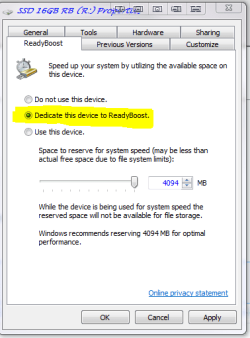
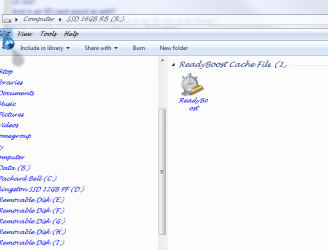
yes leave it in if you want best performance. if you choose the settings like mine in the pic (dedicate this device to readyboost) if you need to take it out to use another sd card for pics etc windows will remember it when you put it back in the slot, what i do is call the drive readyboost or RB so i no what drive it is also if you click on it in computer you will see the readyboost icon as like in my other pic (also a good way to see if windows has configured it). the SD slot will be good i use that its ok and it saves a thumb drive sticking out!! what size sd do you have?
 

Attachments

  • readyboost1.PNG
    readyboost1.PNG
    13.9 KB · Views: 3
  • readyboost2.PNG
    readyboost2.PNG
    19.1 KB · Views: 1

My Computer

Computer Manufacturer/Model Number
packard bell IXTREME M5722
OS
Operating System : Windows 7 Home Premium Edition 6.01.7600 SP1 (x64)
CPU
Processor : Intel Core 2 Quad Q8300 @ 2500 MHz
Motherboard
Mainboard : Packard Bell (Acer EG43M )
Memory
Physical Memory :8GB Corsair4x 2GB 800MHz C5 DDR2
Graphics Card(s)
Video Card : XFX 6700 AMD
Monitor(s) Displays
Maestro 234DL - BenQ V2220 - BenQ VW2420H
Screen Resolution
Current Display :1920x1080p pixels at 60 Hz in HD LED
Hard Drives
Hard Disks : WDC (1000 GB)
Drive C: (Hard Disk) : 428 GB available on 491 GB
Drive D: (Hard Disk) : 426 GB available on 492 GB
SAMSUNG spinpoint HD103SJ 1000.2 GB
(X 2) KINGSTON SSD NOW V 30GB
PSU
XFX ProSeries 550W PSU
Case
PACKARD BELL IXTREME
Cooling
System Blower Current: 150mA Air Flow16CFM ;Akasa 90mm rear
Keyboard
Gigabyte Aivia K8100
Mouse
TRUST-Wireless Laser Mouse - Carbon edition MI-7770C
Internet Speed
TP-LINK > TL-WN951N / AV500 Gigabit Powerline Adapters
Browser
chrome dev
Other Info
EXTRA COOLING>(FAN CONTROLLER) PC Bay Cooler 3 x 40mm fans; Akasa AK-HD-BL Blue hard drive cooler 2 x 40 mm fan 4500 rpm 29.7 dBA
Bios> American Megatrends Inc.
Version : P01-A1
Date : 08/31/2009

Attachments

  • ready boost cache.PNG
    ready boost cache.PNG
    39.5 KB · Views: 9
Last edited:

My Computer

Computer Manufacturer/Model Number
packard bell IXTREME M5722
OS
Operating System : Windows 7 Home Premium Edition 6.01.7600 SP1 (x64)
CPU
Processor : Intel Core 2 Quad Q8300 @ 2500 MHz
Motherboard
Mainboard : Packard Bell (Acer EG43M )
Memory
Physical Memory :8GB Corsair4x 2GB 800MHz C5 DDR2
Graphics Card(s)
Video Card : XFX 6700 AMD
Monitor(s) Displays
Maestro 234DL - BenQ V2220 - BenQ VW2420H
Screen Resolution
Current Display :1920x1080p pixels at 60 Hz in HD LED
Hard Drives
Hard Disks : WDC (1000 GB)
Drive C: (Hard Disk) : 428 GB available on 491 GB
Drive D: (Hard Disk) : 426 GB available on 492 GB
SAMSUNG spinpoint HD103SJ 1000.2 GB
(X 2) KINGSTON SSD NOW V 30GB
PSU
XFX ProSeries 550W PSU
Case
PACKARD BELL IXTREME
Cooling
System Blower Current: 150mA Air Flow16CFM ;Akasa 90mm rear
Keyboard
Gigabyte Aivia K8100
Mouse
TRUST-Wireless Laser Mouse - Carbon edition MI-7770C
Internet Speed
TP-LINK > TL-WN951N / AV500 Gigabit Powerline Adapters
Browser
chrome dev
Other Info
EXTRA COOLING>(FAN CONTROLLER) PC Bay Cooler 3 x 40mm fans; Akasa AK-HD-BL Blue hard drive cooler 2 x 40 mm fan 4500 rpm 29.7 dBA
Bios> American Megatrends Inc.
Version : P01-A1
Date : 08/31/2009
Thank you everybody :)
But do I have to got the USB driver plugged in at all times?
Or not?
And is an SD card good as well?
Because I can keep SD'cards inserted in my SD slot at all times :)
And not having to remove my USB drive :)

yes leave it in if you want best performance. if you choose the settings like mine in the pic (dedicate this device to readyboost) if you need to take it out to use another sd card for pics etc windows will remember it when you put it back in the slot, what i do is call the drive readyboost or RB so i no what drive it is also if you click on it in computer you will see the readyboost icon as like in my other pic (also a good way to see if windows has configured it). the SD slot will be good i use that its ok and it saves a thumb drive sticking out!! what size sd do you have?
i don't have one right now.. I have a 4GB SD in my camera, but I need that xD
So I might buy one :)
what size u suggest?
 

My Computer

Computer Manufacturer/Model Number
Dell Vostro 3700
OS
Microsoft Windows 7 Professional (x64) 6.1.7601
CPU
Intel(R) Core(TM) i5 CPU M 520 @ 2.40GHz (4 CPUs), ~2
Memory
4096MB RAM
Graphics Card(s)
NVIDIA GeForce GT 330M
Sound Card
nVIDIA GT216 - High Definition Audio Controller
Monitor(s) Displays
Integrated 17"
Screen Resolution
1600 x 900
Hard Drives
OS (C:) 451,07 GB
Recovery: 14,65 GB
Case
Standard
Keyboard
integrated
Internet Speed
2.4 Mbps
hi there 4 GB will be ok windows will recognize it ok when you first put it in you should get a window pop up with choices as in the pic i have posted and choose speed up my system and dedicate the disc to readyboost
 

Attachments

  • readyboost3.PNG
    readyboost3.PNG
    11.2 KB · Views: 0

My Computer

Computer Manufacturer/Model Number
packard bell IXTREME M5722
OS
Operating System : Windows 7 Home Premium Edition 6.01.7600 SP1 (x64)
CPU
Processor : Intel Core 2 Quad Q8300 @ 2500 MHz
Motherboard
Mainboard : Packard Bell (Acer EG43M )
Memory
Physical Memory :8GB Corsair4x 2GB 800MHz C5 DDR2
Graphics Card(s)
Video Card : XFX 6700 AMD
Monitor(s) Displays
Maestro 234DL - BenQ V2220 - BenQ VW2420H
Screen Resolution
Current Display :1920x1080p pixels at 60 Hz in HD LED
Hard Drives
Hard Disks : WDC (1000 GB)
Drive C: (Hard Disk) : 428 GB available on 491 GB
Drive D: (Hard Disk) : 426 GB available on 492 GB
SAMSUNG spinpoint HD103SJ 1000.2 GB
(X 2) KINGSTON SSD NOW V 30GB
PSU
XFX ProSeries 550W PSU
Case
PACKARD BELL IXTREME
Cooling
System Blower Current: 150mA Air Flow16CFM ;Akasa 90mm rear
Keyboard
Gigabyte Aivia K8100
Mouse
TRUST-Wireless Laser Mouse - Carbon edition MI-7770C
Internet Speed
TP-LINK > TL-WN951N / AV500 Gigabit Powerline Adapters
Browser
chrome dev
Other Info
EXTRA COOLING>(FAN CONTROLLER) PC Bay Cooler 3 x 40mm fans; Akasa AK-HD-BL Blue hard drive cooler 2 x 40 mm fan 4500 rpm 29.7 dBA
Bios> American Megatrends Inc.
Version : P01-A1
Date : 08/31/2009
Back
Top