5.1 audio system problem

alexlikEEEE

Banned
Local time
10:09 PM
Messages
39
Hi, first off all sorry for my bad english.
A couple a days i've bought an audio card Asus Xonar DGX. I own a Logitech Z506 and my sound is not 5.1 . I hope u guys could help me...i installed the driver and my center and rear speker don't work. only 2 or 3 speakers work. Cheers
 

My Computer

OS
Windows 7 Ultimate x64
CPU
Intel Core i3
Motherboard
MSI
Monitor(s) Displays
SAMSUNG
Keyboard
Logitech
Mouse
Logitech
First, disable the integrated audio (on the motherboard audio) in the BIOS. This will prevent any conflict since you now have a separate sound card.

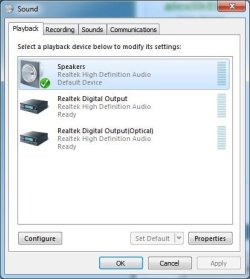
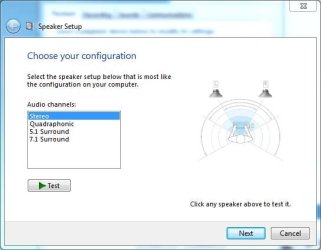
The Speakers need 5.1 selected. Go to the Control Panel/Hardware and Sound and finally the Sound Panel, Playback section. Click on Speakers (the Xonar DGX) to highlight it and then click the "Configure" button at the bottom left of the panel. In the Speaker Configuration Panel, select 5.1 and you can also test the speakers there.

Here are some screen shots (I have RealTek but yours will be the Xonar).
 

Attachments

  • Sound playback panel.JPG
    Sound playback panel.JPG
    33.2 KB · Views: 23
  • speaker setup.JPG
    speaker setup.JPG
    27.3 KB · Views: 23

My Computer

Computer type
PC/Desktop
Computer Manufacturer/Model Number
My Own Build
OS
Windows 10 64 bit
CPU
Intel i7 6700K
Motherboard
ASUS ROG Maximus VIII Hero
Memory
16GB Corsair Dominator
Graphics Card(s)
Intel CPU Graphics
Sound Card
RealTek
Monitor(s) Displays
27" Dell S2719dgf
Screen Resolution
2560X1440
Hard Drives
1 TB Samsung 850 EVO SSD for Win 10 Pro
500GB Samsung 850 EVO SSD for Win 10 Insider
2 TB drive for backup
PSU
EVGA Supernova 750G2
Case
BeQuiet Silent Base 600
Cooling
Deepcool Captain 120EX
Keyboard
Microsoft Wireless 2000
Mouse
Microsoft wireless
Internet Speed
100 MB/sec (Cable)
Antivirus
Microsoft Defender and Malwarebytes
Browser
Edge/Firefox
Other Info
Cakewalk (Sonar) by BandLab and Studio One 4.1 Pro recording studio software. MOTU 896Mk3 Hybrid recording interface, Frontier Tranzport wireless control unit, Behringer X-Touch Control Surface.
Five USB connected optical drives for CD Audio production using Nero BurningROM
Hi, thanks for answer i've already done this but when i press test buton i can't hear center speaker. I don't know why but i don't hear as i said 2-3 speakers when i play a movie or a game
 

My Computer

OS
Windows 7 Ultimate x64
CPU
Intel Core i3
Motherboard
MSI
Monitor(s) Displays
SAMSUNG
Keyboard
Logitech
Mouse
Logitech
If it does not work with the Test, there is either a problem with the speaker system, a connection problem or a problem in the ASUS Xonar card. If the ASUS Xonar has a configuration panel, check that to see if the 5.1 is set up correctly.
 

My Computer

Computer type
PC/Desktop
Computer Manufacturer/Model Number
My Own Build
OS
Windows 10 64 bit
CPU
Intel i7 6700K
Motherboard
ASUS ROG Maximus VIII Hero
Memory
16GB Corsair Dominator
Graphics Card(s)
Intel CPU Graphics
Sound Card
RealTek
Monitor(s) Displays
27" Dell S2719dgf
Screen Resolution
2560X1440
Hard Drives
1 TB Samsung 850 EVO SSD for Win 10 Pro
500GB Samsung 850 EVO SSD for Win 10 Insider
2 TB drive for backup
PSU
EVGA Supernova 750G2
Case
BeQuiet Silent Base 600
Cooling
Deepcool Captain 120EX
Keyboard
Microsoft Wireless 2000
Mouse
Microsoft wireless
Internet Speed
100 MB/sec (Cable)
Antivirus
Microsoft Defender and Malwarebytes
Browser
Edge/Firefox
Other Info
Cakewalk (Sonar) by BandLab and Studio One 4.1 Pro recording studio software. MOTU 896Mk3 Hybrid recording interface, Frontier Tranzport wireless control unit, Behringer X-Touch Control Surface.
Five USB connected optical drives for CD Audio production using Nero BurningROM
the center speaker is working tested in other port. The problem is the driver. Can u guys give me some moded drivers or something like that?
 

My Computer

OS
Windows 7 Ultimate x64
CPU
Intel Core i3
Motherboard
MSI
Monitor(s) Displays
SAMSUNG
Keyboard
Logitech
Mouse
Logitech
I don't know of any modded drivers.
 

My Computer

Computer type
PC/Desktop
Computer Manufacturer/Model Number
My Own Build
OS
Windows 10 64 bit
CPU
Intel i7 6700K
Motherboard
ASUS ROG Maximus VIII Hero
Memory
16GB Corsair Dominator
Graphics Card(s)
Intel CPU Graphics
Sound Card
RealTek
Monitor(s) Displays
27" Dell S2719dgf
Screen Resolution
2560X1440
Hard Drives
1 TB Samsung 850 EVO SSD for Win 10 Pro
500GB Samsung 850 EVO SSD for Win 10 Insider
2 TB drive for backup
PSU
EVGA Supernova 750G2
Case
BeQuiet Silent Base 600
Cooling
Deepcool Captain 120EX
Keyboard
Microsoft Wireless 2000
Mouse
Microsoft wireless
Internet Speed
100 MB/sec (Cable)
Antivirus
Microsoft Defender and Malwarebytes
Browser
Edge/Firefox
Other Info
Cakewalk (Sonar) by BandLab and Studio One 4.1 Pro recording studio software. MOTU 896Mk3 Hybrid recording interface, Frontier Tranzport wireless control unit, Behringer X-Touch Control Surface.
Five USB connected optical drives for CD Audio production using Nero BurningROM
hey. sorry for answering so late. i've been gone out of town.
I don't know why it's keep reseting to stereo when i set 'em on 5.1 in Speaker Setup
 

My Computer

OS
Windows 7 Ultimate x64
CPU
Intel Core i3
Motherboard
MSI
Monitor(s) Displays
SAMSUNG
Keyboard
Logitech
Mouse
Logitech
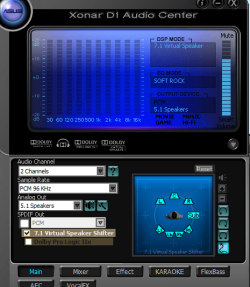
You should be able to correct problems with the center and rear speakers not working in the Asus software. Below you'll see the Asus software. At the left side near the center of the picture where it says Audio Channel, what that really means is you select from the drop down box what your source material is. In other words, if you are playing stereo material (CD for example) you'll set that to 2 channels, then your Analog Out to 5.1 speakers and get music through all 5 speakers plus your subwoofer. You can add more surround affect using 7.1 Virtual Speaker or Dolby Pro Logic as well.

If you want simply stereo music from a CD or MP3, keep the Audio Channel set to 2 Channels and set the Analog out to 2 speakers. If you are playing a movie that has 5.1 output, you set Audio Channel to 6 channels. Make certain your Analog Out is set to 5.1 speakers and you're set.

By the way, you'll find that if you open the Asus software and the Windows Sound software that whatever you select in the Asus software under Audio Channel, the Windows Sound software will change with it. For example select 2 channels and the change is reflected in the Windows software, and the same if you select others, 4 channel, 6 channel, etc.
 

Attachments

  • Xonar software.PNG
    Xonar software.PNG
    51.1 KB · Views: 9

My Computer

Computer type
PC/Desktop
Computer Manufacturer/Model Number
Wordsworth 5000
OS
Windows 10 Pro 64 bit
CPU
Core i7 6700K Skylake 4.0GHz
Motherboard
Asus Z170 Pro
Memory
Corsair Vengeance LPX DDR4 32GB 3000MHz
Graphics Card(s)
Asus Radeon RX480 Strix 8GB
Sound Card
Asus Xonar DSX
Monitor(s) Displays
HP 2709m
Screen Resolution
1920x1080
Hard Drives
Intel 600p M.2 PCIe NVMe SSD 512GB; Intel 335 SSD 240GB ;Western Digital Caviar Black 1TB
PSU
Thermaltake Toughpower Grand Platinum 850W
Case
Lian Li PC-B70
Cooling
CPU-Noctua NH D15, GPU-Stock, Case-Noctua 2x140, 2x120
Keyboard
Microsoft Natural Ergo 4000
Mouse
Microsoft Wireless Optical 1000
Internet Speed
Cable
Other Info
HP bd 340,
HP bd 240,
Klipsch Promedia 5.1 THX
Back
Top