5.1 - sound only coming from 2 speakers in windows 7

Pandy90

New member
Member
Local time
5:34 PM
Messages
46
I have 5.1 surround sound speakers and a realtek sound card, and when I do the sound test everything is fine, but when I come to play anything, the sound only comes through the front and rear speakers on the right. I have tried alot of things that I found while searching the net but still found no luck. I installed winamp and the sound comes through all speakers but is very bad quality no matter what play.

Can anyone help?

Thanks
 

My Computer My Computer

At a glance

Windows 7Intel Core 2 Duo ~ 2.2GHZ3GBATI Radeon HD 4570
Computer Manufacturer/Model Number
Acer Aspire 5935G
OS
Windows 7
CPU
Intel Core 2 Duo ~ 2.2GHZ
Memory
3GB
Graphics Card(s)
ATI Radeon HD 4570
Sound Card
Realtek HD (Dolby Home Theatre v3)
Monitor(s) Displays
[Laptop]
Hard Drives
320 GB
Internet Speed
10Mb
I'm in the same situation, but with Supreme FX-II that comes with Asus Rampage Formula. Worked just great with Win XP Prof x86. I've now tested a lot of drivers with this and with every one of them the sound comes from the rear speakers while testing, but when I try to play music with winamp or watch videos with VLC the rear speakers won't work.

I'd appreciate some help also.

Ps. I think of trying to install the old drivers in compatibility mode. Will tell if I get lucky.
 

My Computer My Computer

At a glance

Windows 7 Ultimate x86Intel E8500 @ 4GHzDDR2 2x2GB 1000MHz CL5HD 4870
Computer Manufacturer/Model Number
Self built
OS
Windows 7 Ultimate x86
CPU
Intel E8500 @ 4GHz
Motherboard
Asus Rampage Formula
Memory
DDR2 2x2GB 1000MHz CL5
Graphics Card(s)
HD 4870
Sound Card
Supreme FX-II
Monitor(s) Displays
24" Samsung 245B + 19" Samsung Syncmaster 910T
Screen Resolution
1920x1200 + 1280x1024
Hard Drives
2x 1TB Samsung F1 Spinpoint
PSU
BFG ES-800
Case
Cooler Master Stacker 830 EVO
Cooling
Xigmatek HDT-S1283
Keyboard
Logitech G15 Blue Backlight
Mouse
Razer Lachesis
Internet Speed
24/1
Hi Guys,

Welcome to 7 forums :)

* Try Enabling the EAX/Matrix mode (or similar mode in your audio card) in the Audio settings. This would work for you !!!
 

My Computer My Computer

At a glance

Windows 7 Ultimate x64 SP1Intel Core i34 GB DDR3
Computer Manufacturer/Model Number
Dell Inspiron N5010
OS
Windows 7 Ultimate x64 SP1
CPU
Intel Core i3
Memory
4 GB DDR3
Screen Resolution
1366 X 768
Hard Drives
Seagate 500 GB
Internet Speed
4 MBPS
Didn't find the EAX/Matrix mode when I quickly looked in the settings, but I found something called Sonic Focus Processing. Listened to music while ticked the box to use it and instantly the sound quality got up a notch and the rear speakers came to life!

Sonic_Focus.jpg
 

My Computer My Computer

At a glance

Windows 7 Ultimate x86Intel E8500 @ 4GHzDDR2 2x2GB 1000MHz CL5HD 4870
Computer Manufacturer/Model Number
Self built
OS
Windows 7 Ultimate x86
CPU
Intel E8500 @ 4GHz
Motherboard
Asus Rampage Formula
Memory
DDR2 2x2GB 1000MHz CL5
Graphics Card(s)
HD 4870
Sound Card
Supreme FX-II
Monitor(s) Displays
24" Samsung 245B + 19" Samsung Syncmaster 910T
Screen Resolution
1920x1200 + 1280x1024
Hard Drives
2x 1TB Samsung F1 Spinpoint
PSU
BFG ES-800
Case
Cooler Master Stacker 830 EVO
Cooling
Xigmatek HDT-S1283
Keyboard
Logitech G15 Blue Backlight
Mouse
Razer Lachesis
Internet Speed
24/1
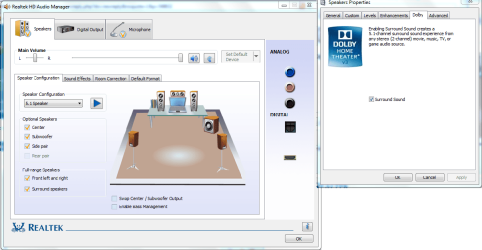
I cant find any of them settings anywhere. Heres is my sound controls.
 

Attachments

  • Untitled.png
    Untitled.png
    62.5 KB · Views: 828

My Computer My Computer

At a glance

Windows 7Intel Core 2 Duo ~ 2.2GHZ3GBATI Radeon HD 4570
Computer Manufacturer/Model Number
Acer Aspire 5935G
OS
Windows 7
CPU
Intel Core 2 Duo ~ 2.2GHZ
Memory
3GB
Graphics Card(s)
ATI Radeon HD 4570
Sound Card
Realtek HD (Dolby Home Theatre v3)
Monitor(s) Displays
[Laptop]
Hard Drives
320 GB
Internet Speed
10Mb
Didn't find the EAX/Matrix mode when I quickly looked in the settings, but I found something called Sonic Focus Processing. Listened to music while ticked the box to use it and instantly the sound quality got up a notch and the rear speakers came to life!

Sonic_Focus.jpg


Glad to hear that your issue was resolved :) Thanks for letting us know the same
 

My Computer My Computer

At a glance

Windows 7 Ultimate x64 SP1Intel Core i34 GB DDR3
Computer Manufacturer/Model Number
Dell Inspiron N5010
OS
Windows 7 Ultimate x64 SP1
CPU
Intel Core i3
Memory
4 GB DDR3
Screen Resolution
1366 X 768
Hard Drives
Seagate 500 GB
Internet Speed
4 MBPS
Glad to hear that your issue was resolved :) Thanks for letting us know the same

Is there anything further you could help me with?
 

My Computer My Computer

At a glance

Windows 7Intel Core 2 Duo ~ 2.2GHZ3GBATI Radeon HD 4570
Computer Manufacturer/Model Number
Acer Aspire 5935G
OS
Windows 7
CPU
Intel Core 2 Duo ~ 2.2GHZ
Memory
3GB
Graphics Card(s)
ATI Radeon HD 4570
Sound Card
Realtek HD (Dolby Home Theatre v3)
Monitor(s) Displays
[Laptop]
Hard Drives
320 GB
Internet Speed
10Mb
I cant find any of them settings anywhere. Heres is my sound controls.

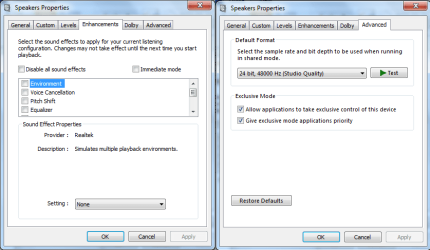
What do you have in the Enhancement and Advanced options?
 

My Computer My Computer

At a glance

Windows 7 Ultimate x64 SP1Intel Core i34 GB DDR3
Computer Manufacturer/Model Number
Dell Inspiron N5010
OS
Windows 7 Ultimate x64 SP1
CPU
Intel Core i3
Memory
4 GB DDR3
Screen Resolution
1366 X 768
Hard Drives
Seagate 500 GB
Internet Speed
4 MBPS
This..

I tried Immediate mode (although I didn't know what this was) but it still didnt work.
 

Attachments

  • Untitled2.png
    Untitled2.png
    24.9 KB · Views: 517

My Computer My Computer

At a glance

Windows 7Intel Core 2 Duo ~ 2.2GHZ3GBATI Radeon HD 4570
Computer Manufacturer/Model Number
Acer Aspire 5935G
OS
Windows 7
CPU
Intel Core 2 Duo ~ 2.2GHZ
Memory
3GB
Graphics Card(s)
ATI Radeon HD 4570
Sound Card
Realtek HD (Dolby Home Theatre v3)
Monitor(s) Displays
[Laptop]
Hard Drives
320 GB
Internet Speed
10Mb
Try enabling the "Immediate mode" option...

Can u also show the Dolby menu ?
 

My Computer My Computer

At a glance

Windows 7 Ultimate x64 SP1Intel Core i34 GB DDR3
Computer Manufacturer/Model Number
Dell Inspiron N5010
OS
Windows 7 Ultimate x64 SP1
CPU
Intel Core i3
Memory
4 GB DDR3
Screen Resolution
1366 X 768
Hard Drives
Seagate 500 GB
Internet Speed
4 MBPS
I tried immediate mode but it just makes the sounds quieter.

I shown the dolby menu in post #5

Also when I disable the centre speaker in the realtek control panel, the sounds come from all speakers (including the centre) with winamp. But I want to know how to do it for other programs like windows media player and media player classic (k-lite)
 

My Computer My Computer

At a glance

Windows 7Intel Core 2 Duo ~ 2.2GHZ3GBATI Radeon HD 4570
Computer Manufacturer/Model Number
Acer Aspire 5935G
OS
Windows 7
CPU
Intel Core 2 Duo ~ 2.2GHZ
Memory
3GB
Graphics Card(s)
ATI Radeon HD 4570
Sound Card
Realtek HD (Dolby Home Theatre v3)
Monitor(s) Displays
[Laptop]
Hard Drives
320 GB
Internet Speed
10Mb
Try enabling the option "Swap Centre Speaker and Subwoofer Output" under the RealTeck Audio manager.

Apart from this, am not sure about the option which you are asking for other players :(
 

My Computer My Computer

At a glance

Windows 7 Ultimate x64 SP1Intel Core i34 GB DDR3
Computer Manufacturer/Model Number
Dell Inspiron N5010
OS
Windows 7 Ultimate x64 SP1
CPU
Intel Core i3
Memory
4 GB DDR3
Screen Resolution
1366 X 768
Hard Drives
Seagate 500 GB
Internet Speed
4 MBPS
Try enabling the option "Swap Centre Speaker and Subwoofer Output" under the RealTeck Audio manager.

Apart from this, am not sure about the option which you are asking for other players :(

I already tried that with no luck, but thanks for your help anyway :)

I would just use winamp but the sound just seems distorted :(
 

My Computer My Computer

At a glance

Windows 7Intel Core 2 Duo ~ 2.2GHZ3GBATI Radeon HD 4570
Computer Manufacturer/Model Number
Acer Aspire 5935G
OS
Windows 7
CPU
Intel Core 2 Duo ~ 2.2GHZ
Memory
3GB
Graphics Card(s)
ATI Radeon HD 4570
Sound Card
Realtek HD (Dolby Home Theatre v3)
Monitor(s) Displays
[Laptop]
Hard Drives
320 GB
Internet Speed
10Mb
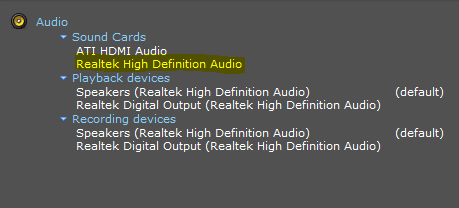
That is fine, I would still like to try resolving this. Can u give the exact model of your Sound card ?
 

My Computer My Computer

At a glance

Windows 7 Ultimate x64 SP1Intel Core i34 GB DDR3
Computer Manufacturer/Model Number
Dell Inspiron N5010
OS
Windows 7 Ultimate x64 SP1
CPU
Intel Core i3
Memory
4 GB DDR3
Screen Resolution
1366 X 768
Hard Drives
Seagate 500 GB
Internet Speed
4 MBPS
As far as I know its a realtek high difinition sound card if that helps
 

My Computer My Computer

At a glance

Windows 7Intel Core 2 Duo ~ 2.2GHZ3GBATI Radeon HD 4570
Computer Manufacturer/Model Number
Acer Aspire 5935G
OS
Windows 7
CPU
Intel Core 2 Duo ~ 2.2GHZ
Memory
3GB
Graphics Card(s)
ATI Radeon HD 4570
Sound Card
Realtek HD (Dolby Home Theatre v3)
Monitor(s) Displays
[Laptop]
Hard Drives
320 GB
Internet Speed
10Mb

My Computer My Computer

At a glance

Windows 7 Ultimate x64 SP1Intel Core i34 GB DDR3
Computer Manufacturer/Model Number
Dell Inspiron N5010
OS
Windows 7 Ultimate x64 SP1
CPU
Intel Core i3
Memory
4 GB DDR3
Screen Resolution
1366 X 768
Hard Drives
Seagate 500 GB
Internet Speed
4 MBPS
Didn't find the EAX/Matrix mode when I quickly looked in the settings, but I found something called Sonic Focus Processing. Listened to music while ticked the box to use it and instantly the sound quality got up a notch and the rear speakers came to life!

Sonic_Focus.jpg


Glad to hear that your issue was resolved :) Thanks for letting us know the same

Yesterday spent 3 hours messing around with drivers and stuff and didn't get it to work... I was so frustrated.

Thanks for helping Venths. If you hadn't said anything about the EAX/Matrix mode I probably would have not tried the Sonic Focus thingy :)
 

My Computer My Computer

At a glance

Windows 7 Ultimate x86Intel E8500 @ 4GHzDDR2 2x2GB 1000MHz CL5HD 4870
Computer Manufacturer/Model Number
Self built
OS
Windows 7 Ultimate x86
CPU
Intel E8500 @ 4GHz
Motherboard
Asus Rampage Formula
Memory
DDR2 2x2GB 1000MHz CL5
Graphics Card(s)
HD 4870
Sound Card
Supreme FX-II
Monitor(s) Displays
24" Samsung 245B + 19" Samsung Syncmaster 910T
Screen Resolution
1920x1200 + 1280x1024
Hard Drives
2x 1TB Samsung F1 Spinpoint
PSU
BFG ES-800
Case
Cooler Master Stacker 830 EVO
Cooling
Xigmatek HDT-S1283
Keyboard
Logitech G15 Blue Backlight
Mouse
Razer Lachesis
Internet Speed
24/1

Attachments

  • Capture.PNG
    Capture.PNG
    3.3 KB · Views: 14

My Computer My Computer

At a glance

Windows 7Intel Core 2 Duo ~ 2.2GHZ3GBATI Radeon HD 4570
Computer Manufacturer/Model Number
Acer Aspire 5935G
OS
Windows 7
CPU
Intel Core 2 Duo ~ 2.2GHZ
Memory
3GB
Graphics Card(s)
ATI Radeon HD 4570
Sound Card
Realtek HD (Dolby Home Theatre v3)
Monitor(s) Displays
[Laptop]
Hard Drives
320 GB
Internet Speed
10Mb

My Computer My Computer

At a glance

Windows 7 Ultimate x64 SP1Intel Core i34 GB DDR3
Computer Manufacturer/Model Number
Dell Inspiron N5010
OS
Windows 7 Ultimate x64 SP1
CPU
Intel Core i3
Memory
4 GB DDR3
Screen Resolution
1366 X 768
Hard Drives
Seagate 500 GB
Internet Speed
4 MBPS
Didn't find the EAX/Matrix mode when I quickly looked in the settings, but I found something called Sonic Focus Processing. Listened to music while ticked the box to use it and instantly the sound quality got up a notch and the rear speakers came to life!

Sonic_Focus.jpg


Glad to hear that your issue was resolved :) Thanks for letting us know the same

Yesterday spent 3 hours messing around with drivers and stuff and didn't get it to work... I was so frustrated.

Thanks for helping Venths. If you hadn't said anything about the EAX/Matrix mode I probably would have not tried the Sonic Focus thingy :)

You are most welcome Pawni :)
 

My Computer My Computer

At a glance

Windows 7 Ultimate x64 SP1Intel Core i34 GB DDR3
Computer Manufacturer/Model Number
Dell Inspiron N5010
OS
Windows 7 Ultimate x64 SP1
CPU
Intel Core i3
Memory
4 GB DDR3
Screen Resolution
1366 X 768
Hard Drives
Seagate 500 GB
Internet Speed
4 MBPS
Back
Top