5.1 sound problems.

sanssan

New member
Local time
12:30 PM
Messages
16
Hi guys

Well, I have motherboard Asus P5Q3 deluxe with AP with soundMAX HD. Driver is up to date (from asus website). Aslo, I have 5.1 sound system. When Im doing the test everything works just fine. All 5 speakers are working. But, when Im starting to listen to the music from my hdd, rear speakers dont work. If you have any ideas about this strange things please let me know.:)

thanx
 

My Computer

Computer Manufacturer/Model Number
Microsift Windiws 7 32bit
OS
windows 7
CPU
Core2Quad [email protected]
Motherboard
Asus P2Q 3
Memory
DDR3 1600 4GB
Graphics Card(s)
Asus 8800GTS
Sound Card
M-Audio FW410
Monitor(s) Displays
HPL2445W
Hard Drives
3x500 GB
Case
Cooler Master Cavalier
Cooling
Cooler Master
Is your recorded music 5.1?
 

My Computer

Computer type
PC/Desktop
Computer Manufacturer/Model Number
Custom Built
OS
Windows 10 Pro x64, Windows 8.1 Pro x64, Windows 7 Ultimate x64 SP1,
CPU
INTEL i9-7920X LGA 2066
Motherboard
Gigabyte X299-WU8 F3
Memory
64 GB (4 X 16 GB) G-Skill V Series DDR4 3200 Quad Channel
Graphics Card(s)
EVGA GTX 1060 SC 3 GB
Sound Card
Realtek Onboard ALC1220
Monitor(s) Displays
2 x Samsung S27E310
Screen Resolution
1920x1080
Hard Drives
Samsung 2 x 970 EVO Plus 500 GB NVMe
1 x 6TB WD 6003FZBX SATA
1 x 6TB WD 60EFRX SATA
12 x 3TB WD 30EFRX SATA
PSU
Seasonic X-1050
Case
Thermaltake Armor+
Cooling
Corsair H80i V2 Liquid AOI Cooler
Keyboard
Logitech G510s
Mouse
Logitech MX Master 2S
Internet Speed
200 Mb/s
Antivirus
ESET NOD32 13.1
Browser
EDGE (Dev, Canary, Beta), Chrome
Other Info
ASUS RT-AC68U router
Malwarebytes 4.0.4
Is your recorded music 5.1?

This. Unless the source is 5.1 to begin with all you will get is stereo. To get 5.1/surround from stereo sources you need to enable speaker fill or whatever it is called in the Soundmax control panel, might even be in the Windows playback properties if there is an Enhancement tab.
 

My Computer

Computer type
PC/Desktop
Computer Manufacturer/Model Number
Me
OS
Win 7 Ultimate x64
CPU
FX-8350 @ 4.6 GHz so far
Motherboard
Asus M5A97 EVO
Memory
ADATA XPG V1 Series Black 8GB DDR3 1600
Graphics Card(s)
Sapphire R9 270x Dual-X
Sound Card
Xonar DGX w/ Corsair Vengence 1300
Monitor(s) Displays
Acer S232HL Abid
Screen Resolution
1920x1080
Hard Drives
120 GB OCZ Vertex 3
500 GB Seagate 7200.12
PSU
Antec Earthwatts 650W Green
Case
Antec Three Hundred
Cooling
Cooler Master 212 EVO
Keyboard
Logitech G510
Mouse
Logitech G500s
Internet Speed
35000/3000
Is your recorded music 5.1?

This. Unless the source is 5.1 to begin with all you will get is stereo. To get 5.1/surround from stereo sources you need to enable speaker fill or whatever it is called in the Soundmax control panel, might even be in the Windows playback properties if there is an Enhancement tab.

I changed all settings in sound or soundmax settings to 5.1. Then made 5.1 TEST and everything works fine. All 5 speaks are working. When I try to play the track , I only get sound in 2 speaks. Its definitely Windows 7 problem, because when I restarting pc in XP OS all 5 speaks are working well.
 

My Computer

Computer Manufacturer/Model Number
Microsift Windiws 7 32bit
OS
windows 7
CPU
Core2Quad [email protected]
Motherboard
Asus P2Q 3
Memory
DDR3 1600 4GB
Graphics Card(s)
Asus 8800GTS
Sound Card
M-Audio FW410
Monitor(s) Displays
HPL2445W
Hard Drives
3x500 GB
Case
Cooler Master Cavalier
Cooling
Cooler Master
As has already been said, unless the music is encoded in 5.1 to begin with (DVD-A, also known as DVD Audio) all you will get is stereo from it unless you enable the speaker fill option,

sound_enhancements.jpg
 

My Computer

Computer type
PC/Desktop
Computer Manufacturer/Model Number
Me
OS
Win 7 Ultimate x64
CPU
FX-8350 @ 4.6 GHz so far
Motherboard
Asus M5A97 EVO
Memory
ADATA XPG V1 Series Black 8GB DDR3 1600
Graphics Card(s)
Sapphire R9 270x Dual-X
Sound Card
Xonar DGX w/ Corsair Vengence 1300
Monitor(s) Displays
Acer S232HL Abid
Screen Resolution
1920x1080
Hard Drives
120 GB OCZ Vertex 3
500 GB Seagate 7200.12
PSU
Antec Earthwatts 650W Green
Case
Antec Three Hundred
Cooling
Cooler Master 212 EVO
Keyboard
Logitech G510
Mouse
Logitech G500s
Internet Speed
35000/3000
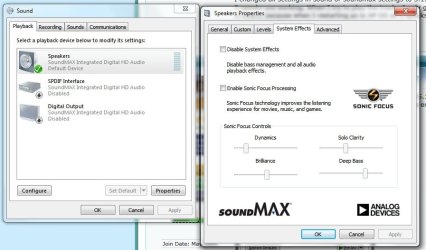
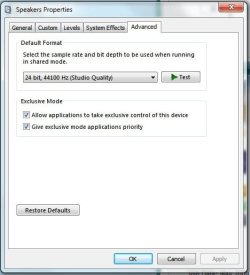
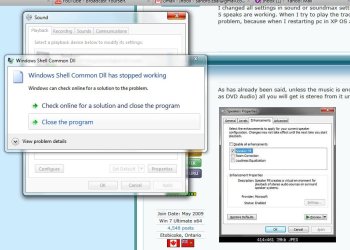
OK. Look what I have here:

I dont have any "speaker fill option". And finally, when I click OK, Im getting this error message.
 

Attachments

  • pic 1.jpg
    pic 1.jpg
    57.9 KB · Views: 26
  • pic 2.jpg
    pic 2.jpg
    26.7 KB · Views: 8
  • pic 3.jpg
    pic 3.jpg
    71.5 KB · Views: 15

My Computer

Computer Manufacturer/Model Number
Microsift Windiws 7 32bit
OS
windows 7
CPU
Core2Quad [email protected]
Motherboard
Asus P2Q 3
Memory
DDR3 1600 4GB
Graphics Card(s)
Asus 8800GTS
Sound Card
M-Audio FW410
Monitor(s) Displays
HPL2445W
Hard Drives
3x500 GB
Case
Cooler Master Cavalier
Cooling
Cooler Master
Back
Top