
Solved 5.1 system with Win7?

stubbyhs

New member
Power User
Local time
1:26 PM
Messages
139
Location
Northern Ireland
I have been going over the web for about half an hour on this now, is there any way to make my 5.1 Logitech speaker system work with Windows?

They all output sound but if I cannot configure them to a 5.1 system.

My laptop is an Acer Aspire v3-571G and all the most recent drivers are installed.

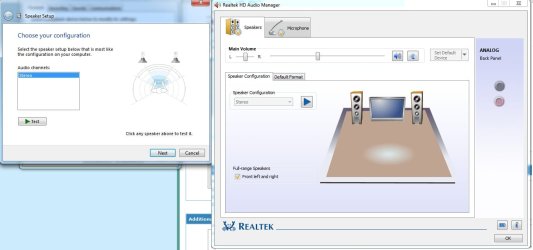
Below is what is displayed when I try and configure the speakers in either Windows Sound Manager or Realtek Sound Manager.

Thanks all,
StubbyHS
 

Attachments
  • Speaker config.jpg
    Speaker config.jpg
    62.8 KB · Views: 33

My Computer

Computer Manufacturer/Model Number
HP Envy H8
OS
Windows 7 Ultimate 64 bit
CPU
Intel Core i7-3770
Motherboard
Intel (Laptop)
Memory
16 GB DDR3
Graphics Card(s)
NVIDIA GeForce GTX 660
Screen Resolution
1920x1080
Hard Drives
SSD 120GB
HDD 3TB
True 5.1 output is hardware and software dependent. Do you have 5.1 outputs on your laptop or are these the kind of speakers that simulate Dolby Digital or DTS 5.1?

The setup appears to be 2 channel only.
 

My Computer

OS
Windows 7 x64

My Computer

Computer type
PC/Desktop
Computer Manufacturer/Model Number
My Own Build
OS
Windows 10 64 bit
CPU
Intel i7 6700K
Motherboard
ASUS ROG Maximus VIII Hero
Memory
16GB Corsair Dominator
Graphics Card(s)
Intel CPU Graphics
Sound Card
RealTek
Monitor(s) Displays
27" Dell S2719dgf
Screen Resolution
2560X1440
Hard Drives
1 TB Samsung 850 EVO SSD for Win 10 Pro
500GB Samsung 850 EVO SSD for Win 10 Insider
2 TB drive for backup
PSU
EVGA Supernova 750G2
Case
BeQuiet Silent Base 600
Cooling
Deepcool Captain 120EX
Keyboard
Microsoft Wireless 2000
Mouse
Microsoft wireless
Internet Speed
100 MB/sec (Cable)
Antivirus
Microsoft Defender and Malwarebytes
Browser
Edge/Firefox
Other Info
Cakewalk (Sonar) by BandLab and Studio One 4.1 Pro recording studio software. MOTU 896Mk3 Hybrid recording interface, Frontier Tranzport wireless control unit, Behringer X-Touch Control Surface.
Five USB connected optical drives for CD Audio production using Nero BurningROM
Unless you have 5.1 output jacks and the driver supports it you probably cannot. If you want 5.1, a USB connected sound device that supports that is a better option. This is a common issue with laptops and only a few have 5.1 output.

Here is a Creative device that will do what you want. There are others (other than Creative) just what I found doing a google search. Creative Sound Blaster X-Fi Surround 5.1 Pro USB Sound Card powered by THX TruStudio Pro | Creative Labs Online Store

Damn. Thanks a lot, might have to invest!

It crashed my COD4 when I selected 5.1 system, do you know why this could be?
 

My Computer

Computer Manufacturer/Model Number
HP Envy H8
OS
Windows 7 Ultimate 64 bit
CPU
Intel Core i7-3770
Motherboard
Intel (Laptop)
Memory
16 GB DDR3
Graphics Card(s)
NVIDIA GeForce GTX 660
Screen Resolution
1920x1080
Hard Drives
SSD 120GB
HDD 3TB
If you only have the two audio jacks, you would have to reconfigure the MIC In as CH2 out. The only other way to do it is to switch the audio out to Digital instead of analog. That would make it an spdif jack, your speakers would have to have an spdif input for this to work though. Assuming the laptop will do that. My Aspire 5920 will.
 

My Computer

Computer type
PC/Desktop
Computer Manufacturer/Model Number
Home Built
OS
Windows 10 Education 64 bit
CPU
AMD Phenom II X4 980 Black Edition Deneb 3.7GHz
Motherboard
Asus M4N68T-M V2 µATX Motherboard
Memory
8GB 4GBx2 Kingston PC10600 DDR3 1333 Memory
Graphics Card(s)
Zotac NVIDIA Geforce GT640 2 Gig DDR3 PCIe
Sound Card
VIA VT1708s High Definition Audio 8-channel Onboard
Monitor(s) Displays
22" LG E2242 1080p and 2 19" I-INC AG191D
Screen Resolution
1280x1024 - 1920x1080 - 1280x1024
Hard Drives
Crucial M100 256 GB SSD and 500 GB WD Blue SATA
PSU
Thermaltake TR 620
Case
Power Up Black ATX Mid-Tower Case
Cooling
Stock heatsink and fan
Keyboard
Logitech Wireless K350 Wave
Mouse
Logitech Wireless M570 Trackman Wheel
Internet Speed
80 Mbps Down 30 Mbps Up
Antivirus
Windows Defender
Browser
Internet Explorer 11
Other Info
HP DVD1040e Lightscribe - External USB2
If you only have the two audio jacks, you would have to reconfigure the MIC In as CH2 out. The only other way to do it is to switch the audio out to Digital instead of analog. That would make it an spdif jack, your speakers would have to have an spdif input for this to work though. Assuming the laptop will do that. My Aspire 5920 will.

This sounds fun. I will give this a go when I have a few hours to kill. Cheers!
 

My Computer

Computer Manufacturer/Model Number
HP Envy H8
OS
Windows 7 Ultimate 64 bit
CPU
Intel Core i7-3770
Motherboard
Intel (Laptop)
Memory
16 GB DDR3
Graphics Card(s)
NVIDIA GeForce GTX 660
Screen Resolution
1920x1080
Hard Drives
SSD 120GB
HDD 3TB
My two ASUS desktop boards auto detect when speakers and or Mics are plugged in. One is Realtek and the other is VIA. I can't remember if I ever plugged external speakers into the Acer. It was my fathers originally, and I can remember when he got it he couldn't get his external speakers working. We discovered that it was set to digital out and once we switched it to analog it was all set. It supports 5.1 Digital Dolby out, but I think the only way to get it is with SPDIF out. lol, I'd have to go and have a look at it and maybe even read the manual. My wife uses it more than I do.
 

My Computer

Computer type
PC/Desktop
Computer Manufacturer/Model Number
Home Built
OS
Windows 10 Education 64 bit
CPU
AMD Phenom II X4 980 Black Edition Deneb 3.7GHz
Motherboard
Asus M4N68T-M V2 µATX Motherboard
Memory
8GB 4GBx2 Kingston PC10600 DDR3 1333 Memory
Graphics Card(s)
Zotac NVIDIA Geforce GT640 2 Gig DDR3 PCIe
Sound Card
VIA VT1708s High Definition Audio 8-channel Onboard
Monitor(s) Displays
22" LG E2242 1080p and 2 19" I-INC AG191D
Screen Resolution
1280x1024 - 1920x1080 - 1280x1024
Hard Drives
Crucial M100 256 GB SSD and 500 GB WD Blue SATA
PSU
Thermaltake TR 620
Case
Power Up Black ATX Mid-Tower Case
Cooling
Stock heatsink and fan
Keyboard
Logitech Wireless K350 Wave
Mouse
Logitech Wireless M570 Trackman Wheel
Internet Speed
80 Mbps Down 30 Mbps Up
Antivirus
Windows Defender
Browser
Internet Explorer 11
Other Info
HP DVD1040e Lightscribe - External USB2
Back
Top