Solved 5 bars no internet access

Pipepro

New member
Local time
5:40 AM
Messages
31
Location
Cleveland, Ohio
I am in an RV park and the owner is a friend, he has problems all the time with his wifi service to the park, but no problems inside his house which holds a single port Cable Modem to which he has a 4 port MyDlink wireless router. That router has its own network, plugged to that router his desktop and a outside wireless modem with another network setup for the patrons. The park can have 5 bars but no internet access, other days it is fine. But, more often than not the answer is none. He resets it at my request and maybe it will work and maybe it won't. My friend is very limited in his computer skills.
What does he need to do?
 

My Computer

Computer Manufacturer/Model Number
Home made
OS
Windows 7
CPU
AMD Phenom II x3 720 2.80Ghz
Motherboard
Asus
Memory
4 GB
Graphics Card(s)
ATI 4670
Monitor(s) Displays
NEC
Hard Drives
Western Digital
PSU
Ultra
If he is daisy chaining another router he needs to turn off the seconds router DHCP setting. Or else you will not get a valid IP address, also if this is for customers I would strongly suggest he gets a router that can have two V-Lans and have one for his home and the other for his customers (this way they can not go into his network and he can not go into theirs). If you can get the model of the second router I can show you what he needs to turn off. It may also have an option to be a strict access point only.
 

My Computer

Computer type
PC/Desktop
Computer Manufacturer/Model Number
Custom
OS
10 Pro x64
CPU
Ryzen 9 3900X
Motherboard
Asrock x370 Tachi
Memory
64GB(4x16GB) DDR4
Graphics Card(s)
EVGA 1080ti FTW3
Sound Card
ASUS Xonar Essence STX (V4 Bursons), ODAC rev B, NFB-11, O2
Monitor(s) Displays
3xASUS PB278Q/R, Optoma HD142X
Screen Resolution
3x1440p, 1080p
Hard Drives
512GB 850 EVO(OS, Programs)
4TB (Movies)
3TB (Downloads)
3TB (Programs)
1TB HDD (Games)
2x6TB R1 (videos)
PSU
AX760
Case
Fractal Define R5
Cooling
NH-D15S
Keyboard
Massdrop Ctrl with Box Navy's
Mouse
G903, Alioth XXL Mat
Internet Speed
280/40
Antivirus
MBAM, ESET
Browser
Canary 64 Bit
Other Info
I also own a Thinkpad P50 Xeon 4K, X220T, X1C5
EnGenius Model ENH210EXT FREQUENCY 802.11b/g/n
 

My Computer

Computer Manufacturer/Model Number
Home made
OS
Windows 7
CPU
AMD Phenom II x3 720 2.80Ghz
Motherboard
Asus
Memory
4 GB
Graphics Card(s)
ATI 4670
Monitor(s) Displays
NEC
Hard Drives
Western Digital
PSU
Ultra
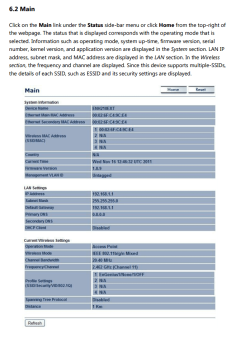
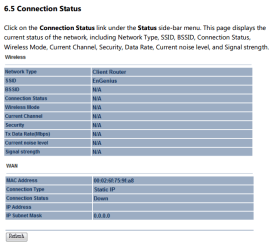
I'm looking through that model's manual and it is a very a good device he grabbed (he did his homework) If it is not already being used I would set it up in access point mode and have one VID And make that VID restricted so it can only see that VID. If his main router supports VLAN's then in when creating the SSID he can put two there and if the main understands it then only him can see VLAN 1 (for testing purposes I would do this after it works all the time only) If I were him I would also filter the mac address's on his main so that only the ones he knows for sure can enter his VLAN (find the mac of the extender and add it to the mains white list, also make sure that his main has the mac for the pc he uses in the white list before activating filtering). But back to the connection issue, In the main status location when it is not working but you are connected to access point, does the device LAN IP match a IP on the main router's DHCP table (I would Make the DHCP of that router reserve the address for this device so that it is always static).

I hope I have not made this more confusing for you. If you need clarification of some things let me know. The Info I got this from is this http://www.engeniustech.com/resources/ENH210EXT_User Manual_v.1.1.pdf

The steps In order I would take to trouble shoot should do this:

1. On main router find in the DHCP table the IP of the extender and make sure its is reserved and never expires.
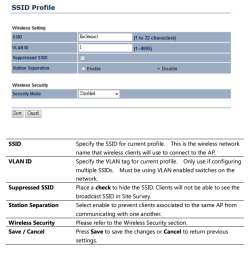
2. set SSID on the extender to restrict the VID so it is safer for the patrons and your friend.
3. Check to make sure the extender is using the correct LAN IP (should be the static one you set on the main) Then try to connect to it again.

Best of luck
rvcjew

EDIT: forgot to add the images sorry.
 

Attachments

  • Main.PNG
    Main.PNG
    85.4 KB · Views: 2
  • status.PNG
    status.PNG
    23 KB · Views: 29
  • VID settings.PNG
    VID settings.PNG
    45.2 KB · Views: 2
  • vlan.PNG
    vlan.PNG
    41.4 KB · Views: 30

My Computer

Computer type
PC/Desktop
Computer Manufacturer/Model Number
Custom
OS
10 Pro x64
CPU
Ryzen 9 3900X
Motherboard
Asrock x370 Tachi
Memory
64GB(4x16GB) DDR4
Graphics Card(s)
EVGA 1080ti FTW3
Sound Card
ASUS Xonar Essence STX (V4 Bursons), ODAC rev B, NFB-11, O2
Monitor(s) Displays
3xASUS PB278Q/R, Optoma HD142X
Screen Resolution
3x1440p, 1080p
Hard Drives
512GB 850 EVO(OS, Programs)
4TB (Movies)
3TB (Downloads)
3TB (Programs)
1TB HDD (Games)
2x6TB R1 (videos)
PSU
AX760
Case
Fractal Define R5
Cooling
NH-D15S
Keyboard
Massdrop Ctrl with Box Navy's
Mouse
G903, Alioth XXL Mat
Internet Speed
280/40
Antivirus
MBAM, ESET
Browser
Canary 64 Bit
Other Info
I also own a Thinkpad P50 Xeon 4K, X220T, X1C5
I am very confused but with all this information and advice I'm hoping to work it all out. I will check on his IP address being the same as the repeater. Thank You so very much
 

My Computer

Computer Manufacturer/Model Number
Home made
OS
Windows 7
CPU
AMD Phenom II x3 720 2.80Ghz
Motherboard
Asus
Memory
4 GB
Graphics Card(s)
ATI 4670
Monitor(s) Displays
NEC
Hard Drives
Western Digital
PSU
Ultra
I am very confused but with all this information and advice I'm hoping to work it all out. I will check on his IP address being the same as the repeater. Thank You so very much

No problem if you got the model of his main I can show you the the screens I mean.
 

My Computer

Computer type
PC/Desktop
Computer Manufacturer/Model Number
Custom
OS
10 Pro x64
CPU
Ryzen 9 3900X
Motherboard
Asrock x370 Tachi
Memory
64GB(4x16GB) DDR4
Graphics Card(s)
EVGA 1080ti FTW3
Sound Card
ASUS Xonar Essence STX (V4 Bursons), ODAC rev B, NFB-11, O2
Monitor(s) Displays
3xASUS PB278Q/R, Optoma HD142X
Screen Resolution
3x1440p, 1080p
Hard Drives
512GB 850 EVO(OS, Programs)
4TB (Movies)
3TB (Downloads)
3TB (Programs)
1TB HDD (Games)
2x6TB R1 (videos)
PSU
AX760
Case
Fractal Define R5
Cooling
NH-D15S
Keyboard
Massdrop Ctrl with Box Navy's
Mouse
G903, Alioth XXL Mat
Internet Speed
280/40
Antivirus
MBAM, ESET
Browser
Canary 64 Bit
Other Info
I also own a Thinkpad P50 Xeon 4K, X220T, X1C5
His router is a D-Link DIR-605L
 

My Computer

Computer Manufacturer/Model Number
Home made
OS
Windows 7
CPU
AMD Phenom II x3 720 2.80Ghz
Motherboard
Asus
Memory
4 GB
Graphics Card(s)
ATI 4670
Monitor(s) Displays
NEC
Hard Drives
Western Digital
PSU
Ultra
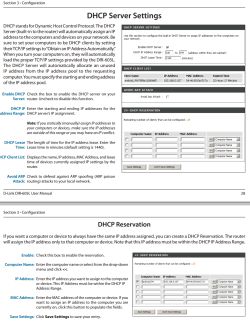
I don't know what hardware revision he has (a vs b) but I am going to assume its firmware is about the same from my experience. The top most tab will be Setup and left most will then be LAN Setup to get to this screen then if he scrolls down should show the pic I linked. Once there he can click down on the list to the right of the entry's and pick the device he wants to make reserved (static in the DHCP) Once he adds that and applies it will never change it. Using the list on the right should auto fill for him the IP, MAC address and name of the device. Got this info from here: ftp://ftp2.dlink.com/PRODUCTS/DIR-605L/REVA/DIR-605L_MANUAL_1.00_EN.PDF
 

Attachments

  • dhcpreserv.PNG
    dhcpreserv.PNG
    92.2 KB · Views: 2

My Computer

Computer type
PC/Desktop
Computer Manufacturer/Model Number
Custom
OS
10 Pro x64
CPU
Ryzen 9 3900X
Motherboard
Asrock x370 Tachi
Memory
64GB(4x16GB) DDR4
Graphics Card(s)
EVGA 1080ti FTW3
Sound Card
ASUS Xonar Essence STX (V4 Bursons), ODAC rev B, NFB-11, O2
Monitor(s) Displays
3xASUS PB278Q/R, Optoma HD142X
Screen Resolution
3x1440p, 1080p
Hard Drives
512GB 850 EVO(OS, Programs)
4TB (Movies)
3TB (Downloads)
3TB (Programs)
1TB HDD (Games)
2x6TB R1 (videos)
PSU
AX760
Case
Fractal Define R5
Cooling
NH-D15S
Keyboard
Massdrop Ctrl with Box Navy's
Mouse
G903, Alioth XXL Mat
Internet Speed
280/40
Antivirus
MBAM, ESET
Browser
Canary 64 Bit
Other Info
I also own a Thinkpad P50 Xeon 4K, X220T, X1C5
going to give this a try today or tomorrow thanks again. I will report back
 

My Computer

Computer Manufacturer/Model Number
Home made
OS
Windows 7
CPU
AMD Phenom II x3 720 2.80Ghz
Motherboard
Asus
Memory
4 GB
Graphics Card(s)
ATI 4670
Monitor(s) Displays
NEC
Hard Drives
Western Digital
PSU
Ultra

My Computer

Computer type
PC/Desktop
Computer Manufacturer/Model Number
Custom
OS
10 Pro x64
CPU
Ryzen 9 3900X
Motherboard
Asrock x370 Tachi
Memory
64GB(4x16GB) DDR4
Graphics Card(s)
EVGA 1080ti FTW3
Sound Card
ASUS Xonar Essence STX (V4 Bursons), ODAC rev B, NFB-11, O2
Monitor(s) Displays
3xASUS PB278Q/R, Optoma HD142X
Screen Resolution
3x1440p, 1080p
Hard Drives
512GB 850 EVO(OS, Programs)
4TB (Movies)
3TB (Downloads)
3TB (Programs)
1TB HDD (Games)
2x6TB R1 (videos)
PSU
AX760
Case
Fractal Define R5
Cooling
NH-D15S
Keyboard
Massdrop Ctrl with Box Navy's
Mouse
G903, Alioth XXL Mat
Internet Speed
280/40
Antivirus
MBAM, ESET
Browser
Canary 64 Bit
Other Info
I also own a Thinkpad P50 Xeon 4K, X220T, X1C5
OK I went into both networks, they both have a IPv4 address of 192.168.0.130 and the same physical IP address, yesterday when I checked the address ended in 126.
That is the same address on his office desktop and the one I get with both networks. Both SSID's have different names and different passwords.
I navigated to the page you directed me to, not sure now what IP address to use for each one. Forgive me for being so dense I do not want to make changes to someone else's system and mess it up.
My home network I reserved addresses for each device (which I have 7 devices), after viewing the Mac address for each. I'm not seeing the mac address for devices so far.
I haven't gone into the engenius yet with my laptop, but I don't think I would need to, there is one network setup and the engenius is just an access point off that network with its own SSID I believe.
 

My Computer

Computer Manufacturer/Model Number
Home made
OS
Windows 7
CPU
AMD Phenom II x3 720 2.80Ghz
Motherboard
Asus
Memory
4 GB
Graphics Card(s)
ATI 4670
Monitor(s) Displays
NEC
Hard Drives
Western Digital
PSU
Ultra
Wait so are you saying the desktop that is wired is using the same IP as another device(like your laptop) on the WIFI? If more than one device is sharing the same IP that is why you are having issues, that will cause a conflict and only who gets on first will have a valid connection. Can you post a screen of how your lan part in the main router looks (Don't post a screen of your public IP)?
 

My Computer

Computer type
PC/Desktop
Computer Manufacturer/Model Number
Custom
OS
10 Pro x64
CPU
Ryzen 9 3900X
Motherboard
Asrock x370 Tachi
Memory
64GB(4x16GB) DDR4
Graphics Card(s)
EVGA 1080ti FTW3
Sound Card
ASUS Xonar Essence STX (V4 Bursons), ODAC rev B, NFB-11, O2
Monitor(s) Displays
3xASUS PB278Q/R, Optoma HD142X
Screen Resolution
3x1440p, 1080p
Hard Drives
512GB 850 EVO(OS, Programs)
4TB (Movies)
3TB (Downloads)
3TB (Programs)
1TB HDD (Games)
2x6TB R1 (videos)
PSU
AX760
Case
Fractal Define R5
Cooling
NH-D15S
Keyboard
Massdrop Ctrl with Box Navy's
Mouse
G903, Alioth XXL Mat
Internet Speed
280/40
Antivirus
MBAM, ESET
Browser
Canary 64 Bit
Other Info
I also own a Thinkpad P50 Xeon 4K, X220T, X1C5
I will take a screen shot today if I can get into his office.
 

My Computer

Computer Manufacturer/Model Number
Home made
OS
Windows 7
CPU
AMD Phenom II x3 720 2.80Ghz
Motherboard
Asus
Memory
4 GB
Graphics Card(s)
ATI 4670
Monitor(s) Displays
NEC
Hard Drives
Western Digital
PSU
Ultra
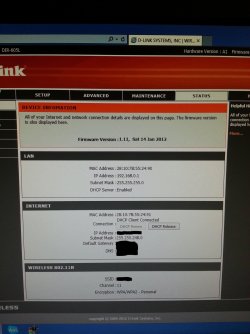
I took some screen shots but what is troubling is something I seen in Status - active sessions.
Whole system ACK Flood Attack from WAN rule :default deny. Then the same message with IP addresses - packet dropped
The desktop PC actually has an IP ending in 100
The Lan setup page does not have the DHCP client list
1st pic is router
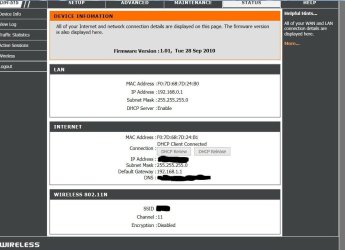
2nd pic is engenius
 

Attachments

  • C3.jpg
    C3.jpg
    676.7 KB · Views: 1
  • En1.jpg
    En1.jpg
    67.3 KB · Views: 1
Last edited:

My Computer

Computer Manufacturer/Model Number
Home made
OS
Windows 7
CPU
AMD Phenom II x3 720 2.80Ghz
Motherboard
Asus
Memory
4 GB
Graphics Card(s)
ATI 4670
Monitor(s) Displays
NEC
Hard Drives
Western Digital
PSU
Ultra
Your engenius is using D-Link firmware? It shows in top left as a dir-515. if the engenius is plugged into the main router that has an ip of 192.168.0.1 then the engenius must have a gateway of 192.168.0.1 its own IP will be something different. From those picture sit looks like both routers have the same IP address at the moment which will not work.

EDIT: his Modem is the 192.168.1.1 correct?
 

My Computer

Computer type
PC/Desktop
Computer Manufacturer/Model Number
Custom
OS
10 Pro x64
CPU
Ryzen 9 3900X
Motherboard
Asrock x370 Tachi
Memory
64GB(4x16GB) DDR4
Graphics Card(s)
EVGA 1080ti FTW3
Sound Card
ASUS Xonar Essence STX (V4 Bursons), ODAC rev B, NFB-11, O2
Monitor(s) Displays
3xASUS PB278Q/R, Optoma HD142X
Screen Resolution
3x1440p, 1080p
Hard Drives
512GB 850 EVO(OS, Programs)
4TB (Movies)
3TB (Downloads)
3TB (Programs)
1TB HDD (Games)
2x6TB R1 (videos)
PSU
AX760
Case
Fractal Define R5
Cooling
NH-D15S
Keyboard
Massdrop Ctrl with Box Navy's
Mouse
G903, Alioth XXL Mat
Internet Speed
280/40
Antivirus
MBAM, ESET
Browser
Canary 64 Bit
Other Info
I also own a Thinkpad P50 Xeon 4K, X220T, X1C5
I found this setup information on a google search at http://support.dlink.com/emulators/dir515/101/Internet.htm But as I looked around the pages when I got to LAN setup and clicked on STATUS the page started flashing http://support.dlink.com/emulators/dir515/101/Device_Info.htm I then thought I connected to the engenius through this device info page, because I was on my laptop in the park, and it showed the internet IP address as 192.168.1.154. Does that make any sense? I now think I'm full of crap.
This is what I know, the guy that set this up piggy backed the engenius to the D-Link as a repeater with a different SSID and password.
I hope I'm not wasting your time and thank you for being patient.
 

My Computer

Computer Manufacturer/Model Number
Home made
OS
Windows 7
CPU
AMD Phenom II x3 720 2.80Ghz
Motherboard
Asus
Memory
4 GB
Graphics Card(s)
ATI 4670
Monitor(s) Displays
NEC
Hard Drives
Western Digital
PSU
Ultra
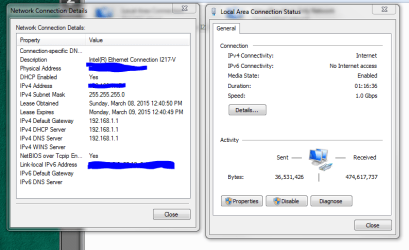
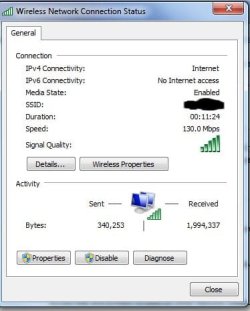
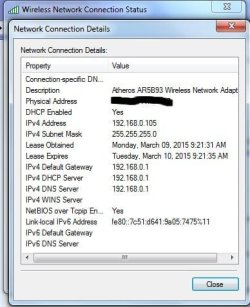
Oh wow I did not know this emulator existed, this is a great tool. but if you go into the engenius you get a screen like the one you just linked too with dlink branding or one that is blue and white? The two screens you posted a while back make it look like you have two d-link routers and not an engenius. When connected to the engenius and you go to your computer than network like my pic what does it show under network infrastructure category, and under your network adapters if you chose status then details what is your gateway it is using?

And you are not wasting any ones time, learning is never wasting:)
 

Attachments

  • network.PNG
    network.PNG
    14.3 KB · Views: 0
  • nic.PNG
    nic.PNG
    30 KB · Views: 0

My Computer

Computer type
PC/Desktop
Computer Manufacturer/Model Number
Custom
OS
10 Pro x64
CPU
Ryzen 9 3900X
Motherboard
Asrock x370 Tachi
Memory
64GB(4x16GB) DDR4
Graphics Card(s)
EVGA 1080ti FTW3
Sound Card
ASUS Xonar Essence STX (V4 Bursons), ODAC rev B, NFB-11, O2
Monitor(s) Displays
3xASUS PB278Q/R, Optoma HD142X
Screen Resolution
3x1440p, 1080p
Hard Drives
512GB 850 EVO(OS, Programs)
4TB (Movies)
3TB (Downloads)
3TB (Programs)
1TB HDD (Games)
2x6TB R1 (videos)
PSU
AX760
Case
Fractal Define R5
Cooling
NH-D15S
Keyboard
Massdrop Ctrl with Box Navy's
Mouse
G903, Alioth XXL Mat
Internet Speed
280/40
Antivirus
MBAM, ESET
Browser
Canary 64 Bit
Other Info
I also own a Thinkpad P50 Xeon 4K, X220T, X1C5
This is what I have. The D link wireless modem does not have V LAN capability.
 

Attachments

  • RV2.jpg
    RV2.jpg
    23.8 KB · Views: 6
  • RV.jpg
    RV.jpg
    34.2 KB · Views: 6
  • RV1.jpg
    RV1.jpg
    24.2 KB · Views: 6
Last edited:

My Computer

Computer Manufacturer/Model Number
Home made
OS
Windows 7
CPU
AMD Phenom II x3 720 2.80Ghz
Motherboard
Asus
Memory
4 GB
Graphics Card(s)
ATI 4670
Monitor(s) Displays
NEC
Hard Drives
Western Digital
PSU
Ultra
This is now confusing me as the info is a little scarce, I will ask the more help forum to have a senior guy take a look for you as to me it looks like you sent two d-links and not one engenious but perhaps they use firmware from d-link now idk. I will get someone more experienced to take a look for you thanks for sticking with it.
 

My Computer

Computer type
PC/Desktop
Computer Manufacturer/Model Number
Custom
OS
10 Pro x64
CPU
Ryzen 9 3900X
Motherboard
Asrock x370 Tachi
Memory
64GB(4x16GB) DDR4
Graphics Card(s)
EVGA 1080ti FTW3
Sound Card
ASUS Xonar Essence STX (V4 Bursons), ODAC rev B, NFB-11, O2
Monitor(s) Displays
3xASUS PB278Q/R, Optoma HD142X
Screen Resolution
3x1440p, 1080p
Hard Drives
512GB 850 EVO(OS, Programs)
4TB (Movies)
3TB (Downloads)
3TB (Programs)
1TB HDD (Games)
2x6TB R1 (videos)
PSU
AX760
Case
Fractal Define R5
Cooling
NH-D15S
Keyboard
Massdrop Ctrl with Box Navy's
Mouse
G903, Alioth XXL Mat
Internet Speed
280/40
Antivirus
MBAM, ESET
Browser
Canary 64 Bit
Other Info
I also own a Thinkpad P50 Xeon 4K, X220T, X1C5
Back
Top