56K USB External Modem Problem

stevepruett

New member
Local time
11:51 PM
Messages
5
I have an Acer Aspire 5552 laptop. It didn't come with a 56k modem so I purchased an external Conexant USB 2.0 56K modem. All is well the modem connects fine. But the PROBLEM... When i'm running only on battery power (with the ac cord disconnected) I connect to my internet provider at 40-44K every time. If I have the ac cord plugged in, I only connect at 21.6K every time. I've connected and reconnected hundreds of times and this is always the case. Why does having my ac cord plugged in make me connect at half of what i do when i'm running on battery power? This is very frustrating as 56K is slow anyway but when I connect at 40K at least its a lot faster than 21.6k! Please if anyone can help me on this issue I would greatly appreciate it. I think it has something to do with the modem being external because last year I had a Compaq laptop with an internal modem and usually connected at 40K with it. Is it a difference in the watts or power consumption while on battery power that makes it connect better. PLEASE HELP!!!
 
Last edited by a moderator:

My Computer

Computer Manufacturer/Model Number
Acer Aspire 5552-3691
OS
Windows 7 Home Premium 64bit
CPU
AMD Athlon II X2 P340
Memory
4GB
Graphics Card(s)
ATI Mobility Radeon HD 4250
Hard Drives
250GB
Hello Steve, and welcome to Seven Forums.

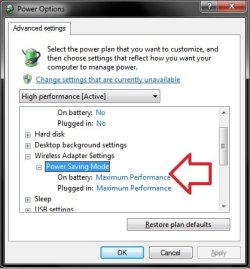
Double check your advanced Power Options for your selected power plan to make sure that you have the "Plugged in" option for Wireless Adapter Settings set to Maximum Performance as below.

Power_Options.jpg

Hope this helps,
Shawn
 

My Computer

Computer type
PC/Desktop
Computer Manufacturer/Model Number
Self built custom
OS
64-bit Windows 11 Pro for Workstations
CPU
Intel i7-8700K OC'd to 5 GHz
Motherboard
ASUS ROG Maximus XI Formula Z390
Memory
64 GB (4x16GB) G.SKILL TridentZ RGB DDR4 3600 MHz
Graphics Card(s)
ASUS ROG-STRIX-GTX1080TI-O11G-GAMING
Sound Card
Integrated
Monitor(s) Displays
2 x Samsung Odyssey G7 27"
Screen Resolution
2560x1440
Hard Drives
1TB Samsung 990 PRO M.2,
4TB Samsung 990 PRO PRO M.2,
TerraMaster F8 SSD Plus NAS
PSU
Seasonic Prime Titanium 850W
Case
Thermaltake Core P3
Cooling
Corsair Hydro H115i
Keyboard
Logitech wireless K800
Mouse
Logitech MX Master 4
Internet Speed
2 Gb/s Download and 100 Mb/s Upload
Antivirus
Malwarebyte Anti-Malware Premium
Browser
Google Chrome
Other Info
Logitech Z625 speaker system,
Logitech BRIO 4K Pro webcam,
HP Color LaserJet Pro MFP M477fdn,
APC SMART-UPS RT 1000 XL - SURT1000XLI,
Galaxy S23 Plus phone
thank for you information brink, but this didn't solve my problem unfortunately. When i'm on battery power my laptop connects to my external 56k modem good, with a good download speed, but as soon as I plug in the ac power cord my connection drops to crap. I tried to trick my modem by connecting to the internet while on battery power, thus achieving at least 40K connect speed, but as soon as i plug in the power cord, my download goes from about 8kbps to 2Kbps or less. Very strange. I'm thinking it is something to do with the modem being external running through a USB port for some reason, but i have tried all 3 USB ports on my laptop and they all give me the same issue.
 

My Computer

Computer Manufacturer/Model Number
Acer Aspire 5552-3691
OS
Windows 7 Home Premium 64bit
CPU
AMD Athlon II X2 P340
Memory
4GB
Graphics Card(s)
ATI Mobility Radeon HD 4250
Hard Drives
250GB
Have you tried a different power supply? Maybe the supply is allowing some AC ripple through and this could affect the modem?
 

My Computer

OS
win7
no I haven't yet but am definitely gonna have to try that. Thanx. I have tried all different settings in advanced power settings but nothing has worked either. Do you know of any programs i could try to resolve this? Last year I had a different laptop it was a compaq with an internal 56k modem and i didn't have this problem. I feel that it is something of a power issue with the external 56k modem i'm using now. But why? Unless like you said that my ac adapter is causing a power ripple. cause i swear i can unplug that cord and reconnect to internet and it then connects usually at 42.6K but never less than 40K, but if i have the ac cord in it ALWAYS connects at 21.6K! Could the modem be using different init strings or something when on battery power vs. ac power? I'm at wits end and willing to try anything at this point but i do not have the money to buy a new ac adapter at this time. But i will as soon as possible if i can't find any other solution. thanx for your help.
 

My Computer

Computer Manufacturer/Model Number
Acer Aspire 5552-3691
OS
Windows 7 Home Premium 64bit
CPU
AMD Athlon II X2 P340
Memory
4GB
Graphics Card(s)
ATI Mobility Radeon HD 4250
Hard Drives
250GB
Easiest way is to borrow one from a mate with the same model laptop to try it. Another possible is your mains supply might not be stable although unlikely. You could also look on ebay for power supply?
 

My Computer

OS
win7
thanx wilywombat for the info. I sure hope it's not my main power supply. I did find a new ac adapter with cord and all for my laptop on ebay for $8 and it's on the way. I had never bought a new ac adapter before and assumed it would set me back at least $50 or $60 bucks. The $8 adapter with $2 more for priority shipping was a very nice surprise. I will post and let know if the new adapter works. I should get it in a few days. Evidently these modems are very sensitive to power fluctuations. I talked to my phone company and they are saying that within a couple months dsl is going to be available in my area so maybe then I can have a little 56k modem barbecue out in the back yard.
 

My Computer

Computer Manufacturer/Model Number
Acer Aspire 5552-3691
OS
Windows 7 Home Premium 64bit
CPU
AMD Athlon II X2 P340
Memory
4GB
Graphics Card(s)
ATI Mobility Radeon HD 4250
Hard Drives
250GB
hello wilywombat. I received my new ac adapter in the mail today so i brought it right home and hooked it up to my laptop. And whoala!! It works great. The first time i connected to the internet i got 42.6K connect speed. I've connected and disconnected multiple times and i always connect at 42.6K so i'm happy once again. Thanks for the information it really helped. If i hadn't got your post i'd still be stuck at 21.6K. There must be a power ripple in my original ac adapter. I'll throw it in a drawer and if this one burns up at least i'll have a spare. I think i'm still gonna burn this 56k modem when i get dsl eventually. But for now it's all i got. Hey thanks again. Take it easy.
 

My Computer

Computer Manufacturer/Model Number
Acer Aspire 5552-3691
OS
Windows 7 Home Premium 64bit
CPU
AMD Athlon II X2 P340
Memory
4GB
Graphics Card(s)
ATI Mobility Radeon HD 4250
Hard Drives
250GB
Great news Steve, don't be a stranger on the forums..you can pick up a lot of good info...for free!! Good Luck.
 

My Computer

OS
win7
Back
Top