6 gb ram only 3.96 gb usable

aek21tzonis

New member
Local time
6:19 PM
Messages
30
Hey guys , I just bought a 4 gb stick module and I kept one of my 2 gb sticks but even though both of them are installed , my pc recognises only 3.96 gb as usable.
Thing is that the 4 gb stick is "teamgroup 800 mhz" and the other one (2gb) is "kingston 667 mhz", so I was wondering if that could be the case.
I really want to to able to use all 6 gb, so what could be the problem?
Thanks in advance.
 

My Computer My Computer

At a glance

Windows 7 Home Premium 64bitIntel Core i5 760 @ 2.80GHz4 gb2047MB NVIDIA GeForce GT 640 (Gigabyte) 29 °C
Computer type
PC/Desktop
OS
Windows 7 Home Premium 64bit
CPU
Intel Core i5 760 @ 2.80GHz
Motherboard
ASUSTeK Computer INC. P7H55-M LE (LGA1156)
Memory
4 gb
Graphics Card(s)
2047MB NVIDIA GeForce GT 640 (Gigabyte) 29 °C
Sound Card
NVIDIA High Definition Audio
Screen Resolution
1280X768
Antivirus
avast!
Browser
Google Chrome
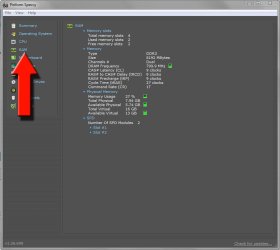
The speeds wouldn't matter I wouldn't have thought, the 800MHz would just run at 667MHz in line with the slower one. Download Speccy as linked in my signature, run it, maximise the RAM tab on the left and post a snip of the results.

Capture.JPG
 

My Computer My Computer

At a glance

W7 Pro x64 SP1 | W10 Pro IP x64 | W8.1 Pro x6...i7-4790k @ 4GHz (4.4GHz Boost)16GB DDR3 Kingston HyperX Fury @ 1600MHz CL 9...EVGA GTX 980 Classified
Computer type
PC/Desktop
Computer Manufacturer/Model Number
Custom Build
OS
W7 Pro x64 SP1 | W10 Pro IP x64 | W8.1 Pro x64 VM | Linux Mint VM
CPU
i7-4790k @ 4GHz (4.4GHz Boost)
Motherboard
ASUS Sabertooth Z87 (BIOS Rev 2004)
Memory
16GB DDR3 Kingston HyperX Fury @ 1600MHz CL 9-9-9-27
Graphics Card(s)
EVGA GTX 980 Classified
Sound Card
Realtek Onboard
Monitor(s) Displays
Samsung S27D390
Screen Resolution
1920 x 1080
Hard Drives
240GB Intel 520 Series SSD |
Samsung 850 EVO 120GB SSD |
2TB WD Caviar Black |
2TB WD Caviar Green
PSU
Corsair HX850-80 Gold Modular
Case
Cooler Master Silencio 650
Cooling
Corsair H80i w/2 x Corsair SP120 | 2 x 120mm Noctua NF-S12B
Keyboard
Microsoft Sidewinder X4
Mouse
Gigabyte M6900 optical
Internet Speed
152mb
Antivirus
F-Secure
Browser
Firefox 38.0
Other Info
Backup Rig: Win 7 Pro 64-bit | AMD A10-5800k | ASUS F2A85-V Pro | 8GB Samsung DDR3 @1600MHz | 120GB Toshiba SDD | 2TB Seagate HDD | Cooler Master Silencio 550
The motherboard tab would be good as well.
 

My Computer My Computer

At a glance

Win 7 Ultimate x64FX-8350 @ 4.6 GHz so farADATA XPG V1 Series Black 8GB DDR3 1600Sapphire R9 270x Dual-X
Computer type
PC/Desktop
Computer Manufacturer/Model Number
Me
OS
Win 7 Ultimate x64
CPU
FX-8350 @ 4.6 GHz so far
Motherboard
Asus M5A97 EVO
Memory
ADATA XPG V1 Series Black 8GB DDR3 1600
Graphics Card(s)
Sapphire R9 270x Dual-X
Sound Card
Xonar DGX w/ Corsair Vengence 1300
Monitor(s) Displays
Acer S232HL Abid
Screen Resolution
1920x1080
Hard Drives
120 GB OCZ Vertex 3
500 GB Seagate 7200.12
PSU
Antec Earthwatts 650W Green
Case
Antec Three Hundred
Cooling
Cooler Master 212 EVO
Keyboard
Logitech G510
Mouse
Logitech G500s
Internet Speed
35000/3000

My Computer My Computer

At a glance

Windows 7 Home Premium 64bitIntel Core i5 760 @ 2.80GHz4 gb2047MB NVIDIA GeForce GT 640 (Gigabyte) 29 °C
Computer type
PC/Desktop
OS
Windows 7 Home Premium 64bit
CPU
Intel Core i5 760 @ 2.80GHz
Motherboard
ASUSTeK Computer INC. P7H55-M LE (LGA1156)
Memory
4 gb
Graphics Card(s)
2047MB NVIDIA GeForce GT 640 (Gigabyte) 29 °C
Sound Card
NVIDIA High Definition Audio
Screen Resolution
1280X768
Antivirus
avast!
Browser
Google Chrome

My Computer My Computer

At a glance

Windows 10 Pro. 64/ version 1709 Windows 7 Pr...Intel i7-6800K @ 4.3Corsair Platinum 16 gig @2400EVGA GTX 1070 OC
Computer type
PC/Desktop
Computer Manufacturer/Model Number
Home made Desktop
OS
Windows 10 Pro. 64/ version 1709 Windows 7 Pro/64
CPU
Intel i7-6800K @ 4.3
Motherboard
ASUS X-99 Deluxe II
Memory
Corsair Platinum 16 gig @2400
Graphics Card(s)
EVGA GTX 1070 OC
Monitor(s) Displays
Asus 27" LED LCD/VE278Q
Screen Resolution
1920-1080 or 1280-720 HDMI
Hard Drives
INTEL SSD 730-240 Gb Sata 3.0/
PSU
EVGA Platium 1200W
Case
Phanteks Luxe Tempered Glass 8 fans/ one radiator
Cooling
XSPC/ Water Cooled CPU
Keyboard
Das 4 Professional
Mouse
Logitech M705/MX Anywhere 2-S
Internet Speed
100 mbits
Antivirus
Microsoft Security Essentials/ Malwarebytes Premium 3.0/ SAS
Browser
I.E. 11 default/Firefox/ ISP Time Warner Cable/Spectrum
Other Info
LG BluRay Burner/
Sound system-KLipsch-THX/
Icy Dock ssd Hot Swap bays.
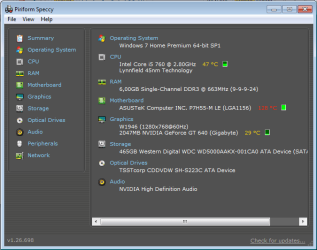
ramtab.png

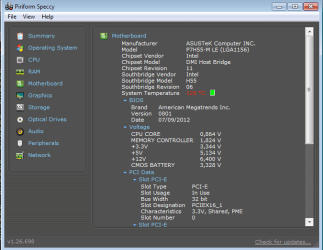
mobotab.png

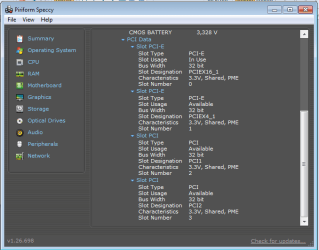
mobotab2.png

thanks for noticing, Layback Bear and sorry.
 

My Computer My Computer

At a glance

Windows 7 Home Premium 64bitIntel Core i5 760 @ 2.80GHz4 gb2047MB NVIDIA GeForce GT 640 (Gigabyte) 29 °C
Computer type
PC/Desktop
OS
Windows 7 Home Premium 64bit
CPU
Intel Core i5 760 @ 2.80GHz
Motherboard
ASUSTeK Computer INC. P7H55-M LE (LGA1156)
Memory
4 gb
Graphics Card(s)
2047MB NVIDIA GeForce GT 640 (Gigabyte) 29 °C
Sound Card
NVIDIA High Definition Audio
Screen Resolution
1280X768
Antivirus
avast!
Browser
Google Chrome
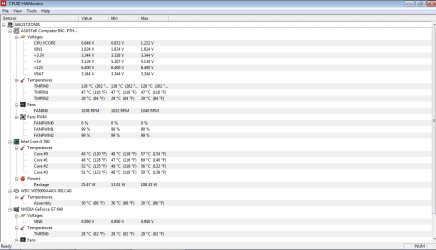
I see two problems right off the bat.

Your temps in read for the motherboard. They might be a false reading but you must check.

Your +12v is very low 6.4 v. It also may be a false reading because I don't think the system would boot with that low of volts.

Please read the tutorials again.
Your Specs in the lower left of your post need to be filled in completely.
That will follow your every post so other members have a ready access to them and don't have to chase them down in the thread.

Look in the lower left corner in this post and tick on My System Specs and you will see what I mean.

Memory Controller volt indicate to high to the best of my memory.
 

My Computer My Computer

At a glance

Windows 10 Pro. 64/ version 1709 Windows 7 Pr...Intel i7-6800K @ 4.3Corsair Platinum 16 gig @2400EVGA GTX 1070 OC
Computer type
PC/Desktop
Computer Manufacturer/Model Number
Home made Desktop
OS
Windows 10 Pro. 64/ version 1709 Windows 7 Pro/64
CPU
Intel i7-6800K @ 4.3
Motherboard
ASUS X-99 Deluxe II
Memory
Corsair Platinum 16 gig @2400
Graphics Card(s)
EVGA GTX 1070 OC
Monitor(s) Displays
Asus 27" LED LCD/VE278Q
Screen Resolution
1920-1080 or 1280-720 HDMI
Hard Drives
INTEL SSD 730-240 Gb Sata 3.0/
PSU
EVGA Platium 1200W
Case
Phanteks Luxe Tempered Glass 8 fans/ one radiator
Cooling
XSPC/ Water Cooled CPU
Keyboard
Das 4 Professional
Mouse
Logitech M705/MX Anywhere 2-S
Internet Speed
100 mbits
Antivirus
Microsoft Security Essentials/ Malwarebytes Premium 3.0/ SAS
Browser
I.E. 11 default/Firefox/ ISP Time Warner Cable/Spectrum
Other Info
LG BluRay Burner/
Sound system-KLipsch-THX/
Icy Dock ssd Hot Swap bays.
I have filled up most of them, thanks again.
So what should I do about that? Could that be that recent update I did to my Mobo manually?
 

My Computer My Computer

At a glance

Windows 7 Home Premium 64bitIntel Core i5 760 @ 2.80GHz4 gb2047MB NVIDIA GeForce GT 640 (Gigabyte) 29 °C
Computer type
PC/Desktop
OS
Windows 7 Home Premium 64bit
CPU
Intel Core i5 760 @ 2.80GHz
Motherboard
ASUSTeK Computer INC. P7H55-M LE (LGA1156)
Memory
4 gb
Graphics Card(s)
2047MB NVIDIA GeForce GT 640 (Gigabyte) 29 °C
Sound Card
NVIDIA High Definition Audio
Screen Resolution
1280X768
Antivirus
avast!
Browser
Google Chrome
I would try using another monitoring program.

Here is a suggestion. Be careful and don't let it download garbage with it.

Download HWMonitor - MajorGeeks


Yes a bios update could cause the misreading of your system.

What was the reason you updated your bios?
 

My Computer My Computer

At a glance

Windows 10 Pro. 64/ version 1709 Windows 7 Pr...Intel i7-6800K @ 4.3Corsair Platinum 16 gig @2400EVGA GTX 1070 OC
Computer type
PC/Desktop
Computer Manufacturer/Model Number
Home made Desktop
OS
Windows 10 Pro. 64/ version 1709 Windows 7 Pro/64
CPU
Intel i7-6800K @ 4.3
Motherboard
ASUS X-99 Deluxe II
Memory
Corsair Platinum 16 gig @2400
Graphics Card(s)
EVGA GTX 1070 OC
Monitor(s) Displays
Asus 27" LED LCD/VE278Q
Screen Resolution
1920-1080 or 1280-720 HDMI
Hard Drives
INTEL SSD 730-240 Gb Sata 3.0/
PSU
EVGA Platium 1200W
Case
Phanteks Luxe Tempered Glass 8 fans/ one radiator
Cooling
XSPC/ Water Cooled CPU
Keyboard
Das 4 Professional
Mouse
Logitech M705/MX Anywhere 2-S
Internet Speed
100 mbits
Antivirus
Microsoft Security Essentials/ Malwarebytes Premium 3.0/ SAS
Browser
I.E. 11 default/Firefox/ ISP Time Warner Cable/Spectrum
Other Info
LG BluRay Burner/
Sound system-KLipsch-THX/
Icy Dock ssd Hot Swap bays.
hw.png

Well my friend told me that updating my BIOS would be a good thing, so he found an asusupdater.exe or something and installed the latest update.
 

My Computer My Computer

At a glance

Windows 7 Home Premium 64bitIntel Core i5 760 @ 2.80GHz4 gb2047MB NVIDIA GeForce GT 640 (Gigabyte) 29 °C
Computer type
PC/Desktop
OS
Windows 7 Home Premium 64bit
CPU
Intel Core i5 760 @ 2.80GHz
Motherboard
ASUSTeK Computer INC. P7H55-M LE (LGA1156)
Memory
4 gb
Graphics Card(s)
2047MB NVIDIA GeForce GT 640 (Gigabyte) 29 °C
Sound Card
NVIDIA High Definition Audio
Screen Resolution
1280X768
Antivirus
avast!
Browser
Google Chrome
Well both programs are indicating about the same thing.
Try this; take the side cover off the computer and point a fan of good size blowing into the case and monitor the temps. If you mother board temp go down then you have a problem. If the motherboard temp read the same in my opinion the updated bios are giving a false reading.

Go into your bios and let us know what the voltages are.
Make sure your bios are set to default.

What was the reason you flashed your bios?
 

My Computer My Computer

At a glance

Windows 10 Pro. 64/ version 1709 Windows 7 Pr...Intel i7-6800K @ 4.3Corsair Platinum 16 gig @2400EVGA GTX 1070 OC
Computer type
PC/Desktop
Computer Manufacturer/Model Number
Home made Desktop
OS
Windows 10 Pro. 64/ version 1709 Windows 7 Pro/64
CPU
Intel i7-6800K @ 4.3
Motherboard
ASUS X-99 Deluxe II
Memory
Corsair Platinum 16 gig @2400
Graphics Card(s)
EVGA GTX 1070 OC
Monitor(s) Displays
Asus 27" LED LCD/VE278Q
Screen Resolution
1920-1080 or 1280-720 HDMI
Hard Drives
INTEL SSD 730-240 Gb Sata 3.0/
PSU
EVGA Platium 1200W
Case
Phanteks Luxe Tempered Glass 8 fans/ one radiator
Cooling
XSPC/ Water Cooled CPU
Keyboard
Das 4 Professional
Mouse
Logitech M705/MX Anywhere 2-S
Internet Speed
100 mbits
Antivirus
Microsoft Security Essentials/ Malwarebytes Premium 3.0/ SAS
Browser
I.E. 11 default/Firefox/ ISP Time Warner Cable/Spectrum
Other Info
LG BluRay Burner/
Sound system-KLipsch-THX/
Icy Dock ssd Hot Swap bays.
As I told you a friend of mine suggested me updating it, so it could be faster.

also where should I go to BIOS exactly to let you know about the voltages?
 

My Computer My Computer

At a glance

Windows 7 Home Premium 64bitIntel Core i5 760 @ 2.80GHz4 gb2047MB NVIDIA GeForce GT 640 (Gigabyte) 29 °C
Computer type
PC/Desktop
OS
Windows 7 Home Premium 64bit
CPU
Intel Core i5 760 @ 2.80GHz
Motherboard
ASUSTeK Computer INC. P7H55-M LE (LGA1156)
Memory
4 gb
Graphics Card(s)
2047MB NVIDIA GeForce GT 640 (Gigabyte) 29 °C
Sound Card
NVIDIA High Definition Audio
Screen Resolution
1280X768
Antivirus
avast!
Browser
Google Chrome
As I told you a friend of mine suggested me updating it, so it could be faster.
Updating a BIOS shouldn't be done if the computer works as designed but it may be possible an updated BIOS will allow additional features such as over-clocking which can be used to adjust settings to make it faster. But over-clocking does bring big risk beyond its design, mainly in destroying the motherboard, CPU, RAM, etc.
 

My Computer My Computer

At a glance

Windows 7 Ultimate 64-bit, Windows 8.1 64-bit...
Computer type
PC/Desktop
Computer Manufacturer/Model Number
Customs, Dell, Gateway, HP, Toshiba, Acer, ASUS
OS
Windows 7 Ultimate 64-bit, Windows 8.1 64-bit, Mac OS X 10.10, Linux Mint 17, Windows 10 Pro TP
Keyboard
Microsoft
Mouse
Microsoft
As I told you a friend of mine suggested me updating it, so it could be faster.
Updating a BIOS shouldn't be done if the computer works as designed but it may be possible an updated BIOS will allow additional features such as over-clocking which can be used to adjust settings to make it faster. But over-clocking does bring big risk beyond its design, mainly in destroying the motherboard, CPU, RAM, etc.

Can I get back to the older version of my bios?
 

My Computer My Computer

At a glance

Windows 7 Home Premium 64bitIntel Core i5 760 @ 2.80GHz4 gb2047MB NVIDIA GeForce GT 640 (Gigabyte) 29 °C
Computer type
PC/Desktop
OS
Windows 7 Home Premium 64bit
CPU
Intel Core i5 760 @ 2.80GHz
Motherboard
ASUSTeK Computer INC. P7H55-M LE (LGA1156)
Memory
4 gb
Graphics Card(s)
2047MB NVIDIA GeForce GT 640 (Gigabyte) 29 °C
Sound Card
NVIDIA High Definition Audio
Screen Resolution
1280X768
Antivirus
avast!
Browser
Google Chrome
From you post #12

As I told you a friend of mine suggested me updating it, so it could be faster.
I do not memorize all the threads I read. So their will be times my question will be redundant.

It will be under hard ware monitoring or something like it.
It varies from bios to bios.

Did you do the things I recommended in my post # 11?
 

My Computer My Computer

At a glance

Windows 10 Pro. 64/ version 1709 Windows 7 Pr...Intel i7-6800K @ 4.3Corsair Platinum 16 gig @2400EVGA GTX 1070 OC
Computer type
PC/Desktop
Computer Manufacturer/Model Number
Home made Desktop
OS
Windows 10 Pro. 64/ version 1709 Windows 7 Pro/64
CPU
Intel i7-6800K @ 4.3
Motherboard
ASUS X-99 Deluxe II
Memory
Corsair Platinum 16 gig @2400
Graphics Card(s)
EVGA GTX 1070 OC
Monitor(s) Displays
Asus 27" LED LCD/VE278Q
Screen Resolution
1920-1080 or 1280-720 HDMI
Hard Drives
INTEL SSD 730-240 Gb Sata 3.0/
PSU
EVGA Platium 1200W
Case
Phanteks Luxe Tempered Glass 8 fans/ one radiator
Cooling
XSPC/ Water Cooled CPU
Keyboard
Das 4 Professional
Mouse
Logitech M705/MX Anywhere 2-S
Internet Speed
100 mbits
Antivirus
Microsoft Security Essentials/ Malwarebytes Premium 3.0/ SAS
Browser
I.E. 11 default/Firefox/ ISP Time Warner Cable/Spectrum
Other Info
LG BluRay Burner/
Sound system-KLipsch-THX/
Icy Dock ssd Hot Swap bays.
I can't do that yet since I'm not home but until then could you please provide me some solutions about the actual problem which is 6 gb ram installed and only 3.96 usable?
 

My Computer My Computer

At a glance

Windows 7 Home Premium 64bitIntel Core i5 760 @ 2.80GHz4 gb2047MB NVIDIA GeForce GT 640 (Gigabyte) 29 °C
Computer type
PC/Desktop
OS
Windows 7 Home Premium 64bit
CPU
Intel Core i5 760 @ 2.80GHz
Motherboard
ASUSTeK Computer INC. P7H55-M LE (LGA1156)
Memory
4 gb
Graphics Card(s)
2047MB NVIDIA GeForce GT 640 (Gigabyte) 29 °C
Sound Card
NVIDIA High Definition Audio
Screen Resolution
1280X768
Antivirus
avast!
Browser
Google Chrome
As I told you a friend of mine suggested me updating it, so it could be faster.
Updating a BIOS shouldn't be done if the computer works as designed but it may be possible an updated BIOS will allow additional features such as over-clocking which can be used to adjust settings to make it faster. But over-clocking does bring big risk beyond its design, mainly in destroying the motherboard, CPU, RAM, etc.

Can I get back to the older version of my bios?
Most BIOS updates will prompt to save the current version, did you get that message and do it? If not then you have to get it from the maker of the motherboard as they purchase the BIOS and implement it as desired.
 

My Computer My Computer

At a glance

Windows 7 Ultimate 64-bit, Windows 8.1 64-bit...
Computer type
PC/Desktop
Computer Manufacturer/Model Number
Customs, Dell, Gateway, HP, Toshiba, Acer, ASUS
OS
Windows 7 Ultimate 64-bit, Windows 8.1 64-bit, Mac OS X 10.10, Linux Mint 17, Windows 10 Pro TP
Keyboard
Microsoft
Mouse
Microsoft
This problem can be caused by many things, some can include.

1. Incorrect bios
2. Miss match ram
3. Faulty ram or ram slots
4. Ram installed incorrectly and not in the proper positions as per motherboard manual.

Obvious my methods of trying to isolate your problem don't meet your standards so I will let other try to help you.
 

My Computer My Computer

At a glance

Windows 10 Pro. 64/ version 1709 Windows 7 Pr...Intel i7-6800K @ 4.3Corsair Platinum 16 gig @2400EVGA GTX 1070 OC
Computer type
PC/Desktop
Computer Manufacturer/Model Number
Home made Desktop
OS
Windows 10 Pro. 64/ version 1709 Windows 7 Pro/64
CPU
Intel i7-6800K @ 4.3
Motherboard
ASUS X-99 Deluxe II
Memory
Corsair Platinum 16 gig @2400
Graphics Card(s)
EVGA GTX 1070 OC
Monitor(s) Displays
Asus 27" LED LCD/VE278Q
Screen Resolution
1920-1080 or 1280-720 HDMI
Hard Drives
INTEL SSD 730-240 Gb Sata 3.0/
PSU
EVGA Platium 1200W
Case
Phanteks Luxe Tempered Glass 8 fans/ one radiator
Cooling
XSPC/ Water Cooled CPU
Keyboard
Das 4 Professional
Mouse
Logitech M705/MX Anywhere 2-S
Internet Speed
100 mbits
Antivirus
Microsoft Security Essentials/ Malwarebytes Premium 3.0/ SAS
Browser
I.E. 11 default/Firefox/ ISP Time Warner Cable/Spectrum
Other Info
LG BluRay Burner/
Sound system-KLipsch-THX/
Icy Dock ssd Hot Swap bays.
It sounds to me like your issues are because you have not reset to defaults after flashing the update as others have stated (maybe your confused it happens to us all) and would and does normally for a lot of asus boards I'v come across make that 128c rating for system show up and the ram not being right. Just to make sure. you have gone into your bios to the exit tab and chosen load defaults then rebooted? Also take a picture of the hardware monitor voltages after doing so from the power tab.
cXzzu.png
 

My Computer My Computer

At a glance

10 Pro x64Ryzen 9 3900X64GB(4x16GB) DDR4EVGA 1080ti FTW3
Computer type
PC/Desktop
Computer Manufacturer/Model Number
Custom
OS
10 Pro x64
CPU
Ryzen 9 3900X
Motherboard
Asrock x370 Tachi
Memory
64GB(4x16GB) DDR4
Graphics Card(s)
EVGA 1080ti FTW3
Sound Card
ASUS Xonar Essence STX (V4 Bursons), ODAC rev B, NFB-11, O2
Monitor(s) Displays
3xASUS PB278Q/R, Optoma HD142X
Screen Resolution
3x1440p, 1080p
Hard Drives
512GB 850 EVO(OS, Programs)
4TB (Movies)
3TB (Downloads)
3TB (Programs)
1TB HDD (Games)
2x6TB R1 (videos)
PSU
AX760
Case
Fractal Define R5
Cooling
NH-D15S
Keyboard
Massdrop Ctrl with Box Navy's
Mouse
G903, Alioth XXL Mat
Internet Speed
280/40
Antivirus
MBAM, ESET
Browser
Canary 64 Bit
Other Info
I also own a Thinkpad P50 Xeon 4K, X220T, X1C5
note: ram issue was before I updated my bios
so @rvsjew, you're telling me to load setup defaults and then save the changes?
 

My Computer My Computer

At a glance

Windows 7 Home Premium 64bitIntel Core i5 760 @ 2.80GHz4 gb2047MB NVIDIA GeForce GT 640 (Gigabyte) 29 °C
Computer type
PC/Desktop
OS
Windows 7 Home Premium 64bit
CPU
Intel Core i5 760 @ 2.80GHz
Motherboard
ASUSTeK Computer INC. P7H55-M LE (LGA1156)
Memory
4 gb
Graphics Card(s)
2047MB NVIDIA GeForce GT 640 (Gigabyte) 29 °C
Sound Card
NVIDIA High Definition Audio
Screen Resolution
1280X768
Antivirus
avast!
Browser
Google Chrome
Back
Top