64-bit browsers?

Windows i7 920

New member
Pro User
Local time
1:24 AM
Messages
544
I now have a pre-release x64 Flash Player installed on my IE x64. However, I don't want to be limited to just IE. Are any of the other browsers available as x64 yet?
 

My Computer

Computer Manufacturer/Model Number
iBuyPower Chimera X58
OS
Windows 8 Pro x64
CPU
Intel Core i7 920
Motherboard
Asus P6T Deluxe V2
Memory
12GB (2GB x6) Triple Channel DDR3 1333 MHz
Graphics Card(s)
ATI Radeon HD 4870 X2 2GB GDDR5
Sound Card
Integrated Digital HD 7.1 Surround Sound
Monitor(s) Displays
24.6-inch ASUS VW246H 20000:1 Contrast, 2 ms response time,
Screen Resolution
1920x1080
Hard Drives
1 TB 7200 RPM SATA II 3 GBps 16MB cache
PSU
NZXT 800W Gaming Series
Case
Guardian Inferno (Custom Painted NZXT Guardian 921)
Cooling
Thermaltake V1 Fan Cooling System OC Proof
Keyboard
Razer Lycosa
Mouse
iBuyPower Ergonomical Internet Mouse
Internet Speed
11 MBps High-speed Cable

My Computer

Computer type
PC/Desktop
Computer Manufacturer/Model Number
GIGABYTE Rig (Custom)
OS
Windows 7 Professional (x64/SP1) /Linux Mint 16
CPU
Intel i5-3570k 3.40 GHz @ 4.6 GHz
Motherboard
GIGABYTE Z77X-D3H
Memory
8GB (2133MHz) DDR3
Graphics Card(s)
Asus GTX560 Ti (Nvidia)
Monitor(s) Displays
HP 23", Acer 19" and a Dell 17"
Screen Resolution
1080p, 1440x900 and 1280x1024
Hard Drives
Sandisk Extreme 120GB (SSD), WD 2TB green and 4 other HDDs
PSU
Antec 620w High Current Gamer
Case
Corsair Obsidian 600D
Cooling
CPU - Antec KÜHLER H₂O 920
Keyboard
Steelseries 6Gv2
Mouse
Roccat LUA
Internet Speed
4 - 6mb/s
Antivirus
ESET NOD32
Browser
Chrome/Firefox
Other Info
Intel Gigabit CT (PCIE NIC) and Thinkpad T61p,

My Computer

Computer Manufacturer/Model Number
OEM - Me
OS
Windows 7 Home Premium x64
CPU
AMD Phenom II X6 1600T
Motherboard
GigaByte GZ-990FXA-UD3
Memory
16GB PC3-10700 (1342MHz)
Graphics Card(s)
ATI Radeon 5770 HD (x2) CrossFire
Sound Card
On-board RealTek chipset
Monitor(s) Displays
3x Hanns-G 1920x1080 Monitors
Screen Resolution
3x Hanns-G 1920x1080 Monitors
Hard Drives
Intel 25-V SSD 40GB: 218 MB/s AT: 0.1ms
Intel X-25M SSD 80GB: 230MB/s AT: 0.1ms
Seagate 750GB: 133 MB/s AT: 13ms (perpendicular storage)
Buffalo HD-PCTU3 1TB External drive
PSU
OCZ Stealth X Stream 750W
Case
Cheap (unknown)
Cooling
Stock
Keyboard
HP USB
Mouse
LogiTech USB
Internet Speed
1.5 Mbps - Slow - At the tail-end of a rural network
Other Info
Printer: Epson Stylus C-84
Scanner: HP 3500C Flatbed
DVD-RW: Plextor
DVD-ROM: Unknown
WEI: 7.4

My Computer

Computer Manufacturer/Model Number
Assembled by me
OS
Windows 7 Ultimate x64
CPU
AMD Phenom II X4 965 3.400 GHz
Motherboard
Asus M4A87TD AMD motherboard
Memory
Kingston DDR3 dual 4GB
Graphics Card(s)
Gigabyte GV-R5670OC-1GI
Sound Card
Asus motherboard onboard VIA VT1818 8-channel HD
Monitor(s) Displays
Samsung SyncMaster 2233BW
Hard Drives
Western Digital 1TB WD1002FAEX-00Z3AO
PSU
Thermaltake Toughpower 600 W
Case
Thermaltake Element V
Cooling
Air cooling by Thermaltake chassis fans
I now have a pre-release x64 Flash Player installed on my IE x64. However, I don't want to be limited to just IE. Are any of the other browsers available as x64 yet?

Thanks to all that have replied prior to my post here.

@Windows i7 920: have a look here, and here. We've been discussing this for a bit. :D
 

My Computer

Computer Manufacturer/Model Number
Toshiba L355D
OS
Windows 7 Ultimate x64 SP1
CPU
Core2 Duo
Motherboard
Intel
Memory
4 GB
Graphics Card(s)
GM965 on-board
Sound Card
RealTek on-board
Monitor(s) Displays
19"+17"(laptop)
Screen Resolution
1440x900 (x 2)
Hard Drives
500GB Ext. 200GB Internal
PSU
N/A
Case
N/A
Cooling
N/A
When I downloaded minefield this is coming up every time I open the browser and I can't figure out why. Also I have an SSD drive and a regular disk drive. Should I have my browser on the SSD drive or regular disk drive or does it matter as far as how fast they are?

111.jpg
 

My Computer

Computer type
PC/Desktop
Computer Manufacturer/Model Number
Custom Build
OS
Windows 7 Home Premium
CPU
AMD Phenom II 955 Black Edition Quad Core
Motherboard
MSI 870-G45
Memory
Corsair XMS3 8GB
Graphics Card(s)
ATI Eyefinity HD 5770 5 mini display ports
Sound Card
Realtek High Definition 6.1
Monitor(s) Displays
2 DELL E207WFP 21.5" - 1 Acer 21.5"
Screen Resolution
2 Dells 1680x1050 - Acer 1920x1080
Hard Drives
Intel 40GB SSD
WD 500GB internal
WD 500Gb external
PSU
Cooler Master 500w
Case
Cooler Master 430 Black Elite
Keyboard
HP
Mouse
MIBRU
Internet Speed
10 mbs
Antivirus
Trend Micro
Browser
Chrome
When I downloaded minefield this is coming up every time I open the browser and I can't figure out why. Also I have an SSD drive and a regular disk drive. Should I have my browser on the SSD drive or regular disk drive or does it matter as far as how fast they are?

View attachment 118952
You have an unsupported extension in Minefield.

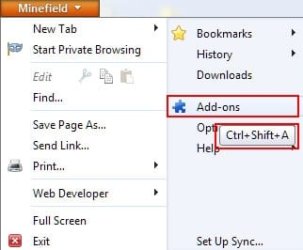
Open Minefield and go to "Add-ons" by selecting it from the drop down menu or typing "Ctrl+Shift+A":

ScreenShot00161.jpg

Disable them one by one until the error message is no longer present at the start up of Minefield.

Once you find the offending add-on, look for an update or a version specifically designed to work with the x64 build of Minefield.

If you have any other questions, Case1, please post them. I think, eventually, you'll enjoy the x64 build and, sooner or later, it will be the de-facto Mozilla build - I just hope it's sooner! :D
 

My Computer

Computer Manufacturer/Model Number
Toshiba L355D
OS
Windows 7 Ultimate x64 SP1
CPU
Core2 Duo
Motherboard
Intel
Memory
4 GB
Graphics Card(s)
GM965 on-board
Sound Card
RealTek on-board
Monitor(s) Displays
19"+17"(laptop)
Screen Resolution
1440x900 (x 2)
Hard Drives
500GB Ext. 200GB Internal
PSU
N/A
Case
N/A
Cooling
N/A
When I downloaded minefield this is coming up every time I open the browser and I can't figure out why. Also I have an SSD drive and a regular disk drive. Should I have my browser on the SSD drive or regular disk drive or does it matter as far as how fast they are?

View attachment 118952
You have an unsupported extension in Minefield.

Open Minefield and go to "Add-ons" by selecting it from the drop down menu or typing "Ctrl+Shift+A":

View attachment 118970

Disable them one by one until the error message is no longer present at the start up of Minefield.

Once you find the offending add-on, look for an update or a version specifically designed to work with the x64 build of Minefield.

If you have any other questions, Case1, please post them. I think, eventually, you'll enjoy the x64 build and, sooner or later, it will be the de-facto Mozilla build - I just hope it's sooner! :D

Mikedl,

Thank you so much for the help! It was the Skype extension that was causing the problem, I will now look for an update or version that might work

The other add on I noticed was JAVA 6.0.22...do you know if there is a different JAVA I am going to need with Minefield or will this one work?

Casey
 

My Computer

Computer type
PC/Desktop
Computer Manufacturer/Model Number
Custom Build
OS
Windows 7 Home Premium
CPU
AMD Phenom II 955 Black Edition Quad Core
Motherboard
MSI 870-G45
Memory
Corsair XMS3 8GB
Graphics Card(s)
ATI Eyefinity HD 5770 5 mini display ports
Sound Card
Realtek High Definition 6.1
Monitor(s) Displays
2 DELL E207WFP 21.5" - 1 Acer 21.5"
Screen Resolution
2 Dells 1680x1050 - Acer 1920x1080
Hard Drives
Intel 40GB SSD
WD 500GB internal
WD 500Gb external
PSU
Cooler Master 500w
Case
Cooler Master 430 Black Elite
Keyboard
HP
Mouse
MIBRU
Internet Speed
10 mbs
Antivirus
Trend Micro
Browser
Chrome
I'm glad you solved that issue, Case1, especially with my blatant error of mentioning only "extensions" when I should have also mentioned "plug-ins". :o You're a smart individual. :D

The Java 6.0.22 64bit version should work fine, Case1, it does for me. :)

I actually tried the Java7 beta (a few weeks ago, I haven't tried it with the latest FF x64 builds) but it wouldn't load properly even though FF 4.0b8pre showed the extension loaded, sites utilizing Java failed to work properly so I went back to the released x64 6.0.22 Java version (you can have both the 32bit and 64bit Java versions installed simultaneously without issue).

I have Skype installed but I don't use the FF extension. I wish I could be of more help regarding it. Sorry. :(

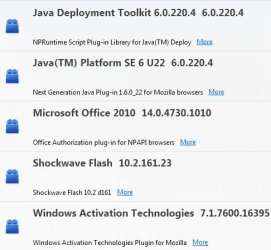
These are the only plug-ins I'm using with my x64 FF 4.0b8pre:
ScreenShot00162.jpg

I'm only using one extension but I won't be mentioning it here; I turn it off for this site, however.
 

My Computer

Computer Manufacturer/Model Number
Toshiba L355D
OS
Windows 7 Ultimate x64 SP1
CPU
Core2 Duo
Motherboard
Intel
Memory
4 GB
Graphics Card(s)
GM965 on-board
Sound Card
RealTek on-board
Monitor(s) Displays
19"+17"(laptop)
Screen Resolution
1440x900 (x 2)
Hard Drives
500GB Ext. 200GB Internal
PSU
N/A
Case
N/A
Cooling
N/A
Does anyone know why I would have trouble getting Gotomeeting to work with Google Chrome? When I try to use this program it freezes and doesn't load...I have only had this problem on my new computer. Gotomeeting only works on IE...as a matter of fact it won't work with FF either. I have Win 7 64 bit.

Thanks,

Casey
 

My Computer

Computer type
PC/Desktop
Computer Manufacturer/Model Number
Custom Build
OS
Windows 7 Home Premium
CPU
AMD Phenom II 955 Black Edition Quad Core
Motherboard
MSI 870-G45
Memory
Corsair XMS3 8GB
Graphics Card(s)
ATI Eyefinity HD 5770 5 mini display ports
Sound Card
Realtek High Definition 6.1
Monitor(s) Displays
2 DELL E207WFP 21.5" - 1 Acer 21.5"
Screen Resolution
2 Dells 1680x1050 - Acer 1920x1080
Hard Drives
Intel 40GB SSD
WD 500GB internal
WD 500Gb external
PSU
Cooler Master 500w
Case
Cooler Master 430 Black Elite
Keyboard
HP
Mouse
MIBRU
Internet Speed
10 mbs
Antivirus
Trend Micro
Browser
Chrome
Back
Top