64 bit Host 32 bit guest - How to do?

twiztdlove17

New member
Local time
6:51 PM
Messages
2
Location
florida
how would u keep 64 bit as your host and create 32 bit as your guest. can somebody break down the steps to doing this.
 

My Computer My Computer

At a glance

windows 7 home preminum 64-bit3 gb
Computer Manufacturer/Model Number
acer/aspire5532
OS
windows 7 home preminum 64-bit
Memory
3 gb
how would u keep 64 bit as your host and create 32 bit as your guest. can somebody break down the steps to doing this.
A virtual machine uses and works with its own emulated hardware. Everything is emulated, from BIOS to sound and video controllers.

This emulated hardware platform is what we call a virtual machine. Running a virtual machine with its own emulated hardware profile and operating system, it is as if it was a separate computer, not just something running on your desktop.

Because of this, a completely emulated and simulated hardware profile, it's not only possible to run 32-bit guest on 64-bit host, but it's also possible to run 64-bit guest on 32-bit host on virtual machines running on VirtualBox and VMware. Windows Virtual PC can at the moment only emulate x86, 32-bit processor architecture.

More:
Virtual machine - Wikipedia, the free encyclopedia
Windows Virtual PC: Home Page
VirtualBox
VMware Player: Run Windows 7, Chrome OS - Free Download for a Virtual PC

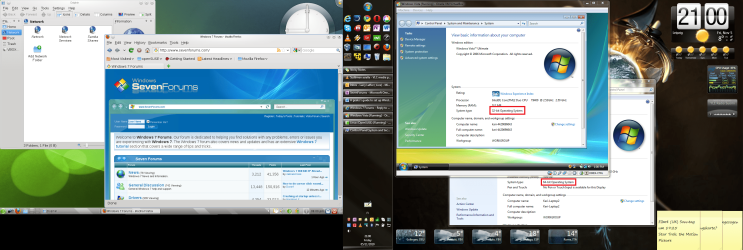
Here 32-bit openSUSE Linux and 32-bit Vista Ultimate running on VirtualBox machines on my Windows 7 Enterprise 64-bit dual display desktop:

x86_on_x64.png

Kari
 

My Computer My Computer

At a glance

Windows 10 Pro x64 EN-GB1.6 GHz Intel Core i7-720QM Processor6 GBATI Mobility Radeon HD 5850 Graphics
Computer type
Laptop
Computer Manufacturer/Model Number
HP ENVY 17-1150eg
OS
Windows 10 Pro x64 EN-GB
CPU
1.6 GHz Intel Core i7-720QM Processor
Memory
6 GB
Graphics Card(s)
ATI Mobility Radeon HD 5850 Graphics
Sound Card
Beats sound system with integrated subwoofer
Monitor(s) Displays
17" laptop display, 22" LED and 32" Full HD TV through HDMI
Screen Resolution
1600*900 (1), 1920*1080 (2&3)
Hard Drives
Internal: 2 x 500 GB SATA Hard Disk Drive 7200 rpm
External: 2TB for backups, 3TB USB3 network drive for media
Cooling
As Envy runs a bit warm, I have it on a Cooler Master pad
Keyboard
Logitech diNovo Media Desktop Laser (bluetooth)
Mouse
Logitech Performance Mouse MX
Internet Speed
50/10 Mbps VDSL
Antivirus
Windows Defender 4.3.9431.0
Browser
Maxthon 3.5.2., IE11
ok. i already downloaded the virtualbox on to my desktop. on there do i add another type of windows 7 i would like to create? i also tried the windows virtual pc and it tells me that my computer is compatiable to use because its a home preminum os. do i need to upgrade?
 

My Computer My Computer

At a glance

windows 7 home preminum 64-bit3 gb
Computer Manufacturer/Model Number
acer/aspire5532
OS
windows 7 home preminum 64-bit
Memory
3 gb
This article shows how to install Ubuntu Linux on VirtualBox. Just follow the steps mentioned, using Windows ISO-image or DVD instead of Ubuntu. The principle to install an OS to a virtual machine is same.

Virtual PC and XP Mode need Seven Professional or better.

Kari
 

My Computer My Computer

At a glance

Windows 10 Pro x64 EN-GB1.6 GHz Intel Core i7-720QM Processor6 GBATI Mobility Radeon HD 5850 Graphics
Computer type
Laptop
Computer Manufacturer/Model Number
HP ENVY 17-1150eg
OS
Windows 10 Pro x64 EN-GB
CPU
1.6 GHz Intel Core i7-720QM Processor
Memory
6 GB
Graphics Card(s)
ATI Mobility Radeon HD 5850 Graphics
Sound Card
Beats sound system with integrated subwoofer
Monitor(s) Displays
17" laptop display, 22" LED and 32" Full HD TV through HDMI
Screen Resolution
1600*900 (1), 1920*1080 (2&3)
Hard Drives
Internal: 2 x 500 GB SATA Hard Disk Drive 7200 rpm
External: 2TB for backups, 3TB USB3 network drive for media
Cooling
As Envy runs a bit warm, I have it on a Cooler Master pad
Keyboard
Logitech diNovo Media Desktop Laser (bluetooth)
Mouse
Logitech Performance Mouse MX
Internet Speed
50/10 Mbps VDSL
Antivirus
Windows Defender 4.3.9431.0
Browser
Maxthon 3.5.2., IE11
Back
Top