Solved 64-bit OS not being able to use >16 GB of ram

curtranhome

New member
Member
Local time
1:51 AM
Messages
48
Location
Sacramento CA
I just installed 16gig on top of my current 16gigs or ram in my machine. When I go to system properties it says 32-gigs (16 usable) I have a 64-bit windows 7. How do I make it use more than 16gigs of ram?
 

My Computer My Computer

At a glance

Windows 8.1Intel i7 4790K 4.0GHz32 GBEVGA
Computer type
PC/Desktop
Computer Manufacturer/Model Number
Custom Build
OS
Windows 8.1
CPU
Intel i7 4790K 4.0GHz
Motherboard
Asus Maximus VI Formula
Memory
32 GB
Graphics Card(s)
EVGA
Sound Card
On-Board Audio
Monitor(s) Displays
HP Pavilion 23xi
Screen Resolution
1920 x 1200
Hard Drives
1x 500GB SSD
1x 3TB HHDD
4x 1TB in 1+0 RAID
PSU
750W
Case
Antec
Cooling
4 Fans + Liquid Cooling System
Keyboard
Razer Black Widow Ultimate
Mouse
Logitech G700
Internet Speed
23 MB/s
Antivirus
Avast! Antivirus
Browser
Google Chrome
If it's home premium I think 16 is it's limit.
 

My Computer My Computer

At a glance

Microsoft Windows 7 Home Premium 64-bit 7601 ...AMD Phenom(tm) II X4 965 Processor8.0 GBNVIDIA GeForce GTX 560 Ti
Computer type
PC/Desktop
Computer Manufacturer/Model Number
Custom Build
OS
Microsoft Windows 7 Home Premium 64-bit 7601 Multiprocessor Free Service Pack 1
CPU
AMD Phenom(tm) II X4 965 Processor
Motherboard
ASUSTeK Computer INC. M4A785-M
Memory
8.0 GB
Graphics Card(s)
NVIDIA GeForce GTX 560 Ti
Sound Card
(1) NVIDIA High Definition Audio (2) NVIDIA High Definitio
Monitor(s) Displays
Samsung SyncMaster T220G
Screen Resolution
1680 x 1050 x 32 bits (4294967296 colors) @ 59 Hz
Hard Drives
WDC WD7500AADS-00M2B0
PSU
650 Watt
Case
Cooler Master HAF XM
Cooling
Air
Keyboard
CompUSA SK-6200
Mouse
Logitech M-510
Internet Speed
Comcast
Antivirus
MSE
Browser
Firefox 27.0 IE 11
Other Info
Belkin Hub To Go F5U706
curtranhome
It would help if you could fill out your specs with more information.
What Asus motherboard
What Ram is installed
Take a look at my System Specs it should show what I mean.

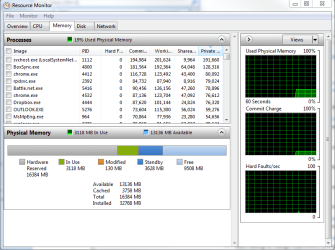
Could you post a picture of one of these?

RAM USAGE.PNG
 

My Computer My Computer

At a glance

Windows 10 Pro. 64/ version 1709 Windows 7 Pr...Intel i7-6800K @ 4.3Corsair Platinum 16 gig @2400EVGA GTX 1070 OC
Computer type
PC/Desktop
Computer Manufacturer/Model Number
Home made Desktop
OS
Windows 10 Pro. 64/ version 1709 Windows 7 Pro/64
CPU
Intel i7-6800K @ 4.3
Motherboard
ASUS X-99 Deluxe II
Memory
Corsair Platinum 16 gig @2400
Graphics Card(s)
EVGA GTX 1070 OC
Monitor(s) Displays
Asus 27" LED LCD/VE278Q
Screen Resolution
1920-1080 or 1280-720 HDMI
Hard Drives
INTEL SSD 730-240 Gb Sata 3.0/
PSU
EVGA Platium 1200W
Case
Phanteks Luxe Tempered Glass 8 fans/ one radiator
Cooling
XSPC/ Water Cooled CPU
Keyboard
Das 4 Professional
Mouse
Logitech M705/MX Anywhere 2-S
Internet Speed
100 mbits
Antivirus
Microsoft Security Essentials/ Malwarebytes Premium 3.0/ SAS
Browser
I.E. 11 default/Firefox/ ISP Time Warner Cable/Spectrum
Other Info
LG BluRay Burner/
Sound system-KLipsch-THX/
Icy Dock ssd Hot Swap bays.
jgiels, that may be the issue.... I have an Anytime Upgrade key but for some reason can't use it...

Layback Bear, attached is the image...
 

Attachments

  • Capture.PNG
    Capture.PNG
    32.4 KB · Views: 0

My Computer My Computer

At a glance

Windows 8.1Intel i7 4790K 4.0GHz32 GBEVGA
Computer type
PC/Desktop
Computer Manufacturer/Model Number
Custom Build
OS
Windows 8.1
CPU
Intel i7 4790K 4.0GHz
Motherboard
Asus Maximus VI Formula
Memory
32 GB
Graphics Card(s)
EVGA
Sound Card
On-Board Audio
Monitor(s) Displays
HP Pavilion 23xi
Screen Resolution
1920 x 1200
Hard Drives
1x 500GB SSD
1x 3TB HHDD
4x 1TB in 1+0 RAID
PSU
750W
Case
Antec
Cooling
4 Fans + Liquid Cooling System
Keyboard
Razer Black Widow Ultimate
Mouse
Logitech G700
Internet Speed
23 MB/s
Antivirus
Avast! Antivirus
Browser
Google Chrome
Your picture show to much Hardware Reserve.
Most of the time this means the wrong ram or the ram is wrong.
Please use the motherboard manual to install the ram correctly.

**** We still need to know exactly what motherboard and ram that you have installed.****

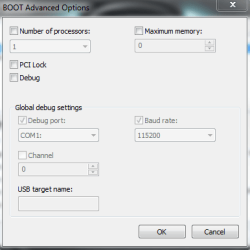
Could you post a picture of this the way it is set now.

Start Orb and type in System Configure. Tick on Boot and then tick on Advanced Options.


Boot Advanced Options..PNG
 

My Computer My Computer

At a glance

Windows 10 Pro. 64/ version 1709 Windows 7 Pr...Intel i7-6800K @ 4.3Corsair Platinum 16 gig @2400EVGA GTX 1070 OC
Computer type
PC/Desktop
Computer Manufacturer/Model Number
Home made Desktop
OS
Windows 10 Pro. 64/ version 1709 Windows 7 Pro/64
CPU
Intel i7-6800K @ 4.3
Motherboard
ASUS X-99 Deluxe II
Memory
Corsair Platinum 16 gig @2400
Graphics Card(s)
EVGA GTX 1070 OC
Monitor(s) Displays
Asus 27" LED LCD/VE278Q
Screen Resolution
1920-1080 or 1280-720 HDMI
Hard Drives
INTEL SSD 730-240 Gb Sata 3.0/
PSU
EVGA Platium 1200W
Case
Phanteks Luxe Tempered Glass 8 fans/ one radiator
Cooling
XSPC/ Water Cooled CPU
Keyboard
Das 4 Professional
Mouse
Logitech M705/MX Anywhere 2-S
Internet Speed
100 mbits
Antivirus
Microsoft Security Essentials/ Malwarebytes Premium 3.0/ SAS
Browser
I.E. 11 default/Firefox/ ISP Time Warner Cable/Spectrum
Other Info
LG BluRay Burner/
Sound system-KLipsch-THX/
Icy Dock ssd Hot Swap bays.
My motherboard: ASUS P8B75-V
 

Attachments

  • Capture.PNG
    Capture.PNG
    9.5 KB · Views: 12

My Computer My Computer

At a glance

Windows 8.1Intel i7 4790K 4.0GHz32 GBEVGA
Computer type
PC/Desktop
Computer Manufacturer/Model Number
Custom Build
OS
Windows 8.1
CPU
Intel i7 4790K 4.0GHz
Motherboard
Asus Maximus VI Formula
Memory
32 GB
Graphics Card(s)
EVGA
Sound Card
On-Board Audio
Monitor(s) Displays
HP Pavilion 23xi
Screen Resolution
1920 x 1200
Hard Drives
1x 500GB SSD
1x 3TB HHDD
4x 1TB in 1+0 RAID
PSU
750W
Case
Antec
Cooling
4 Fans + Liquid Cooling System
Keyboard
Razer Black Widow Ultimate
Mouse
Logitech G700
Internet Speed
23 MB/s
Antivirus
Avast! Antivirus
Browser
Google Chrome
Please install the motherboard and ram specs in your System Spec so we don't have to keep asking for them. It will follow your every post.
Your motherboard shows 4 dimm slots so we need to know exactly what and how you installed the ram.
How many ram sticks are you using and what are the ram sticks.
How many gigs, volt, speed.
I need exact specs to continue.
 

My Computer My Computer

At a glance

Windows 10 Pro. 64/ version 1709 Windows 7 Pr...Intel i7-6800K @ 4.3Corsair Platinum 16 gig @2400EVGA GTX 1070 OC
Computer type
PC/Desktop
Computer Manufacturer/Model Number
Home made Desktop
OS
Windows 10 Pro. 64/ version 1709 Windows 7 Pro/64
CPU
Intel i7-6800K @ 4.3
Motherboard
ASUS X-99 Deluxe II
Memory
Corsair Platinum 16 gig @2400
Graphics Card(s)
EVGA GTX 1070 OC
Monitor(s) Displays
Asus 27" LED LCD/VE278Q
Screen Resolution
1920-1080 or 1280-720 HDMI
Hard Drives
INTEL SSD 730-240 Gb Sata 3.0/
PSU
EVGA Platium 1200W
Case
Phanteks Luxe Tempered Glass 8 fans/ one radiator
Cooling
XSPC/ Water Cooled CPU
Keyboard
Das 4 Professional
Mouse
Logitech M705/MX Anywhere 2-S
Internet Speed
100 mbits
Antivirus
Microsoft Security Essentials/ Malwarebytes Premium 3.0/ SAS
Browser
I.E. 11 default/Firefox/ ISP Time Warner Cable/Spectrum
Other Info
LG BluRay Burner/
Sound system-KLipsch-THX/
Icy Dock ssd Hot Swap bays.
Back
Top