64 Bit to 32 Bit

jwhill8

New member
Local time
3:22 PM
Messages
8
I just purchased a Gateway Desktop that came with Windows 7 Home Premium 64 bit. Many of our companies programs will not work with the 64 Bit; is there a way to change my OS from 64 Bit to 32 Bit?

Thanks for you help!!
 

My Computer

OS
Windows 7 Home Premium
You would need to purchase a 32 bit copy of Windows 7 and clean install it since you cannot downgrade from 64 to 32 bit nor upgrade from 32 to 64 bit. What exactly is not running or isn't the program doing that you expect it to do? Most 32 bit applications perform quite well, and briskly, in 64 bit.
 

My Computer

Computer Manufacturer/Model Number
DELL XPS Studio 435T
OS
Vista 64 Ultimate, Windows 7 64 Ultimate, Ubuntu 9.10
CPU
i7 975 3.3 GHz Extreme (Factory OC'd to 3.6 GHz)
Motherboard
DELL provided
Memory
18 Gb Tri-Channel 1066
Graphics Card(s)
ATI 5970 2048 Mb
Sound Card
X-Fi Extreme Gamer
Monitor(s) Displays
Vizio 37" HD-TV
Screen Resolution
1920 x 1080
Hard Drives
1.5 Tb HDD
1.5 Tb HDD
2.0 Tb Network Drive
512 Gb Crucial SSD
PSU
DELL Provided 475 watts
Case
DELL
Cooling
3 fans
Keyboard
Logitech Performance K350 Wireless
Mouse
Logitech Performance MX Wireless
Internet Speed
3 Mb up 750 Kb down
Other Info
Bamboo Fun Tablet, Belkin N+ Wireless router, Pioneer Dolby System Wireless Headphones, Bose 5.1 Dolby Surround Sound System, LifeCam VX 3000 Webcam, Blu-Ray/Hi Def DVD +RW combo and Blu-ray +RW,l 15 in 1 media card reader, Logitech Rumblepad 2, Hauppauge 2250 DTV Tuner with MS Media Center Remote

Laptop:Alienware M17x, Q9100 CPU, 8Gb RAM, 1920x1200 WUXGA LCD driven by 4870's in CrossFireX, Bl
hi jwhill8, and welcome to sevenforums,

are you sure these company programs are 32 bit and not 16?

16 bit software won't run on 64bit windows, but 32 should - most software is still 32bit after all.

have you tried contacting gateway? maybe they can do you some sort of deal, saving you some money if you need to 'downgrade'.

or - the 64bit ultimate has an xp mode - that may be able to run your old progs.

it will be easy to upgrade to 64bit ultimate, more tricky to go down to 32.
 

My Computer

Computer Manufacturer/Model Number
mickey megabyte 1234
OS
ultimate 64 sp1
CPU
i5 2500K [email protected]
Motherboard
MSI P67A-GD53
Memory
8 gigs GSkill Ripjaws 1600
Graphics Card(s)
amd hd6950
Sound Card
creative x-fi gamer
Monitor(s) Displays
samsung 24"
Screen Resolution
1920x1080
Hard Drives
ocz vertex 2e 60 gig, samsung f3 1tb, buffalo 2tb ext
PSU
antec 550
Case
antec three hundred
Cooling
i'm a cooling fan
Keyboard
saitek eclipse ii
Mouse
logitech g3
Internet Speed
about 4 Mbps
Other Info
i love win7
Thank you for your reply. I hav c/p our company's statement on Windows 7:

The 64-bit applications available today are primarily targeted for gamers, not enterprise business users. The 64-bit environment may be incompatible with business applications and peripherals (such as printers) designed for the 32-bit environment. While some improvements have been made with Windows 64-bit, the reliability of supported applications cannot be guaranteed. XXXXXXXXX XXXXXX will continue to monitor the adoption of Windows 64-bit and initiate a certification effort once this product receives more vendor support for enterprise business use.

Many of the problems seem to be with IE 8, and we cannot dowgrad to IE 7 on the OS.

Thanks again.
 

My Computer

OS
Windows 7 Home Premium
Great question, many Home PC's especially laptops, have no business having the 64-bit loaded on them. There is a setting to allow any program to load on a 64-bit system regardless if it has the signatures that 64-bit requires. Give me a moment to find the tut describing what to do an I'll post back.

Otherwise the only other thing I believe one can do is if the PC came with the actual ms disc's in both forms, 32 & 64 bit and you reinstall using 32-bit, but thats a long shot as I haven't heard of the actual ms operating system disc's coming with PC's in a long time, but it does happen from time to time depending on how the system was purchased/ordered.
 

My Computer

Computer Manufacturer/Model Number
POS
OS
OS3.5
CPU
celery
Motherboard
Good Question ...Unknown
Memory
memory never forgets
Graphics Card(s)
OB
Sound Card
OB
Monitor(s) Displays
HUGE
Screen Resolution
168000000x105000000
Hard Drives
full
PSU
OEM 65watt
Case
N/A
Cooling
OB
Keyboard
OB
Mouse
mouse
Internet Speed
1 Trillion MBps
Other Info
Still An Awesome Forum!
you will find both flavours of internet explorer on your system.
 

My Computer

Computer Manufacturer/Model Number
mickey megabyte 1234
OS
ultimate 64 sp1
CPU
i5 2500K [email protected]
Motherboard
MSI P67A-GD53
Memory
8 gigs GSkill Ripjaws 1600
Graphics Card(s)
amd hd6950
Sound Card
creative x-fi gamer
Monitor(s) Displays
samsung 24"
Screen Resolution
1920x1080
Hard Drives
ocz vertex 2e 60 gig, samsung f3 1tb, buffalo 2tb ext
PSU
antec 550
Case
antec three hundred
Cooling
i'm a cooling fan
Keyboard
saitek eclipse ii
Mouse
logitech g3
Internet Speed
about 4 Mbps
Other Info
i love win7
you will find both flavours of internet explorer on your system.

I tried the "switch" to IE 7 using the IE toolbar, however this did not work and kept changing back to IE 8.
 

My Computer

OS
Windows 7 Home Premium
I have found a post where a member recommends installing a virtual machine and running your programs that way. Are you familiar with Virtual machines and if so would that be satisfactory for you? You would need a copy of an XP install disc thats not in-use anymore. In the meantime I'll continue to search for what it takes to allow non 64-bit apps to install. Please feel free yourself to search the web for this as well, you might find faster than me.
 

My Computer

Computer Manufacturer/Model Number
POS
OS
OS3.5
CPU
celery
Motherboard
Good Question ...Unknown
Memory
memory never forgets
Graphics Card(s)
OB
Sound Card
OB
Monitor(s) Displays
HUGE
Screen Resolution
168000000x105000000
Hard Drives
full
PSU
OEM 65watt
Case
N/A
Cooling
OB
Keyboard
OB
Mouse
mouse
Internet Speed
1 Trillion MBps
Other Info
Still An Awesome Forum!
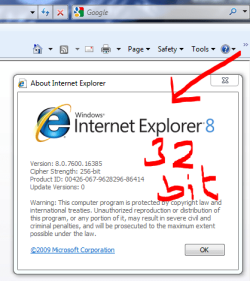
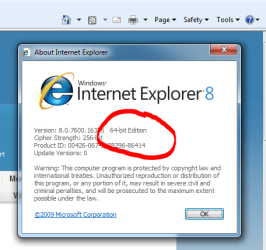
do you not have (in your start menu) two separate shortcuts for internet explorer, one of them expressly saying 64bit? the other one is good old 32bit.

i can't show you a screenshot, as i've deleted my 64bit shortcut.

sorry, when i said flavours, i meant both 32bit and 64bit versions of ie8.

start up ie8 - and click on the question mark at the end of the toolbar, and click about internet explorer
 

Attachments

  • 32.PNG
    32.PNG
    20.9 KB · Views: 3
  • 64.PNG
    64.PNG
    20.5 KB · Views: 2

My Computer

Computer Manufacturer/Model Number
mickey megabyte 1234
OS
ultimate 64 sp1
CPU
i5 2500K [email protected]
Motherboard
MSI P67A-GD53
Memory
8 gigs GSkill Ripjaws 1600
Graphics Card(s)
amd hd6950
Sound Card
creative x-fi gamer
Monitor(s) Displays
samsung 24"
Screen Resolution
1920x1080
Hard Drives
ocz vertex 2e 60 gig, samsung f3 1tb, buffalo 2tb ext
PSU
antec 550
Case
antec three hundred
Cooling
i'm a cooling fan
Keyboard
saitek eclipse ii
Mouse
logitech g3
Internet Speed
about 4 Mbps
Other Info
i love win7
The 64-bit applications available
You should tell your company's IT department to take their heads out of their asses and get with the game. Most reasons and benefits for going to an x64 OS, along with apps to take advantage of the x64 platform are NOT gaming related.

But, here's what I'm confused about. If this is a company system, running company software, why are you buying the system, and why isn't it running a company provided OS/image?
 

My Computer

OS
Windows 7 Ultimate x64 SP1
CPU
Intel Core i7-2600
Motherboard
Gigabyte GA-P67A-UD3P-B3
Memory
12 GB Patriot Extreme DDR3-1333
Graphics Card(s)
Nvidia GTX 470
Monitor(s) Displays
Dell UltraSharp 2209WA
Hard Drives
OCZ Agility3 240 GB, WD5001AALS, WD7501AALS
PSU
OCZ ModStream 700W
Case
CoolerMaster HAF 912 Advanced
Cooling
CoolerMaster Hyper 212 Plus
OEM
I am working with a program "parallel", just haven't perfected it yet.

MM
I did not see that, yes I do have both listed, I will check it out when I get home this eveniing.
 

My Computer

OS
Windows 7 Home Premium


Can I run 32-bit programs on a 64-bit computer?

Most programs designed for the 32-bit version of Windows will work on the 64-bit version of Windows. Notable exceptions are many antivirus programs.
Device drivers designed for 32-bit versions of Windows won't work on computers running a 64-bit version of Windows. If you're trying to install a printer or other device that only has 32-bit drivers available, it won't work correctly on a 64-bit version of Windows. If you are unsure whether there is a 64-bit driver available for your device, go online to the Windows Vista Compatibility Center

Source: 32-bit and 64-bit Windows: frequently asked questions
-----

But I'm sure I've seen/heard of people force the install of a 32-bit driver on a 64-bit system. Sorry I just can't find it, which might be just what MS and other Software & Hardware manufactures want, this way they force you into updating your software & Hardware. Having said that, I know there are programs out there that haven't been updated to run on 64-bit systems, so what is one to do ???

Good Luck, And if all else fails, if you just bought this PC from Gateway I strongly recommend calling them and inform them that you were unaware of the differences and what they can they do for you. Let them know politely if they wish to keep you as a customer, that you really would need them to resolve this for you.
 

My Computer

Computer Manufacturer/Model Number
POS
OS
OS3.5
CPU
celery
Motherboard
Good Question ...Unknown
Memory
memory never forgets
Graphics Card(s)
OB
Sound Card
OB
Monitor(s) Displays
HUGE
Screen Resolution
168000000x105000000
Hard Drives
full
PSU
OEM 65watt
Case
N/A
Cooling
OB
Keyboard
OB
Mouse
mouse
Internet Speed
1 Trillion MBps
Other Info
Still An Awesome Forum!
Thanks OEM. My son is a student and I see as a student he can get a Windows 7 Pro upgrade for $29. I think I will do this an re-install using the 32bit install.

Hopefully this will work.
 

My Computer

OS
Windows 7 Home Premium
Thanks OEM. My son is a student and I see as a student he can get a Windows 7 Pro upgrade for $29. I think I will do this an re-install using the 32bit install.
Why pay for another license? You already have a license for Windows 7 x86, you just need the install media.
 

My Computer

OS
Windows 7 Ultimate x64 SP1
CPU
Intel Core i7-2600
Motherboard
Gigabyte GA-P67A-UD3P-B3
Memory
12 GB Patriot Extreme DDR3-1333
Graphics Card(s)
Nvidia GTX 470
Monitor(s) Displays
Dell UltraSharp 2209WA
Hard Drives
OCZ Agility3 240 GB, WD5001AALS, WD7501AALS
PSU
OCZ ModStream 700W
Case
CoolerMaster HAF 912 Advanced
Cooling
CoolerMaster Hyper 212 Plus
Thanks OEM. My son is a student and I see as a student he can get a Windows 7 Pro upgrade for $29. I think I will do this an re-install using the 32bit install.
Why pay for another license? You already have a license for Windows 7 x86, you just need the install media.

The desktop did not come with a CD/DVD with the OS. I did the backup download that is allowed with the license, do you think with this I could reinstall, this time, using the 32 Bit option?

Thanks!!
 

My Computer

OS
Windows 7 Home Premium
Thanks OEM. My son is a student and I see as a student he can get a Windows 7 Pro upgrade for $29. I think I will do this an re-install using the 32bit install.
Why pay for another license? You already have a license for Windows 7 x86, you just need the install media.

The desktop did not come with a CD/DVD with the OS. I did the backup download that is allowed with the license, do you think with this I could reinstall, this time, using the 32 Bit option?

Thanks!!

That is definitely a possibility, try it out, I'm pretty sure if it doesn't offer the 32-bit option that you can abort the re-install so you don't loose whats installed now.

Try it and if it does offer 32 bit, back out of it and backup all your data, favs, doc, etc, and then re-install.

Edit/Added:

I bought a retail copy of Ultimate Upgrade and it came with both flavors, so it might also be offered both 32&64 during the built in system recovery.

Have you searched Gateway support regarding recovery and the options that it may offer?
 

My Computer

Computer Manufacturer/Model Number
POS
OS
OS3.5
CPU
celery
Motherboard
Good Question ...Unknown
Memory
memory never forgets
Graphics Card(s)
OB
Sound Card
OB
Monitor(s) Displays
HUGE
Screen Resolution
168000000x105000000
Hard Drives
full
PSU
OEM 65watt
Case
N/A
Cooling
OB
Keyboard
OB
Mouse
mouse
Internet Speed
1 Trillion MBps
Other Info
Still An Awesome Forum!
Why pay for another license? You already have a license for Windows 7 x86, you just need the install media.

The desktop did not come with a CD/DVD with the OS. I did the backup download that is allowed with the license, do you think with this I could reinstall, this time, using the 32 Bit option?

Thanks!!

That is definitely a possibility, try it out, I'm pretty sure if it doesn't offer the 32-bit option that you can abort the re-install so you don't loose whats installed now.

Try it and if it does offer 32 bit, back out of it and backup all your data, favs, doc, etc, and then re-install.

Hey, it's worth a shot. I'll try that this evening when I get home.
 

My Computer

OS
Windows 7 Home Premium
it's quite a process to go through, without knowing that you've got a problem in the first place.

it's your machine after all, do what thou wilt :)
 

My Computer

Computer Manufacturer/Model Number
mickey megabyte 1234
OS
ultimate 64 sp1
CPU
i5 2500K [email protected]
Motherboard
MSI P67A-GD53
Memory
8 gigs GSkill Ripjaws 1600
Graphics Card(s)
amd hd6950
Sound Card
creative x-fi gamer
Monitor(s) Displays
samsung 24"
Screen Resolution
1920x1080
Hard Drives
ocz vertex 2e 60 gig, samsung f3 1tb, buffalo 2tb ext
PSU
antec 550
Case
antec three hundred
Cooling
i'm a cooling fan
Keyboard
saitek eclipse ii
Mouse
logitech g3
Internet Speed
about 4 Mbps
Other Info
i love win7
You didn't specify your system model, but doing a Gateway PC support search, it appears you most likely have the option as most PC's do, to create system recovery discs. I would imagine that during the creation of the recovery disc if it will offer the option to install either 32 or 64, it will happen during this DVD recovery disc creation. You can try that first, rather than doing the automated recovery directly from the HD.
 

My Computer

Computer Manufacturer/Model Number
POS
OS
OS3.5
CPU
celery
Motherboard
Good Question ...Unknown
Memory
memory never forgets
Graphics Card(s)
OB
Sound Card
OB
Monitor(s) Displays
HUGE
Screen Resolution
168000000x105000000
Hard Drives
full
PSU
OEM 65watt
Case
N/A
Cooling
OB
Keyboard
OB
Mouse
mouse
Internet Speed
1 Trillion MBps
Other Info
Still An Awesome Forum!
You didn't specify your system model, but doing a Gateway PC support search, it appears you most likely have the option as most PC's do, to create system recovery discs. I would imagine that during the creation of the recovery disc if it will offer the option to install either 32 or 64, it will happen during this DVD recovery disc creation. You can try that first, rather than doing the automated recovery directly from the HD.

You are correct; what I have are the system recovery DVD's and I am hoping on it will give me that option.

I called our IT dept and they told me most all of our software is compatible with the 32 bit version and the ones that are not, they have a workaround.

I will try this tonight and report back what happens.
 

My Computer

OS
Windows 7 Home Premium
Back
Top