
Hello,
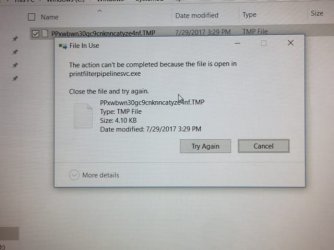
I'm working on a computer on which, after printing a single job, 3 files are usually remain in the C:\Windows\System32\Spool\Printers folder. 2 can be deleted without issue. The 3rd, a .tmp file throws an error when I try to delete it. (see attachment)
Only way I've found to delete the file is to stop the print spooler, delete the file, re-start the spooler. Soon as another print job is sent, problem recurs. I've found information that this .exe is for spooling of .xml files. Haven't found much about others having this problem. There's a little info that malware disguises itself as printfilterpipelinesvc.exe, but I can't find anything real substantial. I would appreciate information helping solve this problem. Thanks!
I'm working on a computer on which, after printing a single job, 3 files are usually remain in the C:\Windows\System32\Spool\Printers folder. 2 can be deleted without issue. The 3rd, a .tmp file throws an error when I try to delete it. (see attachment)
Only way I've found to delete the file is to stop the print spooler, delete the file, re-start the spooler. Soon as another print job is sent, problem recurs. I've found information that this .exe is for spooling of .xml files. Haven't found much about others having this problem. There's a little info that malware disguises itself as printfilterpipelinesvc.exe, but I can't find anything real substantial. I would appreciate information helping solve this problem. Thanks!
Attachments
My Computer
At a glance
Windows 10 64-bit??12GB?
- Computer type
- Laptop
- Computer Manufacturer/Model Number
- HP Envy
- OS
- Windows 10 64-bit
- CPU
- ??
- Motherboard
- ??
- Memory
- 12GB
- Graphics Card(s)
- ?
- Hard Drives
- SSD
- Antivirus
- MS
