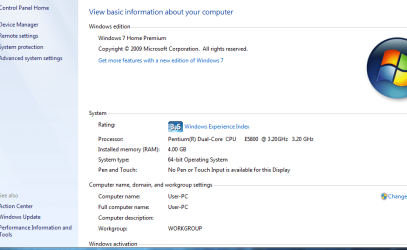
64bit to 32 bit?

GradeAbra

New member
Member
VIP
Local time
10:52 PM
Messages
223
Well i notice that my system is on 64-bit operating system. Howcome my flashplayer, Java and mail is on 32-bit? Is this normal?
 

Attachments

  • Capture2.PNG
    Capture2.PNG
    27.4 KB · Views: 15
  • Capture3.PNG
    Capture3.PNG
    26.7 KB · Views: 20

My Computer

Computer Manufacturer/Model Number
Acer eMachines EL1850
OS
Windows 7 Home Premium 64bit
CPU
Pentium(R) Dual-Core CPU E5800 @ 3.20GHz
Motherboard
eMachines EL1850
Memory
4.00 GB
Graphics Card(s)
Intel(R) G41 Express Chipset
Sound Card
Realtek High Definition Audio
Monitor(s) Displays
Intel(R) G41 Express Chipset
Screen Resolution
1600 x 900 x 32 bits (4294967296 colors) @ 59 Hz
Hard Drives
(1) Hitachi HDS721032CLA362 ATA Device (2) Generic- Compact Flash USB Device (3) Multiple Flash Reader USB Device
From what I have noticed it is normal. Some programs you install run as 32-bit, and not 64-bit.

Please correct me if I am wrong.

-Gamer
 

My Computer

Computer type
PC/Desktop
Computer Manufacturer/Model Number
Custom
OS
Windows 8.1 Pro x64
CPU
Intel Core i5-4570 CPU @ 3.20GHz
Motherboard
Gigabyte Z87-D3HP-CF
Memory
8GB DDR3-1596 - Dual Channel
Graphics Card(s)
NVIDIA GeForce GTX 750 Ti SC
Sound Card
Onboard
Monitor(s) Displays
Samsung
Screen Resolution
1920x1080
Hard Drives
SSD - 120GB
Second - 1TB
Antivirus
MSE
Browser
Chrome
Windows in general is exactly the same in 32bit and 64bit,major difference in the both is that 64bit can handle more then 3.5gbs of ram and supports applications built for 64bit.The reason java and flash player are 32bit is so that it can be compatible with 32bit applications,most browsers that surf the net are 32bit based and since 64bit is backwards compatible and works with 32bit apps then you should have no problems running apps that are 32 bit and 64 bit since windows x64 is backwards compatible. Thus that's why java and flash player are installed as 32bit.If you want 64bit java installed along side 32bit java then visit this blue link Java Downloads for All Operating Systems
As for flash player,64bit is not so much needed but can be downloaded from here which is for Internet explorers 64 bit browser,the default IE browser is 32 bit which is the E on the desktop put by default but you can run the 64bit one by clicking your windows start button and typing internet explorer 64 and it should pop up and either click on it or press enter or drag it to the desktop if you would like to have that out if that's what your planing to use and simply start it up.
Sot to sum it up,yes that's normal for windows to have those two in 32bit.
Download Flash Player 11.3.300.257 (IE) 64-bit - FileHippo.com
 

My Computer

Computer type
PC/Desktop
Computer Manufacturer/Model Number
custom build
OS
Windows 10 64bit
CPU
AMD Phenom II X4 925 (Deneb)(2.8GHz) OC 3.4GHz
Motherboard
M5A78L-MLX Plus
Memory
Corsair Vengeance DDR3 4GBX2 (8192MB)
Graphics Card(s)
XFX HD 6870 1GB (OC)- 940MHz core, mem 1150MHz
Monitor(s) Displays
Vizio 26' 1920x1080 / Acer 1336x768
Screen Resolution
1920x1080 60Hz /1336x768
Hard Drives
Kingston Digital 60GB SSDNow V300/500gb HDD Western Digital 7200rpm (/WD 160GB HDD 7200rpm
PSU
CORSAIR CX600 600w
Case
AZZA Orion 202 EVO
Cooling
cooler master hyper TX3 cpu cooler
Keyboard
Razer DeathStalker
Mouse
Logitech Optical Gaming Mouse G400
Antivirus
Defualt on win 10
Browser
Firefox
Other Info
cpu is overclocked in bios
Windows in general is exactly the same in 32bit and 64bit,major difference in the both is that 64bit can handle more then 3.5gbs of ram and supports applications built for 64bit.The reason java and flash player are 32bit is so that it can be compatible with 32bit applications,most browsers that surf the net are 32bit based and since 64bit is backwards compatible and works with 32bit apps then you should have no problems running apps that are 32 bit and 64 bit since windows x64 is backwards compatible. Thus that's why java and flash player are installed as 32bit.If you want 64bit java installed along side 32bit java then visit this blue link Java Downloads for All Operating Systems
As for flash player,64bit is not so much needed but can be downloaded from here which is for Internet explorers 64 bit browser,the default IE browser is 32 bit which is the E on the desktop put by default but you can run the 64bit one by clicking your windows start button and typing internet explorer 64 and it should pop up and either click on it or press enter or drag it to the desktop if you would like to have that out if that's what your planing to use and simply start it up. Download Flash Player 11.3.300.257 (IE) 64-bit - FileHippo.com


So is everything ok and normal for my case?

Thanks for the help guys.
 

My Computer

Computer Manufacturer/Model Number
Acer eMachines EL1850
OS
Windows 7 Home Premium 64bit
CPU
Pentium(R) Dual-Core CPU E5800 @ 3.20GHz
Motherboard
eMachines EL1850
Memory
4.00 GB
Graphics Card(s)
Intel(R) G41 Express Chipset
Sound Card
Realtek High Definition Audio
Monitor(s) Displays
Intel(R) G41 Express Chipset
Screen Resolution
1600 x 900 x 32 bits (4294967296 colors) @ 59 Hz
Hard Drives
(1) Hitachi HDS721032CLA362 ATA Device (2) Generic- Compact Flash USB Device (3) Multiple Flash Reader USB Device
Yeah it's all okay. Doesn't hurt your computer at all.

-Gamer
 

My Computer

Computer type
PC/Desktop
Computer Manufacturer/Model Number
Custom
OS
Windows 8.1 Pro x64
CPU
Intel Core i5-4570 CPU @ 3.20GHz
Motherboard
Gigabyte Z87-D3HP-CF
Memory
8GB DDR3-1596 - Dual Channel
Graphics Card(s)
NVIDIA GeForce GTX 750 Ti SC
Sound Card
Onboard
Monitor(s) Displays
Samsung
Screen Resolution
1920x1080
Hard Drives
SSD - 120GB
Second - 1TB
Antivirus
MSE
Browser
Chrome
Windows in general is exactly the same in 32bit and 64bit,major difference in the both is that 64bit can handle more then 3.5gbs of ram and supports applications built for 64bit.The reason java and flash player are 32bit is so that it can be compatible with 32bit applications,most browsers that surf the net are 32bit based and since 64bit is backwards compatible and works with 32bit apps then you should have no problems running apps that are 32 bit and 64 bit since windows x64 is backwards compatible. Thus that's why java and flash player are installed as 32bit.If you want 64bit java installed along side 32bit java then visit this blue link Java Downloads for All Operating Systems
As for flash player,64bit is not so much needed but can be downloaded from here which is for Internet explorers 64 bit browser,the default IE browser is 32 bit which is the E on the desktop put by default but you can run the 64bit one by clicking your windows start button and typing internet explorer 64 and it should pop up and either click on it or press enter or drag it to the desktop if you would like to have that out if that's what your planing to use and simply start it up. Download Flash Player 11.3.300.257 (IE) 64-bit - FileHippo.com
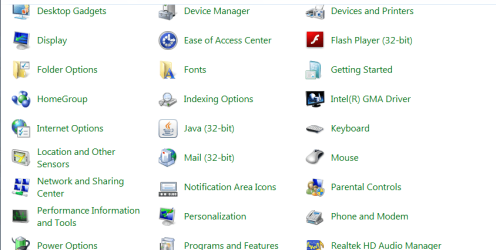

So is everything ok and normal for my case?

Thanks for the help guys.
Yes everthing is fine :cool:
 

My Computer

Computer type
PC/Desktop
Computer Manufacturer/Model Number
custom build
OS
Windows 10 64bit
CPU
AMD Phenom II X4 925 (Deneb)(2.8GHz) OC 3.4GHz
Motherboard
M5A78L-MLX Plus
Memory
Corsair Vengeance DDR3 4GBX2 (8192MB)
Graphics Card(s)
XFX HD 6870 1GB (OC)- 940MHz core, mem 1150MHz
Monitor(s) Displays
Vizio 26' 1920x1080 / Acer 1336x768
Screen Resolution
1920x1080 60Hz /1336x768
Hard Drives
Kingston Digital 60GB SSDNow V300/500gb HDD Western Digital 7200rpm (/WD 160GB HDD 7200rpm
PSU
CORSAIR CX600 600w
Case
AZZA Orion 202 EVO
Cooling
cooler master hyper TX3 cpu cooler
Keyboard
Razer DeathStalker
Mouse
Logitech Optical Gaming Mouse G400
Antivirus
Defualt on win 10
Browser
Firefox
Other Info
cpu is overclocked in bios
Back
Top