7 Automatic boot? (currently xp/7 dual)

TheAnonymity

New member
Local time
1:20 PM
Messages
79
Hey guys. I currently have XP and 7 dual booted, but I want 7 to boot automatically when my computer starts up. On the other hand, I don't want to delete my Windows XP partition yet. XP is on the Active and default C: drive, and 7 is on my secondary partition E:.. Any info/advice would be appreciated. Thanks..

~TA
 

My Computer

Computer Manufacturer/Model Number
Dell Inspiron 1501
OS
Windows 7 Ultimate x86 7600.16385
CPU
AMD Turion 64 Mobile Technology MK-36 2.00 GHz
Motherboard
Dell UW953
Memory
1.00 GB (894 MB usable)
Graphics Card(s)
ATI Radeon XPRESS 128MB
Sound Card
Dunno
Monitor(s) Displays
15"
Screen Resolution
1280 x 800
Hard Drives
Fujitsu MJA2080BH G2 ATA Device (80 GB, 5400 RPM)
Cooling
Laptop fans ftw.
Keyboard
Laptop Keyboard..
Mouse
Laptop touchpad..
Internet Speed
16.45 Mb/s download, 3.84 Mb/s upload
Other Info
My computer sucks.
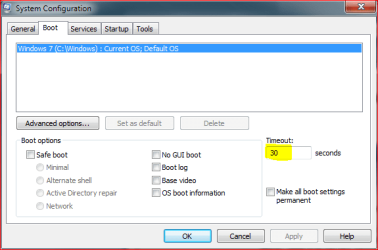
Click start, type msconfig to the search field and press Enter. Open the Boot tab, change boot delay to 0.

In my opinion this is the fastest and easiest way to do what you want, at the same time preserving the possibility to reactivate the boot menu when wanted or needed.

Kari

boot_delay.PNG
 

My Computer

Computer type
Laptop
Computer Manufacturer/Model Number
HP ENVY 17-1150eg
OS
Windows 10 Pro x64 EN-GB
CPU
1.6 GHz Intel Core i7-720QM Processor
Memory
6 GB
Graphics Card(s)
ATI Mobility Radeon HD 5850 Graphics
Sound Card
Beats sound system with integrated subwoofer
Monitor(s) Displays
17" laptop display, 22" LED and 32" Full HD TV through HDMI
Screen Resolution
1600*900 (1), 1920*1080 (2&3)
Hard Drives
Internal: 2 x 500 GB SATA Hard Disk Drive 7200 rpm
External: 2TB for backups, 3TB USB3 network drive for media
Cooling
As Envy runs a bit warm, I have it on a Cooler Master pad
Keyboard
Logitech diNovo Media Desktop Laser (bluetooth)
Mouse
Logitech Performance Mouse MX
Internet Speed
50/10 Mbps VDSL
Antivirus
Windows Defender 4.3.9431.0
Browser
Maxthon 3.5.2., IE11
It says I must enter a value between 3 and 999.
 

My Computer

Computer Manufacturer/Model Number
Dell Inspiron 1501
OS
Windows 7 Ultimate x86 7600.16385
CPU
AMD Turion 64 Mobile Technology MK-36 2.00 GHz
Motherboard
Dell UW953
Memory
1.00 GB (894 MB usable)
Graphics Card(s)
ATI Radeon XPRESS 128MB
Sound Card
Dunno
Monitor(s) Displays
15"
Screen Resolution
1280 x 800
Hard Drives
Fujitsu MJA2080BH G2 ATA Device (80 GB, 5400 RPM)
Cooling
Laptop fans ftw.
Keyboard
Laptop Keyboard..
Mouse
Laptop touchpad..
Internet Speed
16.45 Mb/s download, 3.84 Mb/s upload
Other Info
My computer sucks.
Hey guys. I currently have XP and 7 dual booted, but I want 7 to boot automatically when my computer starts up. On the other hand, I don't want to delete my Windows XP partition yet. XP is on the Active and default C: drive, and 7 is on my secondary partition E:.. Any info/advice would be appreciated. Thanks..

~TA

Kari give you the right info. only is pic does not show... the Win xp.
when you open msconfig --> move to boot -->
look at the links.... if you want Win7 then click 1 time the win 7 link
move down an click "set as default"
I recommend you set the time to 5s.
the very next time you boot you will have 5s to click down to xp or it will boot into Win7.
need to change back to XP reverse the default.
 
It says I must enter a value between 3 and 999.
My bad. Sorry. When you change the value to 3, it means your startup takes only 3 seconds longer than a normal single-boot. Use that.

Kari give you the right info. only is pic does not show... the Win xp.
when you open msconfig --> move to boot -->
look at the links.... if you want Win7 then click 1 time the win 7 link
move down an click "set as default"
I recommend you set the time to 5s.
the very next time you boot you will have 5s to click down to xp or it will boot into Win7.
need to change back to XP reverse the default.
Like always, I forgot something. Thanks for clarifying that default stuff.

Kari
 

My Computer

Computer type
Laptop
Computer Manufacturer/Model Number
HP ENVY 17-1150eg
OS
Windows 10 Pro x64 EN-GB
CPU
1.6 GHz Intel Core i7-720QM Processor
Memory
6 GB
Graphics Card(s)
ATI Mobility Radeon HD 5850 Graphics
Sound Card
Beats sound system with integrated subwoofer
Monitor(s) Displays
17" laptop display, 22" LED and 32" Full HD TV through HDMI
Screen Resolution
1600*900 (1), 1920*1080 (2&3)
Hard Drives
Internal: 2 x 500 GB SATA Hard Disk Drive 7200 rpm
External: 2TB for backups, 3TB USB3 network drive for media
Cooling
As Envy runs a bit warm, I have it on a Cooler Master pad
Keyboard
Logitech diNovo Media Desktop Laser (bluetooth)
Mouse
Logitech Performance Mouse MX
Internet Speed
50/10 Mbps VDSL
Antivirus
Windows Defender 4.3.9431.0
Browser
Maxthon 3.5.2., IE11
TA

You have a boot menu correct?
 

My Computer

Computer Manufacturer/Model Number
HP Pavillion dv-7 1005 Tx
OS
Win 8 Release candidate 8400
CPU
[email protected]
Memory
4 gigs
Graphics Card(s)
Nvidia 9600M
Sound Card
HD built-in
Monitor(s) Displays
17" Wxga
Screen Resolution
1440x900
Cooling
none
Internet Speed
45Mb down 5Mb up
Yes. Previous OS (Windows XP) or Windows 7.
 

My Computer

Computer Manufacturer/Model Number
Dell Inspiron 1501
OS
Windows 7 Ultimate x86 7600.16385
CPU
AMD Turion 64 Mobile Technology MK-36 2.00 GHz
Motherboard
Dell UW953
Memory
1.00 GB (894 MB usable)
Graphics Card(s)
ATI Radeon XPRESS 128MB
Sound Card
Dunno
Monitor(s) Displays
15"
Screen Resolution
1280 x 800
Hard Drives
Fujitsu MJA2080BH G2 ATA Device (80 GB, 5400 RPM)
Cooling
Laptop fans ftw.
Keyboard
Laptop Keyboard..
Mouse
Laptop touchpad..
Internet Speed
16.45 Mb/s download, 3.84 Mb/s upload
Other Info
My computer sucks.
If you want a 0, zero dual boot delay...

I installed Window 7 on a new hard drive and kept my Window XP intact on the older primary HD. I configured the system to a dual boot process, but couldn't find a way to bypass the dual boot screen faster than a 3 second delay. With help of some other soul via the Internet, I followed his suggestion and got the boot delay to 0, zero. The simple process is:

1. With Window 7 running go to START
2. Select Control Panel
3. Select Advanced system settings
4. Select Advanced tab
5. Select Startup and recovery then Settings
6. Then change "Time to display list of operating systems:" (to zero)
7. And save
 

My Computer

OS
Windows 7 home premium
Back
Top