7, I Hate!

Sp3c5

New member
Local time
10:52 AM
Messages
35
Hey guys,

I just came from XP to 7 Ultimate 64Bit to be able to utilize my 6GB of RAM. As of now, 7 is making me made nuts as there are a few things that drive to the point where I feel like I'm using a Mac because it simply just does not make any sense!

First thing I realized, I can't view GIFs in Photo Viewer no more and instead opens up IE (kind alike a Mac). WTFFFF. I have Chrome installed FFS. I don't want to be launching IE and even less just to view a bloody GIF image. So I right click it, Open With... I use the Search Box to find Chrome and yields no results. So then I try Photo Viewer and it's just a still image. At this point, I'm ready to throw the F*****G thing out the window. Dumbest thing I have ever seen!

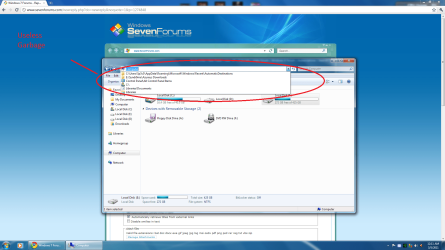
Next in line; when I have Windows Explorer open and I want to navigate to a new destination, I click the drop down menu and... THERE IS NOTHING! Instead I got to open that Navigation Pane which is a total eye sore! Why include a F*****G drop down box and not include any relevant directories? Instead it's a very few list of recently opened, not important folders! What happened to XP style? That was functional!

The weirdest thing by far is the whole "Libraries" thing. What's the damn point? It's so annoying and I see it to be completely useless. Was it made for morons who can't properly find the desired folders so they go and mash em' up in some "virtual" folder? If I want my X and Y folder in the same directory ill just put em' together! What's the problem? You don't want your X and Y folder to be in the same directory? Move em'! It's like a "loop" folder.. I just really don't get it... Your Windows Explorer IS your library! Is the tool you use to organize your folders! So why would I need "Libraries"??

At this very moment, I've never raged so hard about an OS. I feel like Microsoft went to Mac route and screwed up even harder. That damn Windows Explorer icon beside the Start button is like Macs "Finder". Useless Junk icon. I open it up and brings me right to Libraries.. I'm going to throw this machine out onto a busy highway.

Now where did I put my XP CD... Damnit..

/EndRage

/Begin Question

If someone can please help me out with the Drop Down menu in Windows Explorer to show relevant locations it would be greatly appreciated!

And a way to view GIFs "normally".


/Thanks guys!
 

My Computer My Computer

OS
7 Ultimate 64Bit
Whenever a file opens with the wrong program, rightclick on it to Open With the program you want. You may have to browse to it's executable in the Program Files to set it as default.

I'm not sure what drop-down menu you're referring to in Explorer other than the Tools along the top, but the explorer tree at the left is so useful I miss it sorely when in XP or Vista. You can overlook the Libraries until you find a use for them (put any folder in a Library by rightclicking). Just browse into C: to find the folder you want to drop something into, wait until the tree stops expanding to show you all sub-folders to drop the file. This allows you to do everything in one window.

I know it takes some adjustment from XP but in no time you'll get the hang of it. Ask back if you have anything else.
 
Thanks for the fast reply!

I understand the whole process to open a file with a program and make it stick, it's the same as XP. What I want to know is, what the hell are we supposed to use to open GIF images? I don't fell like having 20 million Chrome tabs open just to browse em'. You get what I'm saying?

As for the drop down menu in Windows Explorer... I don't know how I can be more clear.. It's the only one.. it's at the top. And when I click it, there is nothing useful to display, so what's the point? Why can't it display Desktop, My computers, A list of all my HDD and removable storages and so on, just like XP? Instead it's just a browser history.. and messy to! Ye I could use the Navigation Pane but my natural instinct is to go to the Address Bar. I mean after all, it IS an address bar.

/Question

Where is the UpFolder button? And no, don't tell me the back button.

/Thanks!
 

Attachments

  • dropdown.png
    dropdown.png
    161.5 KB · Views: 142

My Computer My Computer

OS
7 Ultimate 64Bit
...The weirdest thing by far is the whole "Libraries" thing. What's the damn point? It's so annoying and I see it to be completely useless. Was it made for morons who can't properly find the desired folders so they go and mash em' up in some "virtual" folder?...
Just one scenario:

Suppose you had a folder for recent pictures you were still editing, another folder for pictures you were sorting and tagging, then another folder for pictures which were exactly like you wanted them: tagged, sorted, and archived by date & subject.

Might be nice to have one central (virtual) location where you could find everything all at once, right?

Multiply that by Videos, Music, Documents, Backups, Programs, etc, and you have a one-stop location for all your data - even stuff you've stashed across multiple drives, networked computers, etc.

Even a moron like myself could see where that might be useful. :geek:

Of course, nothing is making you use them... ;)
 

My Computer My Computer

Computer Manufacturer/Model Number
Self
OS
Main - Windows 7 Pro SP1 64-Bit; 2nd - Windows Server 2008 R2
CPU
Main - Core i7 2600K; 2nd - Core i7 920
Motherboard
Main - Asus P8Z68-V Pro/Gen3; 2nd - Gigabyte GA-EX58-UDR3
Memory
Main - 16GB Corsair Vengeance; 2nd - 12GB Corsair Vengeance
Graphics Card(s)
Main - XFX Radeon 6870 1GB; 2nd - XFX Radeon 4870 1GB
Sound Card
Both: Onboard Realtek Azalia
Monitor(s) Displays
Main - Hann 25" + I-INC 25" + Acer 23"; 2nd - Upgrading Soon
Screen Resolution
Main - 1920x1080 (All Three Monitors); 2nd - Upgrading Soon
Hard Drives
Main - (1) Crucial M4 128GB (Boot)
Main - (1) Seagate 2TB 64MB Cache (Data)
Main - (1) Seagate 2TB 64MB Cache (Data Backup)
2nd - (1) Intel X25-M SSD 80GB (Boot)
2nd - (3) Seagate 1TB 32MB Cache (Data Backup)
2nd - (1) Seagate 320GB (Because)
PSU
Main - OCZ 600W Modular; 2nd - OCZ 600W
Case
Main - Thermaltake Element G; 2nd - NZXT something or other
Cooling
Main - Corsair H80; 2nd - Prolimatech Megahalems
Keyboard
Main - Razer Reclusa; 2nd - Old MS Keyboard
Mouse
Main - Logitech MX Revolution; 2nd - Old MS Mouse
Internet Speed
20Mbps Time-Warner Cable
...The weirdest thing by far is the whole "Libraries" thing. What's the damn point? It's so annoying and I see it to be completely useless. Was it made for morons who can't properly find the desired folders so they go and mash em' up in some "virtual" folder?...
Just one scenario:

Suppose you had a folder for recent pictures you were still editing, another folder for pictures you were sorting and tagging, then another folder for pictures which were exactly like you wanted them: tagged, sorted, and archived by date & subject.

Might be nice to have one central (virtual) location where you could find everything all at once, right?

Multiply that by Videos, Music, Documents, Backups, Programs, etc, and you have a one-stop location for all your data - even stuff you've stashed across multiple drives, networked computers, etc.

Even a moron like myself could see where that might be useful. :geek:

Of course, nothing is making you use them... ;)

It's a valid point I must admit. I just hate how MS tried to make everything evolve around it. It was almost like they were trying to force me to stop using normal navigation through a drive.
 

My Computer My Computer

OS
7 Ultimate 64Bit

My Computer My Computer

Computer Manufacturer/Model Number
Self
OS
Main - Windows 7 Pro SP1 64-Bit; 2nd - Windows Server 2008 R2
CPU
Main - Core i7 2600K; 2nd - Core i7 920
Motherboard
Main - Asus P8Z68-V Pro/Gen3; 2nd - Gigabyte GA-EX58-UDR3
Memory
Main - 16GB Corsair Vengeance; 2nd - 12GB Corsair Vengeance
Graphics Card(s)
Main - XFX Radeon 6870 1GB; 2nd - XFX Radeon 4870 1GB
Sound Card
Both: Onboard Realtek Azalia
Monitor(s) Displays
Main - Hann 25" + I-INC 25" + Acer 23"; 2nd - Upgrading Soon
Screen Resolution
Main - 1920x1080 (All Three Monitors); 2nd - Upgrading Soon
Hard Drives
Main - (1) Crucial M4 128GB (Boot)
Main - (1) Seagate 2TB 64MB Cache (Data)
Main - (1) Seagate 2TB 64MB Cache (Data Backup)
2nd - (1) Intel X25-M SSD 80GB (Boot)
2nd - (3) Seagate 1TB 32MB Cache (Data Backup)
2nd - (1) Seagate 320GB (Because)
PSU
Main - OCZ 600W Modular; 2nd - OCZ 600W
Case
Main - Thermaltake Element G; 2nd - NZXT something or other
Cooling
Main - Corsair H80; 2nd - Prolimatech Megahalems
Keyboard
Main - Razer Reclusa; 2nd - Old MS Keyboard
Mouse
Main - Logitech MX Revolution; 2nd - Old MS Mouse
Internet Speed
20Mbps Time-Warner Cable
Hi,

I'm Win user since DOS. There were ups and downs, but Win7 is the best till now, IMO. However, there are many thing where I agree with Sp3c5: some times I have a feeling MS thinks Win7 users are morons (aka: Win can even be managed by 8-years old kid).
The sad truth is, there are many Win user who have no clue about disk management: they just throw things into.. where shall I?... yes: there's "My Music"! And see: there's also a place for "My Video"! What a great OS! Of course, they have no idea where their files actually are -Win reinstalling comes to mind?
There (above) was mentioned how Libraries can be usefull. Whatever...
For me, after changing few things (one of them being hidding of Libraries), Win7 is pleasant to use.

Just my 2c,
Bogdan
 

My Computer My Computer

Computer type
PC/Desktop
Computer Manufacturer/Model Number
custom build
OS
Windows 7 HomePremium 64bit
CPU
i5-6600
Motherboard
Asus H170-PRO
Memory
16GB
Graphics Card(s)
Radeon RX470 4GB
Monitor(s) Displays
Dell U2415
Screen Resolution
1920x1200
Hard Drives
Samsung SSD-850PRO 256GB
WD Green 1TB
PSU
Corsair CX-600
Case
CoolerMaster Silencio-550
Browser
Firefox
I click the drop down menu and... THERE IS NOTHING!
For your dropdown in explorer:
1. Probably can get it back simply by ticking "Store and display recently opened programs..." in Start menu > Properties
2. Another possiblilty: Internet Options > Content tab > Autocomplete "Settings" button: tick your preferences
3. But if you disabled Internet Explorer like I do, and some of the autocomplete settings are gone, then go to
[HKEY_CURRENT_USER\Software\Microsoft\Windows\CurrentVersion\Explorer\AutoComplete]
Set "AutoSuggest" to yes

Edit: The above is for the recent places dropdown at the right. If you want to see Desktop, Computer, etc use the little dropdown at the left, and while you're at it try the other dropdowns - the Windows 7 address bar is far more versatile than XP and you'll like it when you get used to it, I think.
 
Last edited:

My Computer My Computer

OS
Windows 7
If you don't like the Library system, you can DELETE your Libraries!

Libraries Folder - Add or Remove from Navigation Pane – Delete Library

You can delete the Library itself and/or any folder within a Library.
Here's what Microsoft says (at Windows 7 Libraries: Frequently Asked Questions):

LIBRARY - DELETE - To delete an ENTRY in a Library: Right click on the library and go to Properties. Then highlight the folder(s) in question and click the "Remove" button - that does not delete the folder itself but the entry into the Library. To delete the LIBRARY ITSELF: When the library is empty, you can delete it.
 

My Computer My Computer

Computer Manufacturer/Model Number
HP Pavillion dv5t (generation 1)
OS
Vista 64 bit and 32 bit (SP2)
CPU
Intel(R) Core(TM)2 Duo Processor T9400 (2.53 GHz
Memory
4GB DDR2 System Memory (2 Dimm)
Graphics Card(s)
512 MB NVIDIA GeForce 9600M GT
Monitor(s) Displays
15.4" diagonal WSXGA+ High-Definition HP BrightView Widescre
Screen Resolution
1680 x 1050
Hard Drives
320GB 5400RPM SATA Hard Drive with HP ProtectSmart Hard Drive Protection
Keyboard
Built-in HP
Mouse
Built in - Synaptics TouchPad V6.5 on PS/2 Port
Internet Speed
Max
Other Info
~ Intel Next-Gen Wireless-N Mini-card w/Bluetooth ~ Blu-Ray ROM DVD+/-R/RW ~ Integ. HDTV Hybrid Tuner ~ 12 Cell Battery ~ MS Office (Home Premium) 2007 ~
At this very moment, I've never raged so hard about an OS. I feel like Microsoft went to Mac route and screwed up even harder. That damn Windows Explorer icon beside the Start button is like Macs "Finder". Useless Junk icon. I open it up and brings me right to Libraries.. I'm going to throw this machine out onto a busy highway.

Now where did I put my XP CD... Damnit..

/EndRage

/Begin Question

If someone can please help me out with the Drop Down menu in Windows Explorer to show relevant locations it would be greatly appreciated!

And a way to view GIFs "normally".


/Thanks guys!

Oh dear another XP dinosaur, who can't be bothered to learn.

A kid of 5 would know how to set a default for .gif

Mind you if he has no intention of attempting to learn, its fairly obvious its just a rant without any real sense.

Try the book "Seven for Dummies."
 

My Computer My Computer

Computer Manufacturer/Model Number
Home build.
OS
Vista Ultimate 32 bit, Win 7 Pro 32 bit, Win 7 Pro 64 bit
CPU
Intel i5 CPU 750 @ 2.67 GHZ, OC 3.7 GHZ
Motherboard
Asus P7P55D
Memory
4 Gig
Graphics Card(s)
Nvidia GeForce GTS450
Monitor(s) Displays
Acer 24"
Screen Resolution
1440 x 900
Hard Drives
1000 GIG
1000 GIG
PSU
650
Case
Antec Nine Hundred Two
Internet Speed
14 MB (APPROX)
At this very moment, I've never raged so hard about an OS. I feel like Microsoft went to Mac route and screwed up even harder. That damn Windows Explorer icon beside the Start button is like Macs "Finder". Useless Junk icon. I open it up and brings me right to Libraries.. I'm going to throw this machine out onto a busy highway.

Now where did I put my XP CD... Damnit..

/EndRage

/Begin Question

If someone can please help me out with the Drop Down menu in Windows Explorer to show relevant locations it would be greatly appreciated!

And a way to view GIFs "normally".


/Thanks guys!

Oh dear another XP dinosaur, who can't be bothered to learn.

A kid of 5 would know how to set a default for .gif

Mind you if he has no intention of attempting to learn, its fairly obvious its just a rant without any real sense.

Try the book "Seven for Dummies."

I really believe that this is the starting point of a process that ultimately becomes fodder for another episode of "Stupid User Tricks." I've supported several of these folks who, in an effort to make XP act like 95, of Win7 act like Vista, etc, make their systems so unusable, or unstable that they've become expensive paperweights. I'm sure that this is "preaching to the choir" but, I'll say it again: When you buy something, be it a toaster, a car or even an OS, RTFM (Read The Freakin' Manual!!!!!).
 

My Computer My Computer

Computer type
PC/Desktop
Computer Manufacturer/Model Number
iBuyPower NZXT
OS
Microsoft Windows 10 Home Build 15036
CPU
Intel(R) Core(TM) i7-860 @ 2.80GHz
Motherboard
Gigabyte Technology Co., Ltd. P55-UD3L
Memory
4.00 GB
Graphics Card(s)
NVIDIA GeForce GTX 750
Sound Card
(1) Line 6 UX2 (2) Realtek High Definition Audio
Monitor(s) Displays
23" acer
Screen Resolution
1920 x 1080 x 32 bits (4294967296 colors) @ 60 Hz
Hard Drives
(1) WDC WD5000AAKS-00D2B0 ATA Device (2) Seagate FreeAgent Go 250G USB Device
Cooling
Corsair H75 liquid cooler (Very easy to install, actually)
Internet Speed
60M cable modem-->Linksys E1200-->1Gbps net card
Browser
Chrome
Other Info
This is probably the longest I've ever had a Windows machine run without having to restore it to scratch. I'm used to restoring to "factory" about every 2 yrs. I've run with Win7 since new in 2009 and only recently (Nov, '14) restored to clean up the machine from all my 'xperimenting. LOL!! I may never need another machine.

Upgraded to 10 when it was still free, then installed 2017 update.
I disagree with a lot of your statements. If you got to the Default program settings, you can just set Windows Media Player 12 to open up your .gif images. Trust me, I tried it and the .gif pictures move on Windows Media Player 12 or better yet like what someone else suggested, get a third party program to do that for you. There is a ton of advantage on Windows 7 over XP and I find XP's interface kind of antique when I use it. I suggest you watch tutorials of Windows 7 on Youtube so you get an better picture of how its done. And yes, read manuals, guides and tutorials. There's a lot of them on the Internet which you can read or watch for free. Youtube for example. Discover for yourself before you immediately arrive to such conclusions and rants.
 

My Computer My Computer

Computer Manufacturer/Model Number
Custom Built
OS
Windows 7 Ultimate 32 Bit, Windows Developer Preview, Linux Mint 9 Gnome 32 Bit
CPU
Intel Pentium Dual CPU E2180@2GHz
Motherboard
Elitegroup 671T-M3
Graphics Card(s)
NVIDIA GeForce 7200 GS
Monitor(s) Displays
AOC TFT1560 15" LCD Monitor
Screen Resolution
1024x768
Keyboard
Logitech USB Keyboard
I bet someone (not saying who) will have a BSOD RSN. :sarc:
 

My Computer My Computer

Computer type
Laptop
Computer Manufacturer/Model Number
Toshiba Laptop Qosimo X870
OS
Windows 7 Pro x64 SP1
CPU
Intel Core I7
Motherboard
Toshiba Qosmio
Memory
16 Gigs
Graphics Card(s)
NVIDIA GeForce GTX 670M
Monitor(s) Displays
17.7" laptop
Screen Resolution
1600 x 900
Hard Drives
256 Gig SanDisk SSD for C
256 Gig Intel SSD for D
Internet Speed
50/25 FIOS
Antivirus
Vipre (all you can eat for 10 machines)
Browser
IE and FF
Other Info
I have dos 6.22, wfwg 3.11, win98, 2000 and xp VHD's available for testing. MS's Virtual PC works great.
I have Explorer set to open at my User folder - when it opens everything is there.
 

My Computer My Computer

Computer Manufacturer/Model Number
Acer 7738G
OS
Windows 7 Home Premium X64 SP1
CPU
Intel Core2 duo T6600
Memory
4gb
Graphics Card(s)
Nvidia GeForce GT 1gb
Hard Drives
2 X 500 gb
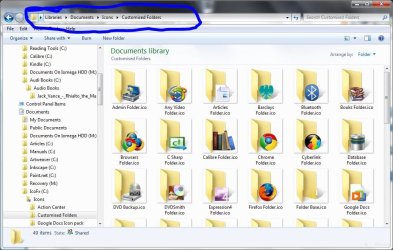
As you point out there is no up arrow but at the top there is an area where you can click to navigate to anywhere in the current path by clicking the sections or dropdown buttons. Much more flexible than the up arrow.

Capture.jpg
 

My Computer My Computer

Computer type
Laptop
Computer Manufacturer/Model Number
Hewlett-Packard/G62-107SA Notebook
OS
Microsoft Windows 7 Home Premium 64-bit Service Pack 1
CPU
Intel(R) Core(TM) i3 CPU M 330 @ 2.13GHz
Motherboard
Hewlett-Packard 1425
Memory
8 GB DDR3
Graphics Card(s)
Intel(R) HD Graphics
Sound Card
Realtek High Definition Audio
Monitor(s) Displays
Builtin
Screen Resolution
1366 x 768 x 32 bits (4294967296 colors) @ 60 Hz
Hard Drives
250 GB SATA Hard Disk Drive 7200 rpm
2TB Seagate GoFlex USB 2 Drive
1TB Iomega Prestige USB 2 Drive
1.5TB Iomega Prestige USB 2 Drive (Samsung)
2TB WD MyBook Live NAS.
Mouse
Logitech Anywhere MX
Internet Speed
152 Mbs download 10 Mbs upload
Antivirus
Norton 360
Browser
Chrome
I'm just blown away at how few complaints for W7 there are. I'm sorry the thread starter isn't happy but we all know that W7 represents a huge step forward and for this I can't wait for 8. That being said I too enjoyed XP in it's day but after acquainting myself with W7 it's a no brainier....Go forward, move ahead, try to detect it, it's not too late.....to whip it, whip it good !
 
Last edited:

My Computer My Computer

Computer type
PC/Desktop
Computer Manufacturer/Model Number
A blend of brains, brawn and dumb luck.
OS
Windows 7 Ultimate 64
CPU
i7 3770k OC'd 4.6 @ 1.17v, also FX 8120 & i5 miniITX
Motherboard
MSI P67A-GD80 b3
Memory
32 gb G.Skill Sniper DDR3 10-12-12-31 @ 2133
Graphics Card(s)
XFX Radeon 7870 2GB DDR5
Sound Card
Sound Blaster Z Series Card
Monitor(s) Displays
(2) LG LED 23" 1920 x 1080 2ms Monitors via mini d-port
Screen Resolution
1680 X 1050 p
Hard Drives
Samsung 256 gb 830 SSD sata III
(1) 1 tb WD Black
(2) 1 tb Hitachi deskmates/sata II
(2) 1 tb WD green/sata II
(2) 3 tb Seagate Barracuda
(1) 120 gb OCZ Vertex SS
(1) Drobo 5N w/5 Seagate 3tb
PSU
EVGA modular 1000G2 80% gold rating & APC 1200 RS
Case
CoolerMaster Storm Styker
Cooling
7 case fans 140mm & 120mm, NZXT Kraken X60
Keyboard
(2) Logitech Illuminated Keyboards (1) usb (1) wireless
Mouse
Logitech G700 & T-BC21 - nano nx for the laptop
Internet Speed
Basic 120mbps down
Antivirus
Trend Micro Titanium Max Security & Malwarebytes Premium
Browser
Chrome and IE 10
Other Info
5 Noctua case fans + 3 Noctua in p/p on NZXT cooler
Integrated hot swap drive bays for 2.5" Drives
(2) Lite-on dvd/cd/Blu Ray optical 22X
Integrated fan controller and led on/off
HP Officejet Pro 8630 all-n-one
Hot-swappable 3.5" hard drive bay
Netgear Nighthawk router
Asus USB 3 & sata 6 PCIe card
Vantec IDE to sata adptr./Ultra sata adptr
Lenovo L420 i5 lappy with m sata
Drobo 5N advanced NAS
I can't view GIFs in Photo Viewer no more and instead opens up IE (kind alike a Mac).

Just open properties of any gif image by right clicking on it. Under properties, click Change. In ‘Open with’ window, open Other Programs and select Windows Photo Viewer as default program to open with. Now click Ok and again Ok.
 

My Computer My Computer

Computer Manufacturer/Model Number
COMPAQ Presario Laptop
OS
Windows 7 Ultimate 64 bit, Mac OS X 10.6
CPU
Intel Pentium Dual Core @2.0GHz
Motherboard
Compaq Generic
Memory
12GB
Graphics Card(s)
NVIDIA Graphics For Mobile 512MB VRAM
Sound Card
IDT High definition Audio
Monitor(s) Displays
Laptop LCD Display
Screen Resolution
1280*800 Bright View Widescreen
Hard Drives
500 GB Primary Master@7200rpm + 1 TB External HDD
Cooling
Direct ; generic fan
Keyboard
Generic Laptop Keyboard
Mouse
Touch Pad
Internet Speed
3.1 Mbps wireless Broadband
Other Info
Generic Dock
I disagree with a lot of your statements. If you got to the Default program settings, you can just set Windows Media Player 12 to open up your .gif images. Trust me, I tried it and the .gif pictures move on Windows Media Player 12 or better yet like what someone else suggested, get a third party program to do that for you. There is a ton of advantage on Windows 7 over XP and I find XP's interface kind of antique when I use it. I suggest you watch tutorials of Windows 7 on Youtube so you get an better picture of how its done. And yes, read manuals, guides and tutorials. There's a lot of them on the Internet which you can read or watch for free. Youtube for example. Discover for yourself before you immediately arrive to such conclusions and rants.

GIF pictures play at light speed. Useless

As you point out there is no up arrow but at the top there is an area where you can click to navigate to anywhere in the current path by clicking the sections or dropdown buttons. Much more flexible than the up arrow.

Yes, I found that out later. Takes some getting use to but your are right, it is neat. +1

Just open properties of any gif image by right clicking on it. Under properties, click Change. In ‘Open with’ window, open Other Programs and select Windows Photo Viewer as default program to open with. Now click Ok and again Ok.

If you were to actually read my post, you would realize I did do Open With. Hell it's just like XP. What is frustrating is that there is no actual program supplied by Windows 7 to view em'. WMP goes to fast AND you can't click NEXT to go to the next one. Opening up Chrome every time to view a GIF image is annoying because you up with a million tabs, a full screened window and the GIF image displayed at the top left corner (it seems "far" away when you are on a 26" monitor instead of it being nicely centered) AND you can't browse to the next GIF with a NEXT button. Anyways, I find the Windows XP style Photo Viewer. Works good. Done deal.


I'm just blown away at how few complaints for W7 there are. I'm sorry the thread starter isn't happy but we all know that W7 represents a huge step forward and for this I can't wait for 8. That being said I too enjoyed XP in it's day but after acquainting myself with W7 it's a no brainier....Go forward, move ahead, try to detect it, it's not too late.....to whip it, whip it good !

Then tell me this. You think when Toyota releases next years line of cars they are gonna inversed the Brake and Gas pedal and mount the steering wheel to the ceiling? No. Because it worked just fine in the first placed. Newer cars have better engines (Kernels), better brakes and air bag system (Security Measures), sleeker design (Windows 7 new design is hella tight). They don't make new cars to reinvent the standard on how to drive em. That is how I kind of see thing. If it was working just fine in the first place, why change it? The Photo Viewer, honestly, is what boggles me the most. The rest, I can learn to deal with no problem. Just needs time.
 

My Computer My Computer

OS
7 Ultimate 64Bit
Back
Top