nellofalltrades
New member
I've been trying to allow various programs access to my other HDDs/Partitions and every time I change the settings and click OK windows immediately forgets the changes.
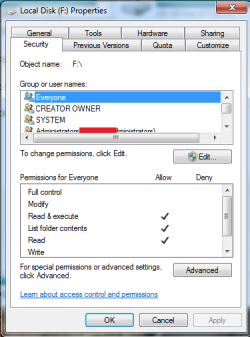
I've tried r-clicking a HDD -> Properties -> Security and changing from "Everyone" to "Administrators(**-PC\Administrators)". When I do this all the little check boxes below switch to Allow like they should. Apply never becomes lit so I can only click OK or Cancel. I click OK thinking my file permissions are now changed but I still do not have permission. When I repeat the process to make sure windows accepted my changes I see it hasn't and goes back to only having the 3 below checked:
Read & Execute
List folder contents
Read
I've tried this with individual folders on a given HDD too to no avail.
Restarting the computer after making changes does nothing.
Thoughts?
I've tried r-clicking a HDD -> Properties -> Security and changing from "Everyone" to "Administrators(**-PC\Administrators)". When I do this all the little check boxes below switch to Allow like they should. Apply never becomes lit so I can only click OK or Cancel. I click OK thinking my file permissions are now changed but I still do not have permission. When I repeat the process to make sure windows accepted my changes I see it hasn't and goes back to only having the 3 below checked:
Read & Execute
List folder contents
Read
I've tried this with individual folders on a given HDD too to no avail.
Restarting the computer after making changes does nothing.
Thoughts?
My Computer
- OS
- Windows 7 (64 bit)
- CPU
- Intel D 925 3.00 Ghz
- Motherboard
- Abit IB 9
- Memory
- (2) 1 GB Corsair 800
- Graphics Card(s)
- GeForce 9400 GT 512MB DDR2