***7 UL x32 install Freezes at first install step copying files 0%***

Mattpache

New member
Local time
2:31 AM
Messages
17
Hi, I am in serious need of help. I've been stuck on this forever. I have never had this difficult of a time on anything I've ever done with computers and windows. Please help... So I purchased a sony vaio p series laptop. Model VGN-P788K/W it came with 64gb SSD I Upgraded to an intel 160gb ssd. I installed the new drive computer starts etc. when I go to install the windows 7 Ultimate.
I get to the very first step of the actual install process "copying windows files" the three little black dots will make 2 passes then it freezes completely still at 0%. No cursor control keyboard control it just stops. I've let it go for 4 hours no change. I'm using a bootable usb I made and to be sure I tried it on my desktop both x32( the one I need) and x64 both work flawlessly like it should. I'm at a complete loss here I can not think of a damn thing as to why it's doing this. I've been completely stuck so I was praying someone on here could help me out. Seriously any help would be greatly appreciated. Thank you so much for your time. I look forward to hearing from someone soon. Thanks again
All the best,
Matt
 

My Computer My Computer

At a glance

Windows 7 Ultimate x322gb
Computer type
Laptop
Computer Manufacturer/Model Number
Sony Vaio P series VGN-P788K/W
OS
Windows 7 Ultimate x32
Memory
2gb
Hard Drives
160gb SSD
Hi thanks for the reply. I took a look at all 28 steps for both the software and hardware troubleshooting steps. I am still in the same position. Is there anyway it's the actual drive? The computer ran fine with the OEM 64gb SSD that came with it. I am completely lost
 

My Computer My Computer

At a glance

Windows 7 Ultimate x322gb
Computer type
Laptop
Computer Manufacturer/Model Number
Sony Vaio P series VGN-P788K/W
OS
Windows 7 Ultimate x32
Memory
2gb
Hard Drives
160gb SSD
Is it a UEFI BIOS? If so are you booting the installer as a UEFI device?

Check for a firmware update for the SSD, then if necessary run its drive diagnostics. If new it is under Tech Support for the first year so ask for their help to determine it is sound and if not RMA.

Did you try a new ISO from Clean Reinstall - Factory OEM Windows 7 burned to DVD, then if that fails try it written to bootable flash stick?
 
I couldn't run the cd scan I will try hooking it up to my desktop and go from there. I just put the OEM ssd drive back in booted it up and installed my windows 7 ultimate from the start. I am looking at it as we speak and it is working. Passed the copying windows files and I'm 67% on expanding win files. Even though the new drive is ssd is there a different option I should/could select when I burn the ISO? I'm positive the drive is brand new it was $160. The model number if that helps any is # ssdsa1m160g2gn 1.8" Intel. And thank you gregrocker for your replies I appreciate it. I know I can't be making this easy.
 

My Computer My Computer

At a glance

Windows 7 Ultimate x322gb
Computer type
Laptop
Computer Manufacturer/Model Number
Sony Vaio P series VGN-P788K/W
OS
Windows 7 Ultimate x32
Memory
2gb
Hard Drives
160gb SSD
We're you able to format an Active partition in laptop ?

What are UEFI and AHCI settings in BIOS
 
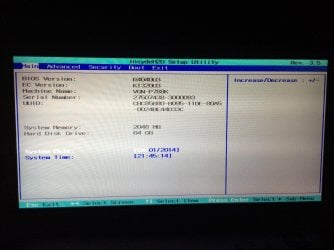
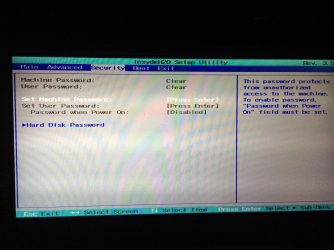
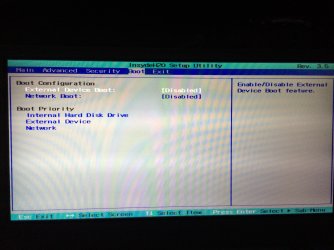
I was able to format a portion. There were three portions on the list 1 was sony recovery(800mb ish) the second was system(190mb ish)and the Third was the main drive (59gb) In my bios I took pics of all the options I am not seeing anything that says UEFI OR AHCI.image.jpg
 

My Computer My Computer

At a glance

Windows 7 Ultimate x322gb
Computer type
Laptop
Computer Manufacturer/Model Number
Sony Vaio P series VGN-P788K/W
OS
Windows 7 Ultimate x32
Memory
2gb
Hard Drives
160gb SSD
Pic 2
 

Attachments

  • image.jpg
    image.jpg
    474.2 KB · Views: 1

My Computer My Computer

At a glance

Windows 7 Ultimate x322gb
Computer type
Laptop
Computer Manufacturer/Model Number
Sony Vaio P series VGN-P788K/W
OS
Windows 7 Ultimate x32
Memory
2gb
Hard Drives
160gb SSD
Pic 3
 

Attachments

  • image.jpg
    image.jpg
    478.7 KB · Views: 1

My Computer My Computer

At a glance

Windows 7 Ultimate x322gb
Computer type
Laptop
Computer Manufacturer/Model Number
Sony Vaio P series VGN-P788K/W
OS
Windows 7 Ultimate x32
Memory
2gb
Hard Drives
160gb SSD
And the advance tab is only a intel graphic accelerator option. Sorry I tried to post them all in one reply but it wasn't letting me.
 

My Computer My Computer

At a glance

Windows 7 Ultimate x322gb
Computer type
Laptop
Computer Manufacturer/Model Number
Sony Vaio P series VGN-P788K/W
OS
Windows 7 Ultimate x32
Memory
2gb
Hard Drives
160gb SSD
Did you format an Active partition in the SSD using the Commands given in Overcoming Windows 7 Installation Failures - Windows 7 Help Forums?

6. At first installer screen Press Shift + F10, or enter System Recovery Options to open a Command Box, type:DISKPART
LIST DISK
SELECT DISK 0 (after confirming Windows 7 target HD #)
CLEAN
CREATE PARTITION PRIMARY ALIGN=1024
FORMAT FS=NTFS LABEL="WINDOWS 7"
ACTIVE
EXIT
EXIT

I added the alignment command as a precaution, though it's not always necessary.
 

My Computer My Computer

At a glance

Windows 10 Pro x64Intel Core i7 6700KGSkill TridentZ RGB 16GB 3600 16-16-16-36EVGA GTX 980 Ti SC x2
Computer type
PC/Desktop
Computer Manufacturer/Model Number
Skylake Special #666
OS
Windows 10 Pro x64
CPU
Intel Core i7 6700K
Motherboard
Asus Sabertooth Z170 Mark 1
Memory
GSkill TridentZ RGB 16GB 3600 16-16-16-36
Graphics Card(s)
EVGA GTX 980 Ti SC x2
Sound Card
Realtek High Definition
Monitor(s) Displays
AOC G2460PG
Screen Resolution
1920 x 1080 144Hz
Hard Drives
Samsung 860 Pro 256GB, Seagate Barracuda 4TB x2
PSU
EVGA 1000 P2, EVGA White Custom Braided Cables
Case
Corsair Vengeance C70 Gunmetal Black
Cooling
Corsair H100i v2, Corsair ML120 x2, Thermal Grizzly Kryonaut
Keyboard
Logitech G910 Orion Spectrum
Mouse
Logitech G700s
Internet Speed
Verizon Fios Quantum Gateway 75/75
Antivirus
Windows Defender, Malwarebytes Free 3.8.3
Browser
Chrome
Other Info
Corsair SP120 x4, LG Blu-ray Drive, Durabrand HT-395 100 Watt Dolby Digital Amp, Corsair H2100 Wireless 7.1 Headset
Yes I did I had the same problem, I did not try to use diskpart to set it up new though. I'm going to put the new hard drive back in and mess around with it some more. It's just going to waste at this point 64gb is 3 days of work. I almost wish I would've just bought the OEM drive from sony but on the other hand I can not see paying $400 for a 160gb drive that's just crazy.
 

My Computer My Computer

At a glance

Windows 7 Ultimate x322gb
Computer type
Laptop
Computer Manufacturer/Model Number
Sony Vaio P series VGN-P788K/W
OS
Windows 7 Ultimate x32
Memory
2gb
Hard Drives
160gb SSD
Excuse me? Why did you say you'd gone through all of the steps when you ignored the most important one? Is there some reason why you couldn't complete the simple steps in Overcoming Windows 7 Installation Failures - Windows 7 Help Forums which resolve 90%+ of all installation problems? Why are you asking for our help if you wont' follow it, then ask for more help? It's really maddening, and wasting both of our time.
 
I followed those steps to the T I created a new Parton and it still wouldn't install. When he posted "try using diskpart to setup a new ssd I was assuming that was a different process than what I had done. Like I said I went through those steps... What in the hell would be the point of me asking for your help if I would just ignore it. I wanted to branch out to finally fix this issue
 

My Computer My Computer

At a glance

Windows 7 Ultimate x322gb
Computer type
Laptop
Computer Manufacturer/Model Number
Sony Vaio P series VGN-P788K/W
OS
Windows 7 Ultimate x32
Memory
2gb
Hard Drives
160gb SSD
It created it saved I went to custom install used the Parton I created and it was the exact same end result. I then went to the hardware troubleshooting absolutely nothing resolved it. That link you sent me was the most help I've gotten and believe me I appreciated it. I am not trying to "madden" you nor am I trying to waste mine or your time
 

My Computer My Computer

At a glance

Windows 7 Ultimate x322gb
Computer type
Laptop
Computer Manufacturer/Model Number
Sony Vaio P series VGN-P788K/W
OS
Windows 7 Ultimate x32
Memory
2gb
Hard Drives
160gb SSD
OK Matt. Can you please go back through the steps to make sure you didn't miss anything, just to be sure?

Normally we hear about questions or failures working through the steps which can help provide clues.

Did you slave the SSD to your other PC, and will Win7 install on it? It will need to be a non-UEFI system. This will tell us a lot, and as a last resort we can help you force the install to boot on the Sony.

It doesn't look like you have a UEFI BIOS. Did you try resetting the BIOS to defaults on the Exit tab, save and Exit?

What are the exact settings offered on the Advanced tab?

Next, go to the Sony Support Downloads webpage for your model PC, look for a BIOS update and compare it to the version shown on the Main tab. Look at the changes offered in the BIOS revision which might relate to SSD's. We can help you find this if you need it, and install it if necessary.
 
Hey listen man I appreciate you taking the time to help me I really do. I'm going to swap the drive with a new one. When I get it back if it still doesn't work then I'll be 100% positive that I'm doing something wrong because according to the link you sent me plus thousands of other people. Installing windows by creating a new oration and doing a clean install that was should defiantly work. So I'll check back probably in 3-4 days depending on shipping. Thanks again and sorry if It came off as me ignoring your suggestions.
All the best,
Matt
 

My Computer My Computer

At a glance

Windows 7 Ultimate x322gb
Computer type
Laptop
Computer Manufacturer/Model Number
Sony Vaio P series VGN-P788K/W
OS
Windows 7 Ultimate x32
Memory
2gb
Hard Drives
160gb SSD
OK Matt, but chances are something in these steps you've been given would have resolved it, as they do for everyone else. What's required here is thoroughness, being engaged with the troubleshooting steps. We won't let down our end, but we can't do it for you.

For example, I just gave you several more steps. No acknowledgement is given of them, no engagement, just surrender. If you're actually doing each of these thing - if you went and checked how dated your BIOS version is, for example - then you would without question eventually get it installed since we have a 100% success rate here with cooperation.
 
I know I'm not expecting anyone to do it for me. I had questions weather or not this drive was actually new seeing the warranty sticker is pealed. While it's still under warranty and there willing to replace it I'm going to go for it. First thing I will do when it gets back is a clean install again following those steps. I will check back in after that. I know I keep saying it but thank you for all the help.
 

My Computer My Computer

At a glance

Windows 7 Ultimate x322gb
Computer type
Laptop
Computer Manufacturer/Model Number
Sony Vaio P series VGN-P788K/W
OS
Windows 7 Ultimate x32
Memory
2gb
Hard Drives
160gb SSD
Back
Top