
7 wakes from sleep

J23

New member
Power User
Local time
11:43 AM
Messages
145
Location
Niagara Falls, New York
Ever since I installed the Beta, then throughout various builds up to the current 64 rc 7100. My Studio xps wakes from sleep? Vista 64 premium did not cause this behavior. I've gone through my advanced sleep options and have them set to let the computer sleep even if streaming is present (not that is is when this happens) ....it is not a virus for the above mentioned reasons. All clean iso installs have produced same behavior. Being as I have no operative help I ask my fellow forum users.
TIA,
J23
 
Last edited:

My Computer

Computer Manufacturer/Model Number
DEll Studio XPS 16 Laptop
OS
Windows 7 Professional 64 bit
CPU
Duo Centrino2 2.4
Motherboard
Intel
Memory
2x2g Of 1067 DDR3
Graphics Card(s)
Ati HD 3670 Radeon 512 mb
Sound Card
IDT 5.1 internal/ Sonar firewire external
Monitor(s) Displays
16" wled & 22" 1080p external
Screen Resolution
Highest for both
Hard Drives
320 Hitachi 7200rpm
Cooling
cpu/Ati card
Keyboard
Backlit touch and external laser Logitech
Mouse
External Laser
Internet Speed
10 D/up1
Other Info
iTouch 32GB, Creative Gigaworks Speakers,Berhinger V-amps Pro, Sonar Power Studio 6.2 660 firewire, 16gb Zune HD,4 gb Zen,FCB1010 Midi Foot Controller,Deans & Ibanez Guitars
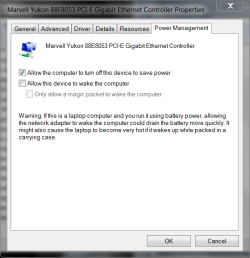
Could be your network card, have a look at your network card driver
in device manager.
 

Attachments

  • power settings.PNG
    power settings.PNG
    22.6 KB · Views: 83

My Computer

Computer type
PC/Desktop
Computer Manufacturer/Model Number
Self Build
OS
MS Windows 7 Professional 64-bit SP1
CPU
AMD FX(tm)-6100 Six-Core Processor Socket AM3+ (942)
Motherboard
ASUSTeK COMPUTER INC. SABERTOOTH 990FX (AM3r2)
Memory
8.00 GB Dual-Channel DDR3 @ 802MHz (11-11-11-36) 1.5Volts
Graphics Card(s)
NVIDIA GeForce GTX 560 Ti
Sound Card
Onboard Realtek HD
Monitor(s) Displays
shimian (1920x1080@60Hz)
Screen Resolution
1920*1080
Hard Drives
OCZ-AGIL ITY3 SATA Disk Device 120GB
PSU
Corsair TX 750
Case
Corsair
Cooling
WaterCooled
Keyboard
Microsoft Wired
Mouse
Logitech USB Optical TiltWheel Mouse
Internet Speed
Realtek PCIe GBE Family Controller 20MB*1MB
Antivirus
Avast
Browser
Firefox
Other Info
150GB Internal Hard Drive for Backing Up Important Files -
Hauppauge Nova-DT Dual DVB-T Tuner Device (+IR) -
USB PC Camera with Mic (SN9C105)
Could be your network card, have a look at your network card driver
in device manager.
Thanks for replying. Both my network cards are checked such as yours is in png. Curious as to your comment about fixing it until itis broke. I love that kind of approach. Any thoughts as to how I would accomplish such a goal?
Regards,
J23
 

My Computer

Computer Manufacturer/Model Number
DEll Studio XPS 16 Laptop
OS
Windows 7 Professional 64 bit
CPU
Duo Centrino2 2.4
Motherboard
Intel
Memory
2x2g Of 1067 DDR3
Graphics Card(s)
Ati HD 3670 Radeon 512 mb
Sound Card
IDT 5.1 internal/ Sonar firewire external
Monitor(s) Displays
16" wled & 22" 1080p external
Screen Resolution
Highest for both
Hard Drives
320 Hitachi 7200rpm
Cooling
cpu/Ati card
Keyboard
Backlit touch and external laser Logitech
Mouse
External Laser
Internet Speed
10 D/up1
Other Info
iTouch 32GB, Creative Gigaworks Speakers,Berhinger V-amps Pro, Sonar Power Studio 6.2 660 firewire, 16gb Zune HD,4 gb Zen,FCB1010 Midi Foot Controller,Deans & Ibanez Guitars
I actually have the same problem, and have since 7022. I have checked my network adapter, and it is not checked to wake up the computer. When I go to bed, I always put my comp to sleep, when I wake up in the morning, it's almost always on again. I have checked all the advanced options as well. Maybe it's just a bug.
 

My Computer

Computer type
PC/Desktop
Computer Manufacturer/Model Number
SuperBeast
OS
Windows 10 Tech Preview 9926 x64
CPU
AMD FX-8350
Motherboard
Gigabyte GA-990FXA-UD3
Memory
16GB DDR3 1333
Graphics Card(s)
Asus R9 290 DirectCU II OC, Gigabyte Windforce R9 290 OC
Sound Card
Integrated w/ Creative A250 2.1 speakers
Monitor(s) Displays
Main: Asus VN289H 28" Secondary: Acer G246HL 24"
Screen Resolution
1920x1080
Hard Drives
128 GB SanDisk Ultra Plus (Windows drive)

240 GB Crucial M500 SSD (Games drive)

1 TB WDC WD10EACS 7200RPM HDD (Data drive)

2 TB Seagate Expansion Desktop external HDD (Backup drive)
PSU
900w Antec HCG-900
Case
Raidmax Agusta Full ATX
Cooling
Corsair H80
Keyboard
Cooler Master Devastator MB24
Mouse
Cooler Master Devastator MS2K 1000/1600/2000 DPI
Internet Speed
100Mbps cable
Antivirus
Avast!
Browser
Chrome
I actually have the same problem, and have since 7022. I have checked my network adapter, and it is not checked to wake up the computer. When I go to bed, I always put my comp to sleep, when I wake up in the morning, it's almost always on again. I have checked all the advanced options as well. Maybe it's just a bug.

Was having same problem, check to see if Windows Media Center is waking computer up to check for new TV programming if so uncheck under Settings/Automatic Download Settings to not allow automatic download of Media Center data between the hours of...

Found the culprit through Administrative Tools/Event Viewer/Applications and Services Logs/Media Center...
 

My Computer

Computer type
PC/Desktop
Computer Manufacturer/Model Number
Custom by Charbroil57
OS
Windows 7 Home Premium x64 (clean install 8/05/2015)
CPU
AMD Phenom II X2 550 Black Edition 3.1GHz
Motherboard
Gigabyte GA-MA790X-UD4P AM3/AM2+/AM2 AMD 790X ATX AMD
Memory
8 GB (4 x 2 GB) Corsair 6400C5 800 MHz
Graphics Card(s)
BFG 512MB GDDR3 9600GT OC
Sound Card
Realtec HD Audio 5.1
Monitor(s) Displays
DVI Viewsonic VA2231
Screen Resolution
1920 x 1080 (1080p)
Hard Drives
1 TB SATA 6G Seagate Barracuda (Boot drive, limited to 3G due to Mobo)
500 GB SATA 3G Seagate Barracuda
500 GB USB Seagate Desktop Drive
PSU
Ultra X4 750w Modular(upgraded)
Case
Antec Sonata
Cooling
Stock (80w CPU)
Keyboard
Microsoft Wireless Desktop Elite
Mouse
Wirless Intellimouse Explorer 2.0
Internet Speed
Xfinity Broadband (Home 75 MB Download)
Antivirus
Norton Internet Security
Browser
Firefox 39 (default) and IE 11
Other Info
SATA HP Lightscribe DVD RW
SATA Samsung Lightscribe DVD RW
One thing id like you to consider, check your windows updates, to see when it installs, mine had this problem, that it would turn itself on at 3am, to install updates, and sometimes never turn off..

Enzo.
 

My Computer

Computer Manufacturer/Model Number
Custom Build
OS
W7 RTM Ultimate x64
CPU
Intel Q8400 @ 2.66GHZ
Motherboard
Gigabyte GA-EG45M-UD2H
Memory
4GB DDR2-800
Graphics Card(s)
Gainward GTS 450 GLH 1GB Edition
Sound Card
Integrated 8 Channel
Monitor(s) Displays
AOC 23.6 Inch Widescreen LCD
Screen Resolution
1920x1080
Hard Drives
Seagate 500GB Internal
Western Digital 1TB Internal

Hitachi 1TB External
PSU
Apevia Java Power 500W
Case
Cooler Master HAF 922 Black
Cooling
Stock Intel CPU Fan
Keyboard
HP SK-2960 Multimedia Keyboard
Mouse
Logitech M350 Wireless Gaming Mouse
Internet Speed
1.5MB
This is a permanent problem I have been facing since build 7000 & still persist in 7100, its something to do with motherboard/bios settings.
 

My Computer

Computer Manufacturer/Model Number
Custom Built
OS
Windows 7 Ultimate x64 build 7600
CPU
Intel C2D 6300 1.86MHz
Motherboard
Asus P5B-dlx wifi
Memory
4x1Gb Transcend JetRAM DDR2 PC2-6400 800MHz
Graphics Card(s)
XFX 7600GT
Sound Card
Creative Audigy Value
Monitor(s) Displays
Lenovo 20"
Screen Resolution
1680x1050
Hard Drives
4 x 1.5TB Seagate barracuda
PSU
Zebronics Platinum 450Watts
Case
Zebronics Peace
Cooling
stock cooling
Keyboard
silicon keyboard
Mouse
Logitech 3 button mouse
Internet Speed
1mbps
I was just checking on my wifes laptop. She is running in x86. She claims to not have had this issue. Mind you she is not the brightest bulb in the kitchen but I though it worth noting. This could be a 64 bit issue. Anyone running x86 had this issue?
J
 

My Computer

Computer Manufacturer/Model Number
DEll Studio XPS 16 Laptop
OS
Windows 7 Professional 64 bit
CPU
Duo Centrino2 2.4
Motherboard
Intel
Memory
2x2g Of 1067 DDR3
Graphics Card(s)
Ati HD 3670 Radeon 512 mb
Sound Card
IDT 5.1 internal/ Sonar firewire external
Monitor(s) Displays
16" wled & 22" 1080p external
Screen Resolution
Highest for both
Hard Drives
320 Hitachi 7200rpm
Cooling
cpu/Ati card
Keyboard
Backlit touch and external laser Logitech
Mouse
External Laser
Internet Speed
10 D/up1
Other Info
iTouch 32GB, Creative Gigaworks Speakers,Berhinger V-amps Pro, Sonar Power Studio 6.2 660 firewire, 16gb Zune HD,4 gb Zen,FCB1010 Midi Foot Controller,Deans & Ibanez Guitars

My Computer

Computer type
PC/Desktop
Computer Manufacturer/Model Number
Self built custom
OS
64-bit Windows 11 Pro for Workstations
CPU
Intel i7-8700K OC'd to 5 GHz
Motherboard
ASUS ROG Maximus XI Formula Z390
Memory
64 GB (4x16GB) G.SKILL TridentZ RGB DDR4 3600 MHz
Graphics Card(s)
ASUS ROG-STRIX-GTX1080TI-O11G-GAMING
Sound Card
Integrated
Monitor(s) Displays
2 x Samsung Odyssey G7 27"
Screen Resolution
2560x1440
Hard Drives
1TB Samsung 990 PRO M.2,
4TB Samsung 990 PRO PRO M.2,
TerraMaster F8 SSD Plus NAS
PSU
Seasonic Prime Titanium 850W
Case
Thermaltake Core P3
Cooling
Corsair Hydro H115i
Keyboard
Logitech wireless K800
Mouse
Logitech MX Master 4
Internet Speed
2 Gb/s Download and 100 Mb/s Upload
Antivirus
Malwarebyte Anti-Malware Premium
Browser
Google Chrome
Other Info
Logitech Z625 speaker system,
Logitech BRIO 4K Pro webcam,
HP Color LaserJet Pro MFP M477fdn,
APC SMART-UPS RT 1000 XL - SURT1000XLI,
Galaxy S23 Plus phone
Hello J23,

You might check the items in this tutorial to see if it may be able to help you determine what may be waking up your computer.

Power Options and Sleep Mode Problems - Vista Forums

Hope this helps,
Shawn
Thanks for the link Shawn. I set it per checklist. Not really much to change but I shall see. I f does not work I feel it is either a bug in the 64 rc or my Cordless laser desktop from Logitech. They were my first thought but I do not want to dl their setpoint SW.
Thanks for the feedback,
J
 

My Computer

Computer Manufacturer/Model Number
DEll Studio XPS 16 Laptop
OS
Windows 7 Professional 64 bit
CPU
Duo Centrino2 2.4
Motherboard
Intel
Memory
2x2g Of 1067 DDR3
Graphics Card(s)
Ati HD 3670 Radeon 512 mb
Sound Card
IDT 5.1 internal/ Sonar firewire external
Monitor(s) Displays
16" wled & 22" 1080p external
Screen Resolution
Highest for both
Hard Drives
320 Hitachi 7200rpm
Cooling
cpu/Ati card
Keyboard
Backlit touch and external laser Logitech
Mouse
External Laser
Internet Speed
10 D/up1
Other Info
iTouch 32GB, Creative Gigaworks Speakers,Berhinger V-amps Pro, Sonar Power Studio 6.2 660 firewire, 16gb Zune HD,4 gb Zen,FCB1010 Midi Foot Controller,Deans & Ibanez Guitars
Back
Top