Solved 7-Zip Causing Explorer to Crash

XLR8TX

New member
Member
Local time
11:07 AM
Messages
53
Location
Houston, TX
I have been using 7-Zip for years without any problems, however yesterday it stopped working. When I try to extract (or even test) a file, it freezes then causes explorer to freeze. Some times I'm able to terminate 7-Zip from the task manager but afterwards explorer still crashes and I have to manually restart.

This only happens when I use 7-Zip on the C: drive. When I use it on an external drive there are no problems.
I ran an system scan (sfc /scannow) and it found no problems.

Any Ideas?

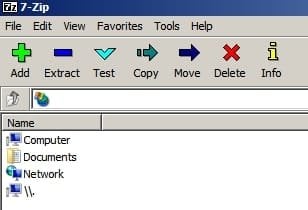
One more thing, I don't know if it's relevant but in the 7-Zip file manager it has two Computer icons. One is labeled computer and the other has this \\.

Thanks in advance for any help.
 

My Computer

Computer type
Laptop
Computer Manufacturer/Model Number
Gateway
OS
Windows 7 Home Premium 64bit
I cannot help with 7-Zip. But know that many programs install "helpers" that tie into Windows Explorer. These are called BHOs (Browser Helper Objects).

Many of them are unreliable and cause Explorer crashes. You can use Microsoft's "ShellEx View" program to find them. This program lists all BHOs. Those BHOs listed as belonging to Microsoft are generally reliable. All others are suspect. You can disable any of them. If you disable the 7-Zip BHO and the problem goes away ...

You might try getting an updated version of 7-Zip, if available. Or you can try WinRAR.

WinRAR does everything. It handles every archive/compression format known to man. It's BHOs are completely reliable. I've found it faultless on WinXP, Win 7, and Win 10 ... both x32 and x64.
 
Last edited:

My Computer

Computer type
PC/Desktop
Computer Manufacturer/Model Number
Dell
OS
Windows 10 x64
CPU
i7-7700K
Memory
16 GB 2400 MHz
Graphics Card(s)
GTX 1060
Sound Card
Integrated, plus external Presonus Audiobox USB
Monitor(s) Displays
2x AOC 27"
Screen Resolution
1920x1080
Hard Drives
512 GB M.2 SSD
2 TB 7200 RPM disk
Internet Speed
110 Mbps
Browser
Firefox
Is ShellEx View an actual MS program?
 

My Computer

Computer type
Laptop
Computer Manufacturer/Model Number
Gateway
OS
Windows 7 Home Premium 64bit
- Schedule a Disk check. Run chkdsk c: /f. When asked if you want to Schedule to the next boot = yes.
- Run a System file check. Run sfc /scannow
- Uninstall 7 zip, download the latest one and install it.
 

My Computers

System One System Two

  • Computer type
    PC/Desktop
    Computer Manufacturer/Model Number
    custom build
    OS
    Windows 7 HP 64
    CPU
    i5 6600K - 800MHz to 4200MHz
    Motherboard
    GA-Z170-HD3P
    Memory
    4+4G GSkill DDR4 3000
    Graphics Card(s)
    IG - Intel 530
    Monitor(s) Displays
    Samsung 226BW
    Screen Resolution
    1680x1050
    Hard Drives
    (1) -1 SM951 – 128GB M.2 AHCI PCIe SSD drive for Windows 7 and Lubuntu
    (2) -1 WD SATA 3 - 1T for Data
    (3) -1 WD SATA 3 - 1T for backup
    PSU
    Thermaltake 450W TR2 gold
    Keyboard
    Old and good Chicony mechanical keyboard
    Mouse
    Logitech mX performance - 9 buttons (had to disable some)
    Internet Speed
    500Mb/s
    Browser
    Firefox 64
    Other Info
    TinyWall firewall
  • Computer type
    Laptop
    System Manufacturer/Model Number
    Asus Q550LF
    OS
    Windows 7 Pro
    CPU
    i7-4500U 800MHz to 3.0GHz
    Motherboard
    Asus Q550LF
    Memory
    (4+4)G DDR3 1600
    Graphics Card(s)
    IG intel 4400 + NVIDIA GeForce GT 745M
    Sound Card
    Realtek
    Monitor(s) Displays
    LG Display LP156WF4-SPH1
    Screen Resolution
    1920 x 1080
    Hard Drives
    BX500 120G SSD for Windows and programs +
    1T HDD for data
    Internet Speed
    500 Mb/s
    Browser
    Firefox
    Other Info
    TinyWall firewall
One more thing, I don't know if it's relevant but in the 7-Zip file manager it has two Computer icons. One is labeled computer and the other has this \\.

That's normal. It opens to root.

7-Zip.jpg

If you know which software you installed or updated on the day it started crashing then start investigating.

Other than that review Post #5 through to Post #10 in this thread:

explorer crashes Solved - Windows 7 Help Forums

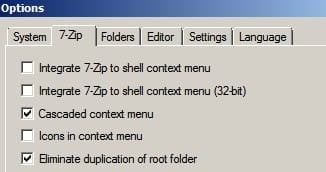
In the meantime try setting 7Zip context menu options like this and then reboot and launch 7-Zip file manager to see if you get the same problem.

7Zip Options.jpg

Also you could re-enable 7-Zip context menu option and try compessing a file by launching 7-Zip from the context menu in Explorer++ portable.

Explorer++ [Administrators].jpg

Explorer++ tends to work if problematic shell extensions crash Explorer. You'd still need to track down the issue to avoid explorer crashes.
 
Last edited:

My Computer

Computer type
Laptop
Computer Manufacturer/Model Number
ASUS
OS
Microsoft Windows 7 Home Premium 64-bit 7601 Multiprocessor Free Service Pack 1
CPU
AMD C-60 APU with Radeon(tm) HD Graphics
Motherboard
ASUSTeK COMPUTER INC. X501U
Memory
4.00 GB
Graphics Card(s)
AMD Radeon HD 6290 Graphics
Sound Card
(1) AMD High Definition Audio Device (2) Realtek High Defi
Screen Resolution
1366 x 768 x 32 bits (4294967296 colors) @ 60 Hz
Hard Drives
Hitachi HTS545050A7E380 SATA Disk Device
Antivirus
Comodo CIS & FW, SecureAplus App Whitelisting, Threatfire
Browser
Cyberfox 64bit, Opera 64bit, Airfox
Other Info
Spy-The-Spy, HitmanPro.Alert, Norton Connect Safe, MJRegWatcher, BitDefender TrafficLight, Voodoo Shield, Zemana AntiMalware
I ran a Disk Check and it found and fixed two files with bad clusters. Since then 7-zip works fine again.
 

My Computer

Computer type
Laptop
Computer Manufacturer/Model Number
Gateway
OS
Windows 7 Home Premium 64bit
Back
Top