7000 vs 7057

peter

New member
Local time
6:53 PM
Messages
2
Location
United States
What do you guys think?
I've had 7000 for at least a month and after some rocky start, everything worked out fine and the system was very reliable. But then of course I had to go for the new one, and I installed 7057.
And now everything is crashing, everyday. Yesterday my wireless card disappeared suddenly after restarting my computer (which ever since I've been scared to do). Firefox crashes everyday. Windows crashes everyday. Usually when right-click menu is involved. On top of everything I've witnessed the first bsod since the very first day I installed Vista.
What's your opinion?
 

My Computer

OS
Windows 7 build 7057
Did you clean install or upgrade? Some people have better luck with a clean install instead of an upgrade.

And have you tried 7048? Again, some report better stability and performance with it as opposed to 7057. Or you could always stay with 7000. I have very few problems with it.
 

My Computer

Computer type
PC/Desktop
Computer Manufacturer/Model Number
Airbot 2.0
OS
Windows 7 Ultimate x64 SP1
CPU
Core i7 920 (D0) @ 4Ghz, *26c idle *65c full load on air
Motherboard
Asus P6X58D Premium - Sata 6Gb/s - USB 3.0
Memory
12GB DDR3 Corsair Dominator -CMD12GX3M6A1600C8 at 1600MHz
Graphics Card(s)
Zotac Geforce GTX 770
Sound Card
ASUS Xonar D2X
Monitor(s) Displays
1 LG 24" Flatron W2453V-PF 1 Samsung 24" P2450H both 2ms RT
Screen Resolution
1920x1080@60hz
Hard Drives
1 Samsung 250GB 840 Evo SSD
1 OCZ Vertex2 180GB SSD
1 TB Samsung Spinpoint F1 7200RPM 32MB cache
2 500GB WD Caviar Blacks 7200RPM 32MB cache (WD5001AALS)

Pioneer DVD Burner DVR-S18M
PSU
Corsair HX1000W
Case
Cooler Master HAF 932
Cooling
Case Fans *3 230mm, *1 140mm/CPU - *Tuniq Tower 120 Extreme
Keyboard
Logitech Wireless MK700
Mouse
Logitech Wireless MK700
Internet Speed
DL 15 Mbps UL 0.98 Mbps
Antivirus
None
Browser
Firefox Nightly
Other Info
Processor-7.7 *RAM- 7.9 *Graphics-7.9 *Gaming Graphics- 7.9 *SSD- 7.8 W.E.I final score= 7.7
*Phone- LG Nexus 5
I haven't tried 7048, but for me 7057 is just as stable as 7000 was. I did a clean install though, not an upgrade so I'm not sure if that is the culprit.
 
Last edited:

My Computer

Computer Manufacturer/Model Number
ASUS G73JH
OS
Windows 7 Ultimate x64
CPU
1.6 GHZ i7-720QM
Memory
12 GB @ 1333 mhz
Graphics Card(s)
AMD Radeon HD 5870M
Screen Resolution
1600x900
Hard Drives
120 GB SATA II SSD
500 GB HDD @ 7200 RPM
Mouse
Razer Death Adder
Internet Speed
15 mb down, 1 mb up
I have been running 7057 for about 3 days now and have to say that for my system it is less stable than 7000. I agree with peter, have seen the first BSOD, crashes, app failures, gadgets issues etc. With 7000 I really only had crashes as a result of overclocking or some other weirdness I caused in the first place.

I plan to stay with 7057 for a while and see if I can not get it running the way I want before reverting to 7000. I had 99% of everything running in 7000, I would say around 90% for 7057. Main issues are with Media Center and Media Player and m2ts files on hard drive, gadget errors, and Internet errors with both IE and Firefox. Overall I do like 7057 it is just giving me some issues.

I really like the expires in 2010 for 57, but I hope there is something for us before 7K expires. I will most likley be going back to 7000 in the next day or two. :huh:
 

My Computer

Computer Manufacturer/Model Number
Ground Up
OS
Windows 7 x64 build 7068
CPU
AMD Phenom II X3 720 @ 3.6 GHz
Motherboard
Gigabyte MA790XT-UD4P AM3
Memory
2x 2GB G.Skill DDR 3 1333
Graphics Card(s)
EVGA GTX 285 @ 702 core 1609 shader 2648 memory
Sound Card
Onboard Realtek ALC889A
Monitor(s) Displays
ViewSonic VX2640w
Screen Resolution
1900 1200
Hard Drives
SAMSUNG 7200 320GB (Boot)
Seagate 500GB (Games, Music, Files, Work)
WD 1TB X 2 (DVD's and Blu Rays)
PSU
Corsair TX850w (12v 70Amps), Backup: CyberPower 810watt UPS
Case
Antec 3000
Cooling
ZEROtherm 120mm Copper CPU, 4 X 120mm Case & 1 140mm Case
Keyboard
Microsoft Natual 4000
Mouse
Logitech G5
Internet Speed
Cable
Other Info
Work System: Win7 x64 7068, Phenom II X4 940 @ 3.6, ASRock K10N780SLI mb, EVGA GTS 250 512mb video, Corsair TX650 power, 2x 2GB G.Skill DDR2 6400, Seagate 250GB, and a lil 17" old LCD.
Hello Peter, Fizban & ibocpro,

Welcome to the Seven Forums. Hope you all enjoy your stay.

I've had more problems with 7057 than 7000. Only real problem with 7000 is IE. Tried it after the update, but have had to go back to FF. I can't login to live with IE8 beta. IE8 in 7057 works though.

Gary
 

My Computer

Computer Manufacturer/Model Number
Dell XPS420
OS
Vista Ult 64 bit Seven Ult RTM x64
CPU
Intel Core2 Quad Q6600 2.40 gigahertz
Memory
Crucial Ballistix 4x2GB PC2 6400
Graphics Card(s)
NVIDIA GeForce 8600 GTS 256 MB
Sound Card
Creative SB X-Fi audio
Monitor(s) Displays
HP w2207 + HPvs15
Screen Resolution
1680x1050 + 1024x768
Hard Drives
2-WD5000AAKS-500 GB
WD5000AAV-500 GB external
Keyboard
Microsoft Comfort Curve
Mouse
MX Revolution
Other Info
Wacom Intuos 2 Graphics Tablet
Experience Index=5.5
I would say try a clean install of 7057 if you can. Once you get all the drivers installed correctly should find it stable. I have been running 7057 x86 and x64 since they were leaked and I am very pleased.
 

My Computer

Computer Manufacturer/Model Number
Dell Inspiron 1525 Notebook
OS
Windows 7
CPU
rocessor Intel(R) Pentium(R) Dual CPU T2390 @ 1.86GHz, 1867
Motherboard
Intel(R) ICH8 Family Chipset
Memory
Installed Physical Memory (RAM) 4 GB
Graphics Card(s)
Mobile Intel(R) 965 Express Chipset Family (Sux)
Sound Card
Intel(R) High Definition Audio HDMI
Hello wguimb,

I first did an upgrade from 7048. It didn't work out very well (I'd been warned, but wanted to try it). Then I wiped the partition and did a clean install. Still had problems. I still boot into it and mess around once in awhile, but I'm going to wait for the RC before I go installing all my programs and tweaks again. I can wait a month or two.

Gary
 

My Computer

Computer Manufacturer/Model Number
Dell XPS420
OS
Vista Ult 64 bit Seven Ult RTM x64
CPU
Intel Core2 Quad Q6600 2.40 gigahertz
Memory
Crucial Ballistix 4x2GB PC2 6400
Graphics Card(s)
NVIDIA GeForce 8600 GTS 256 MB
Sound Card
Creative SB X-Fi audio
Monitor(s) Displays
HP w2207 + HPvs15
Screen Resolution
1680x1050 + 1024x768
Hard Drives
2-WD5000AAKS-500 GB
WD5000AAV-500 GB external
Keyboard
Microsoft Comfort Curve
Mouse
MX Revolution
Other Info
Wacom Intuos 2 Graphics Tablet
Experience Index=5.5
Ive had no issues upgrading. Non that I noticed anyways.
 

My Computer

Computer Manufacturer/Model Number
Built
OS
Windows 7 RTM
CPU
Intel I7 920 2.67 ghz
Motherboard
EVGA X58
Memory
6GB CORSAIR DOMINATOR
Graphics Card(s)
GeForce GTX 260 Core 216 896MB 448-bit GDDR3 PCI Express 2.0
From 7000 to 7057

Well for the past week and a half I have gone through testing all Win 7 from the original (Registered) 7000 to the latest available - 7057 in both the x86 and the x64 platforms.

They all suck. I have been a computer geek for over 20 years and work my systems like a bulldozer pushing a mountain.

I have 7 different computer systems, some old (ish) and some new. Laptops, Handheld and Desktop Workstations, that all are running and active now.

The only systems that I have been able to use the beta 7000 are 2 (sort of) laptops, one is an Acer Aspire ONE (my wife's toy) and the other is a LENOVO 3000 n100, these two are minor usage, my wife is a school teacher and only uses hers about once a week, just for documents. My LENOVO is used mainly just for online research on info and data that I look up regularly. I do also use Visual Studio 2008 Pro on it for app designs that I use and some times need.

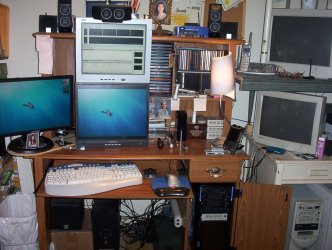
As for my others, My main box is my own build, Gigabyte GA-965P-DS3, Intel C2Q 6600 @ 2.4 Ghz, 8 Gigs mem, 5 Tbts HDDs, 2 gForce nVidia Graphic Cards (8600GTS, 6200OS), 3 LCD monitors (2 Hanns-G and one AOC). This one is the main test box I have used because I need a very strong computer for the type of work I do, I some times run 3 - 5 different programs at the same time. I have attached a Picture of my home office system, (hope it aint to big for this site).
I am an Engineering Designer, and I use Computer Simulated type of software to test my designs, as I design parts and Manufacturing equipment.

I have run all kinds of benchmarking software for many years, always testing my equipment, and none of them have ever come close to demanding the process resources that my software demands when I am working. Hope this gives you an Idea of my meaning.

For Windows 7, my only impression is on the appearance, as for the process operations, it is constantly freezing, crashing and just plain locking up for too long of a time. I have constantly examined the Event files and find constant critical, errors and warnings, In a massive scale. I have run Debugging and analyzed the crash dmp files and found problem after problem in the many .dll files that have many errors in interacting with system handles and threads.
I Hope that Microsoft will make a lot of improvements before the final release.
 

Attachments

  • 100_1470.JPG
    100_1470.JPG
    274.2 KB · Views: 223

My Computer

OS
Windows 7 7600 x86 &x64, Windows XPP sp3 (x86) & sp2 x64
CPU
C2Q 6600, C2D 6420, C2D T2060, C2-ATOM N270
Motherboard
Gigabyte GA-965P-DS3, GA-G31M-ES2L, Lenovo 3000 N100, Acer A
Memory
8 Gig, 4 Gig, 2 Gig, 1.5 Gig
Graphics Card(s)
nVidia 9400 GS, 7200GT, FX 5200
Monitor(s) Displays
2-Hanns-G HW191D, 1-Hanns-G JC199D, 1-AOC 720LM, 2-Samtron
Screen Resolution
1440x900, 1280x1024
Hard Drives
Seagate Barracuda 11 & 12 series
2-500G, 2-1Tb
WD My Book 1Tb
Samsung 3-500G
Maxtor Diamond 9 - 11 80G to 300G about 8 diff.
PSU
many from 1000w to 250w
Case
many
Cooling
Massive fans on all, and my home build AC unit
Keyboard
MS Natural Multimedia
Mouse
MS IntelliMouse 3.0
Internet Speed
10Mbs d/l 768Kbs u/l
LarryLaser,

I am puzzled why your having so many problems?
I use build 7057 as my main OS, with no problems at all. :)
You can check my system specs on the bottom of my post.

We would be glad to help with any problems. :)
 

My Computer

Computer Manufacturer/Model Number
Dilithium Computers/Engineering (Myself) Star date 42.739285.5432.9
OS
Win7 Ultimate x64 on Desktop / Win7 Ultimate x86 on laptop / Win7 x86 Starter on Netbook
CPU
AMD Phenom 965 X4 3.4Ghz cpu Black Edition
Motherboard
Gigabyte 790XT
Memory
12 Gb DDR3
Graphics Card(s)
Nvidea Gforce GTX 470
Sound Card
Onboard Realtek hi-fi
Monitor(s) Displays
Lg 3D led 23"
Screen Resolution
1920x1080
Hard Drives
Loads maxstore sata 1 & 2/ loads of partitions + 1Tb Hitachi sata 2. 256Gb Crucial ssd.
PSU
OCZ 700W GameXstream
Case
Artec 10000
Cooling
On board + many case fans
Keyboard
Logitech wireless K350
Mouse
Inferno gaming mouse
Internet Speed
Talk talk. 10Mb
Other Info
My PC was hand built with matchsticks. xbox 360 controller. Printers,fax.........
I have run 7000, 7048, and 7057 (currently).
7000 IE8 only real issue
7048 quickiest
7057 as good as 7048 (except debug stuff that must be going on)

The key I believe is to do a clean-install and not an upgrade from one version to another (for my experience anyway).
I also am running Java 6 Update 14 (beta) build 3 which I think helps somewhat:

https://jdk6.dev.java.net/6uNea.html
 

My Computer

Computer type
PC/Desktop
Computer Manufacturer/Model Number
Black Shadow IV
OS
Win7 x64
CPU
i5-3570K
Motherboard
Asrock Z77 Extreme4
Memory
2x4GB Rip Jaws 8-9-9-24
Graphics Card(s)
Asus R9 280X
Sound Card
X-Fi Extreme Music
Monitor(s) Displays
Dell U2412M
Screen Resolution
1920x1200
Hard Drives
Samsung Evo 250GB /
OCZ Vertex 4 128GB
PSU
Seasonic 660XP2
Case
Fractal Design R4
Cooling
Noctua NH-U12S
No problems here with 7057. :)
 

My Computer

Computer Manufacturer/Model Number
Asus G50V-A2 / Clevo D901C / 3-custom built
OS
XP Pro sp3, Windows 7 Ultimate X64, Ubuntu 12.04 X64
CPU
Intel T9400 2.5 / Intel Q9650 3.0 / Intel Core i7 920
Motherboard
AsusTeK / Clevo / Gigabyte
Memory
4gb / 4gb / 24gb
Graphics Card(s)
Nvidia 9500 GT / Nvidia 9700m GT / Nvidia 9800m GT
Sound Card
Tascam FW1884
Monitor(s) Displays
15.5" / 17" / dual 23"
Screen Resolution
1680x1050 / 1680x1050 / 1920x1080
Hard Drives
2-200gb 7200 / 3-320gb 7200 / 5-Intel ssd
Hey Romulinx2
I have no Idea why my system has so many hangs, I wish I knew. I think it might be related to my Graphics cards but I don't know for sure.
When it hangs I can't run debugging or any thing to test or find the issue, none of the Event reports relate to the hardware issues at all, when the system freezes I have to hit Ctrl + Alt + Del and force a reboot. Some times, even after the lockup I have to manual reset, which is not good.
I have considered buying newer cards, but have not wanted to. Mine are considered old, the 6200 OC is from 2007 and the 8600GTS is from last year (2008).
 

My Computer

OS
Windows 7 7600 x86 &x64, Windows XPP sp3 (x86) & sp2 x64
CPU
C2Q 6600, C2D 6420, C2D T2060, C2-ATOM N270
Motherboard
Gigabyte GA-965P-DS3, GA-G31M-ES2L, Lenovo 3000 N100, Acer A
Memory
8 Gig, 4 Gig, 2 Gig, 1.5 Gig
Graphics Card(s)
nVidia 9400 GS, 7200GT, FX 5200
Monitor(s) Displays
2-Hanns-G HW191D, 1-Hanns-G JC199D, 1-AOC 720LM, 2-Samtron
Screen Resolution
1440x900, 1280x1024
Hard Drives
Seagate Barracuda 11 & 12 series
2-500G, 2-1Tb
WD My Book 1Tb
Samsung 3-500G
Maxtor Diamond 9 - 11 80G to 300G about 8 diff.
PSU
many from 1000w to 250w
Case
many
Cooling
Massive fans on all, and my home build AC unit
Keyboard
MS Natural Multimedia
Mouse
MS IntelliMouse 3.0
Internet Speed
10Mbs d/l 768Kbs u/l
Nah, before I got my HIS Digital HD3850 AGP, i was using an All-In-Wonder 9800 Pro AGP and the desktop was very responsive even then with no problems. I even played many games, some of the newest only on lower settings and all was well. The card I have now makes the whole system, gaming included rather sweet...best agp card available heh heh.
 

My Computer

Computer Manufacturer/Model Number
self built
OS
7600.20510 x86
CPU
P4 550 3.4 GHz HT running at 3.5 GHz
Motherboard
MSI PM8M3-V (MS-7211 v1.x) Micro-ATX mainboard
Memory
OCZ 2 GB(2x1GB) DDR400mHz running @ 414 mHz
Graphics Card(s)
HIS Radeon HD 3850 IceQ 3 Turbo HDMI Dual DL-DVI AGP
Sound Card
MOTU Traveler firewire studio interface 192 kHz 24 bit
Monitor(s) Displays
22" widescreen Acer X223W LCD, 17" Compaq P75 CRT
Screen Resolution
1680x1050 and 1280x1024
Hard Drives
SATA I x2 WD, 400 GB and 120 GB, SATA 2 WD Caviar Black 1 TB
PSU
350W generic
Case
Cybertronpc, it glows blue
Cooling
stock cpu fan, Ice-Q 3 gpu and system, many case fans
Keyboard
Logitch Classical Keyboard 200
Mouse
Logitech Mediaplay cordless
Internet Speed
1792/448 kbits/sec
Other Info
SATA II PCI fake RAID adapter, 1 GB Readyboost, original ATI Remote Wonder (even works with WMC perfectly), Logitech Rumblepad 2 game controller x2
Nah, before I got my HIS Digital HD3850 AGP, i was using an All-In-Wonder 9800 Pro AGP and the desktop was very responsive even then with no problems. I even played many games, some of the newest only on lower settings and all was well. The card I have now makes the whole system, gaming included rather sweet...best agp card available heh heh.

How much did that card cost? Would boost my machine no end...
 

My Computer

Computer Manufacturer/Model Number
Advent Roma Laptop
OS
Windows 7 Enterprise SP1 x64 Windows 8 Enterprise RTM x64
CPU
Mobile DualCore Intel Pentium T4400, 2200 MHz (11 x 200)
Motherboard
Advent Roma (Intel Cantiga GL40)
Memory
4028 MB (DDR2-667 DDR2 SDRAM)
Graphics Card(s)
Mobile Intel(R) GMA 4500M
Sound Card
Realtek ALC662 @ Intel 82801IB ICH9 - High Definition Audio
Monitor(s) Displays
Generic PnP Monitor [NoDB]
Screen Resolution
1366x768
Hard Drives
TOSHIBA MK5065GSX ATA Device (500 GB, 5400 RPM, SATA-II)
Mouse
Mikomi 7 Button Laser Mouse w/DPi Switch
Internet Speed
Slow!!
Card at Newegg.com. That's very close to what I paid when tigerdirect.com had it. I overclock it with the ati tray tools to well above 800 mhz gpu and well above 2100 mhz memory without a hiccup. It stays as cool as can be, only reaching like 65 degrees C playing the most demanding games. Highly recommended. And I do this all with a 350 watt power supply, which is not recommended at all...but hey, it's happenin for me. :)
 

My Computer

Computer Manufacturer/Model Number
self built
OS
7600.20510 x86
CPU
P4 550 3.4 GHz HT running at 3.5 GHz
Motherboard
MSI PM8M3-V (MS-7211 v1.x) Micro-ATX mainboard
Memory
OCZ 2 GB(2x1GB) DDR400mHz running @ 414 mHz
Graphics Card(s)
HIS Radeon HD 3850 IceQ 3 Turbo HDMI Dual DL-DVI AGP
Sound Card
MOTU Traveler firewire studio interface 192 kHz 24 bit
Monitor(s) Displays
22" widescreen Acer X223W LCD, 17" Compaq P75 CRT
Screen Resolution
1680x1050 and 1280x1024
Hard Drives
SATA I x2 WD, 400 GB and 120 GB, SATA 2 WD Caviar Black 1 TB
PSU
350W generic
Case
Cybertronpc, it glows blue
Cooling
stock cpu fan, Ice-Q 3 gpu and system, many case fans
Keyboard
Logitch Classical Keyboard 200
Mouse
Logitech Mediaplay cordless
Internet Speed
1792/448 kbits/sec
Other Info
SATA II PCI fake RAID adapter, 1 GB Readyboost, original ATI Remote Wonder (even works with WMC perfectly), Logitech Rumblepad 2 game controller x2
I haven't tried 7000, but for me 7057 is just as stable as 7000 was. I did a clean install though, not an upgrade so I'm not sure if that is the culprit.

If you aint tried 7000 how can 7057 be just as stable, I do agree though that 7057 is just as stable if not more so. The poster of this thread needs to check what he/she has running on this build because I found certain utilities to be the source of some bsods. And since ridding my system of them (touch wood) it has not give me a single problem and is far more responsive than previous builds. Go check what you got installed and try not to run registry cleaners etc etc..............
 

My Computer

Computer Manufacturer/Model Number
Custom Build.
OS
Windows 7 Ultimate x64.
CPU
i5 760 @ 4.2Ghz. 1.18v
Motherboard
Gigabyte - H55M-USB3
Memory
4g Corsair xms3 ddr3, 1600Mhz.
Graphics Card(s)
Gigabyte GTX-560Ti soc edition
Sound Card
Asus Xonar Dx - Logitech Z5500.
Monitor(s) Displays
Acer 22" LCD Wide screen 1680-1050 -Samsung 42" Plasma....
Screen Resolution
1680/1050 -----1920/1080p.
Hard Drives
2x 2TB Seagate Go Flex,
1x 1TB Seagate,
1x 640WD Black,
x16 Gig sandisc flash drive,
1x8Gig sandisc flash drive.
PSU
XigmaTek 80plus NRP-PC702 - 700w dual 30a.
Case
Venus Gamers Midi Tower Case with LED Display
Cooling
Arctic Freezer 7 Pro Rev 2... x2 Arctic F8 case fans........
Keyboard
Logitech G15-v2 Gaming.
Mouse
Microsoft Sidewinder X8.
Internet Speed
Virgin Media - 50mb down- 8mb up.
Other Info
x2 Xbox 360 wireless controllers...

Dual layer optical disc drive...

Chrome 79million

A.V = MSE
7000: HP nc 8430 - problems during first 10 days, later no issues; HP nc 2400 - problems from time to time (hiberanation, mostly); ThinkPad R60 - no problems.

7057: HP nc 8430 (upgrade) - no problems so far (last 3-4 days); HP nc 2400 (clean install) - no problems, hibernation works now; ThinkPad R60 (upgrade) - no problems.
 

My Computer

Computer Manufacturer/Model Number
HP Compaq nc2400
OS
Windows 7
Yes, Like the other people,, have said peter u should do a clean install becuase the reg fils and directories are not in the sa places so you could not pgrade only with release.
 

My Computer

Computer Manufacturer/Model Number
Acer Aspire 8730-6951
OS
Windows 7, Windows Vista
CPU
2.4 GHZ
Memory
4.0 GB
Graphics Card(s)
Nvidia 9600m GT 1GB
Screen Resolution
1680*945
Hard Drives
320GB
I upgraded from 7048 to 7057 and no problem at all...expect that bug of desktop ini and WLM 9 where i can't login...but there is an easy fix, otherwise a great OS and very stable to me.
 

My Computer

Computer Manufacturer/Model Number
ASUS
OS
Windows 7 Ultimate 64bit
CPU
Core2Duo E6420 2,13 GHz @ 2,93 GHz stock cooled
Motherboard
Asus P5k Deluxe Wi-Fi edition
Memory
Kingston 3GB DDR2 733 MHz RAM 2.1v
Graphics Card(s)
Asus 8800GTS 320MB 320-bit stock clocks, (burned in owen) xD
Sound Card
Creative Xi-Fi Extreme Music
Monitor(s) Displays
Samsung T220 22''
Screen Resolution
1680*1050
Hard Drives
320 GB
160 GB
PSU
Codegen 400W
Case
Codegen Briza 6097
Cooling
stock
Keyboard
Logitech media keyboard new
Mouse
RX 1000 laser mouse
Internet Speed
~1,5mb/sec
Back
Top