7068 bugs!

I posted earlier about 7068 in this thread about issues I am having. Today I was playing FEAR via Steam, less than 30 secs into game, pc rebooted!....Logged back in, played ok for 15 mins..I quit the game. Went back later and the game froze on me after less than 30 secs, rebooted and it did the same. Running an EVGA NVIDIA 8800 GT w/Xtreme 182.08 drivers...didnt have this issue w/7057. Also on boot up,I dont get network access each time. My last boot, I had to run a diagnose to get it running.... Really not sure if 7068 is to blame though. I did make changes via services.msc following Blackvipers recommendations, also updated my Linksys router firmware and finally made some changes in the msconfig file but since reverted back... hmmm, maybe a clean install will help darco
 

My Computer

OS
Win 7 x64 7137
Some things I have run into:

1. The navigation click in Windows Explorer cuts off too fast. Sometimes I don't even get it at all. I have a feeling this has to do with the X-fi card I'm running.

2. Explorer doesn't update the folder list when I cut and paste, or delete. Also selecting groups of files causes a significant slowdown that I can't explain; I'm running a Core2 Quad.

3. The pause/play button on the WMP preview pane doesn't work at all.

4. I had the 20 second system resume hiccup happen once. Three other times resume worked fine and dandy.

5. Having big issues with codecs/Media Player Classic. I think I saw this mentioned elsewhere, either here or another site.

BTW, I performed a clean install. On the bright side, Punkbuster no longer kicks me off of QuakeLive! Chromium runs perfect without modifying the shortcut as well.
 

My Computer

Computer Manufacturer/Model Number
Custom
OS
Windows 7 7127 64-bit
CPU
Core 2 Extreme
Motherboard
nForce 750i
Memory
4GB PC-8500
Graphics Card(s)
GeForce GTX 260
Sound Card
X-Fi XtremeMusic
Monitor(s) Displays
24" LG
Screen Resolution
1920x1200
Hard Drives
300GB VelociRaptor
150GB Raptor X
PSU
OCZ
Case
Antec
Cooling
OCZ
Keyboard
Razer Lycosa
Mouse
Razer DeathAdder
2. Explorer doesn't update the folder list when I cut and paste, or delete.

5. Having big issues with codecs/Media Player Classic. I think I saw this mentioned elsewhere, either here or another site.

#2 happened in 7057 sometimes, mainly with libraries. Haven't noticed it in 7068 so far.

I haven't experienced any problems with codecs using Media Player Classic Home Cinema. Then again the only 3rd party codecs I have installed are ffdshow and QuickTime and IMO there is no need for any others.
 

My Computer

OS
Windows 7
I posted earlier about 7068 in this thread about issues I am having. Today I was playing FEAR via Steam, less than 30 secs into game, pc rebooted!....Logged back in, played ok for 15 mins..I quit the game. Went back later and the game froze on me after less than 30 secs, rebooted and it did the same. Running an EVGA NVIDIA 8800 GT w/Xtreme 182.08 drivers...didnt have this issue w/7057. Also on boot up,I dont get network access each time. My last boot, I had to run a diagnose to get it running.... Really not sure if 7068 is to blame though. I did make changes via services.msc following Blackvipers recommendations, also updated my Linksys router firmware and finally made some changes in the msconfig file but since reverted back... hmmm, maybe a clean install will help darco
It is problem of nVidia drivers + 8800GT GFX. I have the same problem but it is not only in W7, but in Vista too. Only stable drivers I found are 178.24. All other causes system reboot. In 181.2x (can't remember version) there is info in release notes about fixed system crashes for 8800 cards. It sometimes works fine, but still the best drivers for me are 178.24 without any crash.
 

My Computer

OS
Windows 7 x64
CPU
AMD Phenom II X4 BE 955
Motherboard
Gigabyte GA-MA770-UD3 v1.0
Memory
2x2GB DDR2-800
Graphics Card(s)
nVidia GeForce GTX 275
Sound Card
Realtec ALC888/1200
Monitor(s) Displays
Asus PM17TU
Screen Resolution
1280*1024
Internet Speed
20Mb/1.5Mb
Some things I have run into:

1. The navigation click in Windows Explorer cuts off too fast. Sometimes I don't even get it at all. I have a feeling this has to do with the X-fi card I'm running.

yes, this are driver problems also happens in vista sometimes. Turn off CMSS-3D in creative control panel.
 

My Computer

Computer Manufacturer/Model Number
Custom
OS
Windows 7 SP1 x64 build 7601.21701
CPU
Intel Q9450 @3608mhz (8x451)
Motherboard
Asus Rampage Formula
Memory
6GB - 2x Corsair CM2X1024-8500C5D and 2x CM2X2048-8500C5D
Graphics Card(s)
Zotac nVidia GTX295
Sound Card
SoundMAX ADI1988B (X-FI MB)
Monitor(s) Displays
LG L227WTP & Samsung LE26R71B LCD TV
Screen Resolution
1680x1050 & 1360x768
Hard Drives
2x Seagate ST3500630NS in RAID0
PSU
Thermaltake Toughpower 750W
Case
Thermaltake
Cooling
Thermalright Ultra-120 Extreme and couple of fans
Keyboard
Logitech G15 v2
Mouse
Razer DeathAdder
Internet Speed
FTTH 50/50 (dualstack IPv4 & native IPv6)
Only issue Ive had so far is taskbar pinned items not working that Ive added myself like for word. Instead you have to make a shortcut from explorer to desktop then pin the desktop item to taskbar.
 

My Computer

Computer Manufacturer/Model Number
self built
OS
Windows 7 Professional 64-bit
CPU
Intel E8400 3GHz
Motherboard
Intel DX48BT2
Memory
Kingston PC3-10700H 4Gb
Graphics Card(s)
XFX Radeon HD 5850 BlackEd.
Sound Card
Asus Xonar DG
Monitor(s) Displays
2x Samsung SM-T220HD 22"
Screen Resolution
1680x1050 on two monitors
Hard Drives
OCZ Vertex 2 120gb 3.5" (OS)
Seagate Momentus XT 500gb
Samsung F3 1Tb (games)
2x Samsung F1 1Tb
PSU
Thermaltake ToughPower 850w
Case
Thermaltake Armor
Cooling
Scythe Mugen II
Keyboard
Microsoft Comfort Curve USB
Mouse
Razer Diamondback 3G
Internet Speed
8128/443
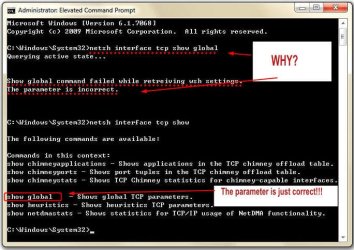
I am not sure whether it is the bug of the command prompt or the bug of the TCP/IP of 7068.

The picture will show you what I mean:

Snap1.jpg

Anybody got the same problem?
 
Last edited:

My Computer

OS
Server 2008 R2 SP1, Win7 x64 Pro SP1
CPU
Intel Core 2 Duo E6700 @3.3GHz
Motherboard
ASUS P5W DH DELUXE
Memory
Transcend DDRII 800 4GB (2 x 2GB )
Graphics Card(s)
GeForce 7950GX2
Sound Card
Realtek ALC882M Integrated on board
Monitor(s) Displays
ACER AL2723 27" LCD
Screen Resolution
1920x1200
Hard Drives
WD 6401 AALS 640G x 1
Seagate 160 GB (Barracuda 7200.7) x 2
PSU
Zippy PSL-6720P(G1)720W
Case
Thermaltake Kandalf VA9000SWA
Cooling
Zalman CNPS9500
Keyboard
Standard
Mouse
Standard
Internet Speed
10M, Cable
Other Info
Above is one of my desktops.
hello! Anyone noticed that in every win7 builds the aero fade effect [when opening and closing windows in explorer] is not working smooth as in Vista? why?
 

My Computer

OS
7232 x64
CPU
athlon x2 x64 5000+
Memory
4gb
Graphics Card(s)
ati hd 3650
Hi all
Well to be honest all the above issues i have not had. The main problems i had with 7 were the wireless. Previous builds did not install the driver and i had probs with the signal dropping randomly, this required a restart. However 7068 installed the driver for my adapter and ive not had one drop out since i installed 7068 so i can only assume that it was the vista driver i was using. Other then that, ive had not one issue, setup took a few mins longer but i can live with that. Im having a flawless expirience with 7068 and hope that it continues through RC to RTM.
Just goes to show with all the possible hardware configs out there MS have done a good job in ensuring that 7 works.
 

My Computer

Computer Manufacturer/Model Number
Made by Mastercard
OS
Windows 7 RTM x64
CPU
Core 2 Quad, @3.8 on aircooling
Motherboard
XFX 750i Nforce
Memory
8 Gig Geil Black Dragon
Graphics Card(s)
Nvidia 8800GTX 512 x 2 in SLI
Sound Card
Razor Barracuda
Monitor(s) Displays
2 X 24 Inch Hannsg
Screen Resolution
1600x1050
Hard Drives
1X64 Gig Kingston SSD Drive
2X 320 sata
2X250 ide
1X 320 External. and lets not forget the 8 gig thumbdrive :)
and a partridge in a pear tree
PSU
600 Watt Coolermaster Elite Silent Pro
Case
Coolermaster Storm
Cooling
Coolermaster V8
Keyboard
Razor Lycosa
Mouse
Razor Mamba, sweet as candy
Internet Speed
Virgin 50MB.
Other Info
Zalman Guardian System Fan Controls
Aerocool Modern V system monitor.
And a nice bunch of stickers on the front!! All that money for something that glows blue. But thats why we do it kids. all for the bling!!

100mbit Seedbox, loving that!
Razor Destructor Gaming Mat, Razor Moray Headphones.

To much spare money perhaps? Nah, my mrs has shoes. I have a very expensive way of her shopping for
The 7057 x86 would choke on Norton 360. Can anyone verify this has been fixed in 7068?

I'd choke on Norton too. Seriously, if I'm eating and someone around me mentions using Norton, choking is my usual response.
 

My Computer

Computer Manufacturer/Model Number
ASUS G73JH
OS
Windows 7 Ultimate x64
CPU
1.6 GHZ i7-720QM
Memory
12 GB @ 1333 mhz
Graphics Card(s)
AMD Radeon HD 5870M
Screen Resolution
1600x900
Hard Drives
120 GB SATA II SSD
500 GB HDD @ 7200 RPM
Mouse
Razer Death Adder
Internet Speed
15 mb down, 1 mb up
I'd choke on Norton too. Seriously, if I'm eating and someone around me mentions using Norton, choking is my usual response.

This is not an issue with Windows 7 but with Norton. I've thrown Norton out of the Window(s 7) and replaced with Avast!, works perfectly.

Not had the taskbar issue though, just this minute pinned Nero SmartStart & worked perfectly. Will install Office 2007 & try Word & see what happens...
 

My Computer

Computer Manufacturer/Model Number
Compaq Desktop
OS
Windows 7 Ultimate x64
CPU
AMD Sempron Dual Core
Memory
3GB
Graphics Card(s)
NVIDIA GeForce 6150SE nForce 430
Screen Resolution
1024x768
Hard Drives
150GB Sata
This is not an issue with Windows 7 but with Norton. I've thrown Norton out of the Window(s 7) and replaced with Avast!, works perfectly.

Not had the taskbar issue though, just this minute pinned Nero SmartStart & worked perfectly. Will install Office 2007 & try Word & see what happens...

Aye I use Avast as well. I was a big AVG fan for years, ended up switching due to a college professor I had 2 years ago who was a large Avast fan. Mainly switched for the ability to run boot-time scans which AVG can't do and Avast can.
 

My Computer

Computer Manufacturer/Model Number
ASUS G73JH
OS
Windows 7 Ultimate x64
CPU
1.6 GHZ i7-720QM
Memory
12 GB @ 1333 mhz
Graphics Card(s)
AMD Radeon HD 5870M
Screen Resolution
1600x900
Hard Drives
120 GB SATA II SSD
500 GB HDD @ 7200 RPM
Mouse
Razer Death Adder
Internet Speed
15 mb down, 1 mb up
I noticed some changes to the default homegroup settings that made it difficult to access files on my XP machine. I had to switch back and forth between the homegroup and user settings in order to access the files on my XP machine. It was easier to access my XP machine with the previous builds because I didn't have to play with the settings to access the files, they were right there from the start before. I hope they change it back to how it was because I spent over an hour messing with it before it worked right.
 

My Computer

Computer type
PC/Desktop
Computer Manufacturer/Model Number
Home built
OS
Windows 7 Ult, Windows 8.1 Pro,
CPU
Q9650-4.275GHz, E8600 4.5GHz, E6750-3.8GHz
Motherboard
Evga 780i FTW
Memory
G.Skill PC2 9600 1200Mhz 5 5 5 15 2T
Graphics Card(s)
GTX480
Sound Card
Asus Xonar D2
Monitor(s) Displays
HannsG
Screen Resolution
1680X1050
Hard Drives
GSkill Phoenix Pro 120GB SSD
PSU
ThermalTake Toughpower 1000Watt modular
Case
ThermalTake XaserV
Cooling
Xigmatek S1283
Keyboard
Logitech G15
Mouse
Logitech G9
Internet Speed
T1
Performing right click on Computer and selecting Manage does nothing. I saw this in 7057 as well. 7022 worked OK

Mx
 

My Computer

OS
Windows 7
Performing right click on Computer and selecting Manage does nothing. I saw this in 7057 as well. 7022 worked OK

Mx


I have heard of that one but it works fine for me. Brings up the computer management screen for me with no problems.
 

My Computer

Computer type
PC/Desktop
Computer Manufacturer/Model Number
Home built
OS
Windows 7 Ult, Windows 8.1 Pro,
CPU
Q9650-4.275GHz, E8600 4.5GHz, E6750-3.8GHz
Motherboard
Evga 780i FTW
Memory
G.Skill PC2 9600 1200Mhz 5 5 5 15 2T
Graphics Card(s)
GTX480
Sound Card
Asus Xonar D2
Monitor(s) Displays
HannsG
Screen Resolution
1680X1050
Hard Drives
GSkill Phoenix Pro 120GB SSD
PSU
ThermalTake Toughpower 1000Watt modular
Case
ThermalTake XaserV
Cooling
Xigmatek S1283
Keyboard
Logitech G15
Mouse
Logitech G9
Internet Speed
T1
I have heard of that one but it works fine for me. Brings up the computer management screen for me with no problems.

Works for me in 7068, but it is quite slow. Takes far longer to open than it would for explorer to open if I had left clicked My Computer. Probably somewhere between .5 and 1.5 seconds.
 

My Computer

Computer Manufacturer/Model Number
ASUS G73JH
OS
Windows 7 Ultimate x64
CPU
1.6 GHZ i7-720QM
Memory
12 GB @ 1333 mhz
Graphics Card(s)
AMD Radeon HD 5870M
Screen Resolution
1600x900
Hard Drives
120 GB SATA II SSD
500 GB HDD @ 7200 RPM
Mouse
Razer Death Adder
Internet Speed
15 mb down, 1 mb up
Guest Mode (PC SafeGuard) has been removed in the 7068 build. :(
 

My Computer

Computer type
PC/Desktop
Computer Manufacturer/Model Number
Self built custom
OS
64-bit Windows 11 Pro for Workstations
CPU
Intel i7-8700K OC'd to 5 GHz
Motherboard
ASUS ROG Maximus XI Formula Z390
Memory
64 GB (4x16GB) G.SKILL TridentZ RGB DDR4 3600 MHz
Graphics Card(s)
ASUS ROG-STRIX-GTX1080TI-O11G-GAMING
Sound Card
Integrated
Monitor(s) Displays
2 x Samsung Odyssey G7 27"
Screen Resolution
2560x1440
Hard Drives
1TB Samsung 990 PRO M.2,
4TB Samsung 990 PRO PRO M.2,
TerraMaster F8 SSD Plus NAS
PSU
Seasonic Prime Titanium 850W
Case
Thermaltake Core P3
Cooling
Corsair Hydro H115i
Keyboard
Logitech wireless K800
Mouse
Logitech MX Master 4
Internet Speed
2 Gb/s Download and 100 Mb/s Upload
Antivirus
Malwarebyte Anti-Malware Premium
Browser
Google Chrome
Other Info
Logitech Z625 speaker system,
Logitech BRIO 4K Pro webcam,
HP Color LaserJet Pro MFP M477fdn,
APC SMART-UPS RT 1000 XL - SURT1000XLI,
Galaxy S23 Plus phone
AVG AV and UPEK Biometric device on 7068 x64

Action Center reported problem with AVG 8.5 on 7068 x64. This was not an issue with the builds 7000, 7048 and 7057.

Didn't manage to install Protector Suite for Windows 7 Beta from UPEQ to manage my fingerprint scanner on this build either.

I am now back with on 7057, which I find to be the best build so far in bug terms.
 

My Computer

Computer Manufacturer/Model Number
Lenovo T61
OS
Windows 7 x64
CPU
Intel Core 2 Duo T7300
Memory
4 GB DDR2
The Program shortcuts in Start Menu don't show.....its empty when I click programs
Anyone have that problem?
 

My Computer

Computer Manufacturer/Model Number
Custom
OS
Windows 7 Pro (x64)
CPU
Core i-7 920
Motherboard
Foxconn Flaming Blade
Memory
6 GB OCZ DD3
Graphics Card(s)
ATI radeon HD 5770 1 GB memory
Sound Card
Realtek HD(built in)
Monitor(s) Displays
21 in Samsung SyncMaster 206BW
Screen Resolution
1680x1050
Hard Drives
400 GB Seagate Barracuda (IDE)
320 GB WD (SATA)
1 TB Samsung
1 TB Samsung
120 GB WD Passport (USB External)
PSU
NZXT HAL-E 650 Watt
Case
Cooler Master cs 960
Cooling
Zalman CNPS 9900 MAX
Keyboard
Logitech Illuminated Keyboard
Mouse
Razer copperhead
Internet Speed
15 mbps Optimum Online Cable (Broadband)
nvidia drivers for win7 from their page are = 181.71 and they are already bundled with 7068 build. However instalation from page gives you NVCP while bundled version doesnt have it. But they dont change for me anythign anyway, just multigpu+multimonitor at same time is not working. ATM im on latest beta opengl 3.1 drivers 182.47.

I've found the Vista64 Nvidia drivers work much better than the Win7 Nvidia drivers (as of now).
 

My Computer

Computer Manufacturer/Model Number
Apple MacBook Pro
OS
Windows 7 64-bit (7127) & Mac OS X 10.5.7
CPU
2.53 GHz Intel Core2Duo (6MB L2 Cache)
Memory
4GB DDR2 667
Graphics Card(s)
8600M GT 512MB
Monitor(s) Displays
15.4 LED backlit LCD
Screen Resolution
1440x900
Hard Drives
Hitachi 250GB 5400 RPM (soon to be replaced)
Mouse
Logitech
Back
Top