71 processes at idle / computer slow - what's wrong?

catalogue

New member
Member
VIP
Local time
9:30 AM
Messages
108
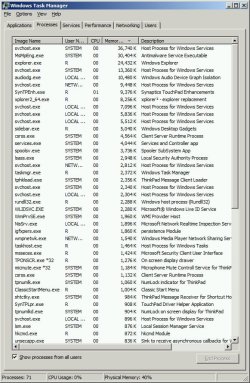
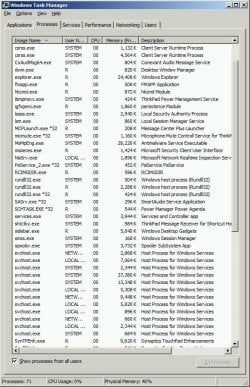
My computer has gotten molasses-slow over the past 6-12 months with no major new programs. Could it have something to do with the 71 processes that Task Manager reports when the computer is freshly started, with no programs opened? They use about 1 Gb of RAM - is that high? High or not, the computer is definitely very, very slow.

For example, is it okay to have 12 instances of svchost.exe?

I know you can look up processes online but it's not that simple. Can anyone recommend a preferred site for this? The problems is that sites tend to (1) report wide-ranging, contradictory opinions submitted by many users, and/or (2) provide useless non-definitions like "abcd.exe is a executable file for Windows. The filename extension .exe is the abbreviation for executable." A lot of the sites look like bogus aggregators or click farms.

Also, please be aware I am most of the way through this big list of steps for optimizing Win 7: http://www.sevenforums.com/tutorials/11728-optimize-windows-7-a.html

Attached: process list sorted by size and alphabetically.

PS - I am most of the way through this optimization list, but plan to do Black Viper's services tweaks after checking out the running processes.
 

Attachments

  • Processes by size Monday.jpg
    Processes by size Monday.jpg
    108.4 KB · Views: 0
  • processes alphabetical.jpg
    processes alphabetical.jpg
    107.5 KB · Views: 0
Last edited:

My Computer

Computer type
Laptop
Computer Manufacturer/Model Number
Lenovo Thinkpad T520
OS
7 Pro 64
CPU
Intel Core i5-2540M 2.6 GHz
Memory
6 GB RAM
Hard Drives
1 Tb
I have around 78 at the minute but i do have a few things open so im usually around the same mark,
In terms of general slowness, you could have a few unwanted goodies in your system, i suggest running these

Please download AdwCleaner by Xplode and save to your Desktop.
  • Double click on AdwCleaner.exe to run the tool.
    Vista/Windows 7/8 users right-click and select Run As Administrator.
  • Click on the Scan button.
  • AdwCleaner will begin...be patient as the scan may take some time to complete.
  • After the scan has finished, click on the Report button...a logfile (AdwCleaner[R#].txt) will open in Notepad for review (where the largest value of # represents the most recent report).
  • The contents of the log file may be confusing. Unless you see a program name that you know should not be removed, don't worry about it. If you see an entry you want to keep, let me know about it.
  • Copy and paste the contents of that logfile in your next reply.
  • A copy of all logfiles are saved in the C:\AdwCleaner folder which was created when running the tool.
Please download Junkware Removal Tool to your desktop.

  • Shut down your protection software now to avoid potential conflicts.
  • Run the tool by double-clicking it. If you are using Windows Vista, 7, or 8; instead of double-clicking, right-mouse click JRT.exe and select "Run as Administrator".
  • The tool will open and start scanning your system.
  • Please be patient as this can take a while to complete depending on your system's specifications.
  • On completion, a log (JRT.txt) is saved to your desktop and will automatically open.
  • Post the contents of JRT.txt into your next message.
 

My Computer

Computer type
Laptop
Computer Manufacturer/Model Number
Packard Bell
OS
Windows 7 Home Premium 64Bit
CPU
AMD A6-3420M 1.5GHZ OC - 2.0GHZ
Memory
4GB DDR3 1600MHZ
Graphics Card(s)
AMD RADEON 6520G+AMD RADEON HD7470M 1GB DDR3
Screen Resolution
1366x768
Hard Drives
500GB SATA
Internet Speed
18Mb Unlimited
Antivirus
AVAST!
Browser
MOZILLA FIREFOX

My Computer

Computer type
Laptop
Computer Manufacturer/Model Number
Lenovo Thinkpad T520
OS
7 Pro 64
CPU
Intel Core i5-2540M 2.6 GHz
Memory
6 GB RAM
Hard Drives
1 Tb
Yeah, they can be prime examples of slowing down systems
Also, if you only have 2gb ram i'd Highly advise upgrading it to 4gb, you will notice a massive difference especially on a 64bit OS, 2gb of ram would be more suited to a 32bit OS and 4gb for 64bit os.
 

My Computer

Computer type
Laptop
Computer Manufacturer/Model Number
Packard Bell
OS
Windows 7 Home Premium 64Bit
CPU
AMD A6-3420M 1.5GHZ OC - 2.0GHZ
Memory
4GB DDR3 1600MHZ
Graphics Card(s)
AMD RADEON 6520G+AMD RADEON HD7470M 1GB DDR3
Screen Resolution
1366x768
Hard Drives
500GB SATA
Internet Speed
18Mb Unlimited
Antivirus
AVAST!
Browser
MOZILLA FIREFOX
Read through these from this Tutorial.

By Brink:
http://www.sevenforums.com/tutorials/11728-optimize-windows-7-a.html

Take a close look at # 8 & 9
I would recommend not fooling with Windows Services.
On both of my computer I have less than 50 processes.
 

My Computer

Computer type
PC/Desktop
Computer Manufacturer/Model Number
Home made Desktop
OS
Windows 10 Pro. 64/ version 1709 Windows 7 Pro/64
CPU
Intel i7-6800K @ 4.3
Motherboard
ASUS X-99 Deluxe II
Memory
Corsair Platinum 16 gig @2400
Graphics Card(s)
EVGA GTX 1070 OC
Monitor(s) Displays
Asus 27" LED LCD/VE278Q
Screen Resolution
1920-1080 or 1280-720 HDMI
Hard Drives
INTEL SSD 730-240 Gb Sata 3.0/
PSU
EVGA Platium 1200W
Case
Phanteks Luxe Tempered Glass 8 fans/ one radiator
Cooling
XSPC/ Water Cooled CPU
Keyboard
Das 4 Professional
Mouse
Logitech M705/MX Anywhere 2-S
Internet Speed
100 mbits
Antivirus
Microsoft Security Essentials/ Malwarebytes Premium 3.0/ SAS
Browser
I.E. 11 default/Firefox/ ISP Time Warner Cable/Spectrum
Other Info
LG BluRay Burner/
Sound system-KLipsch-THX/
Icy Dock ssd Hot Swap bays.
12 Instances of svchost.exe is typical. How many processes you have running isn't very important. What is important is what they are doing, and considering that the displayed CPU usage is 0 the answer seems clear. Not very much.

40% CPU usage with a 32 bit OS and 2 GB RAM is very reasonable. I doubt your problem is memory related. But understand that 2 GB RAM is the minimum for a 32 bit OS. 4 GB will allow a higher working set for processes, more in the system cache, etc, leading to better performance.
 

My Computer

Computer type
PC/Desktop
Computer Manufacturer/Model Number
HP
OS
Windows 7 Pro 64 bit
CPU
Xeon W3520
Memory
8 GB
Graphics Card(s)
Nvidia Geforce 210
12 Instances of svchost.exe is typical. How many processes you have running isn't very important. What is important is what they are doing, and considering that the displayed CPU usage is 0 the answer seems clear. Not very much.

40% CPU usage with a 32 bit OS and 2 GB RAM is very reasonable. I doubt your problem is memory related.

I read in his system specs that he has a 64bit OS?
 

My Computer

Computer type
Laptop
Computer Manufacturer/Model Number
Packard Bell
OS
Windows 7 Home Premium 64Bit
CPU
AMD A6-3420M 1.5GHZ OC - 2.0GHZ
Memory
4GB DDR3 1600MHZ
Graphics Card(s)
AMD RADEON 6520G+AMD RADEON HD7470M 1GB DDR3
Screen Resolution
1366x768
Hard Drives
500GB SATA
Internet Speed
18Mb Unlimited
Antivirus
AVAST!
Browser
MOZILLA FIREFOX
Also, if you only have 2gb ram i'd Highly advise upgrading it to 4gb,

I will for sure, but the thing is, the computer used to be plenty fast with 2 Gb. So something must have changed - and I am ruthless about not installing adware, bloatware, anything that comes bundled with freeware, doodads that run in the background or sit in the taskbar or Quick Launch, all that stuff. Naturally something can sneak in without your knowledge.
 

My Computer

Computer type
Laptop
Computer Manufacturer/Model Number
Lenovo Thinkpad T520
OS
7 Pro 64
CPU
Intel Core i5-2540M 2.6 GHz
Memory
6 GB RAM
Hard Drives
1 Tb
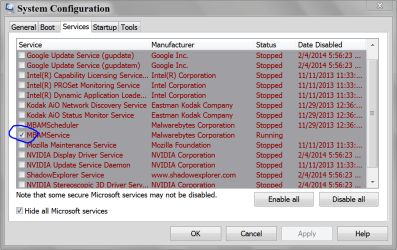
These pictures might help. Msconfig/Startup and Services.
Notice: Hide all Microsoft Services lower left corner.

MSCONFIG STARTUP.PNG

MSCONFIG SERVICES.PNG
 

My Computer

Computer type
PC/Desktop
Computer Manufacturer/Model Number
Home made Desktop
OS
Windows 10 Pro. 64/ version 1709 Windows 7 Pro/64
CPU
Intel i7-6800K @ 4.3
Motherboard
ASUS X-99 Deluxe II
Memory
Corsair Platinum 16 gig @2400
Graphics Card(s)
EVGA GTX 1070 OC
Monitor(s) Displays
Asus 27" LED LCD/VE278Q
Screen Resolution
1920-1080 or 1280-720 HDMI
Hard Drives
INTEL SSD 730-240 Gb Sata 3.0/
PSU
EVGA Platium 1200W
Case
Phanteks Luxe Tempered Glass 8 fans/ one radiator
Cooling
XSPC/ Water Cooled CPU
Keyboard
Das 4 Professional
Mouse
Logitech M705/MX Anywhere 2-S
Internet Speed
100 mbits
Antivirus
Microsoft Security Essentials/ Malwarebytes Premium 3.0/ SAS
Browser
I.E. 11 default/Firefox/ ISP Time Warner Cable/Spectrum
Other Info
LG BluRay Burner/
Sound system-KLipsch-THX/
Icy Dock ssd Hot Swap bays.
Please download AdwCleaner by Xplode and save to your Desktop.

A few Firefox-related things I see in there:

1) anttoolbar - This relates to an extension (which is not a toolbar; wondering why it says that). Looked it up; it tracks all your web browsing - holy bejeezus - I got rid of it.

2) Something about ask.com - I don't know what that is and I can pretty much guarantee I don't want anything to do with ask.com

3) rambler.ru - I assume anything to do with .ru (Russia) is dangerous until proven otherwise. However it conceivably could be a perfectly safe, clean and useful FF add-on.


# AdwCleaner v3.018 - Report created 03/02/2014 at 18:21:56
# Updated 28/01/2014 by Xplode
# Operating System : Windows 7 Professional Service Pack 1 (64 bits)
# Username : R - RTHINKPAD2
# Running from : C:\Users\R\Desktop\AdwCleaner.exe
# Option : Scan

***** [ Services ] *****


***** [ Files / Folders ] *****

Folder Found : C:\UseRs\R\AppData\Roaming\Mozilla\FiRefox\PRofiles\cx93p3fq.default\Extensions\[email protected]

***** [ Shortcuts ] *****


***** [ Registry ] *****

Key Found : HKCU\Software\Conduit
Key Found : HKCU\Software\Microsoft\Windows\CurrentVersion\Ext\Settings\{AE805869-2E5C-4ED4-8F7B-F1F7851A4497}
Key Found : HKCU\Software\Microsoft\Windows\CurrentVersion\Ext\Stats\{898EA8C8-E7FF-479B-8935-AEC46303B9E5}
Key Found : HKCU\Software\Microsoft\Windows\CurrentVersion\Ext\Stats\{AE805869-2E5C-4ED4-8F7B-F1F7851A4497}
Key Found : [x64] HKCU\Software\Conduit
Key Found : HKLM\Software\Conduit
Key Found : HKLM\SOFTWARE\Microsoft\Tracing\au__rasapi32
Key Found : HKLM\SOFTWARE\Microsoft\Tracing\au__rasmancs

***** [ Browsers ] *****

-\\ Internet Explorer v8.0.7601.17514


-\\ Mozilla Firefox v26.0 (en-US)

[ File : C:\UseRs\R\AppData\Roaming\Mozilla\FiRefox\PRofiles\cx93p3fq.default\prefs.js ]

Line Found : user_pref("extensions.wrc.SearchRules.ask.com.style", ".WRCN {display:none} #yui-main .tsrc_vnru .title + .WRCN, #yui-main #teoma-results .title + .WRCN {display:inline !important; background: url(\"I[...]
Line Found : user_pref("extensions.wrc.SearchRules.ask.com.url", "^hxxp(s)?\\:\\/\\/(.+\\.)?ask\\.com\\/.*");
Line Found : user_pref("extensions.wrc.SearchRules.rambler.ru.style", ".WRCN {display:none} .search-results .title + .WRCN {display:inline !important; background: url(\"IMAGE\") right no-repeat}");

[ File : C:\UseRs\R\AppData\Roaming\Mozilla\FiRefox\PRofiles\glni89au.New clean blank profile 6-25-12\prefs.js ]


*************************

AdwCleaner[R0].txt - [1938 octets] - [03/02/2014 18:21:56]

########## EOF - C:\AdwCleaner\AdwCleaner[R0].txt - [1998 octets] ##########
 

My Computer

Computer type
Laptop
Computer Manufacturer/Model Number
Lenovo Thinkpad T520
OS
7 Pro 64
CPU
Intel Core i5-2540M 2.6 GHz
Memory
6 GB RAM
Hard Drives
1 Tb
Please download Junkware Removal Tool to your desktop.

The only thing I recognize in there is Ixquick, which I want. It's a non-tracking non-spying alternative to Google search.


~~~~~~~~~~~~~~~~~~~~~~~~~~~~~~~~~~~~~~~~~~~~~~~~~~~~~~~~~~~~~
Junkware Removal Tool (JRT) by Thisisu
Version: 6.1.0 (01.07.2014:1)
OS: Windows 7 Professional x64
Ran by R on Mon 02/03/2014 at 18:43:13.86
~~~~~~~~~~~~~~~~~~~~~~~~~~~~~~~~~~~~~~~~~~~~~~~~~~~~~~~~~~~~~


~~~ Services


~~~ Registry Values


~~~ Registry Keys

Successfully deleted: [Registry Key] HKEY_CURRENT_USER\Software\conduit
Successfully deleted: [Registry Key] HKEY_LOCAL_MACHINE\Software\caphyon
Successfully deleted: [Registry Key] HKEY_LOCAL_MACHINE\Software\conduit
Successfully deleted: [Registry Key] HKEY_LOCAL_MACHINE\Software\Microsoft\Tracing\au__rasapi32
Successfully deleted: [Registry Key] HKEY_LOCAL_MACHINE\Software\Microsoft\Tracing\au__rasmancs


~~~ Files


~~~ Folders


~~~ FireFox

Successfully deleted: [File] C:\Users\R\AppData\Roaming\mozilla\firefox\profiles\cx93p3fq.default\extensions\[email protected]
Successfully deleted: [Folder] C:\Users\R\AppData\Roaming\mozilla\firefox\profiles\cx93p3fq.default\extensions\staged
Successfully deleted the following from C:\Users\R\AppData\Roaming\mozilla\firefox\profiles\cx93p3fq.default\prefs.js

user_pref("browser.search.defaultenginename", "Ixquick HTTPS");
user_pref("browser.search.selectedEngine", "Ixquick HTTPS");
Emptied folder: C:\Users\R\AppData\Roaming\mozilla\firefox\profiles\cx93p3fq.default\minidumps [369 files]


~~~ Event Viewer Logs were cleared


~~~~~~~~~~~~~~~~~~~~~~~~~~~~~~~~~~~~~~~~~~~~~~~~~~~~~~~~~~~~~
Scan was completed on Mon 02/03/2014 at 18:48:00.08
End of JRT log
~~~~~~~~~~~~~~~~~~~~~~~~~~~~~~~~~~~~~~~~~~~~~~~~~~~~~~~~~~~~~
 

My Computer

Computer type
Laptop
Computer Manufacturer/Model Number
Lenovo Thinkpad T520
OS
7 Pro 64
CPU
Intel Core i5-2540M 2.6 GHz
Memory
6 GB RAM
Hard Drives
1 Tb
Conduit is a webpage hijacker, adwcleaner and JRT specialize in the removal of this and programs that are similar as well as many other things. Conduit is typically installed by the user when they click "Express" install instead of "Custom" Clicking custom allows you to choose which programs to install that come with the one you originally wanted.

Also removed some others similar to conduit.

As for the Ixquick.com read here http://forums.anvisoft.com/viewtopic-53-4463-0.html

Il post back in a few minutes with some other programs to run.
Cheers

Also make sure you run the clean/delete part of Adwcleaner
 

My Computer

Computer type
Laptop
Computer Manufacturer/Model Number
Packard Bell
OS
Windows 7 Home Premium 64Bit
CPU
AMD A6-3420M 1.5GHZ OC - 2.0GHZ
Memory
4GB DDR3 1600MHZ
Graphics Card(s)
AMD RADEON 6520G+AMD RADEON HD7470M 1GB DDR3
Screen Resolution
1366x768
Hard Drives
500GB SATA
Internet Speed
18Mb Unlimited
Antivirus
AVAST!
Browser
MOZILLA FIREFOX

My Computer

Computer type
Laptop
Computer Manufacturer/Model Number
Packard Bell
OS
Windows 7 Home Premium 64Bit
CPU
AMD A6-3420M 1.5GHZ OC - 2.0GHZ
Memory
4GB DDR3 1600MHZ
Graphics Card(s)
AMD RADEON 6520G+AMD RADEON HD7470M 1GB DDR3
Screen Resolution
1366x768
Hard Drives
500GB SATA
Internet Speed
18Mb Unlimited
Antivirus
AVAST!
Browser
MOZILLA FIREFOX
Also, to help prevent the installation of unwanted programs when you install a program, download Unchecky: Unchecky - Keeps your checkboxes clear
Even with this application though, be sure to check which things you want and uncheck the things that you don't.
 

My Computer

Computer type
PC/Desktop
Computer Manufacturer/Model Number
HP Pavilion P7-1010
OS
Windows 7 Professional x64 Service Pack 1
CPU
AMD Athlon X4 645
Motherboard
Foxxcon N-Alvorix RS880
Memory
6GB DDR3 1066
Graphics Card(s)
Sapphire Radeon HD 5670 512MB GDDR5
Sound Card
Realtek Integrated Audio
Monitor(s) Displays
HP 2011x
Screen Resolution
1600x900
Hard Drives
1. Crucial M4 128GB SSD
2. 1TB Seagate Barracuda 7200.12 RPM
3. 1TB Western Digital Caviar Green 5400RPM
PSU
Seasonic S12 II Bronze 380 Watt
Case
HP OEM
Cooling
Coolermaster Heatsink, AVC Case Fan
Keyboard
HP OEM- Made by Chicony
Mouse
HP OEM- Made by Logitech
Internet Speed
20MBit Down/4 Up
Antivirus
Microsoft Security Essentials
Browser
Internet Explorer 10
Also make sure you run the clean/delete part of Adwcleaner

Does JRT remove things, or only find them? (I understand that ADW has separate buttons for finding and removing things but I'm not clear on JRT.


The Ixquick issue is complicated and may need its own separate thread. I do not believe it is hijacking or redirecting. It is recognized as one of the top two non-tracking non-spying search providers, the other being Duckduckgo. (Ixquick and Startpage.com are sister pages from the same company. One provides Google results - it's their explicit, intended purpose, with Google's permission, the other collates from multiple other engines.)

It's my default search provider in Firefox. I have had no evidence of redirects or hijacking at all (unusual pop-ups, unintended webpages opening, unfamiliar URLs in the address bar, which I keep visible at all times). I know what redirects look like because I had a redirect problem about 4 years ago on a different computer; I cleaned it out right away.

Ixquick is listed at Prism-break.org, a directory of privacy-protecting (NSA-resistant) applications and services with extremely rigorous standards that has been covered in international media. Very few products of any kind - and none that are proprietary - meet their requirments. (That rules out all of Microsoft, Google and Apple. The site discourages people from using Windows altogether.)

See Ixquick's discussion of privacy issues here (and other information like full names, bios, photos and contact information of company officers, which I don't think I've seen for any computer product ever.)


As for the hijacking issue - if you search for 'ixquick redirect', the results apart from avisoft are at very shady looking sites from places like Lithuania and Brazil, with names like yac.mx and 60boy.com. Something's fishy if those are top results for removing a browser hijacker, and the absence of familiar PC help, news, or cleanup sites should raise flags. Even more suspicious is that those two sites are identical, with different URLs leading to identical pages.

Still, if conclusive information turns up, I could be convinced otherwise. I'm not saying there isn't a malicious Ixquick redirect out there. (Personally, I find it more plausible that some rogue hacker or even someone secretly backed by Google is behind the redirect, than that the operation is an elaborate scam that has fooled not only Prism-break but also the Netherlands Data Protection Authority at which Ixquick is registered.... but this is purely opinion.)


Coverage of Ixquick ----------------------------------

http://www.theguardian.com/technolo...earch-tool-duckduckgo-1bn-queries-2013-google


Dutch search engine ignores IP addresses ? The Register

Scroogle's Gone? Here's Who Still Offers Private Searching

Search Engines Ixquick & StartPage Double Up On Security Measures With 2 New Encryption Standards

Startpage and Ixquick search engines improve user privacy further | Ghacks (This is one person's own tech blog that I have been following for years)

Shady-looking virus-removal sites ----------------------------

http://www.yac.mx/en/guides/virus-g...xquickcom-search-hijacking-removal-guide.html

A guide on how to delete/remove Ixquick.com Redirect (Removal Instructions)
 
Last edited:

My Computer

Computer type
Laptop
Computer Manufacturer/Model Number
Lenovo Thinkpad T520
OS
7 Pro 64
CPU
Intel Core i5-2540M 2.6 GHz
Memory
6 GB RAM
Hard Drives
1 Tb
I would like you to run Rogue killer...

Many thanks for all this help. I will do these things. I try to be super-vigilant about always, always choosing 'Custom' installs and unchecking anything suspicious, but of course something could have slipped through at some point.

I already have Malwarebytes - the free version which only scans when you tell it to (i.e. 'manually'). If I understand correctly only the paid version monitors continually and does automatic scheduled scans.

I read somewhere that the free version is adequate if you run it every week or two and also have MS Security Essentials, which I do.
 

My Computer

Computer type
Laptop
Computer Manufacturer/Model Number
Lenovo Thinkpad T520
OS
7 Pro 64
CPU
Intel Core i5-2540M 2.6 GHz
Memory
6 GB RAM
Hard Drives
1 Tb
RogueKiller log

Two things don't show up in the log:

- List of browser extensions, which shows a few that I removed some time ago. Apparently Firefox didn't completely delete them.
- MDR section which I pasted at the end. It says "Invalid partition table.Error loading operating system.Missing operating system".
------------------------------------------------------------------
RogueKiller V8.8.3 _x64_ [Jan 24 2014] by Tigzy
mail : tigzyRK<at>gmail<dot>com
Feedback : http://www.adlice.com/forum/
Website : RogueKiller download
Blog : Adlice Software | malware analysis

Operating System : Windows 7 (6.1.7601 Service Pack 1) 64 bits version
Started in : Normal mode
User : R [Admin rights]
Mode : Scan -- Date : 02/04/2014 11:27:35
| ARK || FAK || MBR |

¤¤¤ Bad processes : 0 ¤¤¤

¤¤¤ Registry Entries : 16 ¤¤¤
[HJ POL][PUM] HKCU\[...]\System : DisableTaskMgr (0) -> FOUND
[HJ POL][PUM] HKCU\[...]\System : DisableRegistryTools (0) -> FOUND
[HJ POL][PUM] HKLM\[...]\System : ConsentPromptBehaviorAdmin (0) -> FOUND
[HJ POL][PUM] HKLM\[...]\System : EnableLUA (0) -> FOUND
[HJ POL][PUM] HKLM\[...]\Wow6432Node\[...]\System : ConsentPromptBehaviorAdmin (0) -> FOUND
[HJ POL][PUM] HKLM\[...]\Wow6432Node\[...]\System : EnableLUA (0) -> FOUND
[HJ SMENU][PUM] HKCU\[...]\Advanced : Start_ShowMyGames (0) -> FOUND
[HJ SMENU][PUM] HKCU\[...]\Advanced : Start_TrackProgs (0) -> FOUND
[HJ DESK][PUM] HKCU\[...]\ClassicStartMenu : {59031a47-3f72-44a7-89c5-5595fe6b30ee} (1) -> FOUND
[HJ DESK][PUM] HKCU\[...]\ClassicStartMenu : {20D04FE0-3AEA-1069-A2D8-08002B30309D} (1) -> FOUND
[HJ DESK][PUM] HKCU\[...]\ClassicStartMenu : {645FF040-5081-101B-9F08-00AA002F954E} (1) -> FOUND
[HJ DESK][PUM] HKCU\[...]\NewStartPanel : {59031a47-3f72-44a7-89c5-5595fe6b30ee} (1) -> FOUND
[HJ DESK][PUM] HKCU\[...]\NewStartPanel : {20D04FE0-3AEA-1069-A2D8-08002B30309D} (1) -> FOUND
[HJ DESK][PUM] HKCU\[...]\NewStartPanel : {645FF040-5081-101B-9F08-00AA002F954E} (1) -> FOUND
[HJ DESK][PUM] HKLM\[...]\NewStartPanel : {59031a47-3f72-44a7-89c5-5595fe6b30ee} (1) -> FOUND
[HJ DESK][PUM] HKLM\[...]\NewStartPanel : {20D04FE0-3AEA-1069-A2D8-08002B30309D} (1) -> FOUND

¤¤¤ Scheduled tasks : 0 ¤¤¤

¤¤¤ Startup Entries : 0 ¤¤¤

¤¤¤ Web browsers : 0 ¤¤¤

¤¤¤ Browser Addons : 0 ¤¤¤

¤¤¤ Particular Files / Folders: ¤¤¤

¤¤¤ Driver : [NOT LOADED 0x0] ¤¤¤

¤¤¤ External Hives: ¤¤¤

¤¤¤ Infection : ¤¤¤

¤¤¤ HOSTS File: ¤¤¤
--> %SystemRoot%\System32\drivers\etc\hosts


¤¤¤ MBR Check: ¤¤¤

+++++ PhysicalDrive0: (\\.\PHYSICALDRIVE0 @ IDE) ST9500420AS +++++
--- User ---
[MBR] 856421149ca2309c05c09135b46c396f
[BSP] 55809368190c9f11845a881640868884 : Windows 7/8 MBR Code
Partition table:
0 - [ACTIVE] NTFS (0x07) [VISIBLE] Offset (sectors): 2048 | Size: 1200 Mo
1 - [XXXXXX] NTFS (0x07) [VISIBLE] Offset (sectors): 2459648 | Size: 459738 Mo
2 - [XXXXXX] NTFS (0x07) [VISIBLE] Offset (sectors): 944003072 | Size: 16000 Mo
User = LL1 ... OK!
User = LL2 ... OK!

Finished : << RKreport[0]_S_02042014_112735.txt >>

------------------------------------------------------------------------

MDR SECTION:


¤¤¤ MBR Check: ¤¤¤

+++++ PhysicalDrive0: ST9500420AS +++++
--- User ---
[MBR] 856421149ca2309c05c09135b46c396f
[BSP] 55809368190c9f11845a881640868884 : Windows 7/8 MBR Code
Partition table:
0 - [ACTIVE] NTFS (0x07) [VISIBLE] Offset (sectors): 2048 | Size: 1200 Mo
1 - [XXXXXX] NTFS (0x07) [VISIBLE] Offset (sectors): 2459648 | Size: 459738 Mo
2 - [XXXXXX] NTFS (0x07) [VISIBLE] Offset (sectors): 944003072 | Size: 16000 Mo

33 c0 8e d0 bc 00 7c 8e c0 8e d8 be 00 7c bf 00 06
b9 00 02 fc f3 a4 50 68 1c 06 cb fb b9 04 00 bd be
07 80 7e 00 00 7c 0b 0f 85 0e 01 83 c5 10 e2 f1 cd
18 88 56 00 55 c6 46 11 05 c6 46 10 00 b4 41 bb aa
55 cd 13 5d 72 0f 81 fb 55 aa 75 09 f7 c1 01 00 74
03 fe 46 10 66 60 80 7e 10 00 74 26 66 68 00 00 00
00 66 ff 76 08 68 00 00 68 00 7c 68 01 00 68 10 00
b4 42 8a 56 00 8b f4 cd 13 9f 83 c4 10 9e eb 14 b8
01 02 bb 00 7c 8a 56 00 8a 76 01 8a 4e 02 8a 6e 03
cd 13 66 61 73 1c fe 4e 11 75 0c 80 7e 00 80 0f 84
8a 00 b2 80 eb 84 55 32 e4 8a 56 00 cd 13 5d eb 9e
81 3e fe 7d 55 aa 75 6e ff 76 00 e8 8d 00 75 17 fa
b0 d1 e6 64 e8 83 00 b0 df e6 60 e8 7c 00 b0 ff e6
64 e8 75 00 fb b8 00 bb cd 1a 66 23 c0 75 3b 66 81
fb 54 43 50 41 75 32 81 f9 02 01 72 2c 66 68 07 bb
00 00 66 68 00 02 00 00 66 68 08 00 00 00 66 53 66
53 66 55 66 68 00 00 00 00 66 68 00 7c 00 00 66 61
68 00 00 07 cd 1a 5a 32 f6 ea 00 7c 00 00 cd 18 a0
b7 07 eb 08 a0 b6 07 eb 03 a0 b5 07 32 e4 05 00 07
8b f0 ac 3c 00 74 09 bb 07 00 b4 0e cd 10 eb f2 f4
eb fd 2b c9 e4 64 eb 00 24 02 e0 f8 24 02 c3 49 6e
76 61 6c 69 64 20 70 61 72 74 69 74 69 6f 6e 20 74
61 62 6c 65 00 45 72 72 6f 72 20 6c 6f 61 64 69 6e
67 20 6f 70 65 72 61 74 69 6e 67 20 73 79 73 74 65
6d 00 4d 69 73 73 69 6e 67 20 6f 70 65 72 61 74 69
6e 67 20 73 79 73 74 65 6d 00 00 00 63 7b 9a 36 57
b0 8c 00 00

3.....|......|.........Ph...........~..|.............V.U.F...F...A..U..]r...U.u.....t..F.f`.~..t&fh....f.v.h..h.|h..h...B.V.................|.V..v..N..n...fas..N.u..~..........U2..V...]...>.}U.un.v....u.....d......`.|....d.u.......f#.u;f..TCPAu2....r,fh....fh....fh....fSfSfUfh....fh.|..fah.....Z2...|.................2.......<.t.............+..d..$...$..Invalid partition table.Error loading operating system.Missing operating system...c{.6W....

User = LL1 ... OK!
User = LL2 ... OK!
--------------------------------------------------

 

My Computer

Computer type
Laptop
Computer Manufacturer/Model Number
Lenovo Thinkpad T520
OS
7 Pro 64
CPU
Intel Core i5-2540M 2.6 GHz
Memory
6 GB RAM
Hard Drives
1 Tb
Back
Top