7201 won't activate

Sprat69

New member
Local time
4:29 PM
Messages
5
Location
St. Augustine, Fl.
First time post, so please bear with me. I downloaded 7201 X86 and it installed fine, and is by far the best version to date, but now when I try to activate it, it says it can't connect to activation server and to use an alternate method. My MD5 file hash was correct and I havn't used any patches. Anyone else have this problem with 7201? 7227 X86 is available. Should I install it?
By the way, all other versions installed activated ok.

Thanks,
Sprat69:cry:
 

My Computer

OS
Windows 7 Build 7229 x64 (clean install)
Hi Sprat69, welcome to the forums.

Have you tried multiple times, it could be that the server is busy. Also, have you selected to 'Activate When Online' when you installed? If you can get a screenshot then that'd be great too :p


Jeff
 

My Computer

Computer Manufacturer/Model Number
Compaq Desktop
OS
Windows 7 Ultimate x64
CPU
AMD Sempron Dual Core
Memory
3GB
Graphics Card(s)
NVIDIA GeForce 6150SE nForce 430
Screen Resolution
1024x768
Hard Drives
150GB Sata
First time post, so please bear with me. I downloaded 7201 X86 and it installed fine, and is by far the best version to date, but now when I try to activate it, it says it can't connect to activation server and to use an alternate method. My MD5 file hash was correct and I havn't used any patches. Anyone else have this problem with 7201? 7227 X86 is available. Should I install it?
By the way, all other versions installed activated ok.

Thanks,
Sprat69:cry:
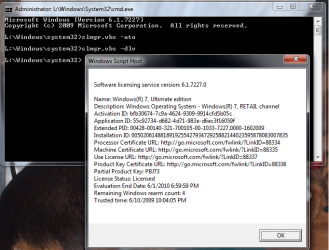
Several updates for my part have failed to activate on line. with the check mark. so what I do is
ORB -> cmd (run as admin) wait for the popup
type slmgr.vbs -ato wait for the popup to say your activated.
type slmgr.vbs -dlv wait for the popup to show your expire date.

exit out.

enjoy

PS: I currently have Win7 7227 running.
 
Several updates for my part have failed to activate on line. with the check mark. so what I do is
ORB -> cmd (run as admin) wait for the popup
type slmgr.vbs -ato wait for the popup to say your activated.
type slmgr.vbs -dlv wait for the popup to show your expire date.

Thanks for the trick, i'm about to install and was worried about that, 'cause when i'd install W 7137, it said i had only three days to activate, and when it was W 7100 it was 29 days.

So....could be normal as the activation date is off limits !?!:sarc:
 

My Computer

Computer type
PC/Desktop
Computer Manufacturer/Model Number
Custom Build
OS
Windows 7 Professional SP1 - x64 [Non-UEFI Boot]
CPU
Ivy Bridge Core i5 3570K (Delidded)
Motherboard
Asus P8Z77-V LE PLUS
Memory
G.Skill "Ares" DDR3 PC3-12800 - 1600MHz (16Gb)
Graphics Card(s)
Asus Dual-RX480-O4G
Sound Card
Creative Sound Blaster Z w/5.1 sound system
Monitor(s) Displays
Asus IPS 23"
Screen Resolution
16/9
Hard Drives
Internal:
500Go Sata 6Gb/s (x2)
500Go Sata 3Gb/s (x2)
SSD 60Go Sata 6Gb/s
PSU
In Win C 900W Series 80+ Platinum
Case
Thermaltake Chaser A71
Cooling
Custom Water Cooling Loop
Keyboard
Cooler Master QuickFire XTi
Mouse
Razer Imperator 2012 (4G)
Antivirus
MSE
Browser
IE 11.0.xxx Rtm
Other Info
"Raid0" with Intel Smart Response Technology (HDD/SSD)
I always install with no key, after installation is ok, I proceed to install key then activate with no problems at all.

Should try another key to check!
 

My Computer

Computer Manufacturer/Model Number
HP a6720f
OS
7 Ultimate x64 RTM 7600.16385
CPU
AMD Phenom 9550 @ 2.20ghz
Motherboard
Asus M2N78-LA
Memory
4x2GB DDR2 Patriot Viper 800mhz
Graphics Card(s)
GeForce 9400 GT 512MB
Sound Card
Onboard Realtek Hi-Definition ALC 888S chipset
Monitor(s) Displays
Samsung P2370HD 23" 1080P HDTV
Screen Resolution
1920x1080
Hard Drives
Western Digital 640GB; Samsung 1 TB; WD 500GB; Seagate Portable 250gb;
Keyboard
Logitech LX310 Wireless Internet Keyboard
Mouse
Logitech LX310 Wireless Laser Mouse
Internet Speed
7Mbps/384Kbps
Thanks for the trick, i'm about to install and was worried about that, 'cause when i'd install W 7137, it said i had only three days to activate, and when it was W 7100 it was 29 days.

So....could be normal as the activation date is off limits !?!:sarc:
If you don't enter a key during Installation you get the 29 days.....to enter a key and then 3 days to activate, or you can re-arm.
If you enter a key during Installation you only get 3 days to activate that key.

As suggested one or two posts above....why not try another key, they are readily available from Microsoft so it isn't a problem to get them.
 

My Computer

Computer Manufacturer/Model Number
Home Build
OS
Windows 7 RTM Ultimate - Activated (Technet)
CPU
Athlon 4800+
Motherboard
Gigabyte M56S-S3
Memory
2 gig
Graphics Card(s)
ATI Radeon 2400+
Sound Card
On board
Monitor(s) Displays
Samsung 22" LCD
Screen Resolution
1680 x 1050
Hard Drives
WD 250 gig Sata
PSU
550 w
Case
Antec LS100
Keyboard
Logitech MX5000 BT
Mouse
Logitech MX 5000 BT
Internet Speed
ADSL 2+
Several updates for my part have failed to activate on line. with the check mark. so what I do is
ORB -> cmd (run as admin) wait for the popup
type slmgr.vbs -ato wait for the popup to say your activated.
type slmgr.vbs -dlv wait for the popup to show your expire date.

Learn something new everyday. Thanks, Snuffy.

Gary
 

My Computer

Computer Manufacturer/Model Number
Dell XPS420
OS
Vista Ult 64 bit Seven Ult RTM x64
CPU
Intel Core2 Quad Q6600 2.40 gigahertz
Memory
Crucial Ballistix 4x2GB PC2 6400
Graphics Card(s)
NVIDIA GeForce 8600 GTS 256 MB
Sound Card
Creative SB X-Fi audio
Monitor(s) Displays
HP w2207 + HPvs15
Screen Resolution
1680x1050 + 1024x768
Hard Drives
2-WD5000AAKS-500 GB
WD5000AAV-500 GB external
Keyboard
Microsoft Comfort Curve
Mouse
MX Revolution
Other Info
Wacom Intuos 2 Graphics Tablet
Experience Index=5.5
If you don't enter a key during Installation you get the 29 days.....to enter a key and then 3 days to activate, or you can re-arm.
If you enter a key during Installation you only get 3 days to activate that key.

As suggested one or two posts above....why not try another key, they are readily available from Microsoft so it isn't a problem to get them.

Thanks for info...it's the same anyway...I got already a fresh key from MS for the new build. I'll not bother, so!
 

My Computer

Computer type
PC/Desktop
Computer Manufacturer/Model Number
Custom Build
OS
Windows 7 Professional SP1 - x64 [Non-UEFI Boot]
CPU
Ivy Bridge Core i5 3570K (Delidded)
Motherboard
Asus P8Z77-V LE PLUS
Memory
G.Skill "Ares" DDR3 PC3-12800 - 1600MHz (16Gb)
Graphics Card(s)
Asus Dual-RX480-O4G
Sound Card
Creative Sound Blaster Z w/5.1 sound system
Monitor(s) Displays
Asus IPS 23"
Screen Resolution
16/9
Hard Drives
Internal:
500Go Sata 6Gb/s (x2)
500Go Sata 3Gb/s (x2)
SSD 60Go Sata 6Gb/s
PSU
In Win C 900W Series 80+ Platinum
Case
Thermaltake Chaser A71
Cooling
Custom Water Cooling Loop
Keyboard
Cooler Master QuickFire XTi
Mouse
Razer Imperator 2012 (4G)
Antivirus
MSE
Browser
IE 11.0.xxx Rtm
Other Info
"Raid0" with Intel Smart Response Technology (HDD/SSD)
Learn something new everyday. Thanks, Snuffy.

Gary
If you enter a GOOD Key and simply do not activate it. you get 30 days.
I recommend you activate it prior to day 27, that silly popup is annoying.
here is what I get 1. key entered not activated. 2. activated via script next day. plz read the scripts 1 is only -dlv and 2 is -ato and -dlv.
I do hope this clears up some misconceptions (THIS IS 100% LEGIT). to see all slmgr.vbs scripts type slmgr.vbs /? Enjoy
 

Attachments

  • license.7227.png
    license.7227.png
    46.6 KB · Views: 267
  • license.7227.actd.png
    license.7227.actd.png
    45.2 KB · Views: 160
Hi Snuffy,

I enter a key on install and activate is one of the first things I do. What I learned was how to activate through a command prompt. Didn't know that was possible. I'm no command line guru. I've never had a problem doing it through the GUI though.

Gary
 

My Computer

Computer Manufacturer/Model Number
Dell XPS420
OS
Vista Ult 64 bit Seven Ult RTM x64
CPU
Intel Core2 Quad Q6600 2.40 gigahertz
Memory
Crucial Ballistix 4x2GB PC2 6400
Graphics Card(s)
NVIDIA GeForce 8600 GTS 256 MB
Sound Card
Creative SB X-Fi audio
Monitor(s) Displays
HP w2207 + HPvs15
Screen Resolution
1680x1050 + 1024x768
Hard Drives
2-WD5000AAKS-500 GB
WD5000AAV-500 GB external
Keyboard
Microsoft Comfort Curve
Mouse
MX Revolution
Other Info
Wacom Intuos 2 Graphics Tablet
Experience Index=5.5
Not quite thread jacking but i do have a related question. I'm still running 7100....how do i get the more current version? I see on the MS download site its still 7100........

thanks!
 

My Computer

Computer Manufacturer/Model Number
Dell Optiplex 745
OS
Windows 7 HP x64
Hi all thanks for the advice but since we have a new version to try every few days, I decided to do a clean install of 7229 x64 and it activated right away!
:D
I'm still learning!
Sprat69
 

My Computer

OS
Windows 7 Build 7229 x64 (clean install)
Glad you've got it working for you.

We're all still learning. ;)

Gary
 

My Computer

Computer Manufacturer/Model Number
Dell XPS420
OS
Vista Ult 64 bit Seven Ult RTM x64
CPU
Intel Core2 Quad Q6600 2.40 gigahertz
Memory
Crucial Ballistix 4x2GB PC2 6400
Graphics Card(s)
NVIDIA GeForce 8600 GTS 256 MB
Sound Card
Creative SB X-Fi audio
Monitor(s) Displays
HP w2207 + HPvs15
Screen Resolution
1680x1050 + 1024x768
Hard Drives
2-WD5000AAKS-500 GB
WD5000AAV-500 GB external
Keyboard
Microsoft Comfort Curve
Mouse
MX Revolution
Other Info
Wacom Intuos 2 Graphics Tablet
Experience Index=5.5
Back
Top