Solved 720p & 1080p issue of lagging/chopping playback video

A101

New member
Local time
9:03 AM
Messages
9
Hello beautiful people!

I have a problem with 720p and 1080p on my laptop and I need help with that.

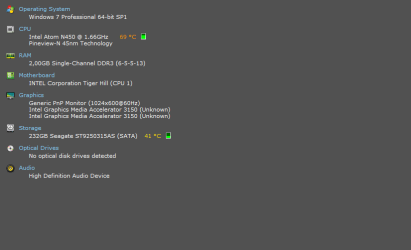
The screen shot, below, displays everything about my computer's information. If there is any way I can fix that , please tell me how. Thank you so much in advance (I believe in you guys!)


ScreenShot_20160318001358.png
 
Last edited:

My Computer My Computer

At a glance

Windows 7 Pro 64 bit
Computer type
PC/Desktop
OS
Windows 7 Pro 64 bit
Hi and welcome to SevenForums,
Seeing your cpu temperature is at 69c might be why that's getting a tad on the hot site
Click Start and type in the search box
resource monitor
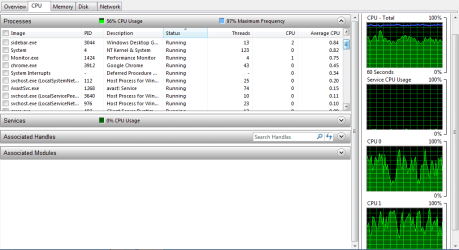
Click on the suggestion for it and open the Overview section and post a screen shot.

You can monitor your temperatures with this
Download Real Temp 3.70 | techPowerUp
Download it to your downloads folder
Right click it and extract all
Open the extracted folder and right click the RealTemp.exe file and click on Send to = desktop create shortcut
Click to open the shortcut on your desktop
It will open and a Celsius # will appear on the action center.
You can minimize the little window and the # will remain.

Realtemp also shows processor Load so you might leave it not minimized so you can monitor the Load also at a glance.
 

My Computer My Computer

At a glance

Win-7-Pro64bit 7-H-Prem-64biti7-5930K 2nd i9-9940x both water blocked VRM'...Trident-z 3200C14 2nd Trident-z 3600C16EVGA 1080ti ftw3 2nd Titan Xp both water blocked
Computer type
PC/Desktop
Computer Manufacturer/Model Number
Custom assembled by me :}
OS
Win-7-Pro64bit 7-H-Prem-64bit
CPU
i7-5930K 2nd i9-9940x both water blocked VRM's too
Motherboard
ASUS SABERTOOTH X99 2nd ASUS x299 Apex
Memory
Trident-z 3200C14 2nd Trident-z 3600C16
Graphics Card(s)
EVGA 1080ti ftw3 2nd Titan Xp both water blocked
Sound Card
Built-in Realtek
Monitor(s) Displays
1-AOC G2460PG 24"G-Sync 144Hz/ 2nd 1-ASUS VG248QE 24" 144Hz
Screen Resolution
1920 x 1080 144Hz
Hard Drives
2-Samsung M.2 Evo & Evo Plus
2-Samsung 850 EVO 500GB SSD's/ 3-2.5 W.D. Black 1tb-&3-1tb/3-3.5 WD Black 1tb hdd's
PSU
EVGA SuperNOVA 1000-P2 2nd 1200-P2
Case
2-Corsair Obsidian Series 450D Black ATX Mid Tower
Cooling
Custom water loops
Keyboard
Logitech G710+/ 2nd Logitech G910
Mouse
2-RedDragon M901 Perdition 16400 dpi Gaming mouse = wired
Internet Speed
Comcast Ping 19ms 89.31mbps download speed 6.12mbps upload
Antivirus
Malwarebytes Pro/ Superantispyware Pro
Browser
FireFox & Pale moon
Other Info
2nd ASUS X299 Apex/Intel i9-9940x with Custom water loop/7H-Prem-x64/Corsair 450D case/Ram Trident-z 3600C16 4x8gb / Samsung970Evo plus 500gb SSD/Dual ssd EZ swap evo/PSU EVGA SuperNova 1200w-P2 80+Platinum/GPU Titan Xp /8-ML-140 on push-pull on 2-280GTX rads
Hello and thank you for your attention to my post on here.

Yes, I do have a problem with CPU temperature but it is not my primary issue here. This is my screenshot of what you asked for. And I am going to download that software and see if it will make any difference.

ScreenShot_20160318011703.png
 

My Computer My Computer

At a glance

Windows 7 Pro 64 bit
Computer type
PC/Desktop
OS
Windows 7 Pro 64 bit
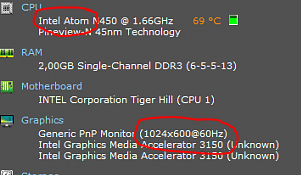
Well first of all, lets look carefully at the specs to see why you're having trouble with HD resolution.

Atom.PNG

I wouldn't expect an atom processor to be able to handle much in the way of HD resolution with any degree of speed, and without lag/chopping. Also, are you using an external monitor to get 1080p? Because the specs only show 1024 x 600.

I would agree with what Thrash said, too. You have a temp problem, and it could be tied to your lag issue.
 

My Computer My Computer

At a glance

Win 7 Pro x64/Win 10 Pro x64 dual bootAMD FX 8350 Vishera @ 420016 GB Mushkin Blackline DDR3-2400 @ 1866 (9-1...XFX Radeon R9 280 Double D Black Edition
Computer type
PC/Desktop
Computer Manufacturer/Model Number
Mellon Labs (custom build)
OS
Win 7 Pro x64/Win 10 Pro x64 dual boot
CPU
AMD FX 8350 Vishera @ 4200
Motherboard
ASUS M5A97 R2.0
Memory
16 GB Mushkin Blackline DDR3-2400 @ 1866 (9-10-10-10-31)
Graphics Card(s)
XFX Radeon R9 280 Double D Black Edition
Sound Card
Realtek HD Audio on MB. Sounds great.
Monitor(s) Displays
Acer 24", Acer 22"
Screen Resolution
3840 x 1080
Hard Drives
1 x Mushkin Chronos 120 GB SSD (Win 10)
1 x Samsung 850 EVO 250 GB SSD (Win 7)
1 x WD 1TB SATA Blue
1 x WD 1TB SATA Green
PSU
Corsair TX-750
Case
CoolerMaster HAF 912+
Cooling
Coolermaster Seidon 240M Liquid AIO. 6 case fans
Keyboard
Logitech G710+
Mouse
Logitech G500s
Internet Speed
Much better since I got fiber, but still way overpriced.
Antivirus
MSE, Malware Bytes for scanning
Browser
Firefox
Other Info
Corsair VOID USB headphones.

A Mellon Labs X-1 - LCD Smartie driven system status display.

Brought to you by the letter E
Hi MellonHead,

Thank you for your time to look at my problem and make a clear response to my post. I appreciate it.

Well I simply do not know what I should do about Atom processor, and if you have any suggestion(s) on that please tell me.

And I do not use any external monitor for 1080p.

Or to sum all this up and go to buy a new laptop? What do you think guys?

Thank you all, really!
 

My Computer My Computer

At a glance

Windows 7 Pro 64 bit
Computer type
PC/Desktop
OS
Windows 7 Pro 64 bit
Hi,
What are you doing with the 720-1080 just watching a video ?
 

My Computer My Computer

At a glance

Win-7-Pro64bit 7-H-Prem-64biti7-5930K 2nd i9-9940x both water blocked VRM'...Trident-z 3200C14 2nd Trident-z 3600C16EVGA 1080ti ftw3 2nd Titan Xp both water blocked
Computer type
PC/Desktop
Computer Manufacturer/Model Number
Custom assembled by me :}
OS
Win-7-Pro64bit 7-H-Prem-64bit
CPU
i7-5930K 2nd i9-9940x both water blocked VRM's too
Motherboard
ASUS SABERTOOTH X99 2nd ASUS x299 Apex
Memory
Trident-z 3200C14 2nd Trident-z 3600C16
Graphics Card(s)
EVGA 1080ti ftw3 2nd Titan Xp both water blocked
Sound Card
Built-in Realtek
Monitor(s) Displays
1-AOC G2460PG 24"G-Sync 144Hz/ 2nd 1-ASUS VG248QE 24" 144Hz
Screen Resolution
1920 x 1080 144Hz
Hard Drives
2-Samsung M.2 Evo & Evo Plus
2-Samsung 850 EVO 500GB SSD's/ 3-2.5 W.D. Black 1tb-&3-1tb/3-3.5 WD Black 1tb hdd's
PSU
EVGA SuperNOVA 1000-P2 2nd 1200-P2
Case
2-Corsair Obsidian Series 450D Black ATX Mid Tower
Cooling
Custom water loops
Keyboard
Logitech G710+/ 2nd Logitech G910
Mouse
2-RedDragon M901 Perdition 16400 dpi Gaming mouse = wired
Internet Speed
Comcast Ping 19ms 89.31mbps download speed 6.12mbps upload
Antivirus
Malwarebytes Pro/ Superantispyware Pro
Browser
FireFox & Pale moon
Other Info
2nd ASUS X299 Apex/Intel i9-9940x with Custom water loop/7H-Prem-x64/Corsair 450D case/Ram Trident-z 3600C16 4x8gb / Samsung970Evo plus 500gb SSD/Dual ssd EZ swap evo/PSU EVGA SuperNova 1200w-P2 80+Platinum/GPU Titan Xp /8-ML-140 on push-pull on 2-280GTX rads
I don't think that you can do anything about the Atom processor. It's not like you can replace it with anything else. It's made for your laptop.

I don't know how you're getting 720p and 1080p out of that thing if you aren't using an external screen. It only has a native resolution of 1024 x 600. That's a long way from 720p or 1080p. Are you sure you're not mistaken about the resolution? Does the screen have a specific HD mode that you can put it into to watch DVDs or something. I'm really confused by this.
 

My Computer My Computer

At a glance

Win 7 Pro x64/Win 10 Pro x64 dual bootAMD FX 8350 Vishera @ 420016 GB Mushkin Blackline DDR3-2400 @ 1866 (9-1...XFX Radeon R9 280 Double D Black Edition
Computer type
PC/Desktop
Computer Manufacturer/Model Number
Mellon Labs (custom build)
OS
Win 7 Pro x64/Win 10 Pro x64 dual boot
CPU
AMD FX 8350 Vishera @ 4200
Motherboard
ASUS M5A97 R2.0
Memory
16 GB Mushkin Blackline DDR3-2400 @ 1866 (9-10-10-10-31)
Graphics Card(s)
XFX Radeon R9 280 Double D Black Edition
Sound Card
Realtek HD Audio on MB. Sounds great.
Monitor(s) Displays
Acer 24", Acer 22"
Screen Resolution
3840 x 1080
Hard Drives
1 x Mushkin Chronos 120 GB SSD (Win 10)
1 x Samsung 850 EVO 250 GB SSD (Win 7)
1 x WD 1TB SATA Blue
1 x WD 1TB SATA Green
PSU
Corsair TX-750
Case
CoolerMaster HAF 912+
Cooling
Coolermaster Seidon 240M Liquid AIO. 6 case fans
Keyboard
Logitech G710+
Mouse
Logitech G500s
Internet Speed
Much better since I got fiber, but still way overpriced.
Antivirus
MSE, Malware Bytes for scanning
Browser
Firefox
Other Info
Corsair VOID USB headphones.

A Mellon Labs X-1 - LCD Smartie driven system status display.

Brought to you by the letter E
The Atom Processor cannot handle a full 720 and 1080 resolution of the video, GMA 3150 can't either.

I suggest you buy a new laptop :)
 

My Computer My Computer

At a glance

Windows 7 Home Premium 64-BITAMD A8 7200P8GB 1600mhzRadeon R5 (APU) + Radeon R5 M230 2GB Dual Gra...
Computer type
PC/Desktop
Computer Manufacturer/Model Number
ASUS X550ZE
OS
Windows 7 Home Premium 64-BIT
CPU
AMD A8 7200P
Motherboard
N/A
Memory
8GB 1600mhz
Graphics Card(s)
Radeon R5 (APU) + Radeon R5 M230 2GB Dual Graphics
Sound Card
Realtek ALC269 with SonicMaster
Monitor(s) Displays
Laptop Display
Screen Resolution
1920 x 1080 @60hz
Hard Drives
WDC WD50 00LPVX-80V0TT0 (500GB)
PSU
Laptop Charger
Mouse
ARMAGGEDON TEXTRON SCORPION 7
Internet Speed
100 mbps DOWN / 50 mbps UP
Antivirus
Windows Defender
Browser
Mozzila FireFox, Valve Steam in-game internet browser
If you wanna try ... Use differrent type of video mp4, xvid, etc.
I think that you can find which kind of video play well/better then other.
However i don't go more than 720p because of laptop resolution.

BTW you can allways convert video to the right resolution of your notebook, so Atom cpu don't have to convert onthefly video
See Ya
 

My Computer My Computer

At a glance

Windows7 ProIntel Core Duo4 GbATI Radeon Hd 6450
Computer type
PC/Desktop
Computer Manufacturer/Model Number
Dell Optiplex 760
OS
Windows7 Pro
CPU
Intel Core Duo
Motherboard
Dell
Memory
4 Gb
Graphics Card(s)
ATI Radeon Hd 6450
Hard Drives
250 Gb Sata
Antivirus
Avast ! Free
Browser
Firefox 25.0
Unfortunately, the guys here are right, those specs are just too low for even HD playback... I woudn't spect for MP4 to work either, h264 decoding needs a VGA capable of hardware accelerated decoding, in other words, it needs to be capable of reading the video and "decrypt" it, if aplicable, without having to rely on the CPU... but here those two are the weak spot so... :(
 

My Computer My Computer

At a glance

Microsoft Windows 7 Home Premium SP1 64-bit B...AMD Athlon 64 X2 5200+ Dual Core CPU @ 2.7 Gh...2x2 GB DDR2 PC-5300 (667 Mhz) Kingston ValueRAMXFX ATI Radeon HD 4350 GPU (512 MB + 512 MB HM)
Computer type
PC/Desktop
Computer Manufacturer/Model Number
Assembled Desktop PC
OS
Microsoft Windows 7 Home Premium SP1 64-bit Build 7600
CPU
AMD Athlon 64 X2 5200+ Dual Core CPU @ 2.7 Ghz (Brisbane)
Motherboard
PCChips A13G+ v3.0
Memory
2x2 GB DDR2 PC-5300 (667 Mhz) Kingston ValueRAM
Graphics Card(s)
XFX ATI Radeon HD 4350 GPU (512 MB + 512 MB HM)
Sound Card
Realtek High Definition Audio Driver ALC660 @ MCP61S
Monitor(s) Displays
HP S2031 20" LED HD Widescreen Display Monitor
Screen Resolution
1600 x 900 px
Hard Drives
Maxtor Diamond Max 10 (160 GB, 7200 RPM, SATA-II Hard Disk)
Western Digital Scorpion Blue (250 GB, 5400 RPM, SATA-II External Hard Disk - Personal Data)
Toshiba MQ01ABD050 (500 GB, 5400 RPM, SATA-II External Hard Disk - Software & ISOs)
PSU
Pixxo Transformer 850W 80+ Certification PSU
Case
Compaq 5BW353 Case
Cooling
Many solutions, see other info...
Keyboard
Green Leaf (Mitzu) Standard Keyboard
Mouse
Microsoft USB Lasser Pointing Device
Internet Speed
10 MB
Antivirus
Avast Antivirus Free
Browser
Firefox, Chrome, Internet Explorer
Other Info
Windows Experience Index Result: 3.8 of 7.9.

Cooling solutions:
- AVC @ 2000/5000 RPM Copper Heatpipes (For Athlon 64 X2 6000+ CPU used in an Athlon 64 X2 5200+)
- Rear Fan 80 mm @ 2700 RPM for heat extraction
- Manhatan Chipset Cooler @ 4700/7200 RPM (For nVidia Chipset in MoBo)
- Foxconn @ 2500 RPM (Old Pentium III heatsink fan) in XFX ATI Radeon HD 4350
Hi,
What are you doing with the 720-1080 just watching a video ?


Yes, I am just trying to watch some videos in 720/1080p quality.
 

My Computer My Computer

At a glance

Windows 7 Pro 64 bit
Computer type
PC/Desktop
OS
Windows 7 Pro 64 bit
I don't think that you can do anything about the Atom processor. It's not like you can replace it with anything else. It's made for your laptop.

I don't know how you're getting 720p and 1080p out of that thing if you aren't using an external screen. It only has a native resolution of 1024 x 600. That's a long way from 720p or 1080p. Are you sure you're not mistaken about the resolution? Does the screen have a specific HD mode that you can put it into to watch DVDs or something. I'm really confused by this.

Yeah, it is a bad news for me to hear that because I have just bought this goddamn laptop.

External screen? How do you mean by that? Please break it down for me. Thank you!

Unfortunately. I am not mistaken about that. I was even trying to replace GMA driver by HD graphic Intel but in vain.

and yeah me either. I do not know, fellow.

And I wanna thank everyone for their interaction to my post here. This forum is really awesome and very friendly indeed.
 

My Computer My Computer

At a glance

Windows 7 Pro 64 bit
Computer type
PC/Desktop
OS
Windows 7 Pro 64 bit
The Atom Processor cannot handle a full 720 and 1080 resolution of the video, GMA 3150 can't either.

I suggest you buy a new laptop :)

Hi!

Yeah you are right. Thank you!
 

My Computer My Computer

At a glance

Windows 7 Pro 64 bit
Computer type
PC/Desktop
OS
Windows 7 Pro 64 bit
If you wanna try ... Use differrent type of video mp4, xvid, etc.
I think that you can find which kind of video play well/better then other.
However i don't go more than 720p because of laptop resolution.

BTW you can allways convert video to the right resolution of your notebook, so Atom cpu don't have to convert onthefly video
See Ya

Hi!

That is a very good idea. I did not think of doing this. Thank you so much. I reckon this will help until I get a new laptop.

Thank you again. You were very helpful indeed. And I am going to mark my situation as solved by your comment.
 

My Computer My Computer

At a glance

Windows 7 Pro 64 bit
Computer type
PC/Desktop
OS
Windows 7 Pro 64 bit
Unfortunately, the guys here are right, those specs are just too low for even HD playback... I woudn't spect for MP4 to work either, h264 decoding needs a VGA capable of hardware accelerated decoding, in other words, it needs to be capable of reading the video and "decrypt" it, if aplicable, without having to rely on the CPU... but here those two are the weak spot so... :(

Hi!

Yeah now I get it. I was just thinking maybe there is another way to fix that and I just do not know about it but it turns out that it is impossible.

Thank you for your comment.
 

My Computer My Computer

At a glance

Windows 7 Pro 64 bit
Computer type
PC/Desktop
OS
Windows 7 Pro 64 bit
Hi,
As far as I know youtube doesn't care what the native resolution of visitors computers are
If the videos are made with higher quality resolutions you can select them
I believe it's more about streaming and internet connection and not native resolution.
 

My Computer My Computer

At a glance

Win-7-Pro64bit 7-H-Prem-64biti7-5930K 2nd i9-9940x both water blocked VRM'...Trident-z 3200C14 2nd Trident-z 3600C16EVGA 1080ti ftw3 2nd Titan Xp both water blocked
Computer type
PC/Desktop
Computer Manufacturer/Model Number
Custom assembled by me :}
OS
Win-7-Pro64bit 7-H-Prem-64bit
CPU
i7-5930K 2nd i9-9940x both water blocked VRM's too
Motherboard
ASUS SABERTOOTH X99 2nd ASUS x299 Apex
Memory
Trident-z 3200C14 2nd Trident-z 3600C16
Graphics Card(s)
EVGA 1080ti ftw3 2nd Titan Xp both water blocked
Sound Card
Built-in Realtek
Monitor(s) Displays
1-AOC G2460PG 24"G-Sync 144Hz/ 2nd 1-ASUS VG248QE 24" 144Hz
Screen Resolution
1920 x 1080 144Hz
Hard Drives
2-Samsung M.2 Evo & Evo Plus
2-Samsung 850 EVO 500GB SSD's/ 3-2.5 W.D. Black 1tb-&3-1tb/3-3.5 WD Black 1tb hdd's
PSU
EVGA SuperNOVA 1000-P2 2nd 1200-P2
Case
2-Corsair Obsidian Series 450D Black ATX Mid Tower
Cooling
Custom water loops
Keyboard
Logitech G710+/ 2nd Logitech G910
Mouse
2-RedDragon M901 Perdition 16400 dpi Gaming mouse = wired
Internet Speed
Comcast Ping 19ms 89.31mbps download speed 6.12mbps upload
Antivirus
Malwarebytes Pro/ Superantispyware Pro
Browser
FireFox & Pale moon
Other Info
2nd ASUS X299 Apex/Intel i9-9940x with Custom water loop/7H-Prem-x64/Corsair 450D case/Ram Trident-z 3600C16 4x8gb / Samsung970Evo plus 500gb SSD/Dual ssd EZ swap evo/PSU EVGA SuperNova 1200w-P2 80+Platinum/GPU Titan Xp /8-ML-140 on push-pull on 2-280GTX rads
Hi,
As far as I know youtube doesn't care what the native resolution of visitors computers are
If the videos are made with higher quality resolutions you can select them
I believe it's more about streaming and internet connection and not native resolution.

IIRC, You can set the default resolution you want, just in case Youtube doesn't detect too well your settings (for example, trying to play HD content in a 1 MB connection), but you need an account.
Another thing to consider, is that resolutions available in Youtube videos also depend of the codecs your system is capable to use, if your GPU or CPU are too slow or just aren't able to support the needed codec (missing some MP4 AVC codecs for example) to even decode HD, that won't be available to select (Google's VP9 case for example).

This hardware acceleration thing and resolutions is so tricky in many cases, that sometimes becomes a calvary...
 

My Computer My Computer

At a glance

Microsoft Windows 7 Home Premium SP1 64-bit B...AMD Athlon 64 X2 5200+ Dual Core CPU @ 2.7 Gh...2x2 GB DDR2 PC-5300 (667 Mhz) Kingston ValueRAMXFX ATI Radeon HD 4350 GPU (512 MB + 512 MB HM)
Computer type
PC/Desktop
Computer Manufacturer/Model Number
Assembled Desktop PC
OS
Microsoft Windows 7 Home Premium SP1 64-bit Build 7600
CPU
AMD Athlon 64 X2 5200+ Dual Core CPU @ 2.7 Ghz (Brisbane)
Motherboard
PCChips A13G+ v3.0
Memory
2x2 GB DDR2 PC-5300 (667 Mhz) Kingston ValueRAM
Graphics Card(s)
XFX ATI Radeon HD 4350 GPU (512 MB + 512 MB HM)
Sound Card
Realtek High Definition Audio Driver ALC660 @ MCP61S
Monitor(s) Displays
HP S2031 20" LED HD Widescreen Display Monitor
Screen Resolution
1600 x 900 px
Hard Drives
Maxtor Diamond Max 10 (160 GB, 7200 RPM, SATA-II Hard Disk)
Western Digital Scorpion Blue (250 GB, 5400 RPM, SATA-II External Hard Disk - Personal Data)
Toshiba MQ01ABD050 (500 GB, 5400 RPM, SATA-II External Hard Disk - Software & ISOs)
PSU
Pixxo Transformer 850W 80+ Certification PSU
Case
Compaq 5BW353 Case
Cooling
Many solutions, see other info...
Keyboard
Green Leaf (Mitzu) Standard Keyboard
Mouse
Microsoft USB Lasser Pointing Device
Internet Speed
10 MB
Antivirus
Avast Antivirus Free
Browser
Firefox, Chrome, Internet Explorer
Other Info
Windows Experience Index Result: 3.8 of 7.9.

Cooling solutions:
- AVC @ 2000/5000 RPM Copper Heatpipes (For Athlon 64 X2 6000+ CPU used in an Athlon 64 X2 5200+)
- Rear Fan 80 mm @ 2700 RPM for heat extraction
- Manhatan Chipset Cooler @ 4700/7200 RPM (For nVidia Chipset in MoBo)
- Foxconn @ 2500 RPM (Old Pentium III heatsink fan) in XFX ATI Radeon HD 4350
Yes it does get a little fuzzy :D
Simply playing a video is just that though = streaming quality choices
I primarily us html5 being I do not have flash player installed on any on my machines.
Doing it that way doesn't support full screen anyway.

Playing local videos in higher quality :/
I doubt that would be a problem either in most cases as long as the computers native resolution is on recommended settings.
 

My Computer My Computer

At a glance

Win-7-Pro64bit 7-H-Prem-64biti7-5930K 2nd i9-9940x both water blocked VRM'...Trident-z 3200C14 2nd Trident-z 3600C16EVGA 1080ti ftw3 2nd Titan Xp both water blocked
Computer type
PC/Desktop
Computer Manufacturer/Model Number
Custom assembled by me :}
OS
Win-7-Pro64bit 7-H-Prem-64bit
CPU
i7-5930K 2nd i9-9940x both water blocked VRM's too
Motherboard
ASUS SABERTOOTH X99 2nd ASUS x299 Apex
Memory
Trident-z 3200C14 2nd Trident-z 3600C16
Graphics Card(s)
EVGA 1080ti ftw3 2nd Titan Xp both water blocked
Sound Card
Built-in Realtek
Monitor(s) Displays
1-AOC G2460PG 24"G-Sync 144Hz/ 2nd 1-ASUS VG248QE 24" 144Hz
Screen Resolution
1920 x 1080 144Hz
Hard Drives
2-Samsung M.2 Evo & Evo Plus
2-Samsung 850 EVO 500GB SSD's/ 3-2.5 W.D. Black 1tb-&3-1tb/3-3.5 WD Black 1tb hdd's
PSU
EVGA SuperNOVA 1000-P2 2nd 1200-P2
Case
2-Corsair Obsidian Series 450D Black ATX Mid Tower
Cooling
Custom water loops
Keyboard
Logitech G710+/ 2nd Logitech G910
Mouse
2-RedDragon M901 Perdition 16400 dpi Gaming mouse = wired
Internet Speed
Comcast Ping 19ms 89.31mbps download speed 6.12mbps upload
Antivirus
Malwarebytes Pro/ Superantispyware Pro
Browser
FireFox & Pale moon
Other Info
2nd ASUS X299 Apex/Intel i9-9940x with Custom water loop/7H-Prem-x64/Corsair 450D case/Ram Trident-z 3600C16 4x8gb / Samsung970Evo plus 500gb SSD/Dual ssd EZ swap evo/PSU EVGA SuperNova 1200w-P2 80+Platinum/GPU Titan Xp /8-ML-140 on push-pull on 2-280GTX rads
Yes it does get a little fuzzy :D
Simply playing a video is just that though = streaming quality choices
I primarily us html5 being I do not have flash player installed on any on my machines.
Doing it that way doesn't support full screen anyway.

Playing local videos in higher quality :/
I doubt that would be a problem either in most cases as long as the computers native resolution is on recommended settings.

It's the funny thing in all this situation, for example, I play a video at 720p@60fps in Firefox, sometimes it just fails at taking the GPU for playback, stutter happens, you refresh, back to normal, sometimes, it just plays normaly.

Download the same video to your HDD, play it with Media Player or even VLC Player using OpenGL and DXVA, no stutter, smooth playback, low CPU usage, correct GPU usage...

Maybe my problems exist because the GPU of this laptop has its years (was manufactured in 2008 more or less), while my desktop GPU is relatively more "modern" (in there H264 decoding is enabled always, without having to override the setting, like I do on my laptop)... And well, it's quite logical, in 2010, GPUs got DXVA HD decoding updates, and many improvements this humble card can only dream for XD.

Another fact is that Firefox is less stable regarding H264 decoding than Chrome (or Opera, or any other Chromium based browser), for example, force H264 decoding on Firefox in a system like mine, sometimes it tends to not work, do it in Chrome, overriding GPU blacklist and adding h264fy extension, always smooth playback... costs a bit more of GPU cycles (FF Normal playback % on a 60fps video stays between 60% or 80% maximum in my system, while Chrome's go up to 95%) but it's more stable.

Another thing to think of is that, for Chrome or even Android, forcing VP9 under people's throat is just kinda silly... NO one supports hardware aceleration for that codec in particular... I mean, Google needs to spare some more money to manufacturers (AMD, Nvidia, Intel, Qualcomm, etc...) to support it, maybe that will make them interested enough... Meantime, it's such a waste of time, resources and hardware to have Chromium based browsers to use only VP9, that is slow as hell, because of it's lack of hardware aceleration support from manufacturers. And well, you can deduct what happens on systems that use Atom processors... well, even worse, systems that use a Quad Core Qualcomm CPU (ehem... my current Xperia M2 smartphone) that exhibit issues like getting too hot because rendering via software a VP9 video over Youtube app is a pain for the CPU...

Dunno if it's just me, but we still have a long way to go regarding HTML5 and proper multimedia support...

 

My Computer My Computer

At a glance

Microsoft Windows 7 Home Premium SP1 64-bit B...AMD Athlon 64 X2 5200+ Dual Core CPU @ 2.7 Gh...2x2 GB DDR2 PC-5300 (667 Mhz) Kingston ValueRAMXFX ATI Radeon HD 4350 GPU (512 MB + 512 MB HM)
Computer type
PC/Desktop
Computer Manufacturer/Model Number
Assembled Desktop PC
OS
Microsoft Windows 7 Home Premium SP1 64-bit Build 7600
CPU
AMD Athlon 64 X2 5200+ Dual Core CPU @ 2.7 Ghz (Brisbane)
Motherboard
PCChips A13G+ v3.0
Memory
2x2 GB DDR2 PC-5300 (667 Mhz) Kingston ValueRAM
Graphics Card(s)
XFX ATI Radeon HD 4350 GPU (512 MB + 512 MB HM)
Sound Card
Realtek High Definition Audio Driver ALC660 @ MCP61S
Monitor(s) Displays
HP S2031 20" LED HD Widescreen Display Monitor
Screen Resolution
1600 x 900 px
Hard Drives
Maxtor Diamond Max 10 (160 GB, 7200 RPM, SATA-II Hard Disk)
Western Digital Scorpion Blue (250 GB, 5400 RPM, SATA-II External Hard Disk - Personal Data)
Toshiba MQ01ABD050 (500 GB, 5400 RPM, SATA-II External Hard Disk - Software & ISOs)
PSU
Pixxo Transformer 850W 80+ Certification PSU
Case
Compaq 5BW353 Case
Cooling
Many solutions, see other info...
Keyboard
Green Leaf (Mitzu) Standard Keyboard
Mouse
Microsoft USB Lasser Pointing Device
Internet Speed
10 MB
Antivirus
Avast Antivirus Free
Browser
Firefox, Chrome, Internet Explorer
Other Info
Windows Experience Index Result: 3.8 of 7.9.

Cooling solutions:
- AVC @ 2000/5000 RPM Copper Heatpipes (For Athlon 64 X2 6000+ CPU used in an Athlon 64 X2 5200+)
- Rear Fan 80 mm @ 2700 RPM for heat extraction
- Manhatan Chipset Cooler @ 4700/7200 RPM (For nVidia Chipset in MoBo)
- Foxconn @ 2500 RPM (Old Pentium III heatsink fan) in XFX ATI Radeon HD 4350
Back
Top